Wolfram Language Paclet Repository

Community-contributed installable additions to the Wolfram Language

Primary Navigation

    • Cloud & Deployment
    • Core Language & Structure
    • Data Manipulation & Analysis
    • Engineering Data & Computation
    • External Interfaces & Connections
    • Financial Data & Computation
    • Geographic Data & Computation
    • Geometry
    • Graphs & Networks
    • Higher Mathematical Computation
    • Images
    • Knowledge Representation & Natural Language
    • Machine Learning
    • Notebook Documents & Presentation
    • Scientific and Medical Data & Computation
    • Social, Cultural & Linguistic Data
    • Strings & Text
    • Symbolic & Numeric Computation
    • System Operation & Setup
    • Time-Related Computation
    • User Interface Construction
    • Visualization & Graphics
    • Random Paclet
    • Alphabetical List
  • Using Paclets
    • Get Started
    • Download Definition Notebook
  • Learn More about Wolfram Language

QuantumFramework

Tutorials

  • Getting Started
  • Quantum Object Composition

Guides

  • Wolfram Quantum Computation Framework

Tech Notes

  • Bell's Theorem: CHSH inequality
  • Circuit Diagram
  • Exploring Fundamentals of Quantum Theory
  • An IBM Quantum Error Map
  • QPU Service Connection
  • Quantum object abstraction
  • Quantum Optimization
  • Second Quantization Functions
  • Sending Queries to IBM QPUs
  • Tensor Network
  • Quantum Computation

Symbols

  • CliffordChannel
  • EinsteinSummation
  • GraphState
  • IBMJob
  • IBMJobSubmit
  • LocalComplement
  • PauliStabilizer
  • QiskitCircuit
  • QiskitTarget
  • QuantumBasis
  • QuantumChannel
  • QuantumCircuitMultiwayGraph [EXPERIMENTAL]
  • QuantumCircuitOperator
  • QuantumDistance
  • QuantumEntangledQ
  • QuantumEntanglementMonotone
  • QuantumEvolve
  • QuantumMeasurement
  • QuantumMeasurementOperator
  • QuantumMeasurementSimulation
  • QuantumMPS [EXPERIMENTAL]
  • QuantumOperator
  • QuantumPartialTrace
  • QuantumPhaseSpaceTransform
  • QuantumQASM
  • QuantumShortcut [EXPERIMENTAL]
  • QuantumSimilarity
  • QuantumStateEstimate [EXPERIMENTAL]
  • QuantumState
  • QuantumTensorProduct
  • QuantumWignerMICTransform [EXPERIMENTAL]
  • QuantumWignerTransform [EXPERIMENTAL]
  • QuditBasis
  • QuditName
  • StabilizerFrame
  • StabilizerStateQ
Wolfram`QuantumFramework`
IBMJobSubmit
​
IBMJobSubmit
[circ]
submits the quantum circuit circ to the default backend of the active IBM Quantum Platform connection and gives an
IBMJob
handle.
​
​
IBMJobSubmit
[circ,"backend"]
submits circ to the named backend.
​
​
IBMJobSubmit
[circ,backend,opts]
submits with the options opts, such as the primitive, the number of shots and the pass-through primitive option tree.
​
Details and Options
▪
circ is a
QuantumCircuitOperator
. It is transpiled against the chosen backend and submitted through qiskit's own
SamplerV2
/
EstimatorV2
primitive, so qiskit owns every wire format: the circuit serialization, the estimator observable's layout, and the primitive options schema. The job is launched without blocking on its result, so the handle returns while the job is still queued.
▪
IBMJobSubmit
requires an active service connection: it consults
ServiceFramework`GetDefaultServiceObject["IBMQuantumPlatform"]
and never creates a connection or prompts for credentials. Run
ServiceConnect
["IBMQuantumPlatform"]
first (see the Sending Queries to IBM QPUs tech note). With no active connection it returns a
Failure
and never submits.
▪
IBMJobSubmit
returns immediately with an asynchronous
IBMJob
handle whose
"Status"
is whatever the service reports (typically
"Queued"
). Query the handle later, or pass
"Wait"True
to block until the job reaches a terminal status (
"Completed"
,
"Cancelled"
or
"Failed"
).
▪
For a sampler job the submission carries the per-classical-bit to original-qubit map captured at transpile time into the
IBMJob
as
"MeasuredQubits"
, so the returned samples decode into ascending-qubit order regardless of how the backend lays out and routes the circuit.
▪
backend defaults to
Automatic
, the first backend in
so["Backends"]
for the active connection so; give a string such as
"ibm_fez"
to target a specific QPU.
▪
For the
"estimator"
primitive the
"Observable"
is built into a qiskit
SparsePauliOp
and mapped onto the transpiled circuit's layout, which both reorders and widens it to the backend's physical register. Submitting the bare logical-width observable is what an IBM Runtime estimator rejects (error 1501, "the number of qubits of the circuit does not match the number of qubits of the observable").
▪
The
"PrimitiveOptions"
tree is applied onto the qiskit primitive's own options object over the defaults
default_shotsshots
and
dynamical_decoupling.enableTrue
, so qiskit validates the option schema. Keys are written in CamelCase and converted to qiskit's snake_case attributes recursively (
"DynamicalDecoupling"
to
dynamical_decoupling
), so the whole options schema is reachable without a curated key list.
Option
Default value
Description
"Primitive"
"sampler"
the IBM Runtime primitive,
"sampler"
or
"estimator"
"Shots"
4096
the number of shots (
default_shots
)
"Observable"
"Z"
the estimator observable: a Pauli string (
"ZZZ"
), a list of Pauli strings, or a list of
{pauliString,coefficient}
pairs; used only when
"Primitive"
is
"estimator"
"Wait"
False
whether to block until the job reaches a terminal status
"PrimitiveOptions"
<||>
an Association of IBM Runtime primitive options, applied onto the qiskit primitive's options object over the defaults
"OptimizationLevel"
Automatic
the transpiler optimization level (0–3) for the submitted circuit. Submission always transpiles against the backend's own
Target
(per-instruction error and duration), so layout and routing are error-aware; this controls how aggressively. Automatic uses qiskit's preset default.
​
Examples  
(14)
Basic Examples  
(1)
With an active IBM Quantum Platform connection, submit a circuit and get back a job handle (the call returns immediately, while the job sits in the queue):
In[1]:=
job=IBMJobSubmit
QuantumCircuitOperator
[{"GHZ","Fourier"[3],{1,2,3}}],"ibm_fez"
Out[1]=
IBMJob
Status: ● Queued
Backend: ibm_fez
Job ID: d8nnncb2d42s73ce3ong

In[2]:=
job["Status"]
Out[2]=
Queued
Once the job completes, the handle's default output is the measurement reconstructed from the hardware counts, in the Wolfram Language qubit order:
In[3]:=
job["Refresh"]
Out[3]=
IBMJob
Status: ● Completed
Backend: ibm_fez
Job ID: d8nnncb2d42s73ce3ong

Get the measurement results from the QPU:
In[4]:=
qpu=job["Refresh"][]
Out[4]=
QuantumMeasurement
Target: {1,2,3}
Measurement Outcomes: 8

Compute the corresponding measurement results in the Wolfram Language:
In[5]:=
wl=
QuantumCircuitOperator
[{"GHZ","Fourier"[3],{1,2,3}}][];
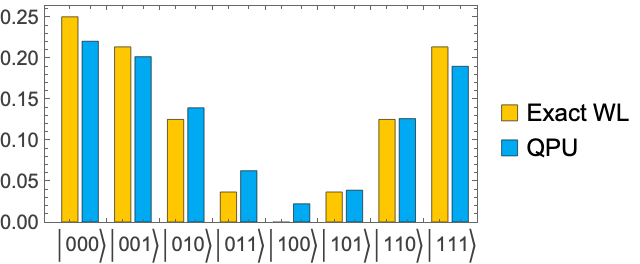
Compare the exact Wolfram Language probabilities with the QPU estimates:
In[6]:=
BarChart[Transpose[Values@*KeySort/@{wl["Probabilities"],qpu["Probabilities"]}],​​AspectRatio1/2,FrameTrue,ChartLegends{"Exact WL","QPU"},​​PlotLabelsKeys[wl["Probabilities"]]]
Out[6]=
Scope  
(5)

Options  
(4)

Possible Issues  
(4)

SeeAlso
IBMJob
 
▪
QuantumQASM
 
▪
QuantumCircuitOperator
 
▪
QuantumMeasurement
RelatedGuides
▪
WolframQuantumComputationFramework
""

© 2026 Wolfram. All rights reserved.

  • Legal & Privacy Policy
  • Contact Us
  • WolframAlpha.com
  • WolframCloud.com