Wolfram Function Repository
Instant-use add-on functions for the Wolfram Language
Function Repository Resource:
Arrange the elements of the argument in a two-dimensional grid with row coloring that helps comprehension
ResourceFunction["GridTableForm"][arg] arranges the elements of arg in a two-dimensional grid. |
| "RowBackground" | {White,GrayLevel[0.96]} | alternating row backgrounds |
| TableHeadings | Automatic | row and column table headings |
| "TableHeadingsStyle" | {Blue,FontFamily -> ”Times”} | style applied to the table headings |
Here is a grid table form of a full integer array:
| In[1]:= | ![SeedRandom[23];
ResourceFunction[
"GridTableForm", ResourceSystemBase -> "https://www.wolframcloud.com/obj/resourcesystem/api/1.0"][RandomInteger[100, {5, 7}]]](https://www.wolframcloud.com/obj/resourcesystem/images/8b7/8b78d59f-21a1-4221-bb06-2887d1571d94/634b9ef6f870b405.png) |
| Out[2]= | 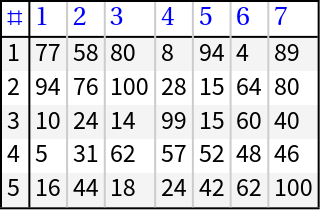 |
Here is a grid table form of a nested list of integers that is not a full array:
| In[3]:= | ![ResourceFunction[
"GridTableForm", ResourceSystemBase -> "https://www.wolframcloud.com/obj/resourcesystem/api/1.0"][Table[RandomInteger[100, i], {i, 3, 7}]]](https://www.wolframcloud.com/obj/resourcesystem/images/8b7/8b78d59f-21a1-4221-bb06-2887d1571d94/4e0601f3270bab61.png) |
| Out[3]= | 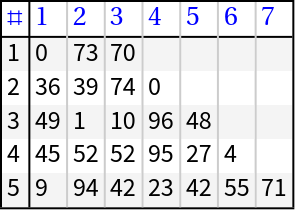 |
Table headings can be specified:
| In[4]:= | ![ResourceFunction[
"GridTableForm", ResourceSystemBase -> "https://www.wolframcloud.com/obj/resourcesystem/api/1.0"][RandomInteger[100, {5, 7}], TableHeadings -> {RandomWord[5], RandomWord[7]}]](https://www.wolframcloud.com/obj/resourcesystem/images/8b7/8b78d59f-21a1-4221-bb06-2887d1571d94/30b73bcacff2bd2b.png) |
| Out[4]= |  |
If needed, various completions of the data and table headings are made in order to produce the final tabular form:
| In[5]:= | ![ResourceFunction[
"GridTableForm", ResourceSystemBase -> "https://www.wolframcloud.com/obj/resourcesystem/api/1.0"][Table[RandomInteger[100, i], {i, 3, 7}], TableHeadings -> {RandomWord[3], RandomWord[3]}]](https://www.wolframcloud.com/obj/resourcesystem/images/8b7/8b78d59f-21a1-4221-bb06-2887d1571d94/4bfbd6db308cb1ae.png) |
| Out[5]= | 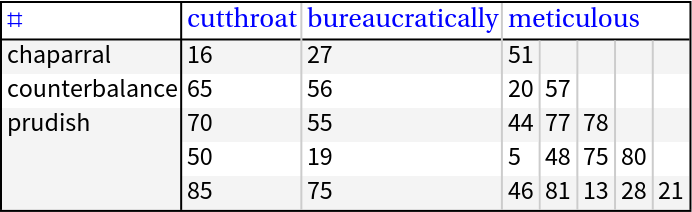 |
GridTableForm can be invoked over Dataset objects; if the dataset has column names, then they are used as table headings:
| In[6]:= | ![dsRand = \!\(\*
TagBox[
StyleBox[
TagBox[
TagBox[
DynamicModuleBox[{
TypeSystem`NestedGrid`PackagePrivate`$state$$ = <|"InitialData" -> {<|"kind" -> -5.819852270098394, "unpaired" -> 6.608417593499134, "preliminary" -> "communicable", "angelically" -> -2.272987994547236|>, <|"kind" -> 0.8536608474342557, "unpaired" -> 9.533798001552185, "preliminary" -> "self-centered", "angelically" -> 0.268359528465286|>, <|"kind" -> 5.349297322544189, "unpaired" -> 6.771847645171391, "preliminary" -> "lychgate", "angelically" -> -9.564566954871797|>}, "AllowEmbedding" -> True, "InitialShape" -> TypeSystem`PackageScope`HeaderShape[<|{All, "kind"} -> 1, {All, "unpaired"} -> 1, {All, "preliminary"} -> 1, {All, "angelically"} -> 1|>,
TypeSystem`PackageScope`Limited[
TypeSystem`PackageScope`ColumnShape[
TypeSystem`PackageScope`Limited[
TypeSystem`PackageScope`RowShape[<|"kind" -> TypeSystem`PackageScope`AtomShape[60], "unpaired" -> TypeSystem`PackageScope`AtomShape[60], "preliminary" -> TypeSystem`PackageScope`AtomShape[
145.60000000000002`], "angelically" -> TypeSystem`PackageScope`AtomShape[
60]|>],
DirectedInfinity[1], 4, {All}]], 3,
DirectedInfinity[1], {}]], "InitialType" -> TypeSystem`Vector[
TypeSystem`Struct[{"kind", "unpaired", "preliminary", "angelically"}, {
TypeSystem`Atom[Real],
TypeSystem`Atom[Real],
TypeSystem`Atom[String],
TypeSystem`Atom[Real]}], 3], "Meta" -> <||>, "RowTarget" -> 20, "ColumnTarget" -> 10, "Shape" -> TypeSystem`PackageScope`HeaderShape[<|{All, "kind"} -> 1, {All, "unpaired"} -> 1, {All, "preliminary"} -> 1, {All, "angelically"} -> 1|>,
TypeSystem`PackageScope`Limited[
TypeSystem`PackageScope`ColumnShape[
TypeSystem`PackageScope`Limited[
TypeSystem`PackageScope`RowShape[<|"kind" -> TypeSystem`PackageScope`AtomShape[60], "unpaired" -> TypeSystem`PackageScope`AtomShape[60], "preliminary" -> TypeSystem`PackageScope`AtomShape[
145.60000000000002`], "angelically" -> TypeSystem`PackageScope`AtomShape[
60]|>],
DirectedInfinity[1], 4, {All}]], 3,
DirectedInfinity[1], {}]], "Type" -> TypeSystem`Vector[
TypeSystem`Struct[{"kind", "unpaired", "preliminary", "angelically"}, {
TypeSystem`Atom[Real],
TypeSystem`Atom[Real],
TypeSystem`Atom[String],
TypeSystem`Atom[Real]}], 3], "Path" -> {}, "DisplayedRowCount" -> 3, "DisplayedColumnCount" -> 4, "DataRowCount" -> 3, "DataColumnCount" -> 4, "SortPaths" -> {}, "SortDirections" -> {},
"HiddenItemsMap" -> Null, "UpdateType" -> 1|>, TypeSystem`NestedGrid`PackagePrivate`$outputID$$, TypeSystem`NestedGrid`PackagePrivate`$path$$ = {}, TypeSystem`NestedGrid`PackagePrivate`$vPos$$ = 1, TypeSystem`NestedGrid`PackagePrivate`$hPos$$ = 1, TypeSystem`NestedGrid`PackagePrivate`$grid$$ = DynamicModule[{TypeSystem`NestedGrid`PackagePrivate`renderedGrid = Deploy[
Style[
Grid[{{
Item[
Pane[
Annotation[
EventHandler[
MouseAppearance[
Mouseover["kind",
Style["kind", FontColor -> RGBColor[
0.27450980392156865`, 0.5372549019607843, 0.792156862745098]]], "LinkHand"], {"MouseClicked", 1} :> If[
TypeSystem`NestedGrid`PackagePrivate`checkInteractivity[
TypeSystem`NestedGrid`PackagePrivate`$state$$],
TypeSystem`NestedGrid`PackagePrivate`updateState[
TypeSystem`NestedGrid`PackagePrivate`$state$$, TypeSystem`NestedGrid`PackagePrivate`$path$$, TypeSystem`NestedGrid`PackagePrivate`$vPos$$, TypeSystem`NestedGrid`PackagePrivate`$hPos$$, TypeSystem`NestedGrid`PackagePrivate`$grid$$,
TypeSystem`NestedGrid`PackagePrivate`localHold[
TypeSystem`NestedGrid`PackagePrivate`localHold[
TypeSystem`NestedGrid`PackagePrivate`$outputID$$]]][{All, "kind"}, 1]]],
TypeSystem`NestedGrid`PackagePrivate`$SliceMarker[
TypeSystem`NestedGrid`PackagePrivate`localHold[
TypeSystem`NestedGrid`PackagePrivate`$outputID$$]][{All, "kind"}, "ColumnHeader", True], "Mouse"], ImageSize -> {{1, Full}, Automatic}, ImageMargins -> {{5, 3}, {4, 5}}], Background -> GrayLevel[0.95], Alignment -> {Left, Baseline}],
Item[
Pane[
Annotation[
EventHandler[
MouseAppearance[
Mouseover["unpaired",
Style["unpaired", FontColor -> RGBColor[
0.27450980392156865`, 0.5372549019607843, 0.792156862745098]]], "LinkHand"], {"MouseClicked", 1} :> If[
TypeSystem`NestedGrid`PackagePrivate`checkInteractivity[
TypeSystem`NestedGrid`PackagePrivate`$state$$],
TypeSystem`NestedGrid`PackagePrivate`updateState[
TypeSystem`NestedGrid`PackagePrivate`$state$$, TypeSystem`NestedGrid`PackagePrivate`$path$$, TypeSystem`NestedGrid`PackagePrivate`$vPos$$, TypeSystem`NestedGrid`PackagePrivate`$hPos$$, TypeSystem`NestedGrid`PackagePrivate`$grid$$,
TypeSystem`NestedGrid`PackagePrivate`localHold[
TypeSystem`NestedGrid`PackagePrivate`localHold[
TypeSystem`NestedGrid`PackagePrivate`$outputID$$]]][{All, "unpaired"}, 1]]],
TypeSystem`NestedGrid`PackagePrivate`$SliceMarker[
TypeSystem`NestedGrid`PackagePrivate`localHold[
TypeSystem`NestedGrid`PackagePrivate`$outputID$$]][{All, "unpaired"}, "ColumnHeader", True], "Mouse"], ImageSize -> {{1, Full}, Automatic}, ImageMargins -> {{5, 3}, {4, 5}}], Background -> GrayLevel[0.95], Alignment -> {Left, Baseline}],
Item[
Pane[
Annotation[
EventHandler[
MouseAppearance[
Mouseover["preliminary",
Style["preliminary", FontColor -> RGBColor[
0.27450980392156865`, 0.5372549019607843, 0.792156862745098]]], "LinkHand"], {"MouseClicked", 1} :> If[
TypeSystem`NestedGrid`PackagePrivate`checkInteractivity[
TypeSystem`NestedGrid`PackagePrivate`$state$$],
TypeSystem`NestedGrid`PackagePrivate`updateState[
TypeSystem`NestedGrid`PackagePrivate`$state$$, TypeSystem`NestedGrid`PackagePrivate`$path$$, TypeSystem`NestedGrid`PackagePrivate`$vPos$$, TypeSystem`NestedGrid`PackagePrivate`$hPos$$, TypeSystem`NestedGrid`PackagePrivate`$grid$$,
TypeSystem`NestedGrid`PackagePrivate`localHold[
TypeSystem`NestedGrid`PackagePrivate`localHold[
TypeSystem`NestedGrid`PackagePrivate`$outputID$$]]][{All, "preliminary"}, 1]]],
TypeSystem`NestedGrid`PackagePrivate`$SliceMarker[
TypeSystem`NestedGrid`PackagePrivate`localHold[
TypeSystem`NestedGrid`PackagePrivate`$outputID$$]][{All, "preliminary"}, "ColumnHeader", True], "Mouse"], ImageSize -> {{1, Full}, Automatic}, ImageMargins -> {{5, 3}, {4, 5}}], Background -> GrayLevel[0.95], Alignment -> {Left, Baseline}],
Item[
Pane[
Annotation[
EventHandler[
MouseAppearance[
Mouseover["angelically",
Style["angelically", FontColor -> RGBColor[
0.27450980392156865`, 0.5372549019607843, 0.792156862745098]]], "LinkHand"], {"MouseClicked", 1} :> If[
TypeSystem`NestedGrid`PackagePrivate`checkInteractivity[
TypeSystem`NestedGrid`PackagePrivate`$state$$],
TypeSystem`NestedGrid`PackagePrivate`updateState[
TypeSystem`NestedGrid`PackagePrivate`$state$$, TypeSystem`NestedGrid`PackagePrivate`$path$$, TypeSystem`NestedGrid`PackagePrivate`$vPos$$, TypeSystem`NestedGrid`PackagePrivate`$hPos$$, TypeSystem`NestedGrid`PackagePrivate`$grid$$,
TypeSystem`NestedGrid`PackagePrivate`localHold[
TypeSystem`NestedGrid`PackagePrivate`localHold[
TypeSystem`NestedGrid`PackagePrivate`$outputID$$]]][{All, "angelically"}, 1]]],
TypeSystem`NestedGrid`PackagePrivate`$SliceMarker[
TypeSystem`NestedGrid`PackagePrivate`localHold[
TypeSystem`NestedGrid`PackagePrivate`$outputID$$]][{All, "angelically"}, "ColumnHeader", True], "Mouse"], ImageSize -> {{1, Full}, Automatic}, ImageMargins -> {{5, 3}, {4, 5}}], Background -> GrayLevel[0.95], Alignment -> {Left, Baseline}]}, {
Item[
Pane[
Annotation[
RawBoxes["-5.81985"],
TypeSystem`NestedGrid`PackagePrivate`$SliceMarker[
TypeSystem`NestedGrid`PackagePrivate`localHold[
TypeSystem`NestedGrid`PackagePrivate`$outputID$$]][{1,
Key["kind"]}, "Item", False], "Mouse"], ImageSize -> {{60, Full}, Automatic}, ImageMargins -> {{5, 3}, {4, 5}}], ItemSize -> {Full, Automatic}],
Item[
Pane[
Annotation[
RawBoxes["6.60842"],
TypeSystem`NestedGrid`PackagePrivate`$SliceMarker[
TypeSystem`NestedGrid`PackagePrivate`localHold[
TypeSystem`NestedGrid`PackagePrivate`$outputID$$]][{1,
Key["unpaired"]}, "Item", False], "Mouse"], ImageSize -> {{60, Full}, Automatic}, ImageMargins -> {{5, 3}, {4, 5}}], ItemSize -> {Full, Automatic}],
Item[
Pane[
Annotation["communicable",
TypeSystem`NestedGrid`PackagePrivate`$SliceMarker[
TypeSystem`NestedGrid`PackagePrivate`localHold[
TypeSystem`NestedGrid`PackagePrivate`$outputID$$]][{1,
Key["preliminary"]}, "Item", False], "Mouse"], ImageSize -> {{145.60000000000002`, Full}, Automatic}, ImageMargins -> {{5, 3}, {4, 5}}], ItemSize -> {Full, Automatic}],
Item[
Pane[
Annotation[
RawBoxes["-2.27299"],
TypeSystem`NestedGrid`PackagePrivate`$SliceMarker[
TypeSystem`NestedGrid`PackagePrivate`localHold[
TypeSystem`NestedGrid`PackagePrivate`$outputID$$]][{1,
Key["angelically"]}, "Item", False], "Mouse"], ImageSize -> {{60, Full}, Automatic}, ImageMargins -> {{5, 3}, {4, 5}}], ItemSize -> {Full, Automatic}]}, {
Item[
Pane[
Annotation[
RawBoxes["0.853661"],
TypeSystem`NestedGrid`PackagePrivate`$SliceMarker[
TypeSystem`NestedGrid`PackagePrivate`localHold[
TypeSystem`NestedGrid`PackagePrivate`$outputID$$]][{2,
Key["kind"]}, "Item", False], "Mouse"], ImageSize -> {{60, Full}, Automatic}, ImageMargins -> {{5, 3}, {4, 5}}], ItemSize -> {Full, Automatic}],
Item[
Pane[
Annotation[
RawBoxes["9.5338"],
TypeSystem`NestedGrid`PackagePrivate`$SliceMarker[
TypeSystem`NestedGrid`PackagePrivate`localHold[
TypeSystem`NestedGrid`PackagePrivate`$outputID$$]][{2,
Key["unpaired"]}, "Item", False], "Mouse"], ImageSize -> {{60, Full}, Automatic}, ImageMargins -> {{5, 3}, {4, 5}}], ItemSize -> {Full, Automatic}],
Item[
Pane[
Annotation["self-centered",
TypeSystem`NestedGrid`PackagePrivate`$SliceMarker[
TypeSystem`NestedGrid`PackagePrivate`localHold[
TypeSystem`NestedGrid`PackagePrivate`$outputID$$]][{2,
Key["preliminary"]}, "Item", False], "Mouse"], ImageSize -> {{145.60000000000002`, Full}, Automatic}, ImageMargins -> {{5, 3}, {4, 5}}], ItemSize -> {Full, Automatic}],
Item[
Pane[
Annotation[
RawBoxes["0.26836"],
TypeSystem`NestedGrid`PackagePrivate`$SliceMarker[
TypeSystem`NestedGrid`PackagePrivate`localHold[
TypeSystem`NestedGrid`PackagePrivate`$outputID$$]][{2,
Key["angelically"]}, "Item", False], "Mouse"], ImageSize -> {{60, Full}, Automatic}, ImageMargins -> {{5, 3}, {4, 5}}], ItemSize -> {Full, Automatic}]}, {
Item[
Pane[
Annotation[
RawBoxes["5.3493"],
TypeSystem`NestedGrid`PackagePrivate`$SliceMarker[
TypeSystem`NestedGrid`PackagePrivate`localHold[
TypeSystem`NestedGrid`PackagePrivate`$outputID$$]][{3,
Key["kind"]}, "Item", False], "Mouse"], ImageSize -> {{60, Full}, Automatic}, ImageMargins -> {{5, 3}, {4, 5}}], ItemSize -> {Full, Automatic}],
Item[
Pane[
Annotation[
RawBoxes["6.77185"],
TypeSystem`NestedGrid`PackagePrivate`$SliceMarker[
TypeSystem`NestedGrid`PackagePrivate`localHold[
TypeSystem`NestedGrid`PackagePrivate`$outputID$$]][{3,
Key["unpaired"]}, "Item", False], "Mouse"], ImageSize -> {{60, Full}, Automatic}, ImageMargins -> {{5, 3}, {4, 5}}], ItemSize -> {Full, Automatic}],
Item[
Pane[
Annotation["lychgate",
TypeSystem`NestedGrid`PackagePrivate`$SliceMarker[
TypeSystem`NestedGrid`PackagePrivate`localHold[
TypeSystem`NestedGrid`PackagePrivate`$outputID$$]][{3,
Key["preliminary"]}, "Item", False], "Mouse"], ImageSize -> {{145.60000000000002`, Full}, Automatic}, ImageMargins -> {{5, 3}, {4, 5}}], ItemSize -> {Full, Automatic}],
Item[
Pane[
Annotation[
RawBoxes["-9.56457"],
TypeSystem`NestedGrid`PackagePrivate`$SliceMarker[
TypeSystem`NestedGrid`PackagePrivate`localHold[
TypeSystem`NestedGrid`PackagePrivate`$outputID$$]][{3,
Key["angelically"]}, "Item", False], "Mouse"], ImageSize -> {{60, Full}, Automatic}, ImageMargins -> {{5, 3}, {4, 5}}], ItemSize -> {Full, Automatic}]}}, BaseStyle -> {ContextMenu -> Dynamic[
TypeSystem`NestedGrid`PackagePrivate`$contextMenuTrigger; Which[
TypeSystem`NestedGrid`PackagePrivate`$lastOutputID =!= TypeSystem`NestedGrid`PackagePrivate`localHold[
TypeSystem`NestedGrid`PackagePrivate`$outputID$$], {}, TypeSystem`NestedGrid`PackagePrivate`$contextMenuTrigger === TypeSystem`NestedGrid`PackagePrivate`$lastContextMenuTrigger, TypeSystem`NestedGrid`PackagePrivate`$lastContextMenu, True, TypeSystem`NestedGrid`PackagePrivate`$lastContextMenuTrigger = TypeSystem`NestedGrid`PackagePrivate`$contextMenuTrigger; TypeSystem`NestedGrid`PackagePrivate`$lastContextMenu = Block[{TypeSystem`NestedGrid`PackagePrivate`$globalScrollPos = {TypeSystem`NestedGrid`PackagePrivate`$vPos$$, TypeSystem`NestedGrid`PackagePrivate`$hPos$$}},
With[{TypeSystem`NestedGrid`PackagePrivate`lastPath$ = TypeSystem`NestedGrid`PackagePrivate`$lastPath, TypeSystem`NestedGrid`PackagePrivate`lastPathType$ = TypeSystem`NestedGrid`PackagePrivate`$lastPathType, TypeSystem`NestedGrid`PackagePrivate`isLeafHeader$ = TypeSystem`NestedGrid`PackagePrivate`$lastPathIsLeafHeader, TypeSystem`NestedGrid`PackagePrivate`headerHidden$ = And[
MatchQ[TypeSystem`NestedGrid`PackagePrivate`$lastPathType,
Alternatives["RowHeader", "ColumnHeader"]],
TypeSystem`NestedGrid`PackagePrivate`headerHiddenQ[
TypeSystem`NestedGrid`PackagePrivate`$lastPath, TypeSystem`NestedGrid`PackagePrivate`$state$$]], TypeSystem`NestedGrid`PackagePrivate`allHidden$ = TypeSystem`NestedGrid`PackagePrivate`allHiddenQ[
TypeSystem`NestedGrid`PackagePrivate`$lastPath, TypeSystem`NestedGrid`PackagePrivate`$state$$], TypeSystem`NestedGrid`PackagePrivate`anyHidden$ = TypeSystem`NestedGrid`PackagePrivate`anyHiddenQ[
TypeSystem`NestedGrid`PackagePrivate`$lastPath, TypeSystem`NestedGrid`PackagePrivate`$state$$], TypeSystem`NestedGrid`PackagePrivate`sortDirection$ = TypeSystem`NestedGrid`PackagePrivate`columnSortDirection[TypeSystem`NestedGrid`PackagePrivate`$lastPath,
TypeSystem`NestedGrid`PackagePrivate`$state$$["SortPaths"],
TypeSystem`NestedGrid`PackagePrivate`$state$$["SortDirections"]], TypeSystem`NestedGrid`PackagePrivate`haveData$ = Not[
FailureQ[
TypeSystem`NestedGrid`PackagePrivate`datasetInitialData[
TypeSystem`NestedGrid`PackagePrivate`$state$$]]], TypeSystem`NestedGrid`PackagePrivate`isKeyDummy$ = Not[
FreeQ[TypeSystem`NestedGrid`PackagePrivate`$lastPath, Keys]]},
Join[{
If[
Or[
Not[TypeSystem`NestedGrid`PackagePrivate`haveData$],
Not[TypeSystem`NestedGrid`PackagePrivate`anyHidden$], TypeSystem`NestedGrid`PackagePrivate`isKeyDummy$],
Nothing,
MenuItem[
"Show " <> Which[
TypeSystem`NestedGrid`PackagePrivate`lastPathType$ == "Item", "", TypeSystem`NestedGrid`PackagePrivate`lastPathType$ == "RowHeader", "Row", TypeSystem`NestedGrid`PackagePrivate`lastPathType$ == "ColumnHeader", "Column", True, ""],
KernelExecute[
TypeSystem`NestedGrid`PackagePrivate`updateHiddenItems[
TypeSystem`NestedGrid`PackagePrivate`$state$$, TypeSystem`NestedGrid`PackagePrivate`$path$$, TypeSystem`NestedGrid`PackagePrivate`$vPos$$, TypeSystem`NestedGrid`PackagePrivate`$hPos$$, TypeSystem`NestedGrid`PackagePrivate`$grid$$,
TypeSystem`NestedGrid`PackagePrivate`localHold[
TypeSystem`NestedGrid`PackagePrivate`localHold[
TypeSystem`NestedGrid`PackagePrivate`$outputID$$]]][TypeSystem`NestedGrid`PackagePrivate`lastPath$, "remove"]], MenuEvaluator -> Automatic]],
If[
Or[
Not[TypeSystem`NestedGrid`PackagePrivate`haveData$],
TypeSystem`NestedGrid`PackagePrivate`pathEmptyQ[
TypeSystem`NestedGrid`PackagePrivate`$lastPath, TypeSystem`NestedGrid`PackagePrivate`$state$$], TypeSystem`NestedGrid`PackagePrivate`isKeyDummy$, And[TypeSystem`NestedGrid`PackagePrivate`allHidden$, TypeSystem`NestedGrid`PackagePrivate`headerHidden$]], Nothing,
MenuItem["Hide " <> Which[
TypeSystem`NestedGrid`PackagePrivate`lastPathType$ == "Item", "", TypeSystem`NestedGrid`PackagePrivate`lastPathType$ == "RowHeader", "Row", TypeSystem`NestedGrid`PackagePrivate`lastPathType$ == "ColumnHeader", "Column", True, ""],
KernelExecute[
TypeSystem`NestedGrid`PackagePrivate`updateHiddenItems[
TypeSystem`NestedGrid`PackagePrivate`$state$$, TypeSystem`NestedGrid`PackagePrivate`$path$$, TypeSystem`NestedGrid`PackagePrivate`$vPos$$, TypeSystem`NestedGrid`PackagePrivate`$hPos$$, TypeSystem`NestedGrid`PackagePrivate`$grid$$,
TypeSystem`NestedGrid`PackagePrivate`localHold[
TypeSystem`NestedGrid`PackagePrivate`localHold[
TypeSystem`NestedGrid`PackagePrivate`$outputID$$]]][TypeSystem`NestedGrid`PackagePrivate`lastPath$, "add"]], MenuEvaluator -> Automatic]], Delimiter},
If[
And[TypeSystem`NestedGrid`PackagePrivate`haveData$,
MatchQ[TypeSystem`NestedGrid`PackagePrivate`lastPathType$,
Alternatives["ColumnHeader", "KeyDummy"]], TypeSystem`NestedGrid`PackagePrivate`isLeafHeader$,
Not[TypeSystem`NestedGrid`PackagePrivate`allHidden$]], {
If[TypeSystem`NestedGrid`PackagePrivate`sortDirection$ =!= "Ascending",
MenuItem["Sort",
KernelExecute[
TypeSystem`NestedGrid`PackagePrivate`updateSort[
TypeSystem`NestedGrid`PackagePrivate`$state$$, TypeSystem`NestedGrid`PackagePrivate`$path$$, TypeSystem`NestedGrid`PackagePrivate`$vPos$$, TypeSystem`NestedGrid`PackagePrivate`$hPos$$, TypeSystem`NestedGrid`PackagePrivate`$grid$$,
TypeSystem`NestedGrid`PackagePrivate`localHold[
TypeSystem`NestedGrid`PackagePrivate`$outputID$$]][TypeSystem`NestedGrid`PackagePrivate`lastPath$, "Ascending"]], MenuEvaluator -> Automatic], Nothing],
If[TypeSystem`NestedGrid`PackagePrivate`sortDirection$ =!= "Descending",
MenuItem["Reverse Sort",
KernelExecute[
TypeSystem`NestedGrid`PackagePrivate`updateSort[
TypeSystem`NestedGrid`PackagePrivate`$state$$, TypeSystem`NestedGrid`PackagePrivate`$path$$, TypeSystem`NestedGrid`PackagePrivate`$vPos$$, TypeSystem`NestedGrid`PackagePrivate`$hPos$$, TypeSystem`NestedGrid`PackagePrivate`$grid$$,
TypeSystem`NestedGrid`PackagePrivate`localHold[
TypeSystem`NestedGrid`PackagePrivate`$outputID$$]][TypeSystem`NestedGrid`PackagePrivate`lastPath$, "Descending"]], MenuEvaluator -> Automatic], Nothing],
If[TypeSystem`NestedGrid`PackagePrivate`sortDirection$ =!= None,
MenuItem["Unsort",
KernelExecute[
TypeSystem`NestedGrid`PackagePrivate`updateSort[
TypeSystem`NestedGrid`PackagePrivate`$state$$, TypeSystem`NestedGrid`PackagePrivate`$path$$, TypeSystem`NestedGrid`PackagePrivate`$vPos$$, TypeSystem`NestedGrid`PackagePrivate`$hPos$$, TypeSystem`NestedGrid`PackagePrivate`$grid$$,
TypeSystem`NestedGrid`PackagePrivate`localHold[
TypeSystem`NestedGrid`PackagePrivate`$outputID$$]][TypeSystem`NestedGrid`PackagePrivate`lastPath$, None]], MenuEvaluator -> Automatic], Nothing], Delimiter}, {}], {
MenuItem["Copy Position to Clipboard",
KernelExecute[
TypeSystem`NestedGrid`PackagePrivate`toCurrentPosition[
TypeSystem`NestedGrid`PackagePrivate`copyClip]], MenuEvaluator -> Automatic],
If[TypeSystem`NestedGrid`PackagePrivate`haveData$,
MenuItem["Copy Data to Clipboard",
KernelExecute[
TypeSystem`NestedGrid`PackagePrivate`toCurrentData[
TypeSystem`NestedGrid`PackagePrivate`$state$$, TypeSystem`NestedGrid`PackagePrivate`copyClip]], MenuEvaluator -> Automatic], Nothing], Delimiter, MenuItem["Paste Position in New Cell",
KernelExecute[
TypeSystem`NestedGrid`PackagePrivate`toCurrentPosition[
TypeSystem`NestedGrid`PackagePrivate`cellPaste]], MenuEvaluator -> Automatic],
If[TypeSystem`NestedGrid`PackagePrivate`haveData$,
MenuItem["Paste Data in New Cell",
KernelExecute[
TypeSystem`NestedGrid`PackagePrivate`toCurrentData[
TypeSystem`NestedGrid`PackagePrivate`$state$$, TypeSystem`NestedGrid`PackagePrivate`cellPaste]], MenuEvaluator -> Automatic], Nothing]}]]]]], FontFamily -> "Source Sans Pro", FontSize -> 14, FontWeight -> Plain}, Dividers -> All, FrameStyle -> GrayLevel[0.7490196078431373], Spacings -> {0, 0}, Alignment -> Left, BaseStyle -> {FontFamily -> "Source Sans Pro", FontSize -> 14, FontWeight -> Plain}], LineBreakWithin -> False, ContextMenu -> {}, NumberMarks -> False, ShowAutoStyles -> False]], TypeSystem`NestedGrid`PackagePrivate`initialQ = True},
Dynamic[
TypeSystem`NestedGrid`PackagePrivate`setupViewPath[
TypeSystem`NestedGrid`PackagePrivate`$path$$, If[
Not[TypeSystem`NestedGrid`PackagePrivate`initialQ],
Module[{TypeSystem`NestedGrid`PackagePrivate`tmpGrid$ = $Failed, TypeSystem`NestedGrid`PackagePrivate`tmpData$ = TypeSystem`NestedGrid`PackagePrivate`datasetData[
TypeSystem`NestedGrid`PackagePrivate`$state$$]}, TypeSystem`NestedGrid`PackagePrivate`tmpGrid$ = If[
FailureQ[TypeSystem`NestedGrid`PackagePrivate`tmpData$], TypeSystem`NestedGrid`PackagePrivate`renderedGrid,
TypeSystem`NestedGrid`PackagePrivate`renderGrid[
TypeSystem`NestedGrid`PackagePrivate`$state$$, TypeSystem`NestedGrid`PackagePrivate`$path$$, TypeSystem`NestedGrid`PackagePrivate`$vPos$$, TypeSystem`NestedGrid`PackagePrivate`$hPos$$, TypeSystem`NestedGrid`PackagePrivate`$grid$$,
TypeSystem`NestedGrid`PackagePrivate`localHold[
TypeSystem`NestedGrid`PackagePrivate`$outputID$$]][
TypeSystem`NestedGrid`PackagePrivate`tmpData$]]; If[
Not[
FailureQ[TypeSystem`NestedGrid`PackagePrivate`tmpGrid$]], TypeSystem`NestedGrid`PackagePrivate`renderedGrid = TypeSystem`NestedGrid`PackagePrivate`tmpGrid$]; Null]]; TypeSystem`NestedGrid`PackagePrivate`initialQ = False; TypeSystem`NestedGrid`PackagePrivate`$vPos$$; TypeSystem`NestedGrid`PackagePrivate`$hPos$$; If[
FailureQ[TypeSystem`NestedGrid`PackagePrivate`renderedGrid],
TypeSystem`SparseGrid[
TypeSystem`H["(data no longer present)"]], TypeSystem`NestedGrid`PackagePrivate`renderedGrid]], TrackedSymbols :> {TypeSystem`NestedGrid`PackagePrivate`$vPos$$, TypeSystem`NestedGrid`PackagePrivate`$hPos$$}], DynamicModuleValues :> {}], TypeSystem`NestedGrid`PackagePrivate`$topBar$$ = Dynamic[
TypeSystem`NestedGrid`PackagePrivate`makeFramedBar[
TypeSystem`PackageScope`SubViewPathbar[
TypeSystem`NestedGrid`PackagePrivate`$path$$,
TypeSystem`NestedGrid`PackagePrivate`updateState[
TypeSystem`NestedGrid`PackagePrivate`$state$$, TypeSystem`NestedGrid`PackagePrivate`$path$$, TypeSystem`NestedGrid`PackagePrivate`$vPos$$, TypeSystem`NestedGrid`PackagePrivate`$hPos$$, TypeSystem`NestedGrid`PackagePrivate`$grid$$,
TypeSystem`NestedGrid`PackagePrivate`localHold[
TypeSystem`NestedGrid`PackagePrivate`$outputID$$]]]], TrackedSymbols :> {TypeSystem`NestedGrid`PackagePrivate`$path$$}], TypeSystem`NestedGrid`PackagePrivate`$bottomBar$$ = Style[
Framed[
Dynamic[
Replace[TypeSystem`NestedGrid`PackagePrivate`mouseAnnotation$$, {TypeSystem`NestedGrid`PackagePrivate`$SliceMarker[
TypeSystem`NestedGrid`PackagePrivate`localHold[
TypeSystem`NestedGrid`PackagePrivate`$outputID$$]][
Null,
Blank[]] -> "", TypeSystem`NestedGrid`PackagePrivate`$SliceMarker[
TypeSystem`NestedGrid`PackagePrivate`localHold[
TypeSystem`NestedGrid`PackagePrivate`$outputID$$]][
Pattern[TypeSystem`NestedGrid`PackagePrivate`path$,
Blank[]],
Pattern[TypeSystem`NestedGrid`PackagePrivate`pathType$,
Blank[]],
Pattern[TypeSystem`NestedGrid`PackagePrivate`isLeafHeader$,
Blank[]]] :> (
Increment[
TypeSystem`NestedGrid`PackagePrivate`$contextMenuTrigger]; TypeSystem`NestedGrid`PackagePrivate`$lastPath = TypeSystem`NestedGrid`PackagePrivate`path$; TypeSystem`NestedGrid`PackagePrivate`$lastPathType = TypeSystem`NestedGrid`PackagePrivate`pathType$; TypeSystem`NestedGrid`PackagePrivate`$lastPathIsLeafHeader = TypeSystem`NestedGrid`PackagePrivate`isLeafHeader$; TypeSystem`NestedGrid`PackagePrivate`$lastOutputID = TypeSystem`NestedGrid`PackagePrivate`localHold[
TypeSystem`NestedGrid`PackagePrivate`$outputID$$]; TypeSystem`NestedGrid`PackagePrivate`makePathTrail[
TypeSystem`NestedGrid`PackagePrivate`path$, TypeSystem`NestedGrid`PackagePrivate`makePathElements]), Null :> Spacer[10], Blank[] :> Spacer[10]}], TrackedSymbols :> {TypeSystem`NestedGrid`PackagePrivate`mouseAnnotation$$}], FrameStyle -> None, ImageMargins -> 0, FrameMargins -> 0, Alignment -> Top, ImageSize -> {Automatic, 15}], FontSize -> 1], TypeSystem`NestedGrid`PackagePrivate`mouseAnnotation$$ = Null},
DynamicWrapperBox[
DynamicBox[ToBoxes[
Dataset`DatasetContent[
2, "Path" -> Hold[
TypeSystem`NestedGrid`PackagePrivate`$path$$], "Grid" -> Hold[
TypeSystem`NestedGrid`PackagePrivate`$grid$$], "State" -> Hold[
TypeSystem`NestedGrid`PackagePrivate`$state$$], "VPos" -> Hold[
TypeSystem`NestedGrid`PackagePrivate`$vPos$$], "HPos" -> Hold[
TypeSystem`NestedGrid`PackagePrivate`$hPos$$], "TopBar" -> Hold[
TypeSystem`NestedGrid`PackagePrivate`$topBar$$], "BottomBar" -> Hold[
TypeSystem`NestedGrid`PackagePrivate`$bottomBar$$], "OutputID" -> Hold[
TypeSystem`NestedGrid`PackagePrivate`localHold[
TypeSystem`NestedGrid`PackagePrivate`$outputID$$]]], StandardForm],
ImageSizeCache->{362.5140625, {51.529296875, 57.142578125}},
TrackedSymbols:>{TypeSystem`NestedGrid`PackagePrivate`$state$$, TypeSystem`NestedGrid`PackagePrivate`$grid$$}], TypeSystem`NestedGrid`PackagePrivate`mouseAnnotation$$ = MouseAnnotation[],
ImageSizeCache->{362.5140625, {51.529296875, 57.142578125}}],
BaseStyle->{LineBreakWithin -> False},
DynamicModuleValues:>{},
Initialization:>(
TypeSystem`NestedGrid`PackagePrivate`$outputID$$ = CreateUUID[]),
UnsavedVariables:>{TypeSystem`NestedGrid`PackagePrivate`$outputID$$}],
Deploy,
DefaultBaseStyle->"Deploy"],
Dataset`InterpretDataset[1],
Editable->False,
SelectWithContents->True,
Selectable->False],
ShowSpecialCharacters->False,
ShowStringCharacters->True,
NumberMarks->True,
"NodeID" -> 56],
FullForm]\);](https://www.wolframcloud.com/obj/resourcesystem/images/8b7/8b78d59f-21a1-4221-bb06-2887d1571d94/54cffa37bf2aa027.png) |
| In[7]:= | ![ResourceFunction[
"GridTableForm", ResourceSystemBase -> "https://www.wolframcloud.com/obj/resourcesystem/api/1.0"][dsRand]](https://www.wolframcloud.com/obj/resourcesystem/images/8b7/8b78d59f-21a1-4221-bb06-2887d1571d94/2bedd809f9b7cddd.png) |
| Out[7]= | 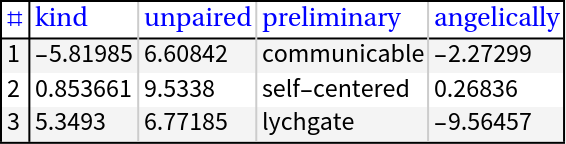 |
GridTableForm can be invoked over Tabular objects; if the tabular object has column names, then they are used as table headings:
| In[8]:= | ![SeedRandom[232];
tblReals = RandomReal[{-10, 10}, {5, 4}];
tblReals = ToTabular[tblReals, "Rows", <|"ColumnKeys" -> RandomWord[Dimensions[tblReals][[2]]]|>]](https://www.wolframcloud.com/obj/resourcesystem/images/8b7/8b78d59f-21a1-4221-bb06-2887d1571d94/15bfeef086f221df.png) |
| Out[10]= | 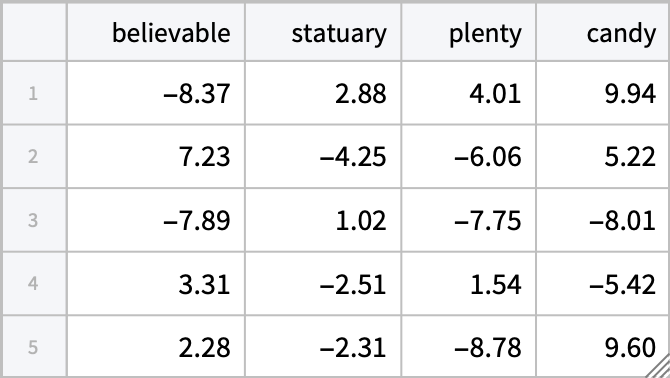 |
| In[11]:= | ![ResourceFunction[
"GridTableForm", ResourceSystemBase -> "https://www.wolframcloud.com/obj/resourcesystem/api/1.0"][tblReals]](https://www.wolframcloud.com/obj/resourcesystem/images/8b7/8b78d59f-21a1-4221-bb06-2887d1571d94/7d288e332f149533.png) |
| Out[11]= | 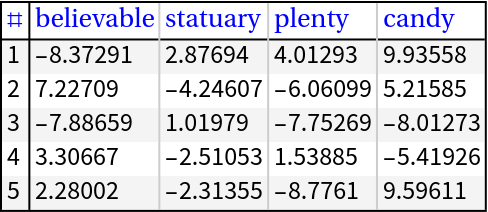 |
Excess table headings are ignored:
| In[12]:= | ![ResourceFunction[
"GridTableForm", ResourceSystemBase -> "https://www.wolframcloud.com/obj/resourcesystem/api/1.0"][RandomInteger[100, {3, 3}], TableHeadings -> {RandomWord[8], RandomWord[5]}]](https://www.wolframcloud.com/obj/resourcesystem/images/8b7/8b78d59f-21a1-4221-bb06-2887d1571d94/48dcbfe839749222.png) |
| Out[12]= | 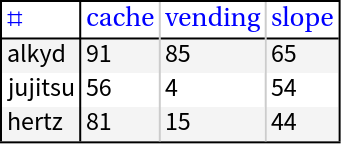 |
The following table demonstrates the effect of different row background specifications:
| In[13]:= | ![arr = RandomInteger[100, {4, 3}];
bgs = {{None}, Automatic, LightGreen, {Nest[Lighter, Pink, 4], LightBlue}};
ResourceFunction[
"GridTableForm", ResourceSystemBase -> "https://www.wolframcloud.com/obj/resourcesystem/api/1.0"][{#, ResourceFunction[
"GridTableForm", ResourceSystemBase -> "https://www.wolframcloud.com/obj/resourcesystem/api/1.0"][arr, "RowBackground" -> #]} & /@ bgs, TableHeadings -> {"\"RowBackground\" value", "Grid"}, "RowBackground" -> {White, White}]](https://www.wolframcloud.com/obj/resourcesystem/images/8b7/8b78d59f-21a1-4221-bb06-2887d1571d94/37eb9049a0032427.png) |
| Out[14]= | 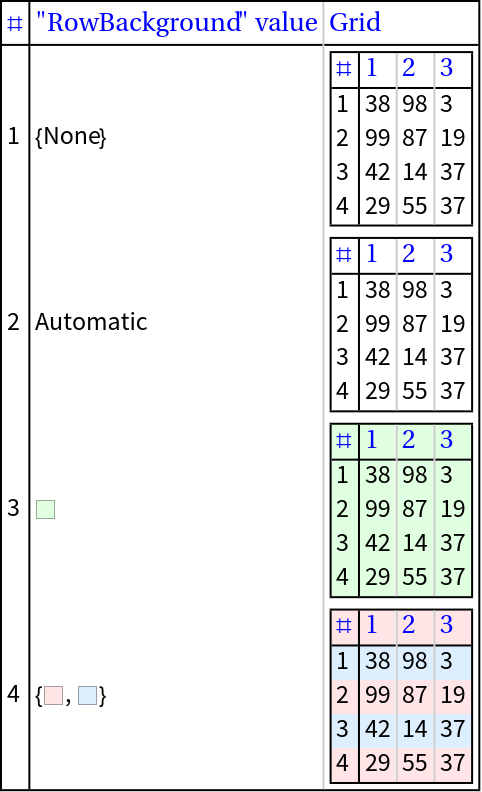 |
The following table demonstrates the effect of different table headings specifications:
| In[15]:= | ![SeedRandom[89];
arr = RandomInteger[100, {4, 3}];
ths = {Automatic, RandomWord[Dimensions[arr][[2]]], {RandomWord[2], Automatic}, {RandomWord[Dimensions[arr][[1]]]}, {RandomWord[
Dimensions[arr][[1]]], RandomWord[Dimensions[arr][[2]]]}};
ResourceFunction[
"GridTableForm", ResourceSystemBase -> "https://www.wolframcloud.com/obj/resourcesystem/api/1.0"][{#, ResourceFunction[
"GridTableForm", ResourceSystemBase -> "https://www.wolframcloud.com/obj/resourcesystem/api/1.0"][arr, TableHeadings -> #]} & /@ ths, TableHeadings -> {"\"TableHeadings\" value", "Grid"}]](https://www.wolframcloud.com/obj/resourcesystem/images/8b7/8b78d59f-21a1-4221-bb06-2887d1571d94/4737bd96a32e0fa5.png) |
| Out[16]= | 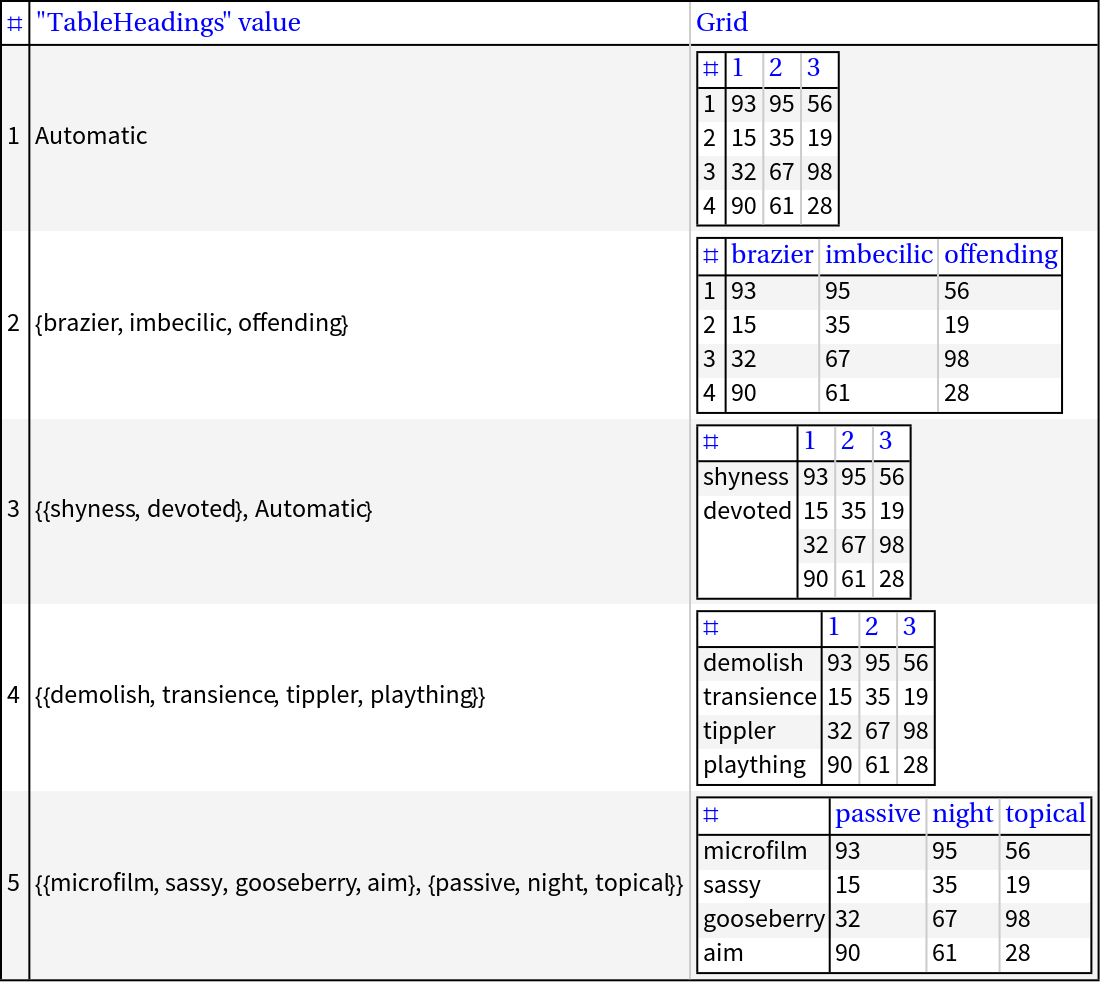 |
If the row headings or column headings are too short, they are completed with SpanFromAbove and SpanFromLeft, respectively:
| In[17]:= | ![ResourceFunction[
"GridTableForm", ResourceSystemBase -> "https://www.wolframcloud.com/obj/resourcesystem/api/1.0"][RandomInteger[100, {5, 7}], TableHeadings -> {RandomWord[3], RandomWord[3]}]](https://www.wolframcloud.com/obj/resourcesystem/images/8b7/8b78d59f-21a1-4221-bb06-2887d1571d94/2d298c462d871896.png) |
| Out[17]= | 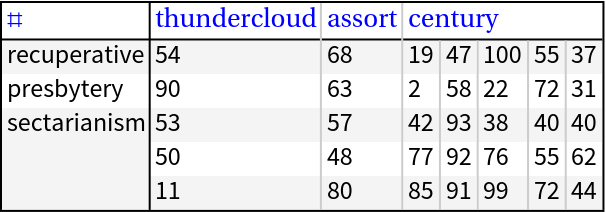 |
Show a sample of machine learning data with corresponding variable names:
| In[19]:= | ![arr = Flatten@*List @@@ RandomSample[ExampleData[{"MachineLearning", "Titanic"}, "Data"], 12];
header = Flatten@*List @@ ExampleData[{"MachineLearning", "Titanic"}, "VariableDescriptions"];
ResourceFunction[
"GridTableForm", ResourceSystemBase -> "https://www.wolframcloud.com/obj/resourcesystem/api/1.0"][arr, TableHeadings -> header]](https://www.wolframcloud.com/obj/resourcesystem/images/8b7/8b78d59f-21a1-4221-bb06-2887d1571d94/54239bb3e9beb063.png) |
| Out[20]= | 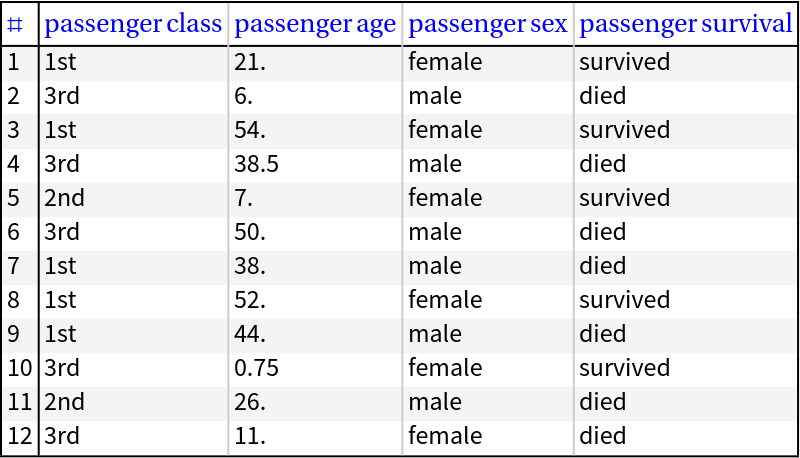 |
When studying data arrays, the use of the ResourceFunction RecordsSummary can be completed with GridTableForm:
| In[21]:= | ![arr = Normal[ExampleData[{"Dataset", "Titanic"}][Values]];
header = Normal[Keys[ExampleData[{"Dataset", "Titanic"}][[1]]]];](https://www.wolframcloud.com/obj/resourcesystem/images/8b7/8b78d59f-21a1-4221-bb06-2887d1571d94/0645028195c7df10.png) |
| In[22]:= | ![ResourceFunction["RecordsSummary"][arr, header]](https://www.wolframcloud.com/obj/resourcesystem/images/8b7/8b78d59f-21a1-4221-bb06-2887d1571d94/614a382bd80e77dd.png) |
| Out[22]= | 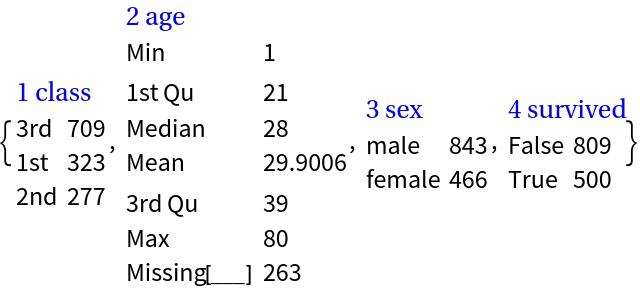 |
| In[23]:= | ![ResourceFunction[
"GridTableForm", ResourceSystemBase -> "https://www.wolframcloud.com/obj/resourcesystem/api/1.0"][RandomSample[arr, 12], TableHeadings -> header]](https://www.wolframcloud.com/obj/resourcesystem/images/8b7/8b78d59f-21a1-4221-bb06-2887d1571d94/23a2cac0dea738a8.png) |
| Out[23]= | 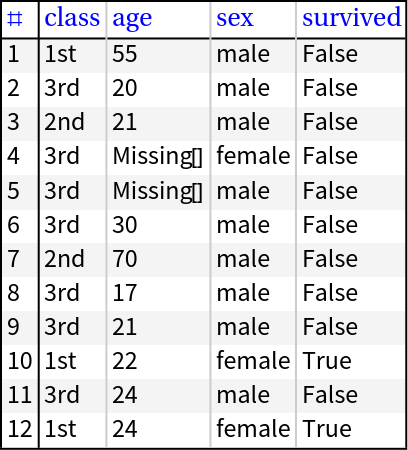 |
Show all rows and columns of a dataset:
| In[24]:= | ![SeedRandom[32];
dsRand = ResourceFunction["RandomTabularDataset"][{25, 15}, "Generators" -> {RandomInteger, RandomReal}];
ResourceFunction[
"GridTableForm", ResourceSystemBase -> "https://www.wolframcloud.com/obj/resourcesystem/api/1.0"][dsRand]](https://www.wolframcloud.com/obj/resourcesystem/images/8b7/8b78d59f-21a1-4221-bb06-2887d1571d94/642c56a3b9b55d66.png) |
| Out[22]= | 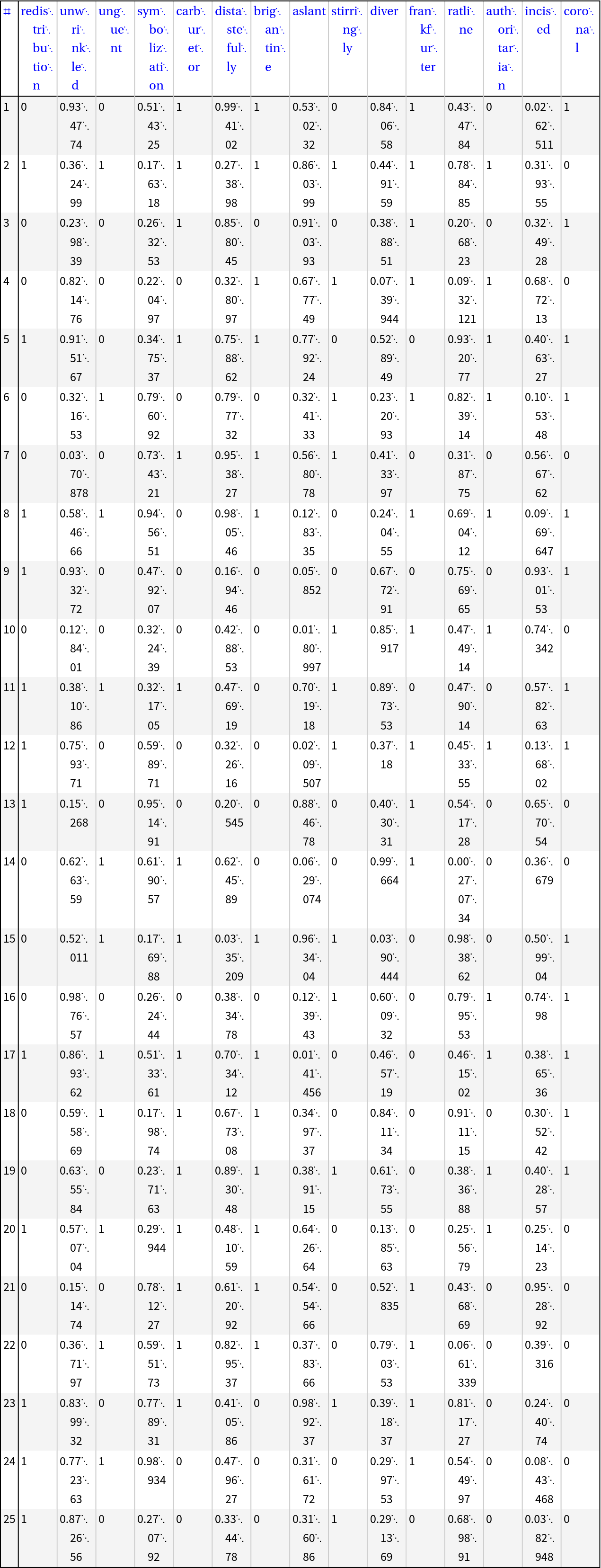 |
GridTableForm is related to both TableForm and Grid. The relation with TableForm can be seen in this example:
| In[25]:= | ![SeedRandom[14];
arr3 = RandomInteger[100, {4, 3}];
header = RandomWord[3];](https://www.wolframcloud.com/obj/resourcesystem/images/8b7/8b78d59f-21a1-4221-bb06-2887d1571d94/7ba8de530f27160a.png) |
| In[26]:= | ![ResourceFunction[
"GridTableForm", ResourceSystemBase -> "https://www.wolframcloud.com/obj/resourcesystem/api/1.0"][arr3, TableHeadings -> {Automatic, header}]](https://www.wolframcloud.com/obj/resourcesystem/images/8b7/8b78d59f-21a1-4221-bb06-2887d1571d94/59bc5dfed6d5763e.png) |
| Out[26]= | 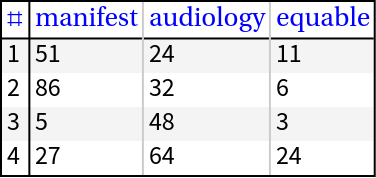 |
| In[27]:= | ![TableForm[arr3, TableHeadings -> {Automatic, header}]](https://www.wolframcloud.com/obj/resourcesystem/images/8b7/8b78d59f-21a1-4221-bb06-2887d1571d94/7fea34d64065c0cc.png) |
| Out[27]= | 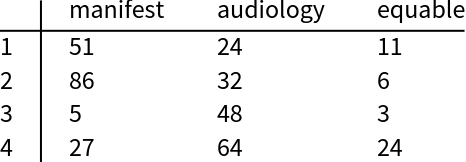 |
In order to produce a similar result using Grid, several data "augmentations" and option specifications have to be made:
| In[28]:= | ![Grid[Prepend[MapThread[Prepend, {arr3, Range[Length[arr3]]}], Prepend[header, ""]], Dividers -> {{False, True}, {False, True}}]](https://www.wolframcloud.com/obj/resourcesystem/images/8b7/8b78d59f-21a1-4221-bb06-2887d1571d94/61fc8425d270f44e.png) |
| Out[28]= | 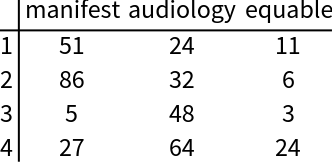 |
If the specified table headings are styled, the specification given to the option "TableHeadingsStyle" has no effect:
| In[29]:= | ![ResourceFunction[
"GridTableForm", ResourceSystemBase -> "https://www.wolframcloud.com/obj/resourcesystem/api/1.0"][RandomInteger[100, {5, 7}], TableHeadings -> Map[Style[#, Red, Bold] &, RandomWord[7]], "TableHeadingsStyle" -> Black]](https://www.wolframcloud.com/obj/resourcesystem/images/8b7/8b78d59f-21a1-4221-bb06-2887d1571d94/668f6753b5ad8f6a.png) |
| Out[29]= | 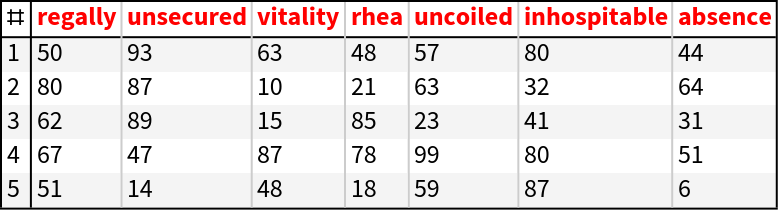 |
The background is extended for the extended row names:
| In[30]:= | ![ResourceFunction[
"GridTableForm", ResourceSystemBase -> "https://www.wolframcloud.com/obj/resourcesystem/api/1.0"][RandomInteger[100, {5, 7}], TableHeadings -> {RandomWord[3], RandomWord[3]}]](https://www.wolframcloud.com/obj/resourcesystem/images/8b7/8b78d59f-21a1-4221-bb06-2887d1571d94/6b41508f33820c94.png) |
| Out[30]= | 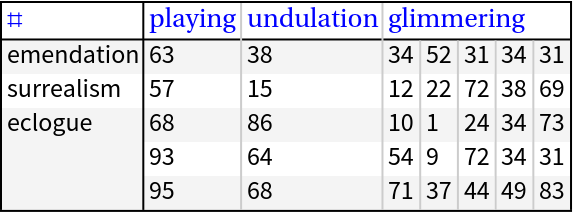 |
If the specified table headings value is a list with one element, that element is treated as a row names specification. Compare the following examples:
| In[31]:= | ![arr4 = RandomInteger[100, {3, 5}];
header = RandomWord[5];
ResourceFunction[
"GridTableForm", ResourceSystemBase -> "https://www.wolframcloud.com/obj/resourcesystem/api/1.0"][arr4, TableHeadings -> {header}]](https://www.wolframcloud.com/obj/resourcesystem/images/8b7/8b78d59f-21a1-4221-bb06-2887d1571d94/0425b009530b2c77.png) |
| Out[22]= | 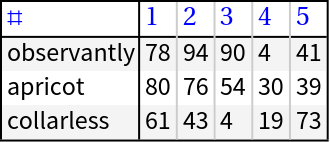 |
| In[32]:= | ![ResourceFunction[
"GridTableForm", ResourceSystemBase -> "https://www.wolframcloud.com/obj/resourcesystem/api/1.0"][arr4, TableHeadings -> header]](https://www.wolframcloud.com/obj/resourcesystem/images/8b7/8b78d59f-21a1-4221-bb06-2887d1571d94/0bcaf925d2e15395.png) |
| Out[32]= | 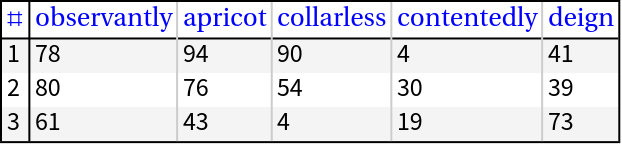 |
This example is similar to the "neat example" in the function page of TableForm:
| In[33]:= | ![Style[ResourceFunction[
"GridTableForm", ResourceSystemBase -> "https://www.wolframcloud.com/obj/resourcesystem/api/1.0"][
Table[StirlingS2[n, k], {n, 1, 28}, {k, 1, 28}], FrameStyle -> {White}, Dividers -> None, "RowBackground" -> {White, LightBlue}], 2, Bold, Red]](https://www.wolframcloud.com/obj/resourcesystem/images/8b7/8b78d59f-21a1-4221-bb06-2887d1571d94/1330f4ff7f24ab97.png) |
| Out[33]= |  |
This work is licensed under a Creative Commons Attribution 4.0 International License
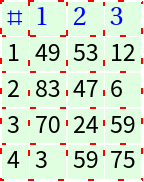
![arr = RandomInteger[100, {4, 3}];
ResourceFunction[
"GridTableForm", ResourceSystemBase -> "https://www.wolframcloud.com/obj/resourcesystem/api/1.0"][arr, "RowBackground" -> Blue, Background -> LightGreen, Dividers -> All, FrameStyle -> Directive[Red, Bold, Dotted]]](https://www.wolframcloud.com/obj/resourcesystem/images/8b7/8b78d59f-21a1-4221-bb06-2887d1571d94/7c50675810bbe702.png)