Wolfram Language Paclet Repository
Community-contributed installable additions to the Wolfram Language
CLI scripts for conversing with persistent LLM personas
Contributed by: Anton Antonov
Command Line Interface (CLI) scripts to manage and interact with multiple, persistent Large Language Model (LLM) chat objects. Access to repository prompts is provided via automatic prompt expansion. Access to chat object elements (history, models, etc.) facilitates the creation of useful CLI pipelines.

To install this paclet in your Wolfram Language environment,
evaluate this code:
PacletInstall["AntonAntonov/Chatnik"]
To load the code after installation, evaluate this code:
Needs["AntonAntonov`Chatnik`"]
The script "LLMChat" is used to interact with the chat objects. Create and chat with an LLM persona named "yoda1" (using the Yoda chat persona):

Continue the conversation with "yoda1":

Execute a chat object management command using the script LLMChatMeta -- view the whole interaction with "yoda1":

Clear the messages of "yoda1":

Copy paclet's scripts to a directory that is already in shell's PATH variable. For example, "~/.local/bin":

On MacOSX if no directory is specified for ChatnikCopyScripts (i.e the directory is Automatic) then paclet's scripts are copied in the "~/Applications" directory:

Longer CLI pipelines make "Chatnik" very useful. For example:

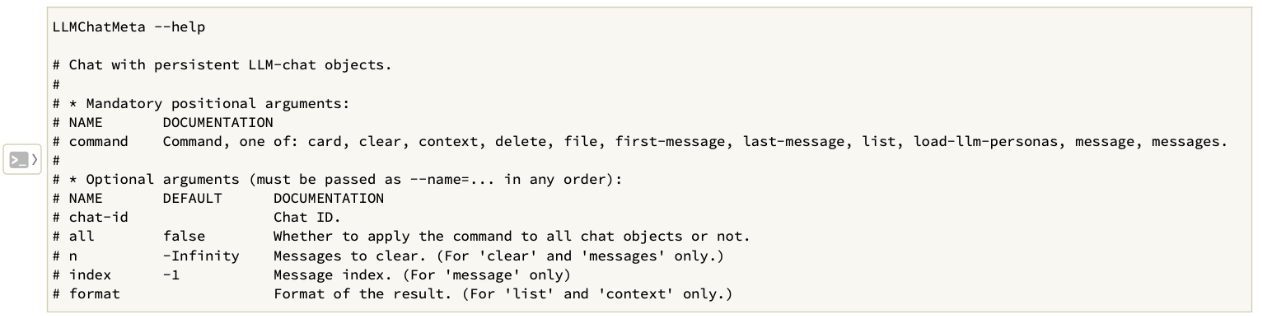
The script "LLMChatMeta" is used to manage the chat objects. Here is its usage message:
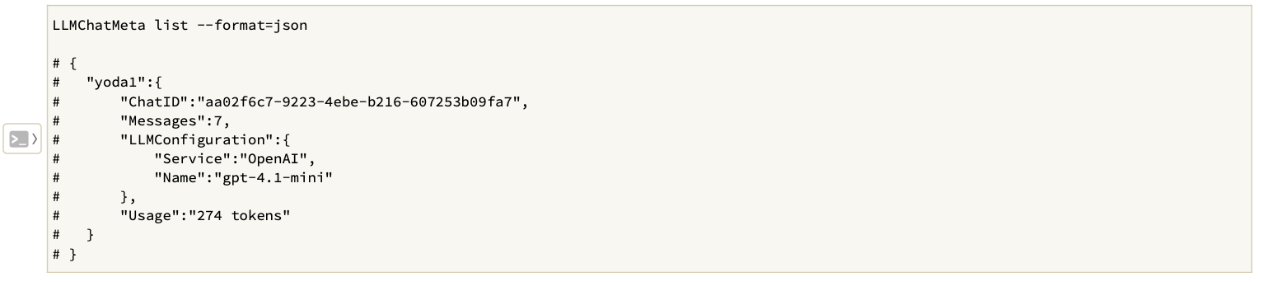
Give a list of all chat object summaries in JSON format:
Wolfram Language Version 14.3