Wolfram Function Repository
Instant-use add-on functions for the Wolfram Language
Function Repository Resource:
Return a sloppy cut and shuffle of a list
ResourceFunction["SloppyShuffle"][deck] performs a single shuffle on the list deck. | |
ResourceFunction["SloppyShuffle"][deck, n] performs n shuffles on the list deck. | |
ResourceFunction["SloppyShuffle"][deck, n, slop] performs n shuffles on the list deck with a sloppiness slop. |
Cut a list of length 20 roughly in half and roughly shuffle the two lists back together:
| In[1]:= | ![ResourceFunction["SloppyShuffle"][Range[20]]](https://www.wolframcloud.com/obj/resourcesystem/images/507/5075b20d-987c-49b9-8a82-09d5e652aa2d/075f6ac195e4d029.png) |
| Out[1]= |  |
Shuffle four times:
| In[2]:= | ![ResourceFunction["SloppyShuffle"][Range[10], 4]](https://www.wolframcloud.com/obj/resourcesystem/images/507/5075b20d-987c-49b9-8a82-09d5e652aa2d/3dde728b0705f592.png) |
| Out[2]= |  |
For general use, build a deck of cards:
| In[3]:= | ![ranks = Join[CharacterRange["2", "9"], {"10", "J", "Q", "K", "A"}];
suits = {Style["\[ClubSuit]", Black], Style["\[SpadeSuit]", Black], Style["\[HeartSuit]", Red], Style["\[DiamondSuit]", Red]};
deck = Row /@ Tuples[{ranks, suits}]](https://www.wolframcloud.com/obj/resourcesystem/images/507/5075b20d-987c-49b9-8a82-09d5e652aa2d/42652667a13863e2.png) |
| Out[4]= |  |
Shuffle the deck:
| In[5]:= | ![deck = {
Row[{"2",
Style["\[ClubSuit]",
GrayLevel[0]]}],
Row[{"2",
Style["\[SpadeSuit]",
GrayLevel[0]]}],
Row[{"2",
Style["\[HeartSuit]",
RGBColor[1, 0, 0]]}],
Row[{"2",
Style["\[DiamondSuit]",
RGBColor[1, 0, 0]]}],
Row[{"3",
Style["\[ClubSuit]",
GrayLevel[0]]}],
Row[{"3",
Style["\[SpadeSuit]",
GrayLevel[0]]}],
Row[{"3",
Style["\[HeartSuit]",
RGBColor[1, 0, 0]]}],
Row[{"3",
Style["\[DiamondSuit]",
RGBColor[1, 0, 0]]}],
Row[{"4",
Style["\[ClubSuit]",
GrayLevel[0]]}],
Row[{"4",
Style["\[SpadeSuit]",
GrayLevel[0]]}],
Row[{"4",
Style["\[HeartSuit]",
RGBColor[1, 0, 0]]}],
Row[{"4",
Style["\[DiamondSuit]",
RGBColor[1, 0, 0]]}],
Row[{"5",
Style["\[ClubSuit]",
GrayLevel[0]]}],
Row[{"5",
Style["\[SpadeSuit]",
GrayLevel[0]]}],
Row[{"5",
Style["\[HeartSuit]",
RGBColor[1, 0, 0]]}],
Row[{"5",
Style["\[DiamondSuit]",
RGBColor[1, 0, 0]]}],
Row[{"6",
Style["\[ClubSuit]",
GrayLevel[0]]}],
Row[{"6",
Style["\[SpadeSuit]",
GrayLevel[0]]}],
Row[{"6",
Style["\[HeartSuit]",
RGBColor[1, 0, 0]]}],
Row[{"6",
Style["\[DiamondSuit]",
RGBColor[1, 0, 0]]}],
Row[{"7",
Style["\[ClubSuit]",
GrayLevel[0]]}],
Row[{"7",
Style["\[SpadeSuit]",
GrayLevel[0]]}],
Row[{"7",
Style["\[HeartSuit]",
RGBColor[1, 0, 0]]}],
Row[{"7",
Style["\[DiamondSuit]",
RGBColor[1, 0, 0]]}],
Row[{"8",
Style["\[ClubSuit]",
GrayLevel[0]]}],
Row[{"8",
Style["\[SpadeSuit]",
GrayLevel[0]]}],
Row[{"8",
Style["\[HeartSuit]",
RGBColor[1, 0, 0]]}],
Row[{"8",
Style["\[DiamondSuit]",
RGBColor[1, 0, 0]]}],
Row[{"9",
Style["\[ClubSuit]",
GrayLevel[0]]}],
Row[{"9",
Style["\[SpadeSuit]",
GrayLevel[0]]}],
Row[{"9",
Style["\[HeartSuit]",
RGBColor[1, 0, 0]]}],
Row[{"9",
Style["\[DiamondSuit]",
RGBColor[1, 0, 0]]}],
Row[{"10",
Style["\[ClubSuit]",
GrayLevel[0]]}],
Row[{"10",
Style["\[SpadeSuit]",
GrayLevel[0]]}],
Row[{"10",
Style["\[HeartSuit]",
RGBColor[1, 0, 0]]}],
Row[{"10",
Style["\[DiamondSuit]",
RGBColor[1, 0, 0]]}],
Row[{"J",
Style["\[ClubSuit]",
GrayLevel[0]]}],
Row[{"J",
Style["\[SpadeSuit]",
GrayLevel[0]]}],
Row[{"J",
Style["\[HeartSuit]",
RGBColor[1, 0, 0]]}],
Row[{"J",
Style["\[DiamondSuit]",
RGBColor[1, 0, 0]]}],
Row[{"Q",
Style["\[ClubSuit]",
GrayLevel[0]]}],
Row[{"Q",
Style["\[SpadeSuit]",
GrayLevel[0]]}],
Row[{"Q",
Style["\[HeartSuit]",
RGBColor[1, 0, 0]]}],
Row[{"Q",
Style["\[DiamondSuit]",
RGBColor[1, 0, 0]]}],
Row[{"K",
Style["\[ClubSuit]",
GrayLevel[0]]}],
Row[{"K",
Style["\[SpadeSuit]",
GrayLevel[0]]}],
Row[{"K",
Style["\[HeartSuit]",
RGBColor[1, 0, 0]]}],
Row[{"K",
Style["\[DiamondSuit]",
RGBColor[1, 0, 0]]}],
Row[{"A",
Style["\[ClubSuit]",
GrayLevel[0]]}],
Row[{"A",
Style["\[SpadeSuit]",
GrayLevel[0]]}],
Row[{"A",
Style["\[HeartSuit]",
RGBColor[1, 0, 0]]}],
Row[{"A",
Style["\[DiamondSuit]",
RGBColor[1, 0, 0]]}]};
ResourceFunction["SloppyShuffle"][deck]](https://www.wolframcloud.com/obj/resourcesystem/images/507/5075b20d-987c-49b9-8a82-09d5e652aa2d/17d4373a18f35ce0.png) |
| Out[6]= |  |
Shuffle the deck seven times:
| In[7]:= | ![ResourceFunction["SloppyShuffle"][deck, 7]](https://www.wolframcloud.com/obj/resourcesystem/images/507/5075b20d-987c-49b9-8a82-09d5e652aa2d/75c1e416909ce5f0.png) |
| Out[7]= |  |
When the sloppiness of the shuffle increases, the number of possible outcomes increases until it reaches about.3:
| In[8]:= | ![Table[Length[
Union[Table[
ResourceFunction["SloppyShuffle"][Range[20], 1, .02 n], {300}]]], {n, 1, 25}]](https://www.wolframcloud.com/obj/resourcesystem/images/507/5075b20d-987c-49b9-8a82-09d5e652aa2d/207c46f03e8a7993.png) |
| Out[8]= |  |
Five shuffles usually suffices for a well-mixed deck, but seven shuffles is recommended:
| In[9]:= | ![deck = {
Row[{"2",
Style["\[ClubSuit]",
GrayLevel[0]]}],
Row[{"2",
Style["\[SpadeSuit]",
GrayLevel[0]]}],
Row[{"2",
Style["\[HeartSuit]",
RGBColor[1, 0, 0]]}],
Row[{"2",
Style["\[DiamondSuit]",
RGBColor[1, 0, 0]]}],
Row[{"3",
Style["\[ClubSuit]",
GrayLevel[0]]}],
Row[{"3",
Style["\[SpadeSuit]",
GrayLevel[0]]}],
Row[{"3",
Style["\[HeartSuit]",
RGBColor[1, 0, 0]]}],
Row[{"3",
Style["\[DiamondSuit]",
RGBColor[1, 0, 0]]}],
Row[{"4",
Style["\[ClubSuit]",
GrayLevel[0]]}],
Row[{"4",
Style["\[SpadeSuit]",
GrayLevel[0]]}],
Row[{"4",
Style["\[HeartSuit]",
RGBColor[1, 0, 0]]}],
Row[{"4",
Style["\[DiamondSuit]",
RGBColor[1, 0, 0]]}],
Row[{"5",
Style["\[ClubSuit]",
GrayLevel[0]]}],
Row[{"5",
Style["\[SpadeSuit]",
GrayLevel[0]]}],
Row[{"5",
Style["\[HeartSuit]",
RGBColor[1, 0, 0]]}],
Row[{"5",
Style["\[DiamondSuit]",
RGBColor[1, 0, 0]]}],
Row[{"6",
Style["\[ClubSuit]",
GrayLevel[0]]}],
Row[{"6",
Style["\[SpadeSuit]",
GrayLevel[0]]}],
Row[{"6",
Style["\[HeartSuit]",
RGBColor[1, 0, 0]]}],
Row[{"6",
Style["\[DiamondSuit]",
RGBColor[1, 0, 0]]}],
Row[{"7",
Style["\[ClubSuit]",
GrayLevel[0]]}],
Row[{"7",
Style["\[SpadeSuit]",
GrayLevel[0]]}],
Row[{"7",
Style["\[HeartSuit]",
RGBColor[1, 0, 0]]}],
Row[{"7",
Style["\[DiamondSuit]",
RGBColor[1, 0, 0]]}],
Row[{"8",
Style["\[ClubSuit]",
GrayLevel[0]]}],
Row[{"8",
Style["\[SpadeSuit]",
GrayLevel[0]]}],
Row[{"8",
Style["\[HeartSuit]",
RGBColor[1, 0, 0]]}],
Row[{"8",
Style["\[DiamondSuit]",
RGBColor[1, 0, 0]]}],
Row[{"9",
Style["\[ClubSuit]",
GrayLevel[0]]}],
Row[{"9",
Style["\[SpadeSuit]",
GrayLevel[0]]}],
Row[{"9",
Style["\[HeartSuit]",
RGBColor[1, 0, 0]]}],
Row[{"9",
Style["\[DiamondSuit]",
RGBColor[1, 0, 0]]}],
Row[{"10",
Style["\[ClubSuit]",
GrayLevel[0]]}],
Row[{"10",
Style["\[SpadeSuit]",
GrayLevel[0]]}],
Row[{"10",
Style["\[HeartSuit]",
RGBColor[1, 0, 0]]}],
Row[{"10",
Style["\[DiamondSuit]",
RGBColor[1, 0, 0]]}],
Row[{"J",
Style["\[ClubSuit]",
GrayLevel[0]]}],
Row[{"J",
Style["\[SpadeSuit]",
GrayLevel[0]]}],
Row[{"J",
Style["\[HeartSuit]",
RGBColor[1, 0, 0]]}],
Row[{"J",
Style["\[DiamondSuit]",
RGBColor[1, 0, 0]]}],
Row[{"Q",
Style["\[ClubSuit]",
GrayLevel[0]]}],
Row[{"Q",
Style["\[SpadeSuit]",
GrayLevel[0]]}],
Row[{"Q",
Style["\[HeartSuit]",
RGBColor[1, 0, 0]]}],
Row[{"Q",
Style["\[DiamondSuit]",
RGBColor[1, 0, 0]]}],
Row[{"K",
Style["\[ClubSuit]",
GrayLevel[0]]}],
Row[{"K",
Style["\[SpadeSuit]",
GrayLevel[0]]}],
Row[{"K",
Style["\[HeartSuit]",
RGBColor[1, 0, 0]]}],
Row[{"K",
Style["\[DiamondSuit]",
RGBColor[1, 0, 0]]}],
Row[{"A",
Style["\[ClubSuit]",
GrayLevel[0]]}],
Row[{"A",
Style["\[SpadeSuit]",
GrayLevel[0]]}],
Row[{"A",
Style["\[HeartSuit]",
RGBColor[1, 0, 0]]}],
Row[{"A",
Style["\[DiamondSuit]",
RGBColor[1, 0, 0]]}]};
ResourceFunction["SloppyShuffle"][deck, 5]](https://www.wolframcloud.com/obj/resourcesystem/images/507/5075b20d-987c-49b9-8a82-09d5e652aa2d/62c0bd856270a82a.png) |
| Out[10]= |  |
Setting zero sloppiness gives a perfect shuffle:
| In[11]:= | ![ResourceFunction["SloppyShuffle"][{a, b, c, d, 1, 2, 3, 4}, 1, 0]](https://www.wolframcloud.com/obj/resourcesystem/images/507/5075b20d-987c-49b9-8a82-09d5e652aa2d/314acc4a3d8615c3.png) |
| Out[11]= |  |
If the sloppiness is set to zero, there are two possible outcomes after 1 shuffle, based on choosing either an in shuffle or out shuffle:
| In[12]:= | ![Union[Table[ResourceFunction["SloppyShuffle"][Range[20], 1, 0], {20}]]](https://www.wolframcloud.com/obj/resourcesystem/images/507/5075b20d-987c-49b9-8a82-09d5e652aa2d/7beadc78fc7fab9b.png) |
| Out[12]= |  |
Use the ResourceFunction "PlayingCardGraphic" to show the top five cards after two shuffles:
| In[13]:= | ![Rasterize@
ResourceFunction["PlayingCardGraphic"][
Take[ResourceFunction["SloppyShuffle"][Range[52], 2], 5], "CardOffset" -> {0, 0}]](https://www.wolframcloud.com/obj/resourcesystem/images/507/5075b20d-987c-49b9-8a82-09d5e652aa2d/6874c951d009c976.png) |
| Out[13]= | 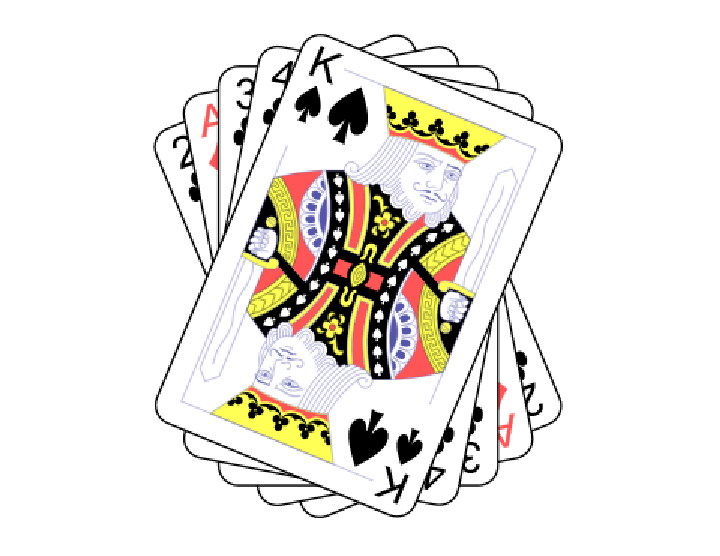 |
This work is licensed under a Creative Commons Attribution 4.0 International License