Wolfram Function Repository
Instant-use add-on functions for the Wolfram Language
Function Repository Resource:
Compute the alignment similarity between two matrices
ResourceFunction["KernelMatrixAlignment"][k1,k2] computes the alignment similarity between matrices k1 and k2. |
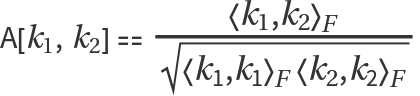 , where 〈k1,k2〉F is the Frobenius product between k1 and k2.
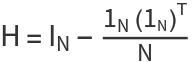 . The centered alignment can be returned using the "Centered" option:
| "Centered" | False | whether the kernel matrices are centered before computing the alignment |
Calculate the alignment between two matrices:
| In[1]:= | ![ResourceFunction["KernelMatrixAlignment"][\!\(\*
TagBox[
RowBox[{"(", "", GridBox[{
{"1",
RowBox[{"-", "2"}]},
{"13", "4"}
},
GridBoxAlignment->{"Columns" -> {{Center}}, "Rows" -> {{Baseline}}},
GridBoxSpacings->{"Columns" -> {
Offset[0.27999999999999997`], {
Offset[0.7]},
Offset[0.27999999999999997`]}, "Rows" -> {
Offset[0.2], {
Offset[0.4]},
Offset[0.2]}}], "", ")"}],
Function[BoxForm`e$,
MatrixForm[BoxForm`e$]]]\), \!\(\*
TagBox[
RowBox[{"(", "", GridBox[{
{"4", "2"},
{"3", "10"}
},
GridBoxAlignment->{"Columns" -> {{Center}}, "Rows" -> {{Baseline}}},
GridBoxSpacings->{"Columns" -> {
Offset[0.27999999999999997`], {
Offset[0.7]},
Offset[0.27999999999999997`]}, "Rows" -> {
Offset[0.2], {
Offset[0.4]},
Offset[0.2]}}], "", ")"}],
Function[BoxForm`e$,
MatrixForm[BoxForm`e$]]]\)] // N](https://www.wolframcloud.com/obj/resourcesystem/images/b24/b2467179-b176-43b9-b60a-3cf65a1b1f51/75d474de5f94546c.png) |
| Out[1]= |  |
The alignment between identical matrices is 1:
| In[2]:= | ![k = {{1, 2}, {3, 4}};
ResourceFunction["KernelMatrixAlignment"][k, k]](https://www.wolframcloud.com/obj/resourcesystem/images/b24/b2467179-b176-43b9-b60a-3cf65a1b1f51/51ff79781cccf7c3.png) |
| Out[3]= |  |
Create two kernel matrices:
| In[4]:= | ![n = 4;
k1 = RandomReal[1, {n, n}];
k2 = RandomReal[1, {n, n}];](https://www.wolframcloud.com/obj/resourcesystem/images/b24/b2467179-b176-43b9-b60a-3cf65a1b1f51/2fda3aeffaf901c1.png) |
Show scaling invariance:
| In[5]:= | ![ResourceFunction["KernelMatrixAlignment"][k1, k2] == ResourceFunction["KernelMatrixAlignment"][10 k1, k2]](https://www.wolframcloud.com/obj/resourcesystem/images/b24/b2467179-b176-43b9-b60a-3cf65a1b1f51/6797addf4302c7b0.png) |
| Out[5]= |  |
Create two kernel matrices:
| In[6]:= | ![n = 4;
base = ConstantArray[10, {n, n}];
k1 = base + RandomReal[0.1, {n, n}];
k2 = base + RandomReal[0.1, {n, n}];](https://www.wolframcloud.com/obj/resourcesystem/images/b24/b2467179-b176-43b9-b60a-3cf65a1b1f51/5d1758ac8868940f.png) |
Use the "Centered" option to return the centered alignment value:
| In[7]:= | ![ResourceFunction["KernelMatrixAlignment"][k1, k2, "Centered" -> True]](https://www.wolframcloud.com/obj/resourcesystem/images/b24/b2467179-b176-43b9-b60a-3cf65a1b1f51/12200186b92c7180.png) |
| Out[7]= |  |
Start with some 2-dimensional data:
| In[8]:= | ![cluster1 = RandomVariate[MultinormalDistribution[{0, 0}, IdentityMatrix[2]], 200];
cluster2 = MapThread[{#1 Cos[#2], #1 Sin[#2]} &, {RandomReal[{4, 5}, 200], RandomReal[{0, 2 Pi}, 200]}];
Short[data = <|"center" -> cluster1, "circle" -> cluster2|>]](https://www.wolframcloud.com/obj/resourcesystem/images/b24/b2467179-b176-43b9-b60a-3cf65a1b1f51/4cad67d5a15bed5d.png) |
| Out[10]= |  |
Define a radial basis function (RBF) kernel:
| In[11]:= | ![rbf[data_, \[Gamma]_] := Outer[Exp[-\[Gamma]*Norm[#1 - #2]^2] &, data, data, 1]](https://www.wolframcloud.com/obj/resourcesystem/images/b24/b2467179-b176-43b9-b60a-3cf65a1b1f51/3d33fd781f5c6103.png) |
Evaluate the kernel on the data for three different γ values:
| In[12]:= | ![With[{points = Flatten[Values@data, 1]},
kernel1 = rbf[points, 1];
kernel2 = rbf[points, 0.05];
kernel3 = rbf[points, 0.0001];]](https://www.wolframcloud.com/obj/resourcesystem/images/b24/b2467179-b176-43b9-b60a-3cf65a1b1f51/1dd2aef01d50ce84.png) |
Compare the alignment values between kernel 1 and the other two:
| In[13]:= | ![ResourceFunction["KernelMatrixAlignment"][kernel1, #, "Centered" -> True] & /@ {kernel2, kernel3}](https://www.wolframcloud.com/obj/resourcesystem/images/b24/b2467179-b176-43b9-b60a-3cf65a1b1f51/650ee27d5268ccfb.png) |
| Out[13]= |  |
Larger alignment values correspond to more similar decision boundaries induced by the kernels:
| In[14]:= | ![With[{gammaValues = {1, 0.05, 0.0001}}, GraphicsGrid[{Table[ResourceFunction[
ResourceObject[<|"Name" -> "DecisionBoundaryPlot", "ShortName" -> "DecisionBoundaryPlot", "UUID" -> "17642d9f-3153-49b8-91d4-c9b9057f07c1", "ResourceType" -> "Function", "Version" -> "1.0.0", "Description" -> "Plot the decision boundaries of a classifier", "RepositoryLocation" -> URL[
"https://www.wolframcloud.com/obj/resourcesystem/api/1.0"], "SymbolName" -> "FunctionRepository`$83347f65c9ab4655a5c610ad84d80aab`DecisionBoundaryPlot", "FunctionLocation" -> CloudObject[
"https://www.wolframcloud.com/obj/451ca251-7093-43ff-8331-ec5af61752e4"]|>, ResourceSystemBase -> Automatic]][data, Method -> {"SupportVectorMachine", "KernelType" -> "RadialBasisFunction", "GammaScalingParameter" -> gamma}, PlotLabel -> \[Gamma] == gamma], {gamma, gammaValues}]}]]](https://www.wolframcloud.com/obj/resourcesystem/images/b24/b2467179-b176-43b9-b60a-3cf65a1b1f51/58003099c56e2764.png) |
| Out[14]= | 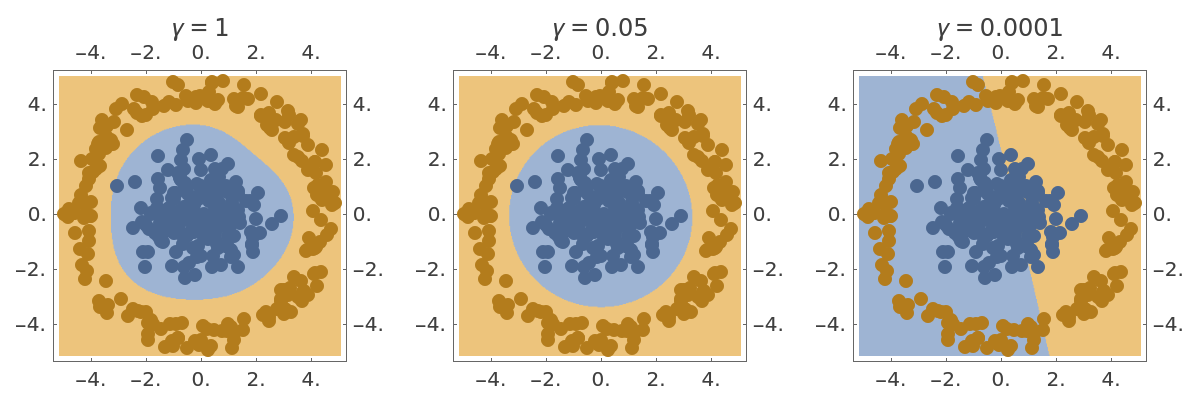 |
Create two kernel matrices with different amounts of noise:
| In[15]:= | ![n = 4;
base = ConstantArray[10, {n, n}];
k1 = base + RandomReal[0.1, {n, n}];
k2 = base + RandomReal[0.1, {n, n}];](https://www.wolframcloud.com/obj/resourcesystem/images/b24/b2467179-b176-43b9-b60a-3cf65a1b1f51/0fc03fc0d98c4690.png) |
Use the "Centered" option to return the centered alignment value:
| In[16]:= | ![ResourceFunction["KernelMatrixAlignment"][k1, k2, "Centered" -> True]](https://www.wolframcloud.com/obj/resourcesystem/images/b24/b2467179-b176-43b9-b60a-3cf65a1b1f51/46d7511913155b37.png) |
| Out[16]= |  |
Compare this to the default uncentered alignment:
| In[17]:= | ![ResourceFunction["KernelMatrixAlignment"][k1, k2, "Centered" -> False]](https://www.wolframcloud.com/obj/resourcesystem/images/b24/b2467179-b176-43b9-b60a-3cf65a1b1f51/050a7b614c4c016e.png) |
| Out[17]= |  |
The uncentered alignment is close to 1 because both matrices share a large constant component, even though their noise structures are unrelated.
Define two kernel matrices:
| In[18]:= | ![n = 3;
k1 = RandomReal[1, {n, n}];
k2 = RandomReal[1, {n, n}];](https://www.wolframcloud.com/obj/resourcesystem/images/b24/b2467179-b176-43b9-b60a-3cf65a1b1f51/70a44321861de507.png) |
Use the "Centered" option to return the centered alignment:
| In[19]:= | ![ResourceFunction["KernelMatrixAlignment"][k1, k2, "Centered" -> True]](https://www.wolframcloud.com/obj/resourcesystem/images/b24/b2467179-b176-43b9-b60a-3cf65a1b1f51/7cf7876144d2848d.png) |
| Out[19]= |  |
Setting "Centered"->True is equivalent to centering the two kernel matrices before calculating the alignment. The matrices can be centered with the resource function CenteringMatrix as follows:
| In[20]:= | ![mCentered[k_] := ResourceFunction[
ResourceObject[<|"Name" -> "CenteringMatrix", "ShortName" -> "CenteringMatrix", "UUID" -> "6fdd6ee1-1cc0-4402-aaf2-327452d9ea54", "ResourceType" -> "Function", "Version" -> "1.0.0", "Description" -> "Generate an n-sized centering matrix", "RepositoryLocation" -> URL[
"https://www.wolframcloud.com/obj/resourcesystem/api/1.0"], "SymbolName" -> "FunctionRepository`$80cab4aa62e44f20939542fca9bdab83`CenteringMatrix", "FunctionLocation" -> CloudObject[
"https://www.wolframcloud.com/obj/168c1480-9031-4800-97a6-2e4e40a3c2b7"]|>, ResourceSystemBase -> Automatic]][Length[k]] . k . ResourceFunction[
ResourceObject[<|"Name" -> "CenteringMatrix", "ShortName" -> "CenteringMatrix", "UUID" -> "6fdd6ee1-1cc0-4402-aaf2-327452d9ea54", "ResourceType" -> "Function", "Version" -> "1.0.0", "Description" -> "Generate an n-sized centering matrix", "RepositoryLocation" -> URL[
"https://www.wolframcloud.com/obj/resourcesystem/api/1.0"], "SymbolName" -> "FunctionRepository`$80cab4aa62e44f20939542fca9bdab83`CenteringMatrix", "FunctionLocation" -> CloudObject[
"https://www.wolframcloud.com/obj/168c1480-9031-4800-97a6-2e4e40a3c2b7"]|>, ResourceSystemBase -> Automatic]][Length[k]]](https://www.wolframcloud.com/obj/resourcesystem/images/b24/b2467179-b176-43b9-b60a-3cf65a1b1f51/52ae84187bf492a7.png) |
Confirm that the centered kernel has zero row and column means (double centered):
| In[21]:= | ![Chop@{Mean[mCentered[k1]], Mean[Transpose@mCentered[k1]]}](https://www.wolframcloud.com/obj/resourcesystem/images/b24/b2467179-b176-43b9-b60a-3cf65a1b1f51/2859233ce5276156.png) |
| Out[21]= |  |
After centering the matrices explicitly, the alignment value is the same as above:
| In[22]:= | ![ResourceFunction["KernelMatrixAlignment"][mCentered[k1], mCentered[k2]]](https://www.wolframcloud.com/obj/resourcesystem/images/b24/b2467179-b176-43b9-b60a-3cf65a1b1f51/5331ea0c96ec6c4d.png) |
| Out[22]= |  |
Kernel matrices must be of equal size:
| In[23]:= | ![ResourceFunction["KernelMatrixAlignment"][\!\(\*
TagBox[
RowBox[{"(", "", GridBox[{
{"1", "1", "1"},
{"2", "2", "2"}
},
GridBoxAlignment->{"Columns" -> {{Center}}, "Rows" -> {{Baseline}}},
GridBoxSpacings->{"Columns" -> {
Offset[0.27999999999999997`], {
Offset[0.7]},
Offset[0.27999999999999997`]}, "Rows" -> {
Offset[0.2], {
Offset[0.4]},
Offset[0.2]}}], "", ")"}],
Function[BoxForm`e$,
MatrixForm[BoxForm`e$]]]\), \!\(\*
TagBox[
RowBox[{"(", "", GridBox[{
{"1", "2"},
{"2", "3"}
},
GridBoxAlignment->{"Columns" -> {{Center}}, "Rows" -> {{Baseline}}},
GridBoxSpacings->{"Columns" -> {
Offset[0.27999999999999997`], {
Offset[0.7]},
Offset[0.27999999999999997`]}, "Rows" -> {
Offset[0.2], {
Offset[0.4]},
Offset[0.2]}}], "", ")"}],
Function[BoxForm`e$,
MatrixForm[BoxForm`e$]]]\)] // N](https://www.wolframcloud.com/obj/resourcesystem/images/b24/b2467179-b176-43b9-b60a-3cf65a1b1f51/309189e00fd63ee9.png) |
| Out[23]= |  |
This work is licensed under a Creative Commons Attribution 4.0 International License
