Wolfram Language Paclet Repository

Community-contributed installable additions to the Wolfram Language

Primary Navigation

    • Cloud & Deployment
    • Core Language & Structure
    • Data Manipulation & Analysis
    • Engineering Data & Computation
    • External Interfaces & Connections
    • Financial Data & Computation
    • Geographic Data & Computation
    • Geometry
    • Graphs & Networks
    • Higher Mathematical Computation
    • Images
    • Knowledge Representation & Natural Language
    • Machine Learning
    • Notebook Documents & Presentation
    • Scientific and Medical Data & Computation
    • Social, Cultural & Linguistic Data
    • Strings & Text
    • Symbolic & Numeric Computation
    • System Operation & Setup
    • Time-Related Computation
    • User Interface Construction
    • Visualization & Graphics
    • Random Paclet
    • Alphabetical List
  • Using Paclets
    • Get Started
    • Download Definition Notebook
  • Learn More about Wolfram Language

DiagrammaticComputation

Tutorials

  • Diagram Examples
  • Introduction to Diagrammatic Computation
  • Rewriting Diagrams

Guides

  • Converting To and From Diagrams
  • Drawing Diagrams Interactively
  • Diagram Grid Layout
  • Diagram Rewriting
  • Diagrams
  • Diagram Surgery
  • Feynman Diagrams
  • Ports

Symbols

  • AnnihilationRule
  • CapDiagram
  • ColumnDiagram
  • CommutationRule
  • CopyDiagram
  • CupDiagram
  • DiagramArrange
  • DiagramAssignPorts
  • DiagramCases
  • DiagramComposition
  • DiagramCopySplit
  • DiagramDecompose
  • DiagramDelete
  • DiagramDraw
  • DiagramDual
  • DiagramExpressionReplace
  • DiagramExtract
  • DiagramFlip
  • DiagramFunction
  • DiagramGraphics
  • DiagramGraphSimplify
  • DiagramGridHeight
  • DiagramGrid
  • DiagramGridTree
  • DiagramGridWidthHeight
  • DiagramGridWidth
  • DiagramHypergraph
  • DiagramHypergraphRule
  • DiagramInsert
  • DiagramMapAt
  • DiagramMap
  • DiagramMatchPorts
  • Diagram
  • DiagramNestReplace
  • DiagramNetwork
  • DiagramPattern
  • DiagramPermute
  • DiagramPosition
  • DiagramPositions
  • DiagramProduct
  • DiagramQ
  • DiagramReplaceList
  • DiagramReplace
  • DiagramReplacePart
  • DiagramReverse
  • DiagramRightComposition
  • DiagramRule
  • DiagramsFreePorts
  • DiagramsGraph
  • DiagramsNetGraph
  • DiagramSplit
  • DiagramsPortGraph
  • DiagramSubdiagrams
  • DiagramSum
  • DiagramTensor
  • DuplicateAnnihilationRule
  • DuplicateEraserRule
  • EmptyDiagram
  • EmptyDiagramQ
  • EmptyPortQ
  • EraserAnnihilationRule
  • EraserDiagram
  • EraserRule
  • FeynArtsTopologyGraphics
  • FeynmanDiagram
  • GridInputPorts
  • GridOutputPorts
  • IdentityDiagram
  • MergeDiagram
  • PermutationDiagram
  • PortDual
  • PortMinus
  • Port
  • PortNeutral
  • PortPower
  • PortProduct
  • PortQ
  • PortSum
  • PropagationRule
  • RemoveDiagramRule
  • RowDiagram
  • SimplifyDiagram
  • SingletonDiagram
  • SpiderDiagram
  • TagPort
  • TensorDiagram
  • ToDiagram
  • ToDiagramNetwork
  • TopologyGraphics
  • TopologyGraph
  • TopologyGraphs
  • UntagPort
  • WigglyArcFunction
  • ZeroDiagram
  • ZeroPortQ
Wolfram`DiagrammaticComputation`
DiagramNetwork
​
DiagramNetwork
[
d
1
,
d
2
,…]
composes the diagrams
d
i
as an orderless network, joining ports of equal name.
​
Details and Options
▪
Network composition matches ports by name rather than by position. Two diagrams sharing a port name are wired through that port; unmatched ports become inputs / outputs of the resulting diagram.
▪
This is the diagram analogue of tensor-network contraction.
▪
A network is automatically converted to a grid layout when displayed; the conversion can be controlled by the network options below.
▪
The following options can be given:
Option
Default
Description
"BinarySpiders"
True
merge binary (degree-2) wire junctions into spiders
"UnarySpiders"
True
merge unary (degree-1) wire endpoints into spiders
"Arrange"
True
automatically arrange the network into a grid for display
"NetworkMethod"
"GridFoliation"
method for converting a network to a grid layout
​
Examples  
(4)
Basic Examples  
(1)
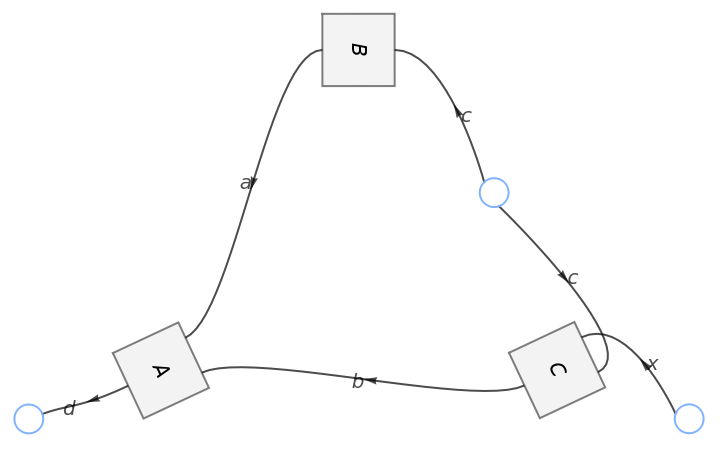
Compose diagrams into a network:
In[1]:=
DiagramNetwork
​​
Diagram
[A,{a,b},d],​​
Diagram
[B,c,a],​​
Diagram
[C,{x,c},b]​​
Out[1]=
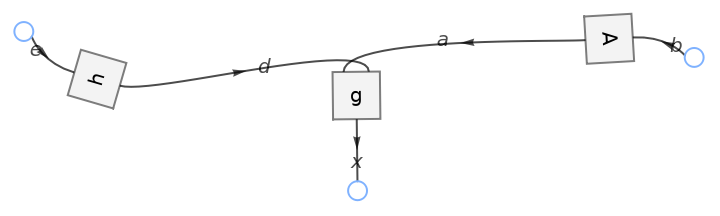
Turn a grid diagram into a network:
In[2]:=
diagram=
DiagramComposition

Diagram
["g",{a,d},x],
Diagram
["A",b,a],
Diagram
["h",e,d];​​diagram["Network"]
Out[2]=
Options  
(2)

Properties & Relations  
(1)

SeeAlso
Diagram
 
▪
DiagramComposition
 
▪
DiagramProduct
 
▪
ToDiagramNetwork
 
▪
DiagramArrange
 
▪
SpiderDiagram
RelatedGuides
▪
Diagrams ▪ DiagramGrid
""

© 2026 Wolfram. All rights reserved.

  • Legal & Privacy Policy
  • Contact Us
  • WolframAlpha.com
  • WolframCloud.com