Wolfram Language Paclet Repository

Community-contributed installable additions to the Wolfram Language

Primary Navigation

    • Cloud & Deployment
    • Core Language & Structure
    • Data Manipulation & Analysis
    • Engineering Data & Computation
    • External Interfaces & Connections
    • Financial Data & Computation
    • Geographic Data & Computation
    • Geometry
    • Graphs & Networks
    • Higher Mathematical Computation
    • Images
    • Knowledge Representation & Natural Language
    • Machine Learning
    • Notebook Documents & Presentation
    • Scientific and Medical Data & Computation
    • Social, Cultural & Linguistic Data
    • Strings & Text
    • Symbolic & Numeric Computation
    • System Operation & Setup
    • Time-Related Computation
    • User Interface Construction
    • Visualization & Graphics
    • Random Paclet
    • Alphabetical List
  • Using Paclets
    • Get Started
    • Download Definition Notebook
  • Learn More about Wolfram Language

DiagrammaticComputation

Tutorials

  • Diagram Examples
  • Introduction to Diagrammatic Computation
  • Rewriting Diagrams

Guides

  • Converting To and From Diagrams
  • Drawing Diagrams Interactively
  • Diagram Grid Layout
  • Diagram Rewriting
  • Diagrams
  • Diagram Surgery
  • Feynman Diagrams
  • Ports

Symbols

  • AnnihilationRule
  • CapDiagram
  • ColumnDiagram
  • CommutationRule
  • CopyDiagram
  • CupDiagram
  • DiagramArrange
  • DiagramAssignPorts
  • DiagramCases
  • DiagramComposition
  • DiagramCopySplit
  • DiagramDecompose
  • DiagramDelete
  • DiagramDraw
  • DiagramDual
  • DiagramExpressionReplace
  • DiagramExtract
  • DiagramFlip
  • DiagramFunction
  • DiagramGraphics
  • DiagramGraphSimplify
  • DiagramGridHeight
  • DiagramGrid
  • DiagramGridTree
  • DiagramGridWidthHeight
  • DiagramGridWidth
  • DiagramHypergraph
  • DiagramHypergraphRule
  • DiagramInsert
  • DiagramMapAt
  • DiagramMap
  • DiagramMatchPorts
  • Diagram
  • DiagramNestReplace
  • DiagramNetwork
  • DiagramPattern
  • DiagramPermute
  • DiagramPosition
  • DiagramPositions
  • DiagramProduct
  • DiagramQ
  • DiagramReplaceList
  • DiagramReplace
  • DiagramReplacePart
  • DiagramReverse
  • DiagramRightComposition
  • DiagramRule
  • DiagramsFreePorts
  • DiagramsGraph
  • DiagramsNetGraph
  • DiagramSplit
  • DiagramsPortGraph
  • DiagramSubdiagrams
  • DiagramSum
  • DiagramTensor
  • DuplicateAnnihilationRule
  • DuplicateEraserRule
  • EmptyDiagram
  • EmptyDiagramQ
  • EmptyPortQ
  • EraserAnnihilationRule
  • EraserDiagram
  • EraserRule
  • FeynArtsTopologyGraphics
  • FeynmanDiagram
  • GridInputPorts
  • GridOutputPorts
  • IdentityDiagram
  • MergeDiagram
  • PermutationDiagram
  • PortDual
  • PortMinus
  • Port
  • PortNeutral
  • PortPower
  • PortProduct
  • PortQ
  • PortSum
  • PropagationRule
  • RemoveDiagramRule
  • RowDiagram
  • SimplifyDiagram
  • SingletonDiagram
  • SpiderDiagram
  • TagPort
  • TensorDiagram
  • ToDiagram
  • ToDiagramNetwork
  • TopologyGraphics
  • TopologyGraph
  • TopologyGraphs
  • UntagPort
  • WigglyArcFunction
  • ZeroDiagram
  • ZeroPortQ
Wolfram`DiagrammaticComputation`
Diagram
​
Diagram
[data]
represents a diagram carrying the data
data
, with no input or output ports.
​
​
Diagram
[data,{
o
1
,
o
2
,…}]
specifies the output ports
o
1
,
o
2
,…
.
​
​
Diagram
[data,{
i
1
,…},{
o
1
,…}]
specifies the input ports
i
1
,…
and output ports
o
1
,…
.
​
Details and Options
▪
Diagram
objects can represent a single process with inputs and outputs as well as arbitrary compositions of such diagrams.
▪
Diagram
["A",…]
displays in a notebook as a box containing the data
"A"
:
▪
The
data
argument can be any of the following:
Form
Meaning
d
1
⊗
d
2
⊗…
or
DiagramProduct
[…]
product of subdiagrams
d
1
⊕
d
2
⊕…
or
DiagramSum
[…]
sum of subdiagrams
d
1
⊙
d
2
⊙…
or
DiagramComposition
[…]
sequential composition
d
1
@
d
2
@…
or
DiagramComposition
[…]
sequential composition (left-to-right execution)
d
1
/
d
2
/…
or
DiagramRightComposition
[…]
sequential composition (right-to-left execution)
{
d
1
,
d
2
,…}
or
DiagramNetwork
[…]
network of subdiagrams
$d^*$
or
DiagramDual
[d]
dual diagram
Overscript
[d,_]
or
DiagramFlip
[d]
flipped diagram
Overscript
[d,~]
or
DiagramReverse
[d]
reversed diagram
any other
expr
singleton diagram
▪
Diagram
[data]
is equivalent to
Diagram
[data,{},{}]
.
▪
Diagram
[data,{
o
1
,…}]
is equivalent to
Diagram
[data,{},{
o
1
,…}]
.
▪
The following special wrappers can be used on individual ports:
Wrapper
Meaning
Labeled
[p,…]
display the port with a labelling
Style
[p,…]
render the port with the specified styles
▪
A
Diagram
carries a large list of options that control its visual appearance. The most-used groups are:
Group
Options
Geometry
"Angle"
,
"Center"
,
"Height"
,
"Width"
,
"Shape"
,
"Rotate"
Layout
"Arrange"
,
"AssignPorts"
,
"Direction"
,
"Grid"
,
"Network"
,
"NetworkMethod"
,
"Orientation"
,
"HorizontalGapSize"
,
"VerticalGapSize"
,
"Spacing"
Decomposition
"Decompose"
,
"Diagram"
,
"Ports"
,
"Unary"
,
"Simplify"
,
"UnarySpiders"
,
"BinarySpiders"
,
"SpiderRadius"
,
"RemoveCycles"
Ports & wires
"PortArrows"
,
"PortLabels"
,
"PortArrowFunction"
,
"PortLabelFunction"
,
"PortFunction"
,
"PortOrderingFunction"
,
"WireArrows"
,
"WireLabels"
,
"WireLabelFunction"
,
"Wires"
Display
"Background"
,
"Frames"
,
"LabelFunction"
,
"ShowLabel"
,
"ShowPortLabels"
,
"ShowWireLabels"
,
"Outline"
,
"Scale"
,
"ArrowSize"
▪
The
"Shape"
option accepts any of the following:
Value
Meaning
Automatic
/
"Rectangle"
/
"Square"
filled rectangle (default)
"RoundedRectangle"
rectangle with one rounded corner
"RoundRectangle"
rectangle with all corners rounded
"Triangle"
/
"UpsideDownTriangle"
triangle pointing up / down
"RoundedTriangle"
/
"RoundedUpsideDownTriangle"
triangle with rounded corners
"Circle"
circle outline
"Disk"
filled disk
"Bracket"
/
"UpsideDownBracket"
U-shaped bracket opening up / down
"Croissant"
/
"UpsideDownCroissant"
crescent-style filled curve
"Wires"
bezier wires connecting matching input / output ports
"Wires"[{{
i
1
,
o
1
},…}]
bezier wires between the specified port-index pairs
"Wire"
single wire bundle through the centre
"CrossWires"
crossing bezier wires for permutation diagrams
"Point"
a single point (spider / junction)
None
render no shape (label only)
f_Function
call
f[d]
on the diagram to produce graphics
any graphics primitive
use the primitive directly (translated to the diagram centre)
​
Examples  
(9)
Basic Examples  
(1)
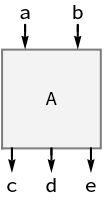
Create a diagram with two input and three output ports:
In[1]:=
Diagram
["A",{a,b},{c,d,e}]
Out[1]=
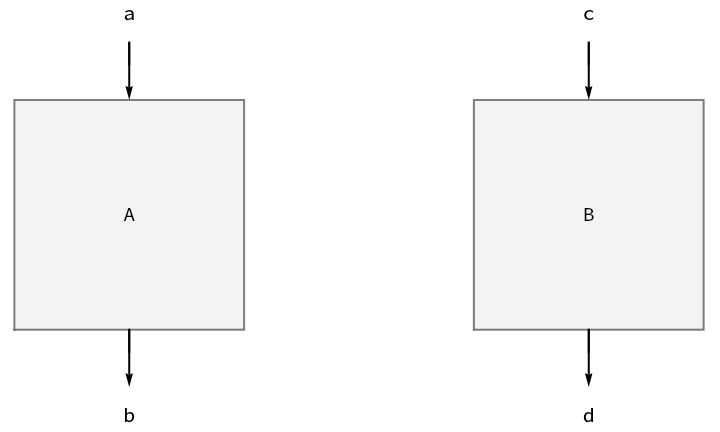
Horizontally compose diagrams using
CircleTimes
:
In[2]:=
Diagram

Diagram
["A",a,b]⊗
Diagram
["B",c,d]
Out[2]=
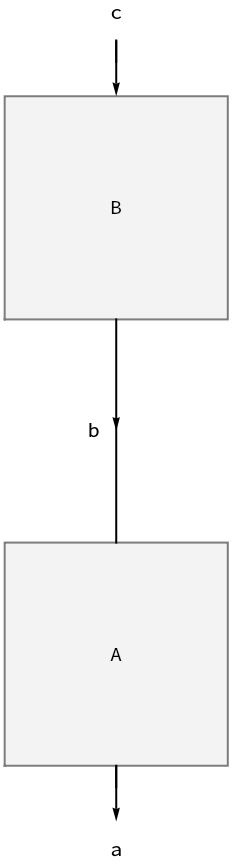
Vertically compose diagrams using
CircleDot
:
In[3]:=
Diagram

Diagram
["A",b,a]⊙
Diagram
["B",c,b]
Out[3]=
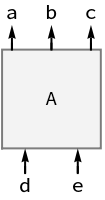
Invert port arrows with
SuperStar
:
In[4]:=
Diagram
SuperStar
Diagram
["A",{a,b,c},{d,e}]
Out[4]=
Scope  
(1)

Options  
(6)

Properties & Relations  
(1)

SeeAlso
DiagramQ
 
▪
ToDiagram
 
▪
Port
 
▪
DiagramProduct
 
▪
DiagramComposition
 
▪
DiagramSum
 
▪
DiagramNetwork
 
▪
DiagramDual
 
▪
DiagramFlip
 
▪
DiagramReverse
 
▪
DiagramGraphics
 
▪
DiagramGrid
RelatedGuides
▪
Diagrams

© 2026 Wolfram. All rights reserved.

  • Legal & Privacy Policy
  • Contact Us
  • WolframAlpha.com
  • WolframCloud.com