Wolfram Language
Paclet Repository
Community-contributed installable additions to the Wolfram Language
Primary Navigation
Categories
Cloud & Deployment
Core Language & Structure
Data Manipulation & Analysis
Engineering Data & Computation
External Interfaces & Connections
Financial Data & Computation
Geographic Data & Computation
Geometry
Graphs & Networks
Higher Mathematical Computation
Images
Knowledge Representation & Natural Language
Machine Learning
Notebook Documents & Presentation
Scientific and Medical Data & Computation
Social, Cultural & Linguistic Data
Strings & Text
Symbolic & Numeric Computation
System Operation & Setup
Time-Related Computation
User Interface Construction
Visualization & Graphics
Random Paclet
Alphabetical List
Using Paclets
Create a Paclet
Get Started
Download Definition Notebook
Learn More about
Wolfram Language
ChatGPTPromptExplorer
Guides
ChatGPTPromptExplorer
Tech Notes
ChatGPTPromptExplorer Workflows
ChatGPTPromptExplorer
Designing an LLMFunction
Experimenting with Prompts
Working with Chatbooks
Working with https://chat.openai.com/
Working with the Prompt Repository
Symbols
ChatGPTPromptExplorerGeneralPalette
ChatGPTPromptExplorerUIElement
ChatGPTQAPI
createPromptNotebook
getAllOpenAIModels
getPromptsFromPromptNotebook
promptEngineeringCell
$openAIAPIKey
Designing an LLMFunction
O
n
e
a
p
p
r
o
a
c
h
t
o
c
r
e
a
t
i
n
g
a
n
L
L
M
F
u
n
c
t
i
o
n
L
L
M
F
u
n
c
t
i
o
n
F
r
o
m
a
C
h
a
t
N
o
t
e
b
o
o
k
C
h
a
t
G
P
T
P
r
o
m
p
t
E
x
p
l
o
r
e
r
G
e
n
e
r
a
l
P
a
l
e
t
t
e
[
]
o
p
e
n
s
t
h
e
C
h
a
t
G
P
T
P
r
o
m
p
t
E
x
p
l
o
r
e
r
G
e
n
e
r
a
l
P
a
l
e
t
t
e
.
T
h
i
s
g
o
v
e
r
n
s
t
h
e
m
a
i
n
i
n
t
e
r
a
c
t
i
o
n
s
w
i
t
h
t
h
i
s
a
p
p
l
i
c
a
t
i
o
n
.
Opening the ChatGPTPromptExplorerGeneralPalette.
One approach to creating an LLMFunction
First load the package:
N
e
e
d
s
[
"
D
a
v
i
d
R
e
i
s
s
`
C
h
a
t
G
P
T
P
r
o
m
p
t
E
x
p
l
o
r
e
r
`
C
h
a
t
G
P
T
P
r
o
m
p
t
E
x
p
l
o
r
e
r
`
"
]
;
L
L
M
F
u
n
c
t
i
o
n
From a Chat Notebook
First approach: from a
C
h
a
t
O
b
j
e
c
t
expression:
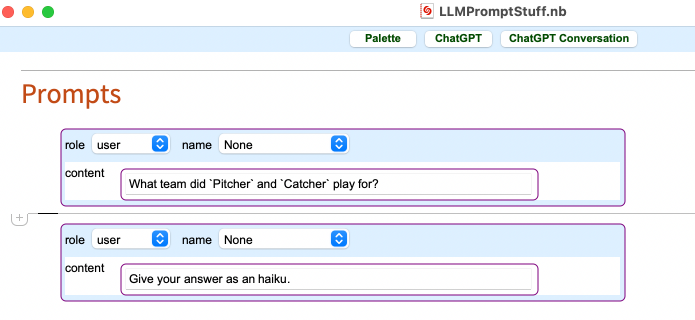
Create a Chat Notebook. For any function keys enclose those in single quotes.
From the
C
h
a
t
G
P
T
P
r
o
m
p
t
E
x
p
l
o
r
e
r
G
e
n
e
r
a
l
P
a
l
e
t
t
e
click on "Copy ChatObject". Then paste the result in to the LLMFunction[""] expression within a pair of quotation marks
I
n
[
3
3
]
:
=
c
o
=
C
h
a
t
O
b
j
e
c
t
W
h
a
t
t
e
a
m
d
i
d
`
P
i
t
c
h
e
r
`
a
n
d
`
C
a
t
c
h
e
r
`
p
l
a
y
f
o
r
?
G
i
v
e
y
o
u
r
a
n
s
w
e
r
a
s
a
n
h
a
i
k
u
.
;
I
n
[
3
7
]
:
=
l
l
m
F
u
n
1
=
L
L
M
F
u
n
c
t
i
o
n
[
Q
u
e
r
y
[
A
l
l
,
"
C
o
n
t
e
n
t
"
]
@
c
o
[
"
M
e
s
s
a
g
e
s
"
]
]
O
u
t
[
3
7
]
=
L
L
M
F
u
n
c
t
i
o
n
T
e
m
p
l
a
t
e
:
{
W
h
a
t
t
e
a
m
d
i
d
`
P
i
t
c
h
e
r
`
a
n
d
`
C
a
t
c
h
e
r
`
p
l
a
y
f
o
r
?
,
G
i
v
e
y
o
u
r
a
n
s
w
e
r
a
s
a
n
h
a
i
k
u
.
}
I
n
t
e
r
p
r
e
t
e
r
:
S
t
r
i
n
g
I
n
[
3
6
]
:
=
l
l
m
F
u
n
1
[
"
P
i
t
c
h
e
r
"
"
W
h
i
t
e
y
F
o
r
d
"
,
"
C
a
t
c
h
e
r
"
"
Y
o
g
i
B
e
r
r
a
"
]
O
u
t
[
3
6
]
=
P
i
n
s
t
r
i
p
e
s
t
h
e
y
d
o
n
n
e
d
p
r
o
u
d
,
Y
a
n
k
e
e
s
l
e
g
e
n
d
s
t
h
e
y
b
e
c
a
m
e
,
F
o
r
d
a
n
d
B
e
r
r
a
'
s
t
e
a
m
.
First approach: from a JSON expression
Create a Chat Notebook. For any function keys enclose those in single quotes.
From the
C
h
a
t
G
P
T
P
r
o
m
p
t
E
x
p
l
o
r
e
r
G
e
n
e
r
a
l
P
a
l
e
t
t
e
click on "Copy Prompts: JSON". Then paste the result in to the LLMFunction[""] expression within a pair of quotation marks
I
n
[
3
1
]
:
=
l
l
m
F
u
n
2
=
L
L
M
F
u
n
c
t
i
o
n
[
"
[
\
t
{
\
t
\
t
\
"
r
o
l
e
\
"
:
\
"
u
s
e
r
\
"
,
\
t
\
t
\
"
c
o
n
t
e
n
t
\
"
:
\
"
W
h
a
t
t
e
a
m
d
i
d
`
P
i
t
c
h
e
r
`
a
n
d
`
C
a
t
c
h
e
r
`
p
l
a
y
f
o
r
?
\
"
\
t
}
,
\
t
{
\
t
\
t
\
"
r
o
l
e
\
"
:
\
"
u
s
e
r
\
"
,
\
t
\
t
\
"
c
o
n
t
e
n
t
\
"
:
\
"
G
i
v
e
y
o
u
r
a
n
s
w
e
r
a
s
a
n
h
a
i
k
u
.
\
"
\
t
}
]
"
]
O
u
t
[
3
1
]
=
L
L
M
F
u
n
c
t
i
o
n
C
o
n
t
e
n
t
:
[
{
"
r
o
l
e
"
:
"
u
s
e
r
"
,
"
c
o
n
t
e
n
t
"
:
"
W
h
a
t
t
e
a
m
d
i
d
"
P
i
t
c
h
e
r
"
a
n
d
"
C
a
t
c
h
e
r
"
p
l
a
y
f
o
r
?
"
}
,
{
"
r
o
l
e
"
:
"
u
s
e
r
"
,
"
c
o
n
t
e
n
t
"
:
"
G
i
v
e
y
o
u
r
a
n
s
w
e
r
a
s
a
n
h
a
i
k
u
.
"
}
]
P
a
r
a
m
e
t
e
r
s
:
"
C
a
t
c
h
e
r
"
,
"
P
i
t
c
h
e
r
"
I
n
[
3
2
]
:
=
l
l
m
F
u
n
2
[
"
P
i
t
c
h
e
r
"
"
W
h
i
t
e
y
F
o
r
d
"
,
"
C
a
t
c
h
e
r
"
"
Y
o
g
i
B
e
r
r
a
"
]
O
u
t
[
3
2
]
=
T
w
o
Y
a
n
k
e
e
s
g
r
e
a
t
s
p
l
a
y
e
d
,
W
h
i
t
e
y
F
o
r
d
a
n
d
Y
o
g
i
B
e
r
r
a
,
B
r
o
n
x
B
o
m
b
e
r
s
f
o
r
l
i
f
e
.
R
e
l
a
t
e
d
G
u
i
d
e
s
▪
C
h
a
t
G
P
T
P
r
o
m
p
t
E
x
p
l
o
r
e
r
R
e
l
a
t
e
d
T
e
c
h
N
o
t
e
s
▪
C
h
a
t
G
P
T
P
r
o
m
p
t
E
x
p
l
o
r
e
r
W
o
r
k
f
l
o
w
s
▪
E
x
p
e
r
i
m
e
n
t
i
n
g
w
i
t
h
P
r
o
m
p
t
s
"
"