Wolfram Function Repository
Instant-use add-on functions for the Wolfram Language
Function Repository Resource:
Split a command-line string respecting quotes and escape characters
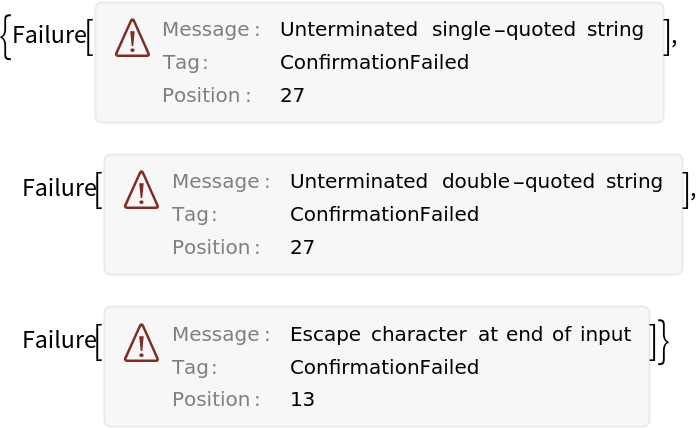
ResourceFunction["CommandLineSplit"][str] splits the string str respecting quotes and escape characters. |
| "TokenDelimiters" | {" ", "\t"} | sets the delimiter between tokens |
| "EscapeCharacter" | "\\" | sets the escape character |
CommandLineSplit will break up a string into constituent argv elements keeping strings as a single unit:
| In[1]:= | ![ResourceFunction["CommandLineSplit"]["echo 'Hello World!'"]](https://www.wolframcloud.com/obj/resourcesystem/images/c04/c049330b-7634-4234-be5b-3e17df7fae86/7c67b6f40dd065b9.png) |
| Out[1]= |  |
Escape characters within strings are supported:
| In[2]:= | ![ResourceFunction["CommandLineSplit"]["echo 'Hello \"World!\"'"]](https://www.wolframcloud.com/obj/resourcesystem/images/c04/c049330b-7634-4234-be5b-3e17df7fae86/34d9a860957a841a.png) |
| Out[2]= |  |
Multiple commands are parsed separately with the separators being retained as separate elements:
| In[3]:= | ![ResourceFunction[
"CommandLineSplit"]["echo 'Hello World!'; echo 'Hello again World!' | grep 'again';"]](https://www.wolframcloud.com/obj/resourcesystem/images/c04/c049330b-7634-4234-be5b-3e17df7fae86/5540eabcdc817ffb.png) |
| Out[3]= |  |
Double-quoted substrings are kept together as one token:
| In[4]:= | ![ResourceFunction["CommandLineSplit"]["grep \"hello world\" file.txt"]](https://www.wolframcloud.com/obj/resourcesystem/images/c04/c049330b-7634-4234-be5b-3e17df7fae86/1eca50caf091f6c1.png) |
| Out[4]= |  |
Escaped command separators are ignored:
| In[5]:= | ![ResourceFunction["CommandLineSplit"]["grep \"\\& hello \\;\""]](https://www.wolframcloud.com/obj/resourcesystem/images/c04/c049330b-7634-4234-be5b-3e17df7fae86/424d5a48c9333b3f.png) |
| Out[5]= |  |
Extra whitespace is ignored:
| In[6]:= | ![ResourceFunction["CommandLineSplit"]["python script.py --flag"]](https://www.wolframcloud.com/obj/resourcesystem/images/c04/c049330b-7634-4234-be5b-3e17df7fae86/0426a887c081a053.png) |
| Out[6]= |  |
Empty strings are preserved:
| In[7]:= | ![ResourceFunction["CommandLineSplit"]["cmd \"\" ''"]](https://www.wolframcloud.com/obj/resourcesystem/images/c04/c049330b-7634-4234-be5b-3e17df7fae86/55c9a22b255a9d16.png) |
| Out[7]= |  |
An equals sign can be treated as an additional delimiter using the "TokenDelimiters" option:
| In[8]:= | ![ResourceFunction[
"CommandLineSplit"]["program --mode=fast --output result.txt", "TokenDelimiters" -> ("=" | " ")]](https://www.wolframcloud.com/obj/resourcesystem/images/c04/c049330b-7634-4234-be5b-3e17df7fae86/5f9ffeb68f9e52d5.png) |
| Out[8]= |  |
A different escape character can be specified with "EscapeCharacter":
| In[9]:= | ![ResourceFunction["CommandLineSplit"]["say ^\"hello world^\"", "EscapeCharacter" -> "^"]](https://www.wolframcloud.com/obj/resourcesystem/images/c04/c049330b-7634-4234-be5b-3e17df7fae86/6ce857004c718019.png) |
| Out[9]= |  |
Split a simple command into a form suitable for further processing:
| In[10]:= | ![cmd = ResourceFunction["CommandLineSplit"][
"wolframscript -code \"2 + 2\""]](https://www.wolframcloud.com/obj/resourcesystem/images/c04/c049330b-7634-4234-be5b-3e17df7fae86/2995b36e265a77f7.png) |
| Out[10]= |  |
Wolfram Language 12.3 (May 2021) or above
This work is licensed under a Creative Commons Attribution 4.0 International License
![(* Evaluate this cell to get the example input *) CloudGet["https://www.wolframcloud.com/obj/766b16b0-6be6-4a20-ab48-ff2b3b3b18da"]](https://www.wolframcloud.com/obj/resourcesystem/images/c04/c049330b-7634-4234-be5b-3e17df7fae86/0c33a60ca0238b8b.png)