Wolfram Function Repository
Instant-use add-on functions for the Wolfram Language
Function Repository Resource:
Generate terms in the Zassenhaus formula
ResourceFunction["ZassenhausTerms"][{op1,op2,…,opm},n] generates the degree-n term of the Zassenhaus expansion of operators {op1,op2,…,opm}, where NonCommutativeMultiply if used as the operation between operators. | |
ResourceFunction["ZassenhausTerms"][{op1,op2,…,opm},n,alg] generates the degree-n term of the Zassenhaus expansion of operators {op1,op2,…,opm}, where alg can be a NonCommutativeAlgebra object, {Dot,n},Dot,Composition,TensorProduct or NonCommutativeMultiply. |
 .
.| "CommutatorForm" | False | whether to give the result in commutator form |
Degree-2 of Zassenhaus term for two operators:
| In[1]:= | ![ResourceFunction["ZassenhausTerms"][{x, y}, 2]](https://www.wolframcloud.com/obj/resourcesystem/images/2f3/2f3af1fe-2038-454d-928f-8f9a68dfdbfc/74ab3d2730e2bc8f.png) |
| Out[1]= |  |
Degree-2 of Zassenhaus term for two operators, in the commutator form:
| In[2]:= | ![ResourceFunction["ZassenhausTerms"][{x, y}, 3, "CommutatorForm" -> True] // TraditionalForm](https://www.wolframcloud.com/obj/resourcesystem/images/2f3/2f3af1fe-2038-454d-928f-8f9a68dfdbfc/2e64c0b03920822a.png) |
| Out[2]= |  |
Degree-4 of Zassenhaus term for two operators:
| In[3]:= | ![ResourceFunction["ZassenhausTerms"][{x, y}, 4] // NonCommutativeExpand](https://www.wolframcloud.com/obj/resourcesystem/images/2f3/2f3af1fe-2038-454d-928f-8f9a68dfdbfc/4d873ccc8691f954.png) |
| Out[3]= |  |
Degree-2 of Zassenhaus term for three symbolic matrices:
| In[4]:= | ![op = Table[MatrixSymbol["x" <> ToString[j], \[FormalN]], {j, 3}];
ResourceFunction["ZassenhausTerms"][op, 2, Dot] // NonCommutativeExpand[#, Dot] &](https://www.wolframcloud.com/obj/resourcesystem/images/2f3/2f3af1fe-2038-454d-928f-8f9a68dfdbfc/2467177e8040af7a.png) |
| Out[5]= |  |
Degree-3 of Zassenhaus term for three operators with Composition as the action:
| In[6]:= | ![ResourceFunction["ZassenhausTerms"][{x, y, w}, 3, Composition] // NonCommutativeExpand[#, Composition] &](https://www.wolframcloud.com/obj/resourcesystem/images/2f3/2f3af1fe-2038-454d-928f-8f9a68dfdbfc/56dd0b4104659dca.png) |
| Out[6]= | 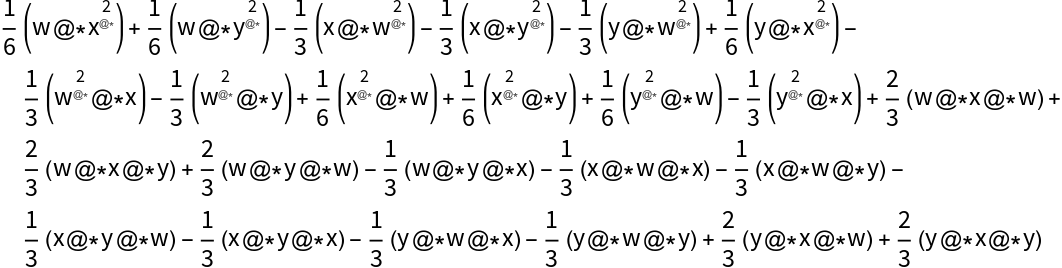 |
Degree-3 of Zassenhaus terms with NonCommutativeMultiply as the action between operators:
| In[7]:= | ![ResourceFunction["ZassenhausTerms"][{x, y}, 3] // NonCommutativeExpand](https://www.wolframcloud.com/obj/resourcesystem/images/2f3/2f3af1fe-2038-454d-928f-8f9a68dfdbfc/03b9014bb4c21b31.png) |
| Out[7]= |  |
Show  :
:
| In[8]:= | ![Z3 = 1/3 Commutator[y, Commutator[x, y]] + 1/6 Commutator[x, Commutator[x, y]];
ResourceFunction["ZassenhausTerms"][{x, y}, 3] - Z3 // NonCommutativeExpand](https://www.wolframcloud.com/obj/resourcesystem/images/2f3/2f3af1fe-2038-454d-928f-8f9a68dfdbfc/6e96ee2bb33cefb2.png) |
| Out[9]= |  |
Show  :
:
| In[10]:= | ![Z4 = -1/8 Commutator[y, Commutator[y, Commutator[x, y]]] - 1/8 Commutator[y, Commutator[x, Commutator[x, y]]] - 1/24 Commutator[x, Commutator[x, Commutator[x, y]]];
ResourceFunction["ZassenhausTerms"][{x, y}, 4] - Z4 // NonCommutativeExpand](https://www.wolframcloud.com/obj/resourcesystem/images/2f3/2f3af1fe-2038-454d-928f-8f9a68dfdbfc/1b50d08f7ea9fd5f.png) |
| Out[11]= |  |
Show degree-3 of Zassenhaus formula, for four operators:
| In[12]:= | ![ResourceFunction["ZassenhausTerms"][{x, y, z, w}, 3] // NonCommutativeExpand](https://www.wolframcloud.com/obj/resourcesystem/images/2f3/2f3af1fe-2038-454d-928f-8f9a68dfdbfc/6fbc0b373822eeda.png) |
| Out[12]= | 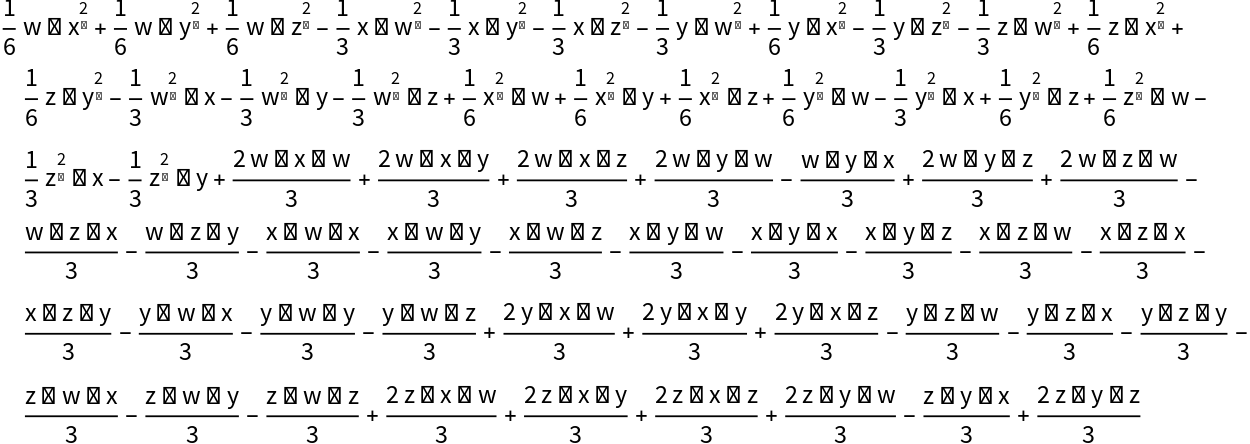 |
Show degree-3 of Zassenhaus formula, for two operators by holding the commutator form:
| In[13]:= | ![ResourceFunction["ZassenhausTerms"][{x, y}, 3, "CommutatorForm" -> True] // TraditionalForm](https://www.wolframcloud.com/obj/resourcesystem/images/2f3/2f3af1fe-2038-454d-928f-8f9a68dfdbfc/462fcf67382f18d6.png) |
| Out[13]= |  |
Show degree-2 of Zassenhaus formula, for four symbolic matrices by holding the commutator form:
| In[14]:= | ![ResourceFunction["ZassenhausTerms"][
Table[MatrixSymbol["x" <> ToString[j], \[FormalN]], {j, 4}], 2, "CommutatorForm" -> True] // TraditionalForm](https://www.wolframcloud.com/obj/resourcesystem/images/2f3/2f3af1fe-2038-454d-928f-8f9a68dfdbfc/593339bfd2e8c23e.png) |
| Out[14]= |  |
Show a few terms of Zassenhaus formula for ⅇx1+x2+x3+x4=ⅇx1ⅇx2ⅇx3ⅇx4∏n=2∞ⅇWn
| In[15]:= | ![With[{ops = Table[
ToString[Subscript[x, j], StandardForm], {j, 3}]},
Grid[Table[{\!\(\*
TagBox[
RowBox[{"ToString", "[",
RowBox[{
RowBox[{"Subscript", "[",
RowBox[{"\[ScriptCapitalW]", ",", "j"}], "]"}], ",", "StandardForm"}],
"]"}],
FullForm]\), ResourceFunction["ZassenhausTerms"][ops, j, Dot] // NonCommutativeExpand[#, Dot] &}, {j, 2, 4}], Frame -> All, Alignment -> Left]]](https://www.wolframcloud.com/obj/resourcesystem/images/2f3/2f3af1fe-2038-454d-928f-8f9a68dfdbfc/6c4570cecede9a4a.png) |
| Out[15]= |  |
This work is licensed under a Creative Commons Attribution 4.0 International License