Details and Options
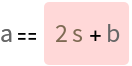
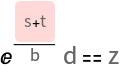
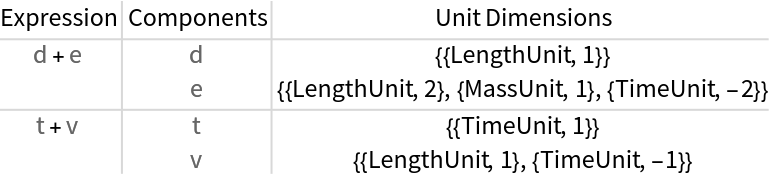
UnitDimensionValidate recursively examines the subexpressions in an equation or expression, checking if each component is internally consistent with regards to unit dimensions. Where it is inconsistent, it will flag the issue either in a table or when displaying the formula with highlighting. Issues include unknown units or physical quantities, function arguments with lingering unit dimensionality, incompatible units added together or incompatible units being equated.
ResourceFunction["UnitDimensionValidate"] supports the following properties:
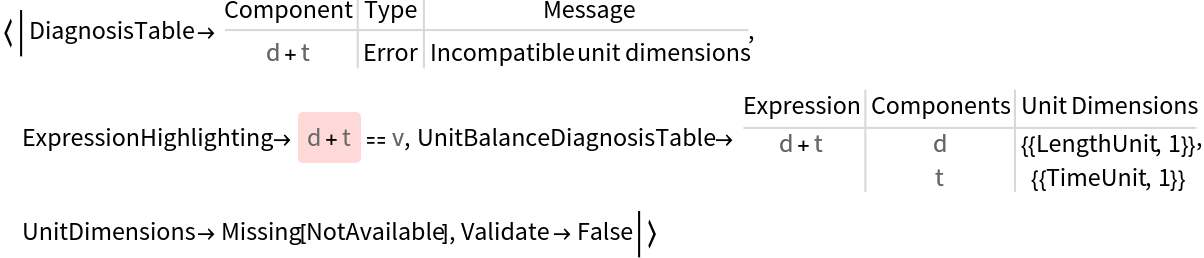
| "DiagnosisTable" | table of subexpressions and their warning or error messages |
| "ExpressionHighlighting" | the original expression with warnings and errors highlighted |
| "UnitDiagnosisTable" | table of subexpressions and unit dimensions for dimensional incompatibilities |
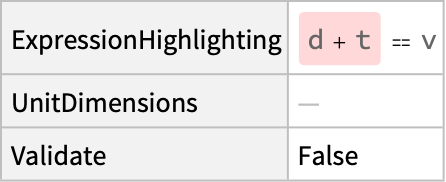
| "UnitDimensions" | unit dimensions of the overall expression if available |
| "Validate" | Boolean result for dimensional balance |
ResourceFunction["UnitDimensionValidate"][expr] is equivalent to ResourceFunction["UnitDimensionValidate"][expr,"ExpressionHighlighting"].
Issues are categorized as errors, where unit dimensions are incompatible or can't be determined in the expression, and warnings, where unit dimension balance can be established by treating angular units and similar unit dimensions as dimensionless.
"ExpressionHighlighting" uses
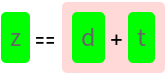
LightRed background highlighting for errors and
Yellow background highlighting for warnings by default. See the options
"CorrectHighlighting",
"ErrorHighlighting" and
"WarningHighlighting" to control the color and style of highlighting for different parts of the expression.
"PropertyAssociation" returns the properties "ExpressionHighlighting", "UnitDimensions" and "Validate". "Dataset" returns those properties as a
Dataset.
All can be used to obtain all properties besides "Dataset" and "PropertyAssociation".
"UnitDimensions" is
Missing["NotAvailable"] when the expression is not dimensionally balanced.
UnitDimensionValidate supports the following options:
| "CheckArgumentDimensions" | True | whether to check the arguments of functions are dimensionless |
| "CorrectHighlighting" | Automatic | Highlighted options for correctly formatted expressions |
| "DimensionedArgumentFailureException" | {} | unit dimensions treated as dimensionless when balancing |
| "DimensionedArgumentWarnings" | Automatic | unit dimensions treated as dimensionless but highlighted when balancing |
| "ErrorHighlighting" | Automatic | Highlighted options for erroneously formatted expressions |
| "WarningHighlighting" | Automatic | Highlighted options for expression warnings |
The default unit dimensions used by "DimensionedArgumentWarnings" include
{"SolidAngleUnit","AngleUnit","RevolutionUnit","PersonUnit","ImpressionUnit",IndependentUnitDimension}.
![ResourceFunction["UnitDimensionValidate"][
QuantityVariable["a", "Length"] == QuantityVariable["z", "Time"]]](https://www.wolframcloud.com/obj/resourcesystem/images/541/541238ca-47e0-4222-8843-aab352831a20/00d25bacd636149e.png)

![ResourceFunction["UnitDimensionValidate"][
QuantityVariable["a", "Length"] == QuantityVariable["b", "Length"] + Quantity[2, "Seconds"]]](https://www.wolframcloud.com/obj/resourcesystem/images/541/541238ca-47e0-4222-8843-aab352831a20/48b813bd75196693.png)
![ResourceFunction["UnitDimensionValidate"][
QuantityVariable["d", "Distance"] Exp[(QuantityVariable["t", "ElectricPotential"] + QuantityVariable["s", "Thickness"])/
QuantityVariable["b", "Thickness"]] == QuantityVariable["z", "Thickness"]]](https://www.wolframcloud.com/obj/resourcesystem/images/541/541238ca-47e0-4222-8843-aab352831a20/4acf336dfb53c5b4.png)
![ResourceFunction[
"UnitDimensionValidate"][{QuantityVariable["m","Mass"]/
QuantityVariable["t","Time"], (
QuantityVariable["e","ElectricCharge"] QuantityVariable[
"E","ElectricFieldStrength"])/QuantityVariable["v","Speed"], (
QuantityVariable["e","ElectricCharge"]^2 QuantityVariable[
"E","ElectricFieldStrength"]^2 QuantityVariable["t","Time"])/(
QuantityVariable["m","Mass"] QuantityVariable[
"v","Speed"]^2)}, "Validate"]](https://www.wolframcloud.com/obj/resourcesystem/images/541/541238ca-47e0-4222-8843-aab352831a20/132da43a93172b78.png)

![ResourceFunction["UnitDimensionValidate"][
QuantityVariable["a", "Length"] == QuantityVariable["b", "Length"]*QuantityVariable["z", "Angle"]]](https://www.wolframcloud.com/obj/resourcesystem/images/541/541238ca-47e0-4222-8843-aab352831a20/5652a95fa5b86117.png)

![ResourceFunction["UnitDimensionValidate"][
QuantityVariable[
"H","Height"] == (Quantity[20.6`3., "Meters"]) ((Quantity[1, 1/("Meters")]) QuantityVariable[
"D","Diameter"])^0.535`, "Validate"]](https://www.wolframcloud.com/obj/resourcesystem/images/541/541238ca-47e0-4222-8843-aab352831a20/3fd2616f9ececcb1.png)

![ResourceFunction["UnitDimensionValidate"][
QuantityVariable["d", "Distance"] Exp[(QuantityVariable["t", "ElectricPotential"] + QuantityVariable["s", "Thickness"])/
QuantityVariable["b", "Thickness"]] == QuantityVariable["z", "Thickness"], "DiagnosisTable"]](https://www.wolframcloud.com/obj/resourcesystem/images/541/541238ca-47e0-4222-8843-aab352831a20/3af3b8aa927a01b8.png)

![ResourceFunction[
"UnitDimensionValidate"][(QuantityVariable["d", "Length"] + QuantityVariable["e", "Energy"])/QuantityVariable["t", "Time"] ==
QuantityVariable["v", "Speed"] + QuantityVariable["t", "Time"], "UnitBalanceDiagnosisTable"]](https://www.wolframcloud.com/obj/resourcesystem/images/541/541238ca-47e0-4222-8843-aab352831a20/6f36f491a85e549a.png)
![ResourceFunction["UnitDimensionValidate"][
QuantityVariable["V","ElectricPotential"] == QuantityVariable["I","ElectricCurrent"] QuantityVariable[
"R","ElectricResistance"], "UnitDimensions"]](https://www.wolframcloud.com/obj/resourcesystem/images/541/541238ca-47e0-4222-8843-aab352831a20/32addb072a026ced.png)

![ResourceFunction["UnitDimensionValidate"][
QuantityVariable["d", "Length"] + QuantityVariable["t", "Time"] == QuantityVariable["v", "Speed"], "PropertyAssociation"]](https://www.wolframcloud.com/obj/resourcesystem/images/541/541238ca-47e0-4222-8843-aab352831a20/6923875e9926e3b2.png)

![ResourceFunction["UnitDimensionValidate"][
QuantityVariable["d", "Length"] + QuantityVariable["t", "Time"] == QuantityVariable["v", "Speed"], "Dataset"]](https://www.wolframcloud.com/obj/resourcesystem/images/541/541238ca-47e0-4222-8843-aab352831a20/66dc5910bbdeb7d2.png)
![ResourceFunction["UnitDimensionValidate"][
QuantityVariable["d", "Length"] + QuantityVariable["t", "Time"] == QuantityVariable["v", "Speed"], All]](https://www.wolframcloud.com/obj/resourcesystem/images/541/541238ca-47e0-4222-8843-aab352831a20/7051f259a8275a8a.png)
![ResourceFunction[
"UnitDimensionValidate"][{QuantityVariable["m","Mass"]/
QuantityVariable["t","Time"], (
QuantityVariable["e","ElectricCharge"] QuantityVariable[
"E","ElectricFieldStrength"])/QuantityVariable["v","Speed"], (
QuantityVariable["e","ElectricCharge"]^2 QuantityVariable[
"E","ElectricFieldStrength"]^2 QuantityVariable["t","Time"])/(
QuantityVariable["m","Mass"] QuantityVariable[
"v","Speed"]^2)}, "Validate"]](https://www.wolframcloud.com/obj/resourcesystem/images/541/541238ca-47e0-4222-8843-aab352831a20/58897b741d67a1d0.png)

![waveequation =
\!\(\*SuperscriptBox[
TemplateBox[{
StyleBox["\"u\""], "\"Pressure\""},
"QuantityVariable",
DisplayFunction->(TooltipBox[
StyleBox[#, FontColor -> GrayLevel[0.4], ShowStringCharacters -> False],
RowBox[{"Quantity variable:", " pressure"}], TooltipStyle -> "TextStyling"]& )],
TagBox[
RowBox[{"(",
RowBox[{"0", ",", "2"}], ")"}],
Derivative],
MultilineFunction->None]\)[QuantityVariable["x","Length"], QuantityVariable["t","Time"]] == QuantityVariable["cp","Speed"]^2
\!\(\*SuperscriptBox[
TemplateBox[{
StyleBox["\"u\""], "\"Pressure\""},
"QuantityVariable",
DisplayFunction->(TooltipBox[
StyleBox[#, FontColor -> GrayLevel[0.4], ShowStringCharacters -> False],
RowBox[{"Quantity variable:", " pressure"}], TooltipStyle -> "TextStyling"]& )],
TagBox[
RowBox[{"(",
RowBox[{"2", ",", "0"}], ")"}],
Derivative],
MultilineFunction->None]\)[QuantityVariable["x","Length"], QuantityVariable["t","Time"]]](https://www.wolframcloud.com/obj/resourcesystem/images/541/541238ca-47e0-4222-8843-aab352831a20/6e7e2faccf0c9de0.png)

![ResourceFunction["UnitDimensionValidate"][waveequation, "Validate"]](https://www.wolframcloud.com/obj/resourcesystem/images/541/541238ca-47e0-4222-8843-aab352831a20/36e1983fb9b211d4.png)

![ResourceFunction[
"UnitDimensionValidate"][waveequation, "UnitDimensions"]](https://www.wolframcloud.com/obj/resourcesystem/images/541/541238ca-47e0-4222-8843-aab352831a20/530fbc8f7d790d61.png)

![ResourceFunction["UnitDimensionValidate"][
QuantityVariable["a", "Length"] == QuantityVariable["b", "Length"] + QuantityVariable["v", "Speed"]*Quantity[2, "Seconds"]]](https://www.wolframcloud.com/obj/resourcesystem/images/541/541238ca-47e0-4222-8843-aab352831a20/2a8f6b1c04a12e34.png)
![ResourceFunction["UnitDimensionValidate"][
QuantityVariable["a", "Length"] == QuantityVariable["b", "Length"] + QuantityVariable["v", "Speed"]*Quantity[2, "Seconds"], "CorrectHighlighting" -> {Background -> Green}]](https://www.wolframcloud.com/obj/resourcesystem/images/541/541238ca-47e0-4222-8843-aab352831a20/2f1b107a54b8485d.png)
![ResourceFunction["UnitDimensionValidate"][
QuantityVariable["z", "Length"] == QuantityVariable["d", "Length"] + QuantityVariable["t", "Time"], "CorrectHighlighting" -> {Background -> Green}]](https://www.wolframcloud.com/obj/resourcesystem/images/541/541238ca-47e0-4222-8843-aab352831a20/5d0d91e6d1e54dbd.png)
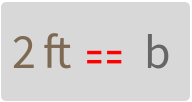
![ResourceFunction["UnitDimensionValidate"][
Quantity[2, "Feet"] == QuantityVariable["b", "Length"], "CorrectHighlighting" -> {Background -> LightGray, BaseStyle -> {Red, 24}}]](https://www.wolframcloud.com/obj/resourcesystem/images/541/541238ca-47e0-4222-8843-aab352831a20/0ff4ce84d8efdefa.png)
![ResourceFunction["UnitDimensionValidate"][
QuantityVariable["d", "Distance"]/
QuantityVariable["t", "Thickness"] == Sin[QuantityVariable["v", "Feet"]], "Validate"]](https://www.wolframcloud.com/obj/resourcesystem/images/541/541238ca-47e0-4222-8843-aab352831a20/12cf9b0b31791be0.png)

![ResourceFunction["UnitDimensionValidate"][
QuantityVariable["d", "Distance"]/
QuantityVariable["t", "Thickness"] == Sin[QuantityVariable["v", "Length"]], "Validate", "CheckArgumentDimensions" -> False]](https://www.wolframcloud.com/obj/resourcesystem/images/541/541238ca-47e0-4222-8843-aab352831a20/4448ee7230626f54.png)

![ResourceFunction["UnitDimensionValidate"][
QuantityVariable["d", "Distance"]/
QuantityVariable["t", "Thickness"] == QuantityVariable["v", "Time"]]](https://www.wolframcloud.com/obj/resourcesystem/images/541/541238ca-47e0-4222-8843-aab352831a20/72f68c264812b03b.png)

![ResourceFunction["UnitDimensionValidate"][
QuantityVariable["d", "Distance"]/
QuantityVariable["t", "Thickness"] == QuantityVariable["v", "Time"],
"DimensionedArgumentFailureExceptions" -> {"TimeUnit"}]](https://www.wolframcloud.com/obj/resourcesystem/images/541/541238ca-47e0-4222-8843-aab352831a20/27ffda3e9efe84c1.png)

![ResourceFunction["UnitDimensionValidate"][
QuantityVariable["d", "Distance"]/
QuantityVariable["t", "Thickness"] QuantityVariable["v", "Angle"] == Sin[QuantityVariable["v", "Angle"]], "DimensionedArgumentWarnings" -> {"AngleUnit"}]](https://www.wolframcloud.com/obj/resourcesystem/images/541/541238ca-47e0-4222-8843-aab352831a20/6370fa9e383191ad.png)
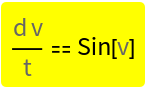
![ResourceFunction["UnitDimensionValidate"][
QuantityVariable["d", "Distance"]/
QuantityVariable["t", "Thickness"] QuantityVariable["v", "Angle"] == Sin[QuantityVariable["v", "Angle"]], "DimensionedArgumentWarnings" -> {"AngleUnit"}, "DimensionedArgumentFailureExceptions" -> {"AngleUnit"}]](https://www.wolframcloud.com/obj/resourcesystem/images/541/541238ca-47e0-4222-8843-aab352831a20/5747336e90c421bf.png)
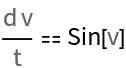
![ResourceFunction["UnitDimensionValidate"][
QuantityVariable["d", "Distance"]/
QuantityVariable["t", "Thickness"] QuantityVariable["v", "Angle"] == Sin[QuantityVariable["v", "Angle"]], "DiagnosisTable"]](https://www.wolframcloud.com/obj/resourcesystem/images/541/541238ca-47e0-4222-8843-aab352831a20/1c3ff42c7094de65.png)

![ResourceFunction["UnitDimensionValidate"][
QuantityVariable["d", "Distance"]/
QuantityVariable["t", "Thickness"] QuantityVariable["v", "Angle"] == Sin[QuantityVariable["v", "Angle"]], "DiagnosisTable",
"DimensionedArgumentWarnings" -> {}]](https://www.wolframcloud.com/obj/resourcesystem/images/541/541238ca-47e0-4222-8843-aab352831a20/5d76a989f9bd05b6.png)

![ResourceFunction["UnitDimensionValidate"][
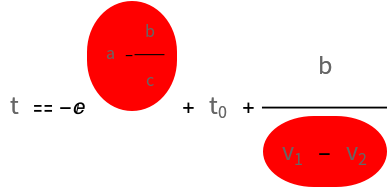
QuantityVariable["t", "Time"] == QuantityVariable[Subscript["t", 0], "Time"] + QuantityVariable["b", "Length"]/(QuantityVariable[Subscript["v", 1], "Speed"] - QuantityVariable[Subscript["v", 2], "Time"]) - Exp[QuantityVariable["a", "Length"] - QuantityVariable["b", "Length"]/QuantityVariable["c", "Length"]],
"ErrorHighlighting" -> {Background -> Red, RoundingRadius -> 25}]](https://www.wolframcloud.com/obj/resourcesystem/images/541/541238ca-47e0-4222-8843-aab352831a20/5e2ea194304ac8ff.png)
![ResourceFunction["UnitDimensionValidate"][
QuantityVariable["a", "Length"] == QuantityVariable["b", "Length"]*QuantityVariable["z", "Angle"], "WarningHighlighting" -> {Frame -> True, FrameStyle -> Red}]](https://www.wolframcloud.com/obj/resourcesystem/images/541/541238ca-47e0-4222-8843-aab352831a20/36a58aedd1062c0f.png)
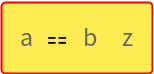
![(* Evaluate this cell to get the example input *) CloudGet["https://www.wolframcloud.com/obj/908f1c28-47ff-437f-afbe-68b6dfdb3e41"]](https://www.wolframcloud.com/obj/resourcesystem/images/541/541238ca-47e0-4222-8843-aab352831a20/2e24c514b3764b9c.png)
![AllTrue[Flatten[{odeHO, odeRC, odeLRC, grav, peq, eq, eq2, odeHO2}], ResourceFunction["UnitDimensionValidate"][#, "Validate"] &]](https://www.wolframcloud.com/obj/resourcesystem/images/541/541238ca-47e0-4222-8843-aab352831a20/19709a1cc22da9c5.png)

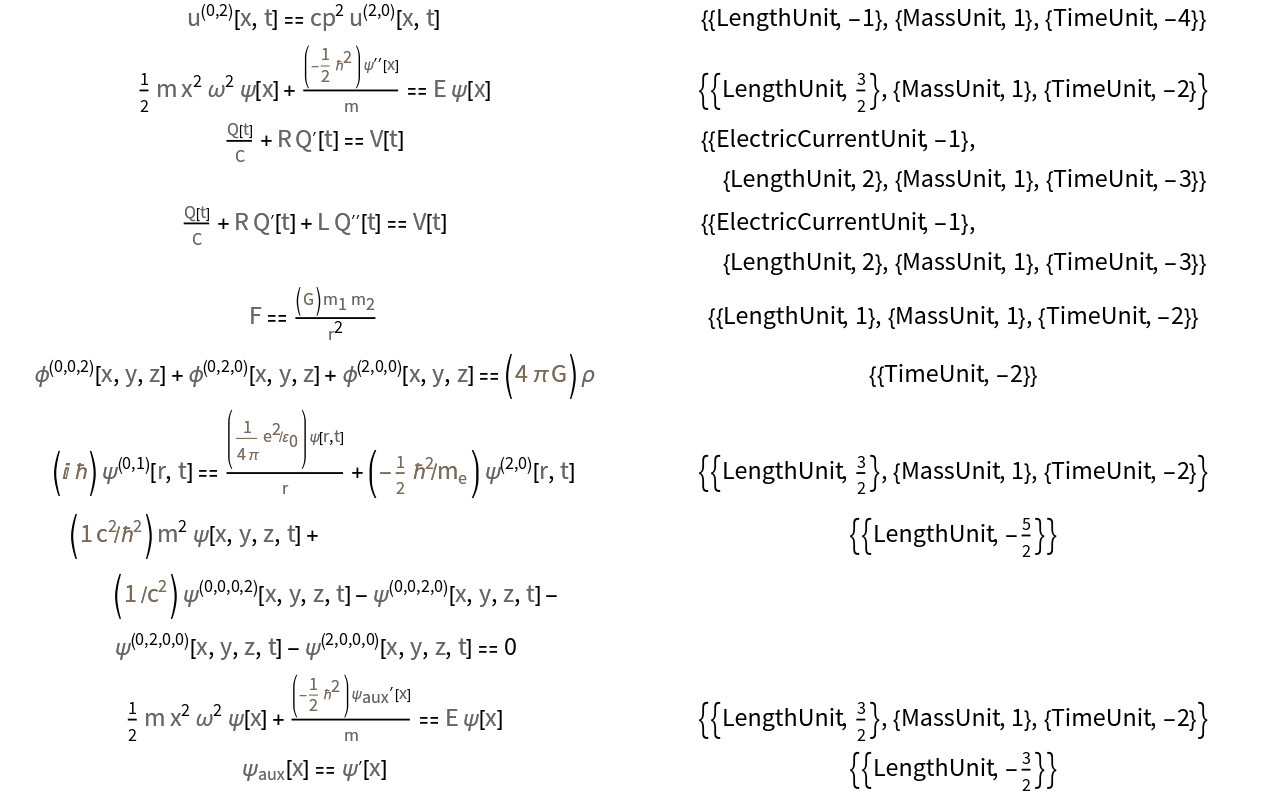
![Grid[{#, ResourceFunction["UnitDimensionValidate"][#, "UnitDimensions"]} & /@ Flatten[{waveequation, odeHO, odeRC, odeLRC, grav, peq, eq, eq2, odeHO2}]]](https://www.wolframcloud.com/obj/resourcesystem/images/541/541238ca-47e0-4222-8843-aab352831a20/5975c3142783f4aa.png)
![ResourceFunction["UnitDimensionValidate"][
QuantityVariable["d", "Foo"]/QuantityVariable["t", "Time"] == QuantityVariable["v", "Speed"], "PropertyAssociation"]](https://www.wolframcloud.com/obj/resourcesystem/images/541/541238ca-47e0-4222-8843-aab352831a20/56bc2adcd45b36da.png)

![ResourceFunction["UnitDimensionValidate"][
QuantityVariable[
"\[Omega]","Frequency"] QuantityVariable["x","Length"][
QuantityVariable["t","Time"]] + a Derivative[1][QuantityVariable["x","Length"]][QuantityVariable[
"t","Time"]] == A QuantityVariable["f","Speed"][QuantityVariable[
"t","Time"]], "PropertyAssociation"]](https://www.wolframcloud.com/obj/resourcesystem/images/541/541238ca-47e0-4222-8843-aab352831a20/114e8c821162e60e.png)

![e = EntityList["PhysicalSystem"];
RandomSample[e, 5]](https://www.wolframcloud.com/obj/resourcesystem/images/541/541238ca-47e0-4222-8843-aab352831a20/3445ef4264cb1dfe.png)

![psformulas = DeleteCases[
Flatten[EntityValue[
e, {EntityProperty["PhysicalSystem", "EquationsOfMotion"], EntityProperty["PhysicalSystem", "HamiltonianEquationsOfMotion"]}]], _Missing];
Length[psformulas]](https://www.wolframcloud.com/obj/resourcesystem/images/541/541238ca-47e0-4222-8843-aab352831a20/78259599db0b7c3c.png)

![AllTrue[Flatten[Quiet[Activate[psformulas], {Cross::nonn1}]], ResourceFunction["UnitDimensionValidate"][#, "Validate"] &]](https://www.wolframcloud.com/obj/resourcesystem/images/541/541238ca-47e0-4222-8843-aab352831a20/12e59bb5a985e39c.png)

