Basic Examples (3)
Download an XLSX file:
Trace the dependencies of the cell D1:
Visualize it as an ExpressionTree:
Scope (4)
Trace a deeper spreadsheet dependency:
Trace formulas with absolute references:
Trace cross-sheet references:
Trace through a column range, expanding it across all rows:
Options (1)
TraceDuplicates (1)
Delete duplicate branches and show a more compact visualization:
Applications (3)
Find all the cells a formula depends on:
Measure the total dependency depth:
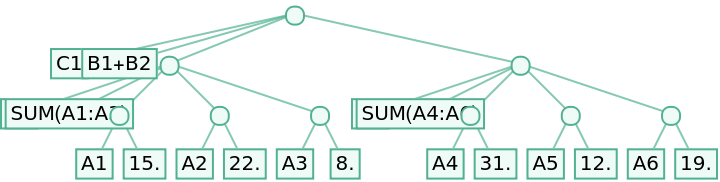
Visualize the full tree of dependencies:
Notice this ExpressionTree respects the ordering among dependencies, but their hierarchical structure is not captured perfectly. See proper Trace tree examples in Properties and Relations.
Properties and Relations (4)
The output of SpreadsheetTrace[file,cell] has the same form as the output of Trace, but truncated after the elementary leafs are reached.
To truncate Trace at the leafs use replacements rules like the this:
Find the full Trace of a double sum:
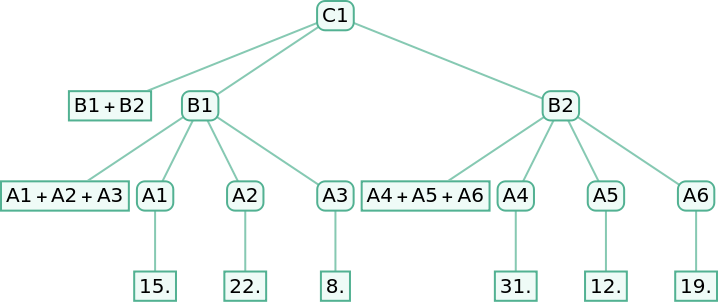
Its truncated version perfectly matches the output of SpreadsheetTrace[file,cell]:
Nevertheless, only the pure Wolfram Language Trace allows the drawing of a proper ExpressionTree, which respects all hierarchical relations:
See Possible Issues for other exceptions to the general analogy between SpreadsheetTrace[file,cell] and Trace.
Possible Issues (1)
In some examples, to achieve complete analogy with Excel formulas, Wolfram built-in functions like If need to be redefined so to be cleared of Attributes like HoldRest:
Still, in this case the analogy with Trace is not yet perfect because SpreadsheetTrace[file,cell] treats as Atom elements only spreadsheet formula cells and their values, ignoring numeric constants in relations such as C4>0 (0) and C1-C3 (-1).
![file1 = URLDownload[
"https://www.wolframcloud.com/obj/064eb405-e9b5-4e95-941a-7898dd493f80",
FileNameJoin[{$TemporaryDirectory, "example_01.xlsx"}]];](https://www.wolframcloud.com/obj/resourcesystem/images/228/22873e78-7ab4-410b-8ab3-14e5f8c90763/21f1279f4a21c178.png)
![trace = ResourceFunction["SpreadsheetTrace"][file1, "D1"]](https://www.wolframcloud.com/obj/resourcesystem/images/228/22873e78-7ab4-410b-8ab3-14e5f8c90763/51b5f5ce609cf657.png)

![ExpressionTree[trace, "Atoms"]](https://www.wolframcloud.com/obj/resourcesystem/images/228/22873e78-7ab4-410b-8ab3-14e5f8c90763/7083621fc6ccbc3c.png)
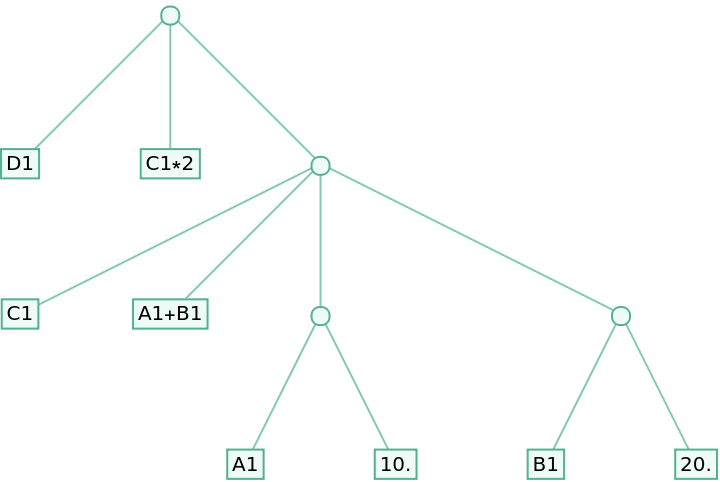
![file2 = URLDownload[
"https://www.wolframcloud.com/obj/67cccf43-b7be-471a-9826-378d88ce4534",
FileNameJoin[{$TemporaryDirectory, "example_02.xlsx"}]];](https://www.wolframcloud.com/obj/resourcesystem/images/228/22873e78-7ab4-410b-8ab3-14e5f8c90763/62ec82a636b0a427.png)
![ResourceFunction["SpreadsheetTrace"][file2, "C5"]](https://www.wolframcloud.com/obj/resourcesystem/images/228/22873e78-7ab4-410b-8ab3-14e5f8c90763/7fb6334b29eb3f0c.png)

![file3 = URLDownload[
"https://www.wolframcloud.com/obj/0439d3b1-0a32-4ccc-a01c-c724965a2386", FileNameJoin[{$TemporaryDirectory, "example_03.xlsx"}]];](https://www.wolframcloud.com/obj/resourcesystem/images/228/22873e78-7ab4-410b-8ab3-14e5f8c90763/1d53e56cb73b8cdb.png)
![ResourceFunction["SpreadsheetTrace"][file3, "F2"]](https://www.wolframcloud.com/obj/resourcesystem/images/228/22873e78-7ab4-410b-8ab3-14e5f8c90763/1706fafb4e6634ee.png)

![file4 = URLDownload[
"https://www.wolframcloud.com/obj/cb328fb3-3a35-4601-a7cb-611e09245574",
FileNameJoin[{$TemporaryDirectory, "example_04.xlsx"}]];](https://www.wolframcloud.com/obj/resourcesystem/images/228/22873e78-7ab4-410b-8ab3-14e5f8c90763/5273e988d9a72c6b.png)
![ResourceFunction["SpreadsheetTrace"][file4, "Summary!B3"]](https://www.wolframcloud.com/obj/resourcesystem/images/228/22873e78-7ab4-410b-8ab3-14e5f8c90763/2944cbf3da2b98bb.png)

![file5 = URLDownload[
"https://www.wolframcloud.com/obj/066a6a74-e239-40f7-bf4a-851fde0da7ea",
FileNameJoin[{$TemporaryDirectory, "example_05.xlsx"}]];](https://www.wolframcloud.com/obj/resourcesystem/images/228/22873e78-7ab4-410b-8ab3-14e5f8c90763/7057966127e3ccf7.png)
![trace = ResourceFunction["SpreadsheetTrace"][file5, "Orders!D2"]](https://www.wolframcloud.com/obj/resourcesystem/images/228/22873e78-7ab4-410b-8ab3-14e5f8c90763/21df15a76140a82b.png)

![ExpressionTree[trace, "Atoms", TreeLayout -> "BalloonEmbedding"]](https://www.wolframcloud.com/obj/resourcesystem/images/228/22873e78-7ab4-410b-8ab3-14e5f8c90763/2cbc4dc8a8a2601b.png)
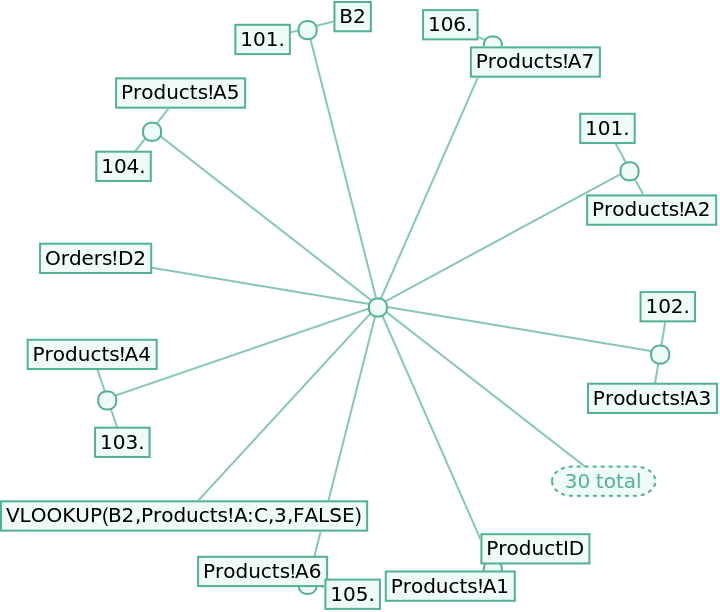
![file2 = URLDownload[
"https://www.wolframcloud.com/obj/67cccf43-b7be-471a-9826-378d88ce4534",
FileNameJoin[{$TemporaryDirectory, "example_02.xlsx"}]];](https://www.wolframcloud.com/obj/resourcesystem/images/228/22873e78-7ab4-410b-8ab3-14e5f8c90763/7edf325ede1bc142.png)
![traceND = ResourceFunction["SpreadsheetTrace"][file2, "D1", "TraceDuplicates" -> False]](https://www.wolframcloud.com/obj/resourcesystem/images/228/22873e78-7ab4-410b-8ab3-14e5f8c90763/1886b4e10a45972c.png)

![ExpressionTree[traceND, "Atoms", ImageSize -> Full]](https://www.wolframcloud.com/obj/resourcesystem/images/228/22873e78-7ab4-410b-8ab3-14e5f8c90763/0ccacc4de997d2e1.png)
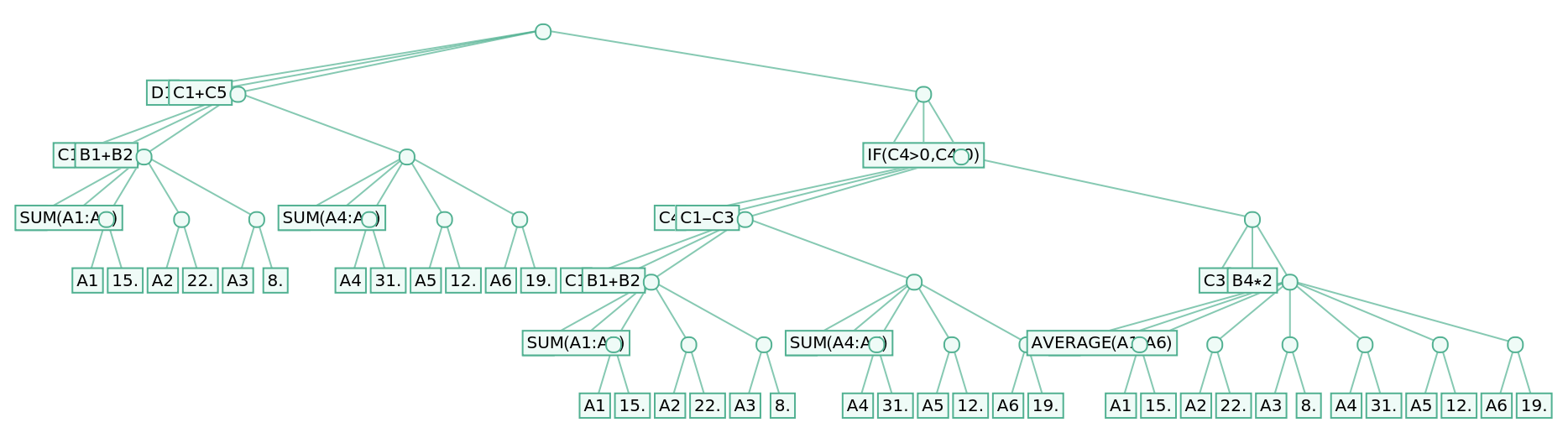
![file3 = URLDownload[
"https://www.wolframcloud.com/obj/0439d3b1-0a32-4ccc-a01c-c724965a2386", FileNameJoin[{$TemporaryDirectory, "example_03.xlsx"}]];](https://www.wolframcloud.com/obj/resourcesystem/images/228/22873e78-7ab4-410b-8ab3-14e5f8c90763/39ee8e8e4e853e6f.png)
![trace = ResourceFunction["SpreadsheetTrace"][file3, "G2"]](https://www.wolframcloud.com/obj/resourcesystem/images/228/22873e78-7ab4-410b-8ab3-14e5f8c90763/58d2d3f28ff30572.png)

![Cases[trace, {cell_String, val_ /; ! StringQ[val]} :> cell, Infinity]](https://www.wolframcloud.com/obj/resourcesystem/images/228/22873e78-7ab4-410b-8ab3-14e5f8c90763/159296e2974b7dde.png)

![file1 = URLDownload[
"https://www.wolframcloud.com/obj/064eb405-e9b5-4e95-941a-7898dd493f80",
FileNameJoin[{$TemporaryDirectory, "example_01.xlsx"}]];](https://www.wolframcloud.com/obj/resourcesystem/images/228/22873e78-7ab4-410b-8ab3-14e5f8c90763/336cfa9e5631f395.png)
![trace = ResourceFunction["SpreadsheetTrace"][file1, "E1"]](https://www.wolframcloud.com/obj/resourcesystem/images/228/22873e78-7ab4-410b-8ab3-14e5f8c90763/609def42cb33202e.png)



![file2 = URLDownload[
"https://www.wolframcloud.com/obj/67cccf43-b7be-471a-9826-378d88ce4534",
FileNameJoin[{$TemporaryDirectory, "example_02.xlsx"}]];;](https://www.wolframcloud.com/obj/resourcesystem/images/228/22873e78-7ab4-410b-8ab3-14e5f8c90763/3ee846121abffc5e.png)
![trace = ResourceFunction["SpreadsheetTrace"][file2, "D1", "TraceDuplicates" -> False];](https://www.wolframcloud.com/obj/resourcesystem/images/228/22873e78-7ab4-410b-8ab3-14e5f8c90763/192c454343252323.png)
![ExpressionTree[trace, "Atoms", ImageSize -> Full]](https://www.wolframcloud.com/obj/resourcesystem/images/228/22873e78-7ab4-410b-8ab3-14e5f8c90763/1b4f42b6db393c96.png)
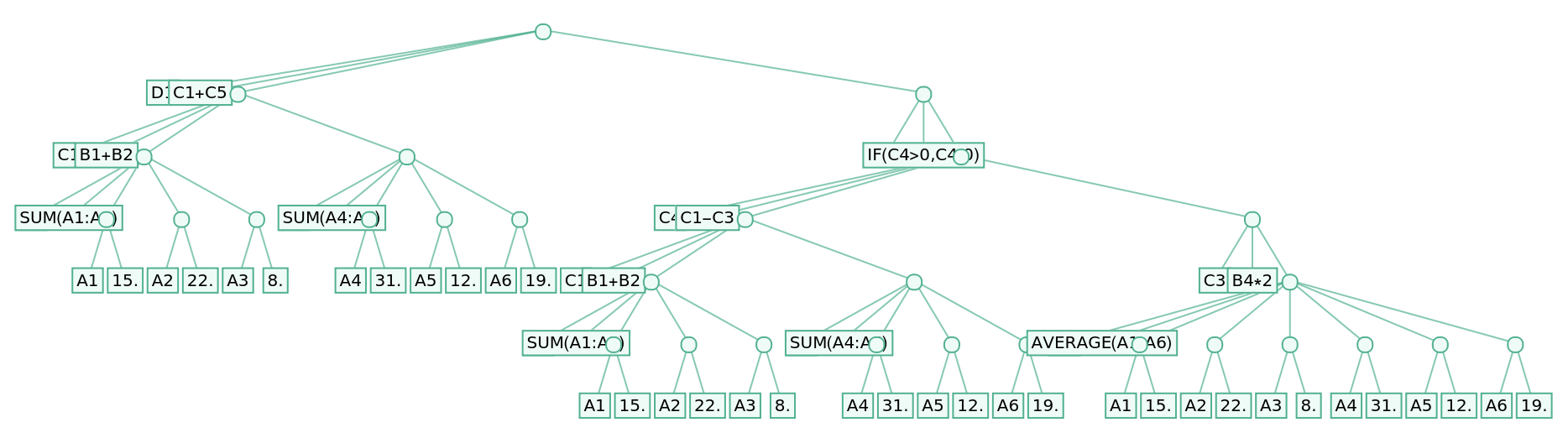
![cutTrace[trace_] :=
ReplaceRepeated[trace,
{k : {_, HoldCompleteForm[_?StringQ]} :> k,
{HoldCompleteForm[_?NumericQ], HoldCompleteForm[_?NumericQ]} -> Nothing,
_[___, _?StringQ ..] -> Nothing,
HoldCompleteForm@Nothing -> Nothing,
_[___, Nothing .., ___] -> Nothing,
_[_[___, __?StringQ ..] ..] -> Nothing}]](https://www.wolframcloud.com/obj/resourcesystem/images/228/22873e78-7ab4-410b-8ab3-14e5f8c90763/6f04b0ed8284dee6.png)
![traceDef =
Block[{C1, B1, B2, A1 = "a1", A2 = "a2", A3 = "a3", A4 = "a4", A5 = "a5", A6 = "a6"},
C1 := B1 + B2;
B1 := A1 + A2 + A3;
B2 := A4 + A5 + A6;
Trace[C1]]](https://www.wolframcloud.com/obj/resourcesystem/images/228/22873e78-7ab4-410b-8ab3-14e5f8c90763/7dff5ea1a0ed802f.png)

![file2 = URLDownload[
"https://www.wolframcloud.com/obj/67cccf43-b7be-471a-9826-378d88ce4534",
FileNameJoin[{$TemporaryDirectory, "example_02.xlsx"}]];](https://www.wolframcloud.com/obj/resourcesystem/images/228/22873e78-7ab4-410b-8ab3-14e5f8c90763/7f97a6fb5a1e7d2f.png)
![replFile1Col1 = Thread[{"a1", "a2", "a3", "a4", "a5", "a6"} -> Take[First /@ First@Import[file2, "Data"], 6]];](https://www.wolframcloud.com/obj/resourcesystem/images/228/22873e78-7ab4-410b-8ab3-14e5f8c90763/093a72874edfb0ad.png)
![trace = ResourceFunction["SpreadsheetTrace"][file2, "C1"]](https://www.wolframcloud.com/obj/resourcesystem/images/228/22873e78-7ab4-410b-8ab3-14e5f8c90763/54f645f1f942e743.png)



![ExpressionTree[cutTrace@traceDef /. replFile1Col1, "Trace"]](https://www.wolframcloud.com/obj/resourcesystem/images/228/22873e78-7ab4-410b-8ab3-14e5f8c90763/5af7a7e11031a531.png)
![ExpressionTree[trace, "Atoms"]](https://www.wolframcloud.com/obj/resourcesystem/images/228/22873e78-7ab4-410b-8ab3-14e5f8c90763/1fc4a53503b75ae7.png)
![cutTrace[trace_] :=
ReplaceRepeated[trace,
{k : {_, HoldCompleteForm[_?StringQ]} :> k,
{HoldCompleteForm[_?NumericQ], HoldCompleteForm[_?NumericQ]} -> Nothing,
_[___, _?StringQ ..] -> Nothing,
HoldCompleteForm@Nothing -> Nothing,
_[___, Nothing .., ___] -> Nothing,
_[_[___, __?StringQ ..] ..] -> Nothing}]](https://www.wolframcloud.com/obj/resourcesystem/images/228/22873e78-7ab4-410b-8ab3-14e5f8c90763/66642c0ec0e13fb8.png)
![traceDef = Block[{C5, C4, C1, C3, B1, B2, B4, A1 = "a1", A2 = "a2", A3 = "a3", A4 = "a4", A5 = "a5", A6 = "a6", if},
if[cond_, then_, else_] := If[cond, then, else];
B1 := A1 + A2 + A3; B2 := A4 + A5 + A6;
B4 := (A1 + A2 + A3 + A4 + A5 + A6)/6;
C1 := B1 + B2; C3 := B4*2; C4 := C1 - C3;
C5 := if[C4 > 0, C4, 0];
Trace[C5]];](https://www.wolframcloud.com/obj/resourcesystem/images/228/22873e78-7ab4-410b-8ab3-14e5f8c90763/47069f7e019f4b49.png)
![file2 = URLDownload[
"https://www.wolframcloud.com/obj/67cccf43-b7be-471a-9826-378d88ce4534",
FileNameJoin[{$TemporaryDirectory, "example_02.xlsx"}]];](https://www.wolframcloud.com/obj/resourcesystem/images/228/22873e78-7ab4-410b-8ab3-14e5f8c90763/13105eb9161e0c53.png)
![replFile1Col1 = Thread[{"a1", "a2", "a3", "a4", "a5", "a6"} -> Take[First /@ First@Import[file2, "Data"], 6]];](https://www.wolframcloud.com/obj/resourcesystem/images/228/22873e78-7ab4-410b-8ab3-14e5f8c90763/55c87476735a2a9d.png)


![ResourceFunction["SpreadsheetTrace"][file2, "C5"]](https://www.wolframcloud.com/obj/resourcesystem/images/228/22873e78-7ab4-410b-8ab3-14e5f8c90763/2922954834a4b52b.png)
