Details and Options
While the basic function
Pause halts code execution for a certain number of seconds,
ResourceFunction["PauseUntil"] halts it until a certain given time occurs.
ResourceFunction["PauseUntil"] accepts the following options:
| TimeZone | Automatic | the time zone used in all the internal evaluations |
| "PauseInformation" | False | whether to Echo the time to be paused |
| "Periodicity" | None | consider the input as a periodically repeating time |
There is no output for
ResourceFunction["PauseUntil"], but the time to be waited for can be echoed by setting the option
"PauseInformation" to
True.
The values for the option "Periodicity" can be:
| None | pause until only the specified time |
| n | pause until the next occurrence of the given time repeated in the future every n days |
| {n,unit} | pause until the next occurrence of the given time repeated in the future every n integer units of time |
The unit in the
"Periodicity" option value can be one of the following:
"Year",
"Quarter",
"Month",
"Week",
"Day",
"Hour",
"Minute",
"Second",
"Weekday",
"Weekend",
Monday through
Sunday,
"EndOfMonth",
"BeginningOfMonth" and
"BusinessDay".
Normally, entering as input past times leads to failure, unless the option "Periodicity" is set. Then a past date or time is interpreted as periodically repeating every n*unit time in the future and the evaluation pauses until the next occurrence of such periodic date.
A potential application of ResourceFunction["PauseUntil"] is for setting up scheduled tasks running at fixed times, especially on remote servers using the Wolfram Engine.
Other use cases include API rate limiting, external coordination, simulations or demonstrations.
![AbsoluteTiming[
ResourceFunction["PauseUntil"][Now + Quantity[10, "Seconds"]]]](https://www.wolframcloud.com/obj/resourcesystem/images/372/3725462b-18f4-4b01-ba22-c24d145a67c9/4a19b33fee2b824b.png)

![ResourceFunction["PauseUntil"]["13 sep 2025 12:00:30"]](https://www.wolframcloud.com/obj/resourcesystem/images/372/3725462b-18f4-4b01-ba22-c24d145a67c9/2807cc03eff22d38.png)
![DateString[]](https://www.wolframcloud.com/obj/resourcesystem/images/372/3725462b-18f4-4b01-ba22-c24d145a67c9/1c42fa7dfd278efc.png)

![ResourceFunction["PauseUntil"]["19:01 JST"]](https://www.wolframcloud.com/obj/resourcesystem/images/372/3725462b-18f4-4b01-ba22-c24d145a67c9/484ab272a64a5cf9.png)
![DateString[TimeZone -> "Asia/Tokyo"]](https://www.wolframcloud.com/obj/resourcesystem/images/372/3725462b-18f4-4b01-ba22-c24d145a67c9/670947c39c498a05.png)

![timeobj = TimeObject[{12, 1, 30}]](https://www.wolframcloud.com/obj/resourcesystem/images/372/3725462b-18f4-4b01-ba22-c24d145a67c9/2a74c761a57565f4.png)
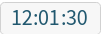
![ResourceFunction["PauseUntil"][timeobj]](https://www.wolframcloud.com/obj/resourcesystem/images/372/3725462b-18f4-4b01-ba22-c24d145a67c9/4fc98bbeecd8ec59.png)
![DateString[]](https://www.wolframcloud.com/obj/resourcesystem/images/372/3725462b-18f4-4b01-ba22-c24d145a67c9/0b9b33eb09c6c519.png)

![dateobj = DatePlus[Now, {10, "Second"}]](https://www.wolframcloud.com/obj/resourcesystem/images/372/3725462b-18f4-4b01-ba22-c24d145a67c9/64065a25230d7634.png)

![ResourceFunction["PauseUntil"][dateobj]](https://www.wolframcloud.com/obj/resourcesystem/images/372/3725462b-18f4-4b01-ba22-c24d145a67c9/50e43b486622a542.png)
![DateString[]](https://www.wolframcloud.com/obj/resourcesystem/images/372/3725462b-18f4-4b01-ba22-c24d145a67c9/1200d330c47d7eaf.png)

![ResourceFunction["PauseUntil"]["16:15 pm", "PauseInformation" -> True]](https://www.wolframcloud.com/obj/resourcesystem/images/372/3725462b-18f4-4b01-ba22-c24d145a67c9/31bf46839c07b70c.png)

![DateString[]](https://www.wolframcloud.com/obj/resourcesystem/images/372/3725462b-18f4-4b01-ba22-c24d145a67c9/068c573a7abc4657.png)

![pastdate = DateObject[Yesterday, TimeObject[{12, 4}]]](https://www.wolframcloud.com/obj/resourcesystem/images/372/3725462b-18f4-4b01-ba22-c24d145a67c9/4cedeae458b3a7ff.png)

![ResourceFunction["PauseUntil"][pastdate, "Periodicity" -> 1]](https://www.wolframcloud.com/obj/resourcesystem/images/372/3725462b-18f4-4b01-ba22-c24d145a67c9/7a3fd7159fbbb174.png)
![DateString[]](https://www.wolframcloud.com/obj/resourcesystem/images/372/3725462b-18f4-4b01-ba22-c24d145a67c9/618112adc39b16cc.png)

![ResourceFunction["PauseUntil"][pastdate, "Periodicity" -> {1, "Minute"}]](https://www.wolframcloud.com/obj/resourcesystem/images/372/3725462b-18f4-4b01-ba22-c24d145a67c9/4e18613ad1c6336c.png)
![DateString[]](https://www.wolframcloud.com/obj/resourcesystem/images/372/3725462b-18f4-4b01-ba22-c24d145a67c9/1f68eb7725e0b6f9.png)


![time = TimeObject["1 pm"]](https://www.wolframcloud.com/obj/resourcesystem/images/372/3725462b-18f4-4b01-ba22-c24d145a67c9/30e742bcfd4511d8.png)
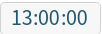
![ResourceFunction["PauseUntil"][time]
Do[
AppendTo[sundata, TimeObject[] -> SunPosition[]];
ResourceFunction["PauseUntil"][time, "Periodicity" -> {15, "Minute"}], 4];
sundata = Append[sundata, TimeObject[] -> SunPosition[]] // Association](https://www.wolframcloud.com/obj/resourcesystem/images/372/3725462b-18f4-4b01-ba22-c24d145a67c9/39ed12f10d8bae0a.png)

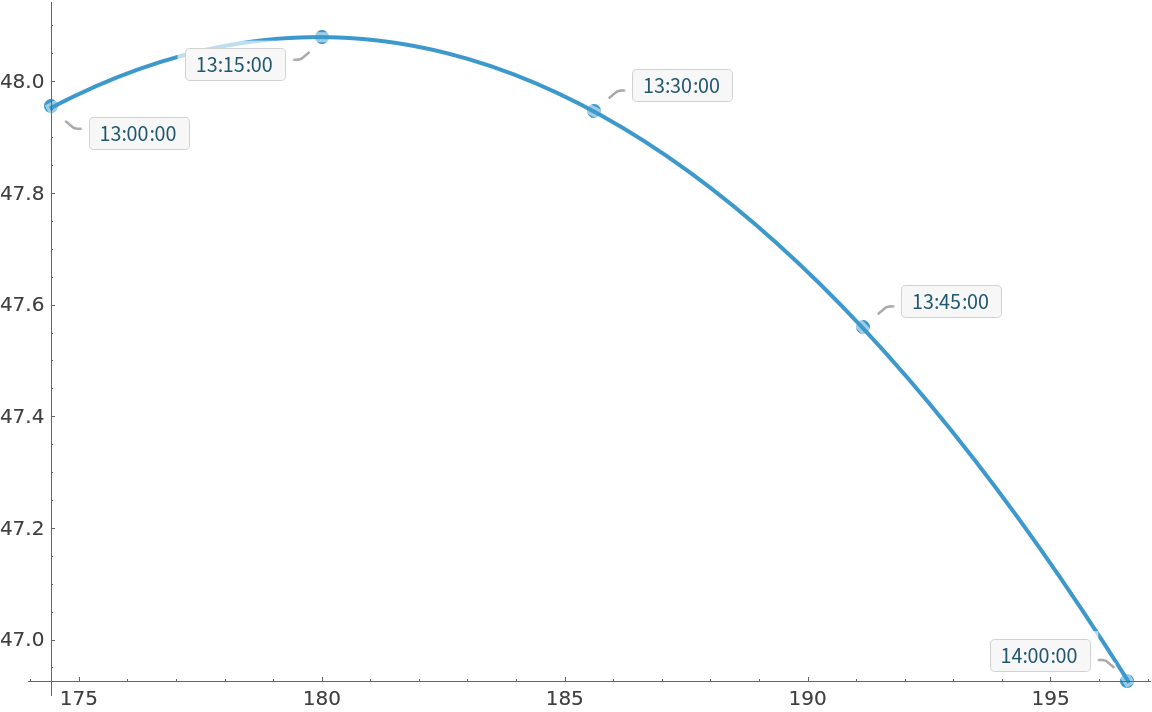
![ListPlot[sundata, PlotFit -> "Quadratic", PlotStyle -> PointSize[Large], ImageSize -> Large]](https://www.wolframcloud.com/obj/resourcesystem/images/372/3725462b-18f4-4b01-ba22-c24d145a67c9/4b955d252b234ec8.png)
![timeforward = TimeObject[{12, 20}]](https://www.wolframcloud.com/obj/resourcesystem/images/372/3725462b-18f4-4b01-ba22-c24d145a67c9/1a9d13903e849f80.png)

![pauseforward = QuantityMagnitude@DateDifference[Now, timeforward, "Seconds"]](https://www.wolframcloud.com/obj/resourcesystem/images/372/3725462b-18f4-4b01-ba22-c24d145a67c9/40a0a1b3de19ff27.png)

![Pause[pauseforward]](https://www.wolframcloud.com/obj/resourcesystem/images/372/3725462b-18f4-4b01-ba22-c24d145a67c9/5bc78947c29316fb.png)
![DateString[]](https://www.wolframcloud.com/obj/resourcesystem/images/372/3725462b-18f4-4b01-ba22-c24d145a67c9/73fe6eb1578f751b.png)

![timebackword = TimeObject[{12, 10}]](https://www.wolframcloud.com/obj/resourcesystem/images/372/3725462b-18f4-4b01-ba22-c24d145a67c9/073b5d9428c8af4b.png)

![pausebackword = 86400 - QuantityMagnitude@
DateDifference[timebackword, Now, "Seconds"]](https://www.wolframcloud.com/obj/resourcesystem/images/372/3725462b-18f4-4b01-ba22-c24d145a67c9/4e5fe888b16361be.png)

![DatePlus[Now, {pausebackword, "Second"}]](https://www.wolframcloud.com/obj/resourcesystem/images/372/3725462b-18f4-4b01-ba22-c24d145a67c9/67ffe4700657a46e.png)

![ResourceFunction["PauseUntil"]["19:11", TimeZone -> "Asia/Tokyo", "PauseInformation" -> True]](https://www.wolframcloud.com/obj/resourcesystem/images/372/3725462b-18f4-4b01-ba22-c24d145a67c9/2c86e59b6da46018.png)


![ResourceFunction["PauseUntil"]["19:11 JST", "PauseInformation" -> True]](https://www.wolframcloud.com/obj/resourcesystem/images/372/3725462b-18f4-4b01-ba22-c24d145a67c9/00a552f6fdf503bc.png)

![DateString[TimeZone -> "Asia/Tokyo"]](https://www.wolframcloud.com/obj/resourcesystem/images/372/3725462b-18f4-4b01-ba22-c24d145a67c9/73f05e3723c1b758.png)

![ResourceFunction["PauseUntil"]["tomorrow night"]](https://www.wolframcloud.com/obj/resourcesystem/images/372/3725462b-18f4-4b01-ba22-c24d145a67c9/436427d7752a5e40.png)

![ResourceFunction["PauseUntil"][Yesterday]](https://www.wolframcloud.com/obj/resourcesystem/images/372/3725462b-18f4-4b01-ba22-c24d145a67c9/3133dde0bee27c5e.png)

![dateobj = DatePlus[Now, {0.03, "Second"}];](https://www.wolframcloud.com/obj/resourcesystem/images/372/3725462b-18f4-4b01-ba22-c24d145a67c9/7913a6d8d9409c72.png)
![ResourceFunction["PauseUntil"][dateobj]](https://www.wolframcloud.com/obj/resourcesystem/images/372/3725462b-18f4-4b01-ba22-c24d145a67c9/63829e23935ddfaf.png)

![ResourceFunction["PauseUntil"][TimeObject[{7, 30}], TimeZone -> "America/Los_Angeles"]](https://www.wolframcloud.com/obj/resourcesystem/images/372/3725462b-18f4-4b01-ba22-c24d145a67c9/39c16d966288fa64.png)
![DateString[TimeZone -> "America/Los_Angeles"]](https://www.wolframcloud.com/obj/resourcesystem/images/372/3725462b-18f4-4b01-ba22-c24d145a67c9/32bfb4d9c5e32e30.png)
