Function Repository Resource:

 PairwiseCompare

Source Notebook

Predict outcomes of comparisons based on pairwise comparison data

Contributed by: Jon McLoone

ResourceFunction["PairwiseCompare"][data,property]

returns the computed comparison model property for data.

ResourceFunction["PairwiseCompare"][data,property,items]

returns the computed comparison model property only for items within data.

ResourceFunction["PairwiseCompare"][data,property,items,n]

returns the n computed comparison model properties for items within data.

Details

items should be a list of values present in the data or All
Available properties are:
"EstimatedUtilities"generate an association of the relative utiltiy values of each of the unique items in the data
"Probabilities"generate the Win, Lose and Draw probabilities for each pairings of itmes
"WinProbabilities"generate the Win probabilities for each pairing of items
"SimulatedOutcome"generate random Win, Lose or Draw outcomes for random pairings of items
"NextSelection"choose pairings of items that should be compared to improve model estimates
"NextSelectionUnique"choose pairings of items that should be compared, without using the same item twice
PairwiseCompare attempts to fit a Bradley-Terry probability model for utility values from pairwise comparisons between items.
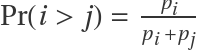
The Bradley-Terry probability model is where Pr is the probability that item i will be "scored" higher or is "preferred" or "beats" item j in some comparison or competition given that i and j have utility values (e.g. "ability" or "strength") pi and pj.
The following options are supported:
"DefaultPriorUncertainty"1the default strength of any provided "UtilityPriors"
"DrawMethod"Automaticthe algorithm to use for data that contains draws
"SelectionCriterion""Utilities"whether to prioritize reducing uncertainty in utilities or ranking when selecting future experiments
"UtilityPriors"Nonepre-existing beliefs about the utility values before actual data is considered
ConfidenceLevelNonetarget confidence level to use for when expressing uncertainty in utility values

Examples

Basic Examples (9) 

In a series of competitions item Alice beat Bob twice and lost once. Alice's estimated utility (or "skill") is 1.4, while Bob's is 0.7:

In[1]:=
ResourceFunction[
 "PairwiseCompare"][{{"alice", "bob"}, {"alice", "bob"}, {"bob", "alice"}}]
Out[1]=

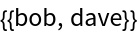
In a three way competition where Alice beat Bob twice, Bob beat Charlie, and Charlie beat Alice, Alice is more likely to win a rematch with Charlie:

In[2]:=
data = {{"alice", "bob"}, {"alice", "bob"}, {"bob", "charlie"}, {"charlie", "alice"}}; ResourceFunction[
 "PairwiseCompare"][data, "Probabilities", {"alice", "charlie"}]
Out[2]=

If you are only interested in the probability of a winning use WinProbabiliites:

In[3]:=
ResourceFunction[
 "PairwiseCompare"][data, "WinProbabilities", {"alice", "charlie"}]
Out[3]=

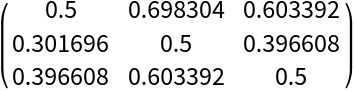
The full table outcome probabilities is:

In[4]:=
ResourceFunction["PairwiseCompare"][data, "WinProbabilities", All] // MatrixForm
Out[4]=

We can find the winner of 10 simulated competitions between item Alice and Bob:

In[5]:=
ResourceFunction[
 "PairwiseCompare"][data, "SimulatedOutcome", {"alice", "bob"}, 10]
Out[5]=

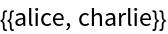
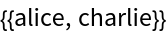
If we can choose future experiments after we have collected some data, we can use NextSelection to optimize our choice of experiment to maximally improve our estimates:

In[6]:=
data2 = {{"alice", "bob"}, {"alice", "bob"}, {"alice", "carol"}, {"carol", "dave"}, {"dave", "erin"}, {"erin", "frank"}};
ResourceFunction["PairwiseCompare"][data2, "NextSelection"]
Out[7]=

We can find a list of the most powerful experiments, sorted with the most useful first:

In[8]:=
ResourceFunction["PairwiseCompare"][data2, "NextSelection", All, 2]
Out[8]=

If it is not possible to use the same item in simultaneous tests (e.g. matches must be held at the same time and players can only compete in one at a time) then use NextSelectionUnique:

In[9]:=
ResourceFunction["PairwiseCompare"][data2, "NextSelectionUnique", All,
  2]
Out[9]=

You can find all pairings that maximally improve our knowledge (if there are an odd number of items then one will always be unpaired):

In[10]:=
ResourceFunction[
 "PairwiseCompare"][data2, "NextSelectionUnique", All, All]
Out[10]=

Scope (6) 

Data (4) 

Data can be provided as pairs where the first element of the pair is taken to be the winner of competition:

In[11]:=
data = {{"alice", "bob"}, {"alice", "bob"}, {"alice", "charlie"}, {"dan", "alice"}, {"bob", "charlie"}, {"charlie", "dan"}, {"dan", "bob"}};
ResourceFunction["PairwiseCompare"][data]
Out[12]=

The data can also explicitly declare whether the first item won or lost or draw using a third argument:

In[13]:=
data = {{"alice", "bob", "Win"}, {"alice", "bob", "Win"}, {"alice", "charlie", "Win"}, {"dan", "alice", "Win"}, {"bob", "charlie", "Win"}, {"charlie", "dan", "Win"}, {"dan", "bob", "Win"}};
ResourceFunction["PairwiseCompare"][data]
Out[14]=

"Win","Greater" or True can be used to indicate that the first item has greater utility. "Lose", "Less" or False to indicate the opposite. "Draw", "Equal" or Indeterminate to indicate that the comparison was not resolved:

In[15]:=
data = {{"alice", "bob", "Win"}, {"alice", "bob", "Greater"}, {"alice",
     "charlie", True},
   {"alice", "dan", "Lose"}, {"charlie", "bob", "Less"}, {"dan", "charlie", False}, {"dan", "bob", "Win"}};
ResourceFunction["PairwiseCompare"][data]
Out[16]=

The third argument can also specify the value of item that won:

In[17]:=
data = {{"alice", "bob", "alice"}, {"alice", "bob", "alice"}, {"alice",
     "charlie", "alice"}, {"dan", "alice", "dan"}, {"bob", "charlie", "bob"}, {"charlie", "dan", "charlie"}, {"dan", "bob", "dan"}};
ResourceFunction["PairwiseCompare"][data]
Out[18]=

Draws (2) 

By default it is assumed that draws are not possible but if any data includes draws, additional information is returned with the utilities:

In[19]:=
data = {{"alice", "bob", "Draw"}, {"alice", "bob", "Greater"}, {"alice", "charlie", True},
   {"alice", "dan", "Lose"}, {"charlie", "bob", "Less"}, {"dan", "charlie", False}, {"dan", "bob", "Win"}};
ResourceFunction["PairwiseCompare"][data]
Out[20]=

The possibility of draws affects all probabilities and simulations:

In[21]:=
Counts[ResourceFunction["PairwiseCompare"][data, "SimulatedOutcome", {"alice", "charlie"}, 100]]
Out[21]=

Options (16) 

ConfidenceLevel (3) 

By default, PairwiseCompare does not attempt to quantify uncertainty:

In[22]:=
data = {{"alice", "bob"}, {"alice", "bob"}, {"alice", "charlie"}, {"dan", "alice"}, {"bob", "charlie"}, {"charlie", "dan"}, {"dan", "bob"}};
ResourceFunction["PairwiseCompare"][data]
Out[23]=

But if you set ConfidenceLevel, it will express uncertainty with Around. For example, here are the intervals that are 95% likely to hold the true value:

In[24]:=
ResourceFunction["PairwiseCompare"][data, ConfidenceLevel -> 0.95]
Out[24]=

If we demand greater confidence, the intervals will become wider:

In[25]:=
ResourceFunction["PairwiseCompare"][data, ConfidenceLevel -> 0.99]
Out[25]=

DrawMethod (3) 

If the data contains draws then PairwiseCompare will use the Davidson extension to the Bradley-Terry model:

In[26]:=
data3 = {{"alice", "bob", "Draw"}, {"alice", "bob", "Win"}, {"alice", "charlie", "Win"}, {"dan", "alice", "Win"}, {"bob", "charlie", "Win"}, {"charlie", "dan", "Win"}, {"dan", "bob", "Win"}};
ResourceFunction[
 "PairwiseCompare"][data3, "Probabilities", {"alice", "bob"}, "DrawMethod" -> "Davidson"]
Out[27]=

The Rao-Kupper extension to Bradley-Terry is more appropriate if draws almost only happen between two very closely matched opponents:

In[28]:=
ResourceFunction[
 "PairwiseCompare"][data3, "Probabilities", {"alice", "bob"}, "DrawMethod" -> "RaoKupper"]
Out[28]=

With "DrawMethod"→None, draws are discarded from the data before it is considered:

In[29]:=
ResourceFunction[
 "PairwiseCompare"][data3, "Probabilities", {"alice", "bob"}, "DrawMethod" -> None]
Out[29]=

UtilityPriors (5) 

In some cases, especially with limited data, unrealistic values may be returned:

In[30]:=
data4 = {{"alice", "bob"}, {"alice", "bob"}, {"alice", "charlie"}};
ResourceFunction["PairwiseCompare"][data4]
Out[31]=

Set "UtilityPriors" to provide initial assumptions:

In[32]:=
ResourceFunction["PairwiseCompare"][data4, "UtilityPriors" -> <|"alice" -> 3, "bob" -> 1, "charlie" -> 1|>]
Out[32]=

Omitted utility priors are assumed to be 1:

In[33]:=
ResourceFunction["PairwiseCompare"][data4, "UtilityPriors" -> <|"alice" -> 3|>]
Out[33]=

You can use utility priors to include items which do not appear in the data:

In[34]:=
ResourceFunction["PairwiseCompare"][{{"alice", "bob"}}, "UtilityPriors" -> <|"charlie" -> 1|>]
Out[34]=

Since there is no data on Charlie, he gets selected for the next experiment:

In[35]:=
ResourceFunction[
 "PairwiseCompare"][{{"alice", "bob"}}, "NextSelection", "UtilityPriors" -> <|"charlie" -> 1|>]
Out[35]=

DefaultPriorUncertainty (3) 

The strength of "UtilityPriors" can controlled globally with "DefaultPriorUncertainty"; a large value indicates weak priors:

In[36]:=
data5 = {{"alice", "bob"}, {"alice", "bob"}, {"alice", "charlie"}};
ResourceFunction["PairwiseCompare"][data5, "UtilityPriors" -> <||>, "DefaultPriorUncertainty" -> 100]
Out[22]=

A small value indicates strong priors that will take more evidence to update significantly:

In[37]:=
ResourceFunction["PairwiseCompare"][data5, "UtilityPriors" -> <||>, "DefaultPriorUncertainty" -> 0.1]
Out[37]=

The strength of "UtilityPriors" can be individually controlled using Around. For weak priors set the uncertainty to be large:

In[38]:=
ResourceFunction["PairwiseCompare"][data5, "UtilityPriors" -> <|"alice" -> Around[3, 30], "bob" -> Around[2, 3],
    "charlie" -> Around[1, 0.1]|>]
Out[38]=

SelectionCriterion (2) 

By default "SelectionCriterion"→"Utilities" directs "NextSelection" or "NextSelectionUnique" to minimize the total uncertainty in the utility values; in this example the utility for Charlie is very poorly known and so it is selected for improvement:

In[39]:=
priors = <|"alice" -> Around[1., 0.05], "bob" -> Around[1.1, 0.05], "charlie" -> Around[0.01, {0.006, 0.02}]|>;
ResourceFunction["PairwiseCompare"][{}, "NextSelection", "UtilityPriors" -> priors, "SelectionCriterion" -> "Utilities"]
Out[40]=

However, Charlie's utility of 0.01 puts him clearly last compared to Alice and Bob so learning more about Charlie is unlikely to change the order of the players. If we are more interested improving our prediction of their order, than their utilities, then we would be better to set Alice against Bob as they are so closely matched that extra information might change their ranking:

In[41]:=
priors = <|"alice" -> Around[1., 0.05], "bob" -> Around[1.1, 0.05], "charlie" -> Around[0.01, {0.006, 0.02}]|>;
ResourceFunction["PairwiseCompare"][{}, "NextSelection", "UtilityPriors" -> priors, "SelectionCriterion" -> "Ranking"]
Out[42]=

Applications (3) 

We can use the 2026 UK Premier League football results to predict the outcome of the 2026 UK FA Cup final:

In[43]:=
(* Evaluate this cell to get the example input *) CloudGet["https://www.wolframcloud.com/obj/f2a0bd60-cc6f-4def-8136-97a2d239050a"]
Out[43]=

During the Premier League season, Arsenal proved themselves most capable:

In[44]:=
ResourceFunction["PairwiseCompare"][UKPremierLeagueFootball2026]
Out[44]=

However, Arsenal were knocked out in the quarter finals of the FA Cup and the final was between Manchester City and Chelsea. The data gives the following prediction at full time (before penalties would have decided in the case of a draw):

In[45]:=
ResourceFunction[
 "PairwiseCompare"][UKPremierLeagueFootball2026, "Probabilities", {"Manchester City", "Chelsea"}]
Out[45]=

In reality, Manchester City won 1-0 at full time.

Properties and Relations (1) 

"DefaultPriorUncertainty" uses a different metric than the Around based uncertainty in "UtilityPriors". "DefaultPriorUncertainty" represent log-scale standard deviations, while Around uses the possible interval. In general "UtilityPriors"→<|"a"→m|> together with "DefaultPriorUncertainty"→u results in "UtilityPriors"→<| "a" → Around[m, {m - m E-u, m Eu - m}] |>. Symmetric Around intervals are adjusted to intervals that are symmetric on a log scale:
In[46]:=
priors = <|"alice" -> Around[1., 0.05], "bob" -> 1|>;
ResourceFunction["PairwiseCompare"][{}, "EstimatedUtilities", "UtilityPriors" -> <|"alice" -> Around[1., 0.5], "bob" -> 1|>, "DefaultPriorUncertainty" -> 2, ConfidenceLevel -> 0.95]
Out[6]=

Publisher

Jon McLoone

Version History

  • 1.0.0 – 30 September 2026

Source Metadata

Related Resources

License Information