Options (16)
Method (2)
Use the default Method→"EulerSum" when expr is not analytic in the neighborhood of x0:
Check:
An incorrect answer is obtained with Method→NIntegrate:
Here is a derivative where the default method works poorly:
The correct answer is:
In this case the expression is analytic, so Method→NIntegrate will work well:
Scale (3)
Use Scale→s to capture the region of variation:
The scale of variation is around .01:
A value of Scale→s that is too large can be compensated by increasing the number of terms:
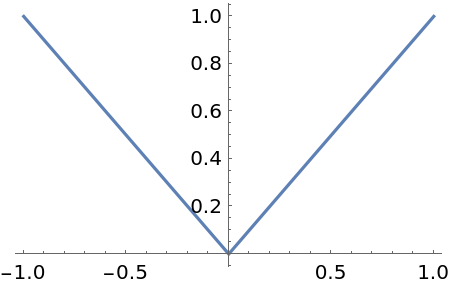
Use Scale to specify directional derivatives. The left and right derivatives of the nonanalytic function |x|:
Check:
Complex directions may also be specified:
Check:
Use the option Scale to avoid regions of nonanalyticity when the method used is NIntegrate:
Shrinking the radius avoids the essential singularity at x⩵1:
Check:
Terms (5)
Increasing the number of terms may improve accuracy. Here is a somewhat inaccurate approximation:
Check:
Increasing the number of terms produces a more accurate answer:
Increasing the number of terms further can produce nonsense due to numerical instability:
Combining an increase in the number of terms with a higher working precision often will reduce the error:
WorkingPrecision (6)
High-order derivatives with Method→"EulerSum" experience significant subtractive cancellation:
Using a higher working precision and additional terms produces an accurate answer:
For this problem, Method→NIntegrate with default options produces a correct answer:
Higher-order derivatives will again experience numerical instability:
Increasing WorkingPrecision will improve the accuracy:
An alternative is to increase the radius of the contour of integration:
Applications (4)
NDerivative is useful for differentiating functions that are only defined numerically. Here is such a function:
Here is the derivative of f[a,b][t] with respect to b evaluated at {a,b,t}={1,2,1}:
NDerivative can be used as an aid in developing and testing a more robust function for finding the derivative:
Check:
Properties & Relations (3)
The option Method→NIntegrate uses Cauchy's integral formula to compute derivatives:
The equivalent computation can be performed using the resource function NResidue:
The Wolfram Language has built-in code to compute derivatives of numerical functions:
The built-in numerical derivative code can be used. However, it is unable to capture the rapid oscillations:
The correct answer:
Using NDerivative with the appropriate options can compute an accurate derivative:
With Method→"EulerSum", NDerivative must be able to evaluate expr at the point x0:
Adding an additional definition for f allows NDerivative to compute the derivative:
Check:
In this case, Method→NIntegrate produces a more accurate answer:
![ResourceFunction["NDerivative"][Exp[x], x, 1]](https://www.wolframcloud.com/obj/resourcesystem/images/66c/66c84429-c3c7-4981-8ad7-8ce74e625558/7ecc4bab987f48af.png)

![ResourceFunction["NDerivative"][Cos[x]^3, {x, 2}, 0]](https://www.wolframcloud.com/obj/resourcesystem/images/66c/66c84429-c3c7-4981-8ad7-8ce74e625558/1a9947fda2379183.png)

![ResourceFunction["NDerivative"][Sin[x], x, \[Pi] I]](https://www.wolframcloud.com/obj/resourcesystem/images/66c/66c84429-c3c7-4981-8ad7-8ce74e625558/7b98e2bf3ecc0d55.png)

![ResourceFunction["NDerivative"][Cos[I x], x, 1 + I]](https://www.wolframcloud.com/obj/resourcesystem/images/66c/66c84429-c3c7-4981-8ad7-8ce74e625558/7504b97be7adb3cd.png)

![ResourceFunction["NDerivative"][{Exp[x], Sin[x]}, x, 1]](https://www.wolframcloud.com/obj/resourcesystem/images/66c/66c84429-c3c7-4981-8ad7-8ce74e625558/7f27829d2cbf5f3b.png)

![ResourceFunction["NDerivative"][Re[Cos[I y]], y, 1]](https://www.wolframcloud.com/obj/resourcesystem/images/66c/66c84429-c3c7-4981-8ad7-8ce74e625558/1983cbf953d4f586.png)

![D[ComplexExpand[Re[Cos[I y]]], y] /. y -> 1 // N](https://www.wolframcloud.com/obj/resourcesystem/images/66c/66c84429-c3c7-4981-8ad7-8ce74e625558/560e3f79afc3be41.png)

![ResourceFunction["NDerivative"][Re[Cos[I y]], y, 1, Method -> NIntegrate]](https://www.wolframcloud.com/obj/resourcesystem/images/66c/66c84429-c3c7-4981-8ad7-8ce74e625558/749d85997bb9870d.png)

![ResourceFunction["NDerivative"][Exp[x^2], {x, 3}, 1]](https://www.wolframcloud.com/obj/resourcesystem/images/66c/66c84429-c3c7-4981-8ad7-8ce74e625558/7c7c4755ccb2640c.png)

![D[Exp[x^2], {x, 3}] /. x -> 1.](https://www.wolframcloud.com/obj/resourcesystem/images/66c/66c84429-c3c7-4981-8ad7-8ce74e625558/0af68770e55a9caa.png)

![ResourceFunction["NDerivative"][Exp[x^2], {x, 3}, 1, Method -> NIntegrate]](https://www.wolframcloud.com/obj/resourcesystem/images/66c/66c84429-c3c7-4981-8ad7-8ce74e625558/54949653087d3f76.png)

![ResourceFunction["NDerivative"][Sin[100 x], x, 0]](https://www.wolframcloud.com/obj/resourcesystem/images/66c/66c84429-c3c7-4981-8ad7-8ce74e625558/764a9b098403a805.png)

![ResourceFunction["NDerivative"][Sin[100 x], x, 0, "Scale" -> .01]](https://www.wolframcloud.com/obj/resourcesystem/images/66c/66c84429-c3c7-4981-8ad7-8ce74e625558/213f942a07cf6584.png)

![ResourceFunction["NDerivative"][Sin[100 x], x, 0, "Terms" -> 11]](https://www.wolframcloud.com/obj/resourcesystem/images/66c/66c84429-c3c7-4981-8ad7-8ce74e625558/1a5467d0fa8c2bbe.png)

![ResourceFunction["NDerivative"][Abs[x], {x, 1}, 0]](https://www.wolframcloud.com/obj/resourcesystem/images/66c/66c84429-c3c7-4981-8ad7-8ce74e625558/189194909b8cc696.png)

![ResourceFunction["NDerivative"][Abs[x], {x, 1}, 0, "Scale" -> -1]](https://www.wolframcloud.com/obj/resourcesystem/images/66c/66c84429-c3c7-4981-8ad7-8ce74e625558/2d374052a76745cc.png)

![Plot[Abs[x], {x, -1, 1}]](https://www.wolframcloud.com/obj/resourcesystem/images/66c/66c84429-c3c7-4981-8ad7-8ce74e625558/02404eb4cdfaa099.png)
![ResourceFunction["NDerivative"][Abs[x], {x, 1}, 0, "Scale" -> 1 + I]](https://www.wolframcloud.com/obj/resourcesystem/images/66c/66c84429-c3c7-4981-8ad7-8ce74e625558/66fcbee67e0f9a43.png)

![Limit[(Abs[(1 + I) h] - Abs[0])/((1 + I) h), h -> 0, Direction -> -1] // N](https://www.wolframcloud.com/obj/resourcesystem/images/66c/66c84429-c3c7-4981-8ad7-8ce74e625558/570043bdabfcbca8.png)

![ResourceFunction["NDerivative"][Exp[1/(1 - x)], x, .5, Method -> NIntegrate]](https://www.wolframcloud.com/obj/resourcesystem/images/66c/66c84429-c3c7-4981-8ad7-8ce74e625558/546128b79078d99e.png)

![ResourceFunction["NDerivative"][Exp[1/(1 - x)], x, .5, Method -> NIntegrate, Scale -> .1]](https://www.wolframcloud.com/obj/resourcesystem/images/66c/66c84429-c3c7-4981-8ad7-8ce74e625558/40b7b72b21c1b8c8.png)

![D[Exp[1/(1 - x)], x] /. x -> .5](https://www.wolframcloud.com/obj/resourcesystem/images/66c/66c84429-c3c7-4981-8ad7-8ce74e625558/47f20b3c5f0c90c0.png)

![ResourceFunction["NDerivative"][Sin[x^2], {x, 3}, 1]](https://www.wolframcloud.com/obj/resourcesystem/images/66c/66c84429-c3c7-4981-8ad7-8ce74e625558/73c5e4d804ab9477.png)

![D[Sin[x^2], {x, 3}] /. x -> 1`30](https://www.wolframcloud.com/obj/resourcesystem/images/66c/66c84429-c3c7-4981-8ad7-8ce74e625558/1fd4ac95dd9b93fa.png)

![ResourceFunction["NDerivative"][Sin[x^2], {x, 3}, 1, "Terms" -> 10] // FullForm](https://www.wolframcloud.com/obj/resourcesystem/images/66c/66c84429-c3c7-4981-8ad7-8ce74e625558/649c5b0afb5ece06.png)

![ResourceFunction["NDerivative"][Sin[x^2], {x, 3}, 1, "Terms" -> 20]](https://www.wolframcloud.com/obj/resourcesystem/images/66c/66c84429-c3c7-4981-8ad7-8ce74e625558/084d992c7d0d7e20.png)

![ResourceFunction["NDerivative"][Sin[x^2], {x, 3}, 1, "Terms" -> 20, WorkingPrecision -> 40]](https://www.wolframcloud.com/obj/resourcesystem/images/66c/66c84429-c3c7-4981-8ad7-8ce74e625558/59a3fb7492494a38.png)

![ResourceFunction["NDerivative"][Exp[x], {x, 10}, 0]](https://www.wolframcloud.com/obj/resourcesystem/images/66c/66c84429-c3c7-4981-8ad7-8ce74e625558/767bf281e0cac406.png)

![ResourceFunction["NDerivative"][Exp[x], {x, 10}, 0, WorkingPrecision -> 40, "Terms" -> 10]](https://www.wolframcloud.com/obj/resourcesystem/images/66c/66c84429-c3c7-4981-8ad7-8ce74e625558/4187d2bf3212b211.png)

![ResourceFunction["NDerivative"][Exp[x], {x, 10}, 0, Method -> NIntegrate]](https://www.wolframcloud.com/obj/resourcesystem/images/66c/66c84429-c3c7-4981-8ad7-8ce74e625558/420fad8d7bc49ef7.png)

![ResourceFunction["NDerivative"][Exp[x], {x, 20}, 0, Method -> NIntegrate]](https://www.wolframcloud.com/obj/resourcesystem/images/66c/66c84429-c3c7-4981-8ad7-8ce74e625558/5a41af92ef5f9522.png)

![ResourceFunction["NDerivative"][Exp[x], {x, 20}, 0, Method -> NIntegrate, WorkingPrecision -> 30]](https://www.wolframcloud.com/obj/resourcesystem/images/66c/66c84429-c3c7-4981-8ad7-8ce74e625558/2adb596fab310c88.png)

![ResourceFunction["NDerivative"][Exp[x], {x, 20}, 0, Method -> NIntegrate, "Scale" -> 5]](https://www.wolframcloud.com/obj/resourcesystem/images/66c/66c84429-c3c7-4981-8ad7-8ce74e625558/5afa98e3e17e4d45.png)

![f[a_?NumericQ, b_?NumericQ] := f[a, b] = Module[{t}, y /. NDSolve[{y'[t] == a - b y[t]^3, y[0] == 1}, y, {t, 0, 1}][[
1]]]](https://www.wolframcloud.com/obj/resourcesystem/images/66c/66c84429-c3c7-4981-8ad7-8ce74e625558/21c751dedb35e024.png)
![ResourceFunction["NDerivative"][f[1, b][1], {b, 1}, 2]](https://www.wolframcloud.com/obj/resourcesystem/images/66c/66c84429-c3c7-4981-8ad7-8ce74e625558/04028a0fd36dabc7.png)

![fb[a_?NumericQ, b_?NumericQ] := fb[a, b] = Module[{t}, yb /. NDSolve[{y'[t] == a - b y[t]^3, yb'[t] == -y[t]^3 - 3 b y[t]^2 yb[t], y[0] == 1, yb[0] == 0}, {y, yb}, {t, 0, 1}][[1]]]](https://www.wolframcloud.com/obj/resourcesystem/images/66c/66c84429-c3c7-4981-8ad7-8ce74e625558/7eaa69aa69e938c7.png)
![fb[1, 2][1]](https://www.wolframcloud.com/obj/resourcesystem/images/66c/66c84429-c3c7-4981-8ad7-8ce74e625558/5c58f2831bb8e759.png)

![ResourceFunction["NDerivative"][Exp[x^2], {x, 4}, 0, Method -> NIntegrate]](https://www.wolframcloud.com/obj/resourcesystem/images/66c/66c84429-c3c7-4981-8ad7-8ce74e625558/6ac0174e37a0234f.png)

![4! ResourceFunction["NResidue"][Exp[x^2]/x^(4 + 1), {x, 0}]](https://www.wolframcloud.com/obj/resourcesystem/images/66c/66c84429-c3c7-4981-8ad7-8ce74e625558/7bed7925aa87c061.png)

![f[t_?NumericQ] := 0.001 + 0.002 Sin[50 t]](https://www.wolframcloud.com/obj/resourcesystem/images/66c/66c84429-c3c7-4981-8ad7-8ce74e625558/2c9652ad0a4a548b.png)
![f'[.1]](https://www.wolframcloud.com/obj/resourcesystem/images/66c/66c84429-c3c7-4981-8ad7-8ce74e625558/529ea96c8a7bddfe.png)

![D[.001 + .002 Sin[50 t], t] /. t -> .1](https://www.wolframcloud.com/obj/resourcesystem/images/66c/66c84429-c3c7-4981-8ad7-8ce74e625558/5072da1b753bef8a.png)

![ResourceFunction["NDerivative"][f[t], t, .1, Scale -> .1]](https://www.wolframcloud.com/obj/resourcesystem/images/66c/66c84429-c3c7-4981-8ad7-8ce74e625558/7b8da6e42a165fd6.png)

![ResourceFunction["NDerivative"][f[t], t, .1, Method -> NIntegrate, Scale -> 1/2]](https://www.wolframcloud.com/obj/resourcesystem/images/66c/66c84429-c3c7-4981-8ad7-8ce74e625558/24c30f3867f38dd2.png)

![f[x_?NumericQ] := Tanh[\[Pi] x]/(1 + x^2)](https://www.wolframcloud.com/obj/resourcesystem/images/66c/66c84429-c3c7-4981-8ad7-8ce74e625558/03ccd2434a853dd0.png)
![ResourceFunction["NDerivative"][f[x], x, I]](https://www.wolframcloud.com/obj/resourcesystem/images/66c/66c84429-c3c7-4981-8ad7-8ce74e625558/1576b011e96816c2.png)

![f[I // N] = Limit[Tanh[\[Pi] x]/(1 + x^2), x -> I]](https://www.wolframcloud.com/obj/resourcesystem/images/66c/66c84429-c3c7-4981-8ad7-8ce74e625558/15d8ef71d01b765e.png)

![ResourceFunction["NDerivative"][f[x], x, I]](https://www.wolframcloud.com/obj/resourcesystem/images/66c/66c84429-c3c7-4981-8ad7-8ce74e625558/23908992de2c5402.png)

![Limit[D[Tanh[\[Pi] x]/(1 + x^2), x], x -> I] // N](https://www.wolframcloud.com/obj/resourcesystem/images/66c/66c84429-c3c7-4981-8ad7-8ce74e625558/0de8783546d6a60e.png)

![ResourceFunction["NDerivative"][f[x], x, I, Method -> NIntegrate, Scale -> 1/10]](https://www.wolframcloud.com/obj/resourcesystem/images/66c/66c84429-c3c7-4981-8ad7-8ce74e625558/3936843cdca8672a.png)

![ResourceFunction["NDerivative"][x, {x, -(1/2)}, 1, Method -> NIntegrate]](https://www.wolframcloud.com/obj/resourcesystem/images/66c/66c84429-c3c7-4981-8ad7-8ce74e625558/75d8cd073da30ead.png)

![ResourceFunction["NDerivative"][x^4, {x, I}, 1, Method -> NIntegrate]](https://www.wolframcloud.com/obj/resourcesystem/images/66c/66c84429-c3c7-4981-8ad7-8ce74e625558/1bc47a9b002f5225.png)






