Basic Examples (3)
Augment a matrix on the right with a list, one entry per row:
Display in matrix form to see the block structure:
Augment with a constant scalar:
Scope (3)
Use the operator form for pipeline composition:
MatrixAugmentRight works with non-numeric matrices:
The operator form composes naturally with itself, allowing successive augmentations within functional pipelines:
Applications (5)
Solving Linear Systems (1)
Use MatrixAugmentRight in operator form to construct the augmented matrix A|b, then apply RowReduce:
The unique solution x=(-1,3/2) is obtained from the last column of the reduced row echelon form.
Design Matrix with Intercept (1)
Use MatrixAugmentRight to construct homogeneous coordinates for affine transformations. Given a list of points {p1,…,pn} in ℝd, the embedding into projective coordinates ℝd+1 is a right augmentation with the constant scalar 1:
This is the canonical preprocessing step for the design matrix in least-squares regression with intercept. Each data row {xi,yi} is augmented with a constant 1 so that the intercept term is absorbed into the matrix–vector product X β.
Vandermonde-Like Matrices (1)
Use MatrixAugmentRight to construct Vandermonde-like matrices. Starting from a column of ones, each successive power of the abscissa vector is appended via the operator form combined with Fold:
This constructs a Vandermonde-like matrix by successive right-augmentation, appending increasing powers of the abscissa vector.
Matrix Bordering (1)
Use MatrixAugmentRight to construct matrices by successive right-augmentation of column blocks:
Each iteration appends a new column, illustrating matrix construction as an incremental bordering process.
Boundary Extension via Augmentation (1)
Use MatrixAugmentRight to extend a matrix by replicating its boundary values via right augmentation:
This appends the last column to the matrix, illustrating how augmentation can be used to construct simple boundary extensions.
Properties and Relations (5)
MatrixAugmentRight is equivalent to a block construction using ArrayFlatten with a threaded column vector:
MatrixAugmentRight is equivalent to a construction via outer transposition using Transpose and Append:
MatrixAugmentRight is equivalent to a row-wise construction using MapThread with Append:
MatrixAugmentRight can also be expressed using Join along the second level after promoting the vector to a one-column matrix:
ResourceFunction["AppendColumn"] can also be used for this task:
Unlike AppendColumn, MatrixAugmentRight also provides an operator form suited for compositional workflows.
Possible Issues (1)
A length mismatch between the matrix and the vector generates a dimension error:
Neat Examples (4)
Solve a parametric family of linear systems via augmentation and row reduction:
For each parameter value, the system is augmented and reduced, and the solution is read from the last column of the reduced row echelon form.
Append row indices to a dataset and sort by a column while retaining original row positions:
This attaches a unique index to each row, allowing sorting operations while retaining a reference to the original ordering.
Construct a Cayley table by augmenting a group multiplication table with its row labels:
This constructs the Cayley table of a finite group and appends the corresponding group elements as row labels using right-augmentation.
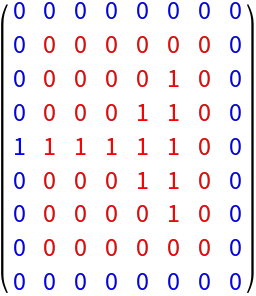
Use MatrixAugmentRight together with rotations to construct boundary extensions of a matrix. Each side is obtained by directional augmentation, enabling consistent neighborhood structure without explicit padding functions:
This constructs a boundary-extended matrix by applying directional augmentations. Each boundary is generated by rotating the matrix and reusing right-augmentation, yielding a full extension that preserves local structure.
![ResourceFunction["MatrixAugmentRight"][{{1, 2}, {3, 4}}, {2, 3}]](https://www.wolframcloud.com/obj/resourcesystem/images/131/13119da2-d613-4396-bf12-ac5980db9693/6d04a0bfe13cba4d.png)

![ResourceFunction[
"MatrixAugmentRight"][{{1, 1, 1}, {2, 2, 2}, {3, 3, 3}}, {2, 4, 6}] // MatrixForm](https://www.wolframcloud.com/obj/resourcesystem/images/131/13119da2-d613-4396-bf12-ac5980db9693/6547a60a3e98bccd.png)

![ResourceFunction[
"MatrixAugmentRight"][{{1, 1, 1}, {2, 2, 2}, {3, 3, 3}}, \[Pi]] // MatrixForm](https://www.wolframcloud.com/obj/resourcesystem/images/131/13119da2-d613-4396-bf12-ac5980db9693/384d663ae3f70035.png)

![RandomReal[1, {3, 4}] // ResourceFunction["MatrixAugmentRight"][{1, 2, 3}] // MatrixForm](https://www.wolframcloud.com/obj/resourcesystem/images/131/13119da2-d613-4396-bf12-ac5980db9693/32d628b876be56c2.png)

![ResourceFunction["MatrixAugmentRight"][{{a, b}, {c, d}}, {p, q}]](https://www.wolframcloud.com/obj/resourcesystem/images/131/13119da2-d613-4396-bf12-ac5980db9693/196b204cf60ec744.png)

![MatrixForm[
Composition[
ResourceFunction["MatrixAugmentRight"] @ {100, 200, 300},
ResourceFunction["MatrixAugmentRight"] @ {10, 20, 30}
][IdentityMatrix @ 3]
]](https://www.wolframcloud.com/obj/resourcesystem/images/131/13119da2-d613-4396-bf12-ac5980db9693/4916a7b2d169ae9f.png)

![With[
{
A = {{1, 2}, {3, 4}},
b = {2, 3}
},
MatrixForm @ RowReduce @ ResourceFunction["MatrixAugmentRight"][b][A]
]](https://www.wolframcloud.com/obj/resourcesystem/images/131/13119da2-d613-4396-bf12-ac5980db9693/6b0fc2a53ab75e69.png)

![MatrixForm[
With[
{pts = {{2, 3}, {5, 1}, {4, 7}, {0, 2}}},
ResourceFunction["MatrixAugmentRight"][pts, 1]
]
]](https://www.wolframcloud.com/obj/resourcesystem/images/131/13119da2-d613-4396-bf12-ac5980db9693/2f08330d3e2cda21.png)

![MatrixForm @ With[{
x = {1, 2, 3, 4}},
Fold[
ResourceFunction["MatrixAugmentRight"][#1, #2] &,
ConstantArray[1, {Length@x, 1}],
Table[x^k, {k, 1, 3}]
]
]](https://www.wolframcloud.com/obj/resourcesystem/images/131/13119da2-d613-4396-bf12-ac5980db9693/2888e43f4483d02b.png)

![MatrixForm @ Fold[
ResourceFunction["MatrixAugmentRight"][#1, #2] &,
{{a1, a2}, {a3, a4}},
{{b1, b3}, {b2, b4}}
]](https://www.wolframcloud.com/obj/resourcesystem/images/131/13119da2-d613-4396-bf12-ac5980db9693/39bf773460d57365.png)

![extendRight[m_] := ResourceFunction["MatrixAugmentRight"][m, m[[All, -1]]];](https://www.wolframcloud.com/obj/resourcesystem/images/131/13119da2-d613-4396-bf12-ac5980db9693/3c3c707e41399d23.png)
![MatrixForm @ extendRight[{{1, 2}, {3, 4}}]](https://www.wolframcloud.com/obj/resourcesystem/images/131/13119da2-d613-4396-bf12-ac5980db9693/7990ff06b820d30e.png)

![With[
{
A = {{1, 2}, {3, 4}},
b = {2, 3}
},
SameQ[ResourceFunction["MatrixAugmentRight"][A, b], ArrayFlatten @ {{A, Thread @ {b}}}]
]](https://www.wolframcloud.com/obj/resourcesystem/images/131/13119da2-d613-4396-bf12-ac5980db9693/51daf3374c6d261b.png)

![With[
{
A = {{1, 2}, {3, 4}},
b = {2, 3}
},
SameQ[ResourceFunction["MatrixAugmentRight"][A, b], Transpose[Append[Transpose[A], b]]]
]](https://www.wolframcloud.com/obj/resourcesystem/images/131/13119da2-d613-4396-bf12-ac5980db9693/5e7fdf53da0647ff.png)

![With[
{
A = {{1, 2}, {3, 4}},
b = {2, 3}
},
SameQ[ResourceFunction["MatrixAugmentRight"][A, b], MapThread[Append, {A, b}]]
]](https://www.wolframcloud.com/obj/resourcesystem/images/131/13119da2-d613-4396-bf12-ac5980db9693/394ffa8cf2455b95.png)

![With[
{
A = {{1, 2}, {3, 4}},
b = {2, 3}},
SameQ[
ResourceFunction["MatrixAugmentRight"][A, b],
Join[A, Thread[{b}], 2]
]
]](https://www.wolframcloud.com/obj/resourcesystem/images/131/13119da2-d613-4396-bf12-ac5980db9693/711f7370ff8970ac.png)

![With[
{
A = {{1, 2}, {3, 4}},
b = {2, 3}},
SameQ[
ResourceFunction["MatrixAugmentRight"][A, b],
ResourceFunction["AppendColumn"][A, b]
]
]](https://www.wolframcloud.com/obj/resourcesystem/images/131/13119da2-d613-4396-bf12-ac5980db9693/4d461a08fe9a3496.png)

![ResourceFunction["MatrixAugmentRight"][{{1, 2}, {3, 4}}, {5, 6, 7}]](https://www.wolframcloud.com/obj/resourcesystem/images/131/13119da2-d613-4396-bf12-ac5980db9693/4ab910a37bd87721.png)

![With[{A = {{1, 2}, {3, 4}}},
Table[
Last@Last@
RowReduce@ResourceFunction["MatrixAugmentRight"][{t, 2 t - 1}]@A,
{t, 0, 3}
]
]](https://www.wolframcloud.com/obj/resourcesystem/images/131/13119da2-d613-4396-bf12-ac5980db9693/453a2ee38b944b9e.png)

![MatrixForm[
With[{data = RandomReal[1, {5, 3}]},
SortBy[
ResourceFunction["MatrixAugmentRight"][Range@Length@data]@data, First]
]
]](https://www.wolframcloud.com/obj/resourcesystem/images/131/13119da2-d613-4396-bf12-ac5980db9693/0e1f9956f03d4276.png)

![With[{g = {0, 1, 2, 3}},
MatrixForm[
ResourceFunction["MatrixAugmentRight"][g][
Outer[Function[Mod[# + #2, 4]], g, g]]
]
]](https://www.wolframcloud.com/obj/resourcesystem/images/131/13119da2-d613-4396-bf12-ac5980db9693/7a43fc51582c6178.png)

![extendRight[m_] := ResourceFunction["MatrixAugmentRight"][m, m[[All, -1]]];
extendLeft[m_] := Reverse[extendRight[Reverse[m, 2]], 2];
extendTop[m_] := Transpose@extendRight[Transpose[m]];
extendBottom[m_] := Transpose@Reverse[extendRight[Reverse[Transpose[m], 2]], 2];](https://www.wolframcloud.com/obj/resourcesystem/images/131/13119da2-d613-4396-bf12-ac5980db9693/0f592a752a4c2f46.png)
![MatrixForm @ With[{
orig = {
{0, 0, 0, 0, 0, 0},
{0, 0, 0, 0, 1, 0},
{0, 0, 0, 1, 1, 0},
{1, 1, 1, 1, 1, 0},
{0, 0, 0, 1, 1, 0},
{0, 0, 0, 0, 1, 0},
{0, 0, 0, 0, 0, 0}
}
},
Module[
{
ext = Fold[#2[#1] &, orig, {extendRight, extendLeft, extendTop, extendBottom}],
r, c
},
{r, c} = Dimensions[orig];
MapIndexed[
If[
2 <= #2[[1]] <= r + 1 && 2 <= #2[[2]] <= c + 1
,
Style[#, Red],
Style[#, Blue]
] &,
ext,
{2}
]
]
]](https://www.wolframcloud.com/obj/resourcesystem/images/131/13119da2-d613-4396-bf12-ac5980db9693/5406f9a0e83973ea.png)