Basic Examples (3)
Augment a matrix on the left with a list, one entry per row:
Display in matrix form to see the leading column:
Augment with a constant scalar. The same value is prepended to every row:
Scope (3)
Use the operator form for pipeline composition:
MatrixAugmentLeft works with non-numeric matrices:
The operator form composes naturally with itself, allowing successive left augmentations within functional pipelines:
Applications (4)
Row Labeling and Ordering (1)
Use MatrixAugmentLeft to append row identifiers to a data matrix by left augmentation, enabling recovery of original row positions after reordering:
The operator form provides a direct alternative to transposition-based constructions for row labeling.
Time-Stamped Trajectories (1)
Use MatrixAugmentLeft to construct a time-stamped trajectory matrix, where each row is a state observation and the leading column carries the sample time:
Cofactor Sign Tables (1)
Construct a cofactor sign table for Laplace expansion by prepending the row-wise cofactor signs:
Boundary Extension via Augmentation (1)
Use MatrixAugmentLeft to extend a matrix by replicating its boundary values via left augmentation:
This prepends the first column to the matrix, illustrating how augmentation can be used to construct simple boundary extensions.
Properties and Relations (5)
MatrixAugmentLeft is equivalent to a block construction using ArrayFlatten with a threaded column vector prepended:
MatrixAugmentLeft is equivalent to a construction via outer transposition using Transpose and Prepend:
MatrixAugmentLeft is equivalent to a row-wise construction using MapThread with Prepend:
MatrixAugmentLeft can also be expressed using Join along the second level after promoting the vector to a one-column matrix:
ResourceFunction["PrependColumn"] can also be used for this task:
Unlike PrependColumn, MatrixAugmentLeft also provides an operator form suited for compositional workflows.
Possible Issues (1)
A length mismatch between the matrix and the vector generates a dimension error:
Neat Examples (3)
Build a labeled correlation matrix where the leading column contains the variable names. Each row i shows variable xi followed by its correlations with all variables:
Construct the bordered Hessian for the quadratic objective 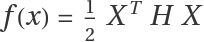 under the linear constraint gTX=c. The sign of the bordered determinant determines the type of constrained extremum:
A negative bordered determinant indicates that the constrained critical point is a maximum of f on the constraint manifold, consistent with second-order sufficient conditions for constrained optimization.
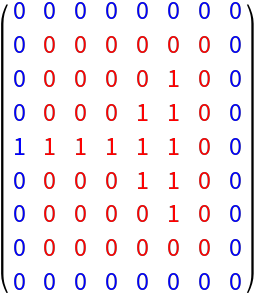
Use MatrixAugmentLeft together with rotations to construct boundary extensions of a matrix. Each side is obtained by directional augmentation, enabling consistent neighborhood structure without explicit padding functions:
This constructs a boundary-extended matrix by applying directional augmentations. Each boundary is generated by rotating the matrix and reusing left-augmentation, yielding a full extension that preserves local structure.
![ResourceFunction["MatrixAugmentLeft"][{{1, 2}, {3, 4}}, {2, 3}]](https://www.wolframcloud.com/obj/resourcesystem/images/3fe/3fe78040-800c-4556-b1ca-5f974b506e19/3d1443077a7ca011.png)

![MatrixForm @ ResourceFunction["MatrixAugmentLeft"][
{{1, 1, 1}, {2, 2, 2}, {3, 3, 3}},
{2, 4, 6}
]](https://www.wolframcloud.com/obj/resourcesystem/images/3fe/3fe78040-800c-4556-b1ca-5f974b506e19/50261a00b0d99a8e.png)

![MatrixForm @ ResourceFunction["MatrixAugmentLeft"][
{{1, 1, 1}, {2, 2, 2}, {3, 3, 3}},
\[Pi]
]](https://www.wolframcloud.com/obj/resourcesystem/images/3fe/3fe78040-800c-4556-b1ca-5f974b506e19/1b720268a170b902.png)

![MatrixForm @ ResourceFunction["MatrixAugmentLeft"][{1, 2, 3}][RandomReal[1, {3, 4}]]](https://www.wolframcloud.com/obj/resourcesystem/images/3fe/3fe78040-800c-4556-b1ca-5f974b506e19/5a52695ced9d7162.png)

![ResourceFunction["MatrixAugmentLeft"][{{a, b}, {c, d}}, {p, q}]](https://www.wolframcloud.com/obj/resourcesystem/images/3fe/3fe78040-800c-4556-b1ca-5f974b506e19/262335170b38e5fc.png)

![MatrixForm[
Composition[
ResourceFunction["MatrixAugmentLeft"] @ {100, 200, 300},
ResourceFunction["MatrixAugmentLeft"] @ {10, 20, 30}
][IdentityMatrix @ 3]
]](https://www.wolframcloud.com/obj/resourcesystem/images/3fe/3fe78040-800c-4556-b1ca-5f974b506e19/722cf84b600b9ab6.png)

![MatrixForm[
With[
{
obs = {
{2.1, 3.4, 0.7},
{5.2, 1., 8.3},
{4.5, 7.7, 2.2},
{0.4, 2.9, 6.1}
}
},
ResourceFunction["MatrixAugmentLeft"][Range @ Length @ obs]@obs
]
]](https://www.wolframcloud.com/obj/resourcesystem/images/3fe/3fe78040-800c-4556-b1ca-5f974b506e19/560d5dc975c83901.png)

![MatrixForm[
With[
{
times = Range[0, 1, 1 / 4],
trajectory = Table[
{Sin @ t, Cos @ t, Sin[2 * t]},
{t, 0, 1, 1 / 4}
]
},
N @ ResourceFunction["MatrixAugmentLeft"][times][trajectory]
]
]](https://www.wolframcloud.com/obj/resourcesystem/images/3fe/3fe78040-800c-4556-b1ca-5f974b506e19/1bf95543b89fc98b.png)

![MatrixForm[
With[
{
M = {{2, -1, 3}, {4, 5, -2}, {1, 0, 7}},
signs = {1, -1, 1}
},
ResourceFunction["MatrixAugmentLeft"][signs][M]
]
]](https://www.wolframcloud.com/obj/resourcesystem/images/3fe/3fe78040-800c-4556-b1ca-5f974b506e19/34a5538035cec2d7.png)

![extendLeft[m_] := ResourceFunction["MatrixAugmentLeft"][m[[All, 1]]][m];](https://www.wolframcloud.com/obj/resourcesystem/images/3fe/3fe78040-800c-4556-b1ca-5f974b506e19/2611e94a722f3f4e.png)
![MatrixForm @ extendLeft[{{1, 2}, {3, 4}}]](https://www.wolframcloud.com/obj/resourcesystem/images/3fe/3fe78040-800c-4556-b1ca-5f974b506e19/168154dcb3cb630a.png)

![With[
{
A = {{1, 2}, {3, 4}},
b = {2, 3}
},
SameQ[ResourceFunction["MatrixAugmentLeft"][A, b], ArrayFlatten @ {{Thread @ {b}, A}}]
]](https://www.wolframcloud.com/obj/resourcesystem/images/3fe/3fe78040-800c-4556-b1ca-5f974b506e19/79a8964f51642c67.png)

![With[
{
A = {{1, 2}, {3, 4}},
b = {2, 3}
},
SameQ[ResourceFunction["MatrixAugmentLeft"][A, b], Transpose[Prepend[Transpose[A], b]]]
]](https://www.wolframcloud.com/obj/resourcesystem/images/3fe/3fe78040-800c-4556-b1ca-5f974b506e19/221f9afafdc06afa.png)

![With[
{
A = {{1, 2}, {3, 4}},
b = {2, 3}
},
SameQ[ResourceFunction["MatrixAugmentLeft"][A, b], MapThread[Prepend, {A, b}]]
]](https://www.wolframcloud.com/obj/resourcesystem/images/3fe/3fe78040-800c-4556-b1ca-5f974b506e19/071acf0c04a7fc30.png)

![With[
{
A = {{1, 2}, {3, 4}},
b = {2, 3}
},
SameQ[
ResourceFunction["MatrixAugmentLeft"][A, b],
Join[Thread@{b}, A, 2]
]
]](https://www.wolframcloud.com/obj/resourcesystem/images/3fe/3fe78040-800c-4556-b1ca-5f974b506e19/201e7ca646700dc1.png)

![With[
{
A = {{1, 2}, {3, 4}},
b = {2, 3}},
SameQ[
ResourceFunction["MatrixAugmentLeft"][A, b],
ResourceFunction["PrependColumn"][A, b]
]
]](https://www.wolframcloud.com/obj/resourcesystem/images/3fe/3fe78040-800c-4556-b1ca-5f974b506e19/294119d300fc1009.png)

![ResourceFunction["MatrixAugmentLeft"][{{1, 2}, {3, 4}}, {5, 6, 7}]](https://www.wolframcloud.com/obj/resourcesystem/images/3fe/3fe78040-800c-4556-b1ca-5f974b506e19/3ea2982bea6c899b.png)

![With[
{
data = RandomReal[NormalDistribution[], {100, 3}],
names = {"x", "y", "z"}
},
Function[
Grid[#, Spacings -> {1, 1}, Frame -> All, Alignment -> Left]
][ResourceFunction["MatrixAugmentLeft"][names][Correlation @ data]]
]](https://www.wolframcloud.com/obj/resourcesystem/images/3fe/3fe78040-800c-4556-b1ca-5f974b506e19/12a8b6b287e1ac58.png)

![With[
{
H = {{2, 1}, {1, 3}},
g = {1, 1}
},
Det[
Plus[PadLeft[ResourceFunction["MatrixAugmentLeft"][g][H], {3, 3}],
SparseArray[{{1, 2} -> 1, {1, 3} -> 1},
{3, 3}
]
]
]
]](https://www.wolframcloud.com/obj/resourcesystem/images/3fe/3fe78040-800c-4556-b1ca-5f974b506e19/44cdbff841848ae4.png)

![extendLeft[m_] := ResourceFunction["MatrixAugmentLeft"][m, m[[All, 1]]];
extendRight[m_] := Reverse[extendLeft[Reverse[m, 2]], 2];
extendTop[m_] := Transpose@extendLeft[Transpose[m]];
extendBottom[m_] := Transpose@Reverse[extendLeft[Reverse[Transpose[m], 2]], 2];](https://www.wolframcloud.com/obj/resourcesystem/images/3fe/3fe78040-800c-4556-b1ca-5f974b506e19/49d2274a35080854.png)
![MatrixForm @ With[
{
orig = {
{0, 0, 0, 0, 0, 0},
{0, 0, 0, 0, 1, 0},
{0, 0, 0, 1, 1, 0},
{1, 1, 1, 1, 1, 0},
{0, 0, 0, 1, 1, 0},
{0, 0, 0, 0, 1, 0},
{0, 0, 0, 0, 0, 0}
}
},
Module[
{
ext =
Fold[#2[#1] &,
orig,
{extendLeft, extendTop, extendRight, extendBottom}],
r, c
}, {r, c} = Dimensions[orig];
MapIndexed[
If[
2 <= #2[[1]] <= r + 1 &&
2 <= #2[[2]] <= c + 1,
Style[#, Red],
Style[#, Blue]
] &,
ext,
{2}
]
]
]](https://www.wolframcloud.com/obj/resourcesystem/images/3fe/3fe78040-800c-4556-b1ca-5f974b506e19/7abc422010a65623.png)