Wolfram Function Repository
Instant-use add-on functions for the Wolfram Language
Function Repository Resource:
Select the largest cell by byte count in a notebook
ResourceFunction["LargestCellObject"][] gives the CellObject for the largest cell in the current notebook. | |
ResourceFunction["LargestCellObject"][nbo] gives the CellObject for the largest cell in the NotebookObject nbo. | |
ResourceFunction["LargestCellObject"][{cellobj1,…}] chooses the largest cell object from a list. | |
ResourceFunction["LargestCellObject"][…,n] gives the n largest cells. |
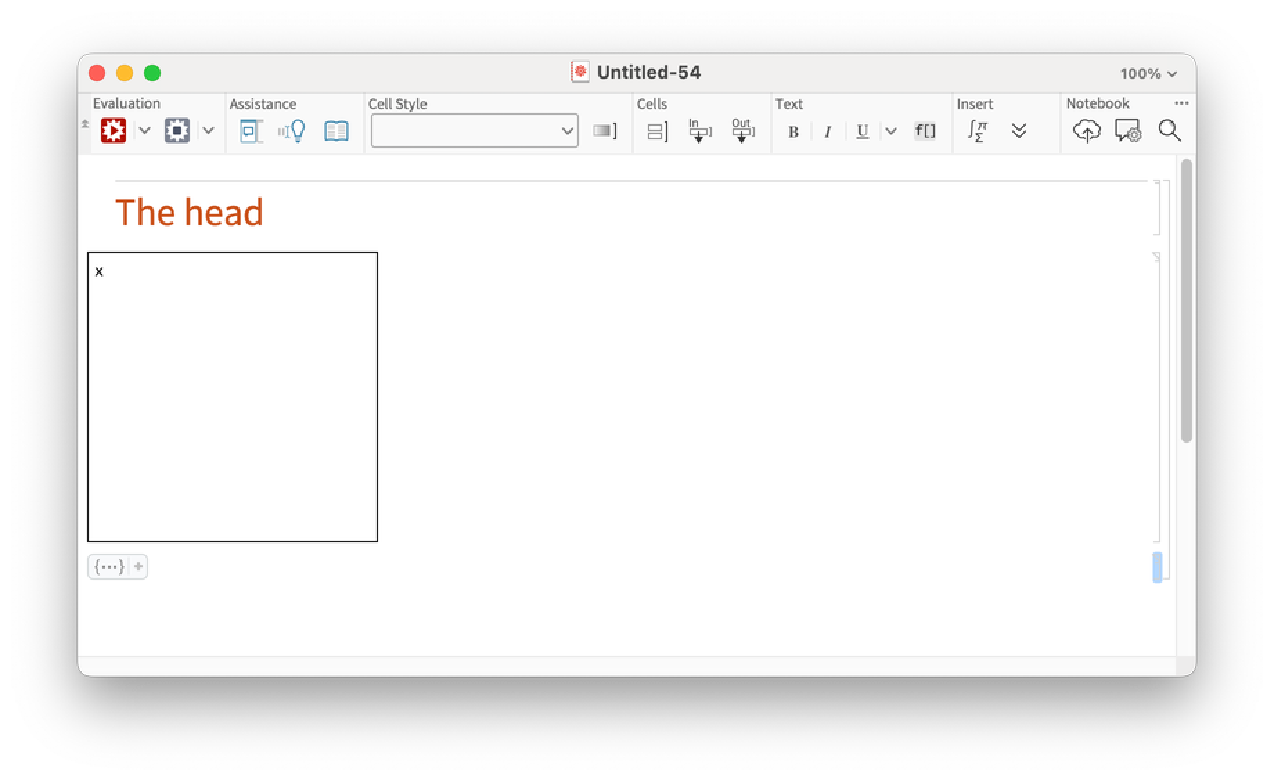
Create a notebook with content:
| In[1]:= | ![nbo = CreateDocument[{TextCell["The head", "Section"],
ExpressionCell[Framed@Pane["x", {200, 200}]],
ExpressionCell[Iconize[Range[1000]]]}]](https://www.wolframcloud.com/obj/resourcesystem/images/aef/aef92186-0d1e-4f21-ae40-1c306da2bc2b/30d228a5e5c96a20.png) |
| Out[1]= |  |
Select the largest cell by ByteCount:
| In[2]:= | ![big = ResourceFunction["LargestCellObject"][nbo]](https://www.wolframcloud.com/obj/resourcesystem/images/aef/aef92186-0d1e-4f21-ae40-1c306da2bc2b/71d27115a1ce7d58.png) |
| Out[2]= |  |
| In[3]:= | ![SelectionMove[big, All, Cell]](https://www.wolframcloud.com/obj/resourcesystem/images/aef/aef92186-0d1e-4f21-ae40-1c306da2bc2b/36c43de2a1c053ce.png) |
Find the largest cell in this notebook:
| In[4]:= | ![ResourceFunction["LargestCellObject"][]](https://www.wolframcloud.com/obj/resourcesystem/images/aef/aef92186-0d1e-4f21-ae40-1c306da2bc2b/0767be6a6ae2d674.png) |
| Out[4]= |  |
Find the ten largest cells in this notebook:
| In[5]:= | ![ResourceFunction["LargestCellObject"][10]](https://www.wolframcloud.com/obj/resourcesystem/images/aef/aef92186-0d1e-4f21-ae40-1c306da2bc2b/3e9713edf8ec4c23.png) |
| Out[5]= |  |
Find the 10 cells before this one in this notebook:
| In[6]:= | ![cells = NestList[PreviousCell[#] &, EvaluationCell[], 10]](https://www.wolframcloud.com/obj/resourcesystem/images/aef/aef92186-0d1e-4f21-ae40-1c306da2bc2b/21ef0404288f4de4.png) |
| Out[6]= |  |
Select the largest one from that list:
| In[7]:= | ![big = ResourceFunction["LargestCellObject"][cells]](https://www.wolframcloud.com/obj/resourcesystem/images/aef/aef92186-0d1e-4f21-ae40-1c306da2bc2b/15a3de125e6c899d.png) |
| Out[7]= |  |
Print the largest cell back out:
| In[8]:= | ![CellPrint@NotebookRead[big]](https://www.wolframcloud.com/obj/resourcesystem/images/aef/aef92186-0d1e-4f21-ae40-1c306da2bc2b/4b133e6aa5e039e4.png) |
| Out[5]= |  |
Use the CellStyle option to limit the cells:
| In[9]:= | ![nbo = CreateDocument[{TextCell["The head", "Section"],
ExpressionCell[Framed@Pane["x", {200, 200}]],
ExpressionCell[Range[10], "Input"],
ExpressionCell[Range[11], "Input"],
ExpressionCell[Range[10], "Output"]}]](https://www.wolframcloud.com/obj/resourcesystem/images/aef/aef92186-0d1e-4f21-ae40-1c306da2bc2b/795e6c5d406165cf.png) |
| Out[9]= |  |
Find the largest input cell:
| In[10]:= | ![ResourceFunction["LargestCellObject"][nbo, CellStyle -> "Input"]](https://www.wolframcloud.com/obj/resourcesystem/images/aef/aef92186-0d1e-4f21-ae40-1c306da2bc2b/3c93cf4a8f3cd891.png) |
| Out[10]= |  |
Find the two largest input cells:
| In[11]:= | ![ResourceFunction["LargestCellObject"][nbo, 2, CellStyle -> "Input"]](https://www.wolframcloud.com/obj/resourcesystem/images/aef/aef92186-0d1e-4f21-ae40-1c306da2bc2b/6f5965d59a3995b7.png) |
| Out[11]= |  |
Find the largest output cell:
| In[12]:= | ![ResourceFunction["LargestCellObject"][nbo, CellStyle -> "Output"]](https://www.wolframcloud.com/obj/resourcesystem/images/aef/aef92186-0d1e-4f21-ae40-1c306da2bc2b/1c8b756e55534428.png) |
| Out[12]= |  |
Omitting the count n gives the largest CellObject directly:
| In[13]:= | ![ResourceFunction["LargestCellObject"][]](https://www.wolframcloud.com/obj/resourcesystem/images/aef/aef92186-0d1e-4f21-ae40-1c306da2bc2b/3334872442de6658.png) |
| Out[13]= |  |
Giving 1 as the count gives the largest cell in a list:
| In[14]:= | ![ResourceFunction["LargestCellObject"][1]](https://www.wolframcloud.com/obj/resourcesystem/images/aef/aef92186-0d1e-4f21-ae40-1c306da2bc2b/0a699d4715ee0289.png) |
| Out[14]= |  |
Retrieve a notebook:
| In[15]:= | ![nbo = ResourceObject["Rhodobacter Capsulatus Whole Network"][
"ExampleNotebook"]](https://www.wolframcloud.com/obj/resourcesystem/images/aef/aef92186-0d1e-4f21-ae40-1c306da2bc2b/797577b85f71920c.png) |
| Out[15]= |  |
See the size:
| In[16]:= | ![ByteCount[NotebookGet[nbo]]](https://www.wolframcloud.com/obj/resourcesystem/images/aef/aef92186-0d1e-4f21-ae40-1c306da2bc2b/10a4e489f16c6afa.png) |
| Out[16]= |  |
Find the three largest output cells:
| In[17]:= | ![bigoutputs = ResourceFunction["LargestCellObject"][nbo, 3, CellStyle -> "Output"]](https://www.wolframcloud.com/obj/resourcesystem/images/aef/aef92186-0d1e-4f21-ae40-1c306da2bc2b/5d5dffef87c155a1.png) |
| Out[17]= |  |
Replace the outputs with images:
| In[18]:= | ![NotebookWrite[#, Cell[BoxData[ToBoxes[Rasterize[#, RasterSize -> 300]]], "Output"]] & /@ bigoutputs](https://www.wolframcloud.com/obj/resourcesystem/images/aef/aef92186-0d1e-4f21-ae40-1c306da2bc2b/648450088f2b67c5.png) |
| Out[18]= |  |
The notebook is now much smaller:
| In[19]:= | ![ByteCount[NotebookGet[nbo]]](https://www.wolframcloud.com/obj/resourcesystem/images/aef/aef92186-0d1e-4f21-ae40-1c306da2bc2b/5eabb8c7bcdba409.png) |
| Out[19]= |  |
| In[20]:= | ![NotebookClose[nbo]](https://www.wolframcloud.com/obj/resourcesystem/images/aef/aef92186-0d1e-4f21-ae40-1c306da2bc2b/419bce32ebce659c.png) |
Wolfram Language 14.0 (January 2024) or above
This work is licensed under a Creative Commons Attribution 4.0 International License