Basic Examples (2)
Find the location of the first Fibonacci number bigger than 100:
Verify:
Scope (2)
If the monotone predicate does not contain a boundary, the function returns All or None. For example, all Fibonacci numbers are less than ∞:
No Fibonacci numbers are negative:
IntegerBinarySearch returns the index on the boundary where the predicate was True. Find the location of the last Fibonacci number less than 30:
Find the location of the first Fibonacci number > 30:
IntegerBinarySearch[f,{max}] is equivalent to IntegerBinarySearch[f,{1,max}]:
Applications (4)
Find the first regular polygon with area larger than 3 and display it:
Find the first Fibonacci number that has 100 digits:
Find the first n where the relative error of Stirling's factorial approximation is no bigger than one part in a million:
Find out how many coin flips one should do in order to see 100 heads with 95% probability:
Possible Issues (3)
The function may not return expected results if the search range is not sufficiently large:
Increasing the search interval solves the problem:
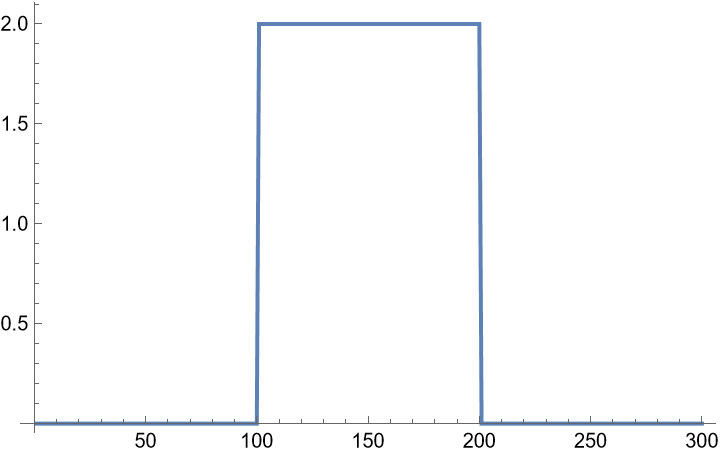
Binary search may fail on non-monotone functions:
But if the interval bounds capture the flip, at least some position will be found:
If the predicate is not boolean, an error will occur:
Neat Examples (4)
Design the optimal threshold for a statistical binomial hypothesis test. In this example:
α is a type I error (rejection of H0 when H0 is true),
β is a type II error (rejection of Ha when Ha is true)
when H0 is rejected if observed sample is >= q:
A test for H0: p=0.5 versus alternative hypothesis Ha: p=0.6 for 1000 draws:
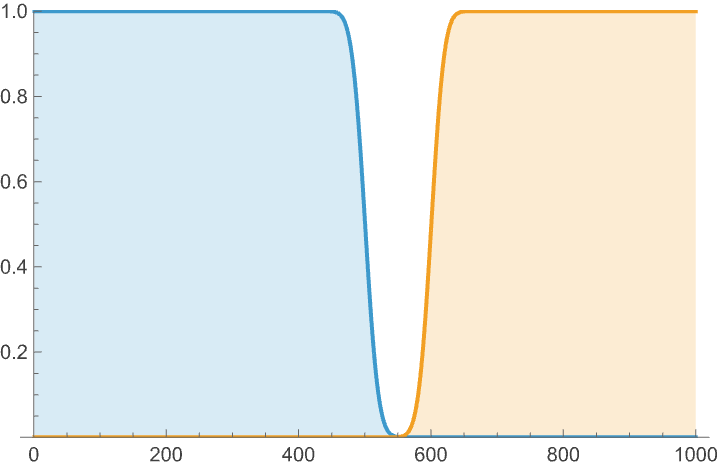
Plot both error types for various threshold cutoff values:
The optimal (pessimistic worst error) threshold is somewhere where both errors meet:
Conclusion: the optimal cutoff threshold for a binomial statistical test for H0: p=0.5 versus alternative hypothesis Ha: p=0.6 for 1000 draws is 551
![location = ResourceFunction["IntegerBinarySearch"][
Fibonacci[#] >= 100 &, {1, 100}]](https://www.wolframcloud.com/obj/resourcesystem/images/bd0/bd0e7a71-9e52-4029-a857-cf00893ebf82/1579c2d793a2386a.png)



![ResourceFunction["IntegerBinarySearch"][
Fibonacci[#] <= \[Infinity] &, {1, 100}]](https://www.wolframcloud.com/obj/resourcesystem/images/bd0/bd0e7a71-9e52-4029-a857-cf00893ebf82/0f7d9ef26fbd2ef8.png)

![ResourceFunction["IntegerBinarySearch"][Fibonacci[#] <= -1 &, {1, 100}]](https://www.wolframcloud.com/obj/resourcesystem/images/bd0/bd0e7a71-9e52-4029-a857-cf00893ebf82/4b23bf20c36c6942.png)

![Fibonacci@
ResourceFunction["IntegerBinarySearch"][Fibonacci[#] < 30 &, {1, 100}]](https://www.wolframcloud.com/obj/resourcesystem/images/bd0/bd0e7a71-9e52-4029-a857-cf00893ebf82/4aef1b342cffb167.png)

![Fibonacci@
ResourceFunction["IntegerBinarySearch"][Fibonacci[#] > 30 &, {1, 100}]](https://www.wolframcloud.com/obj/resourcesystem/images/bd0/bd0e7a71-9e52-4029-a857-cf00893ebf82/29f2f9af46101ace.png)

![Fibonacci@
ResourceFunction["IntegerBinarySearch"][Fibonacci[#] > 100 &, {100}]](https://www.wolframcloud.com/obj/resourcesystem/images/bd0/bd0e7a71-9e52-4029-a857-cf00893ebf82/01511a1612e97593.png)

![Fibonacci@
ResourceFunction["IntegerBinarySearch"][
Fibonacci[#] > 100 &, {1, 100}]](https://www.wolframcloud.com/obj/resourcesystem/images/bd0/bd0e7a71-9e52-4029-a857-cf00893ebf82/4e3c44e0bddcd260.png)

![Graphics@
RegularPolygon@
ResourceFunction["IntegerBinarySearch"][
n |-> Area@RegularPolygon[n] >= 3, {3, 100}]](https://www.wolframcloud.com/obj/resourcesystem/images/bd0/bd0e7a71-9e52-4029-a857-cf00893ebf82/5293aeb25003ef6b.png)

![Fibonacci@
ResourceFunction["IntegerBinarySearch"][
Length@IntegerDigits@Fibonacci@# >= 100 &, {1, 10^3}]](https://www.wolframcloud.com/obj/resourcesystem/images/bd0/bd0e7a71-9e52-4029-a857-cf00893ebf82/7144db24764a1a2d.png)

![stirlingApprox[n_] := Sqrt[2 \[Pi] n] (n/E)^n](https://www.wolframcloud.com/obj/resourcesystem/images/bd0/bd0e7a71-9e52-4029-a857-cf00893ebf82/454a28a16b6b6448.png)
![ResourceFunction["IntegerBinarySearch"][
n |-> stirlingApprox[n]/n! >= 1 - 1/10^6, {2, 100000}]](https://www.wolframcloud.com/obj/resourcesystem/images/bd0/bd0e7a71-9e52-4029-a857-cf00893ebf82/5e9fcef70cdad9b6.png)

![ResourceFunction["IntegerBinarySearch"][
n |-> Probability[x + 100 <= n, x \[Distributed] NegativeBinomialDistribution[100, 0.5]] >= 0.95, {1, 1000}]](https://www.wolframcloud.com/obj/resourcesystem/images/bd0/bd0e7a71-9e52-4029-a857-cf00893ebf82/5061c96502b38252.png)

![ResourceFunction["BinarySearchBy"][Range[5000], 10^60, Fibonacci] // Timing](https://www.wolframcloud.com/obj/resourcesystem/images/bd0/bd0e7a71-9e52-4029-a857-cf00893ebf82/7d1e94e13a317d7b.png)

![First@ResourceFunction["SortedPosition"][Fibonacci@Range[5000], 10^60] // Timing](https://www.wolframcloud.com/obj/resourcesystem/images/bd0/bd0e7a71-9e52-4029-a857-cf00893ebf82/12216e74d745d047.png)

![ResourceFunction["IntegerBinarySearch"][
Fibonacci[#] <= 10^60 &, {1, 5000}] // Timing](https://www.wolframcloud.com/obj/resourcesystem/images/bd0/bd0e7a71-9e52-4029-a857-cf00893ebf82/3a1f594ef43637ef.png)

![ResourceFunction["IntegerBinarySearch"][
Fibonacci[#] <= 10^60 &, {1, 100}]](https://www.wolframcloud.com/obj/resourcesystem/images/bd0/bd0e7a71-9e52-4029-a857-cf00893ebf82/33f9e5e539cac9ef.png)

![ResourceFunction["IntegerBinarySearch"][
Fibonacci[#] <= 10^60 &, {1, 10000}]](https://www.wolframcloud.com/obj/resourcesystem/images/bd0/bd0e7a71-9e52-4029-a857-cf00893ebf82/38216bb446af72b8.png)

![lst = Join[ConstantArray[0, 100], ConstantArray[2, 100], ConstantArray[0, 100]];](https://www.wolframcloud.com/obj/resourcesystem/images/bd0/bd0e7a71-9e52-4029-a857-cf00893ebf82/5e2556be8c641c75.png)
![ListPlot[lst, Joined -> True]](https://www.wolframcloud.com/obj/resourcesystem/images/bd0/bd0e7a71-9e52-4029-a857-cf00893ebf82/365f8022a175604b.png)
![ResourceFunction["IntegerBinarySearch"][
lst[[#]] >= 1 &, {1, Length@lst}]](https://www.wolframcloud.com/obj/resourcesystem/images/bd0/bd0e7a71-9e52-4029-a857-cf00893ebf82/76b88cdb692baf3f.png)

![ResourceFunction["IntegerBinarySearch"][lst[[#]] >= 1 &, {1, 150}]](https://www.wolframcloud.com/obj/resourcesystem/images/bd0/bd0e7a71-9e52-4029-a857-cf00893ebf82/10bd92fc67d9992a.png)

![ResourceFunction["IntegerBinarySearch"][
lst[[#]] >= 1 &, {150, Length@lst}]](https://www.wolframcloud.com/obj/resourcesystem/images/bd0/bd0e7a71-9e52-4029-a857-cf00893ebf82/75506d14d71f472a.png)

![ResourceFunction["IntegerBinarySearch"][Fibonacci, {1, 10}]](https://www.wolframcloud.com/obj/resourcesystem/images/bd0/bd0e7a71-9e52-4029-a857-cf00893ebf82/5c05d74929756bdf.png)

![errors[n_, p0_, pa_, q_] := Module[{dist0, dista, \[Alpha], \[Beta]},
dist0 = BinomialDistribution[n, p0];
dista = BinomialDistribution[n, pa];
\[Alpha] = 1 - CDF[dist0, q - 1];
\[Beta] = CDF[dista, q - 1];
{\[Alpha], \[Beta]}
]](https://www.wolframcloud.com/obj/resourcesystem/images/bd0/bd0e7a71-9e52-4029-a857-cf00893ebf82/13ade57156a21d5d.png)

![DiscretePlot[Evaluate@errors[n, p0, pa, q], {q, 1, n}, PlotRange -> {0, 1}]](https://www.wolframcloud.com/obj/resourcesystem/images/bd0/bd0e7a71-9e52-4029-a857-cf00893ebf82/7a3032c7ec7a9130.png)
![Quiet@ResourceFunction["IntegerBinarySearch"][
q |-> With[{e = errors[n, p0, pa, q]}, e[[1]] <= e[[2]]], {1, n}]](https://www.wolframcloud.com/obj/resourcesystem/images/bd0/bd0e7a71-9e52-4029-a857-cf00893ebf82/1e123e17ade82607.png)
