Details and Options
ResourceFunction["ESeriesValues"] helps to find values or combination of values in the
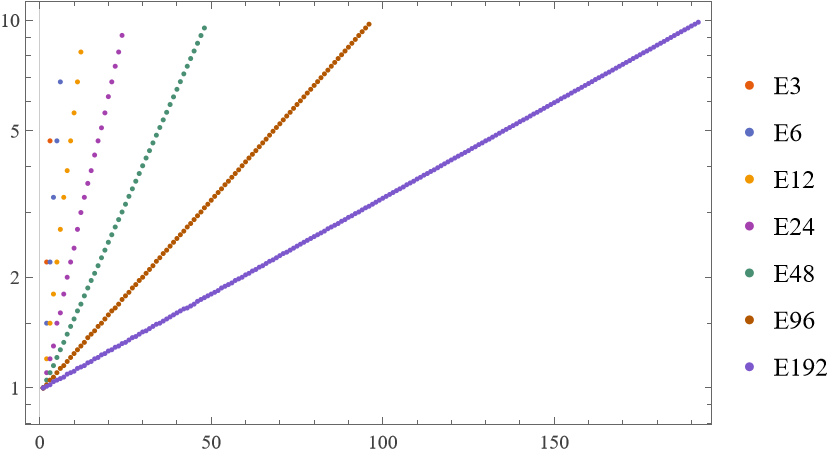
E series of preferred numbers. Those logarithmically spaced number lists are used mainly as values for common electrical components like resistors, capacitors, inductors and other. The standard definitions (IEC 60063:2015) include the series E3, E6, E12, E24, E48, E96 and E192. The number of which designates the number of values included in the series. For example, E6 specifies 6 standard values: 1.0, 1.5, 2.2, 3.3, 4.7, 6.8. So any of those values times an integer exponent base 10 gives any valid E6-series value. Thus 680, 2200 or 0.47 are all members of the E6-series.
ResourceFunction["ESeriesValues"] can be used to find optimal resistor, capacitor, etc. values or optimal configurations of multiple elements given a desired target value.
ResourceFunction["ESeriesValues"] returns an E-series number when called in the one or two argument form.
ResourceFunction["ESeriesValues"] in its three argument form attempts to find the optimum combination of elements closest to the desired value.
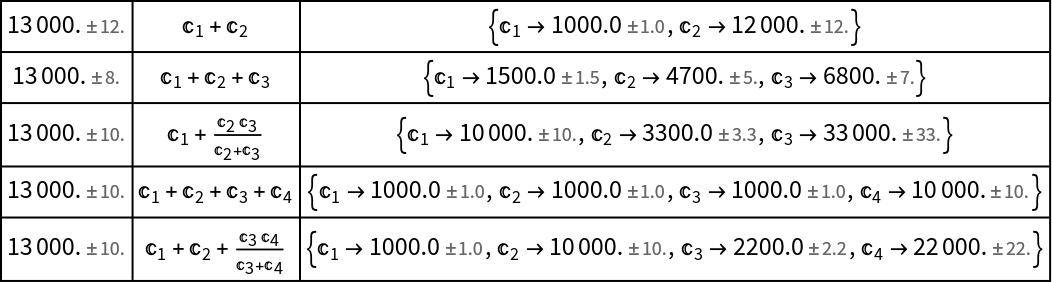
ResourceFunction["ESeriesValues"] in the three argument form returns a list of found optimal/near-optimal solutions each containing the optimized value val, the configuration config highlighting how to set the elements with them enumerated C[1]…C[n], and a rule list which gives the the individual series values C[i]->vali.
The configuration returned by the three argument form of ResourceFunction["ESeriesValues"] is a string expression showing a parallel combination with a pipe symbol "|" or a serial combination with a plus "+" and nesting with brackets. So, for example, (C[1]|(C[2]+C[3])) shows an element C[1] being in parallel with a serial combination of elements C[2] and C[3].
ResourceFunction["ESeriesValues"] is not guaranteed to always find the global optimum, nor to always find all optimum combinations if there are more than one.
The argument series can be specified as:
| "E6" | string with an "E" prefix and a number describing the series |
| d | integer specifying the series |
| {v1,v2,…} | list describing the series |
Supported options are:
| "ExtraExponent" | 1 | how many extra exponents intervals the search depth will use |
| GenerateConditions | False | False prints only the best combinations, True returns all optimums of all possible given configurations of elements |
| "MinValue" | 10^-3 | minimum value searched for |
| "MaxValue" | 10^7 | maximum value searched for |
![ResourceFunction["ESeriesValues"][6150]](https://www.wolframcloud.com/obj/resourcesystem/images/93a/93a198c6-8bcc-475c-af90-a197ea767e2b/06b56bb64789feb6.png)

![ResourceFunction["ESeriesValues"][6150, "E192"]](https://www.wolframcloud.com/obj/resourcesystem/images/93a/93a198c6-8bcc-475c-af90-a197ea767e2b/1902f14402228872.png)

![ResourceFunction["ESeriesValues"][6150, "E6", 3]](https://www.wolframcloud.com/obj/resourcesystem/images/93a/93a198c6-8bcc-475c-af90-a197ea767e2b/0017ef0e89daf4bc.png)

![ResourceFunction["ESeriesValues"][4186, "E6", 3] // N](https://www.wolframcloud.com/obj/resourcesystem/images/93a/93a198c6-8bcc-475c-af90-a197ea767e2b/0ad9765eb38d08d7.png)

![ResourceFunction["ESeriesValues"][4186, "E12", 3] // N](https://www.wolframcloud.com/obj/resourcesystem/images/93a/93a198c6-8bcc-475c-af90-a197ea767e2b/108f1e69dca9de6d.png)

![ResourceFunction["ESeriesValues"][220, "E3", 3] // N](https://www.wolframcloud.com/obj/resourcesystem/images/93a/93a198c6-8bcc-475c-af90-a197ea767e2b/0ba749fa726dc846.png)

![ResourceFunction["ESeriesValues"][230, "E3", 3] // N](https://www.wolframcloud.com/obj/resourcesystem/images/93a/93a198c6-8bcc-475c-af90-a197ea767e2b/761b428219b34b00.png)

![ResourceFunction["ESeriesValues"][All, "E24"] // N](https://www.wolframcloud.com/obj/resourcesystem/images/93a/93a198c6-8bcc-475c-af90-a197ea767e2b/265bda8f707a1469.png)

![ResourceFunction["ESeriesValues"][4115, "E12", 3, "ExtraExponent" -> #] & /@ {1, 2} // Grid](https://www.wolframcloud.com/obj/resourcesystem/images/93a/93a198c6-8bcc-475c-af90-a197ea767e2b/30eaebc33658ff92.png)

![AbsoluteTiming[
ResourceFunction["ESeriesValues"][4115, "E6", 4, "ExtraExponent" -> #];] & /@ {1, 2}](https://www.wolframcloud.com/obj/resourcesystem/images/93a/93a198c6-8bcc-475c-af90-a197ea767e2b/24f319964c851d1d.png)

![ResourceFunction["ESeriesValues"][4115, "E3", 4, GenerateConditions -> True] // Grid](https://www.wolframcloud.com/obj/resourcesystem/images/93a/93a198c6-8bcc-475c-af90-a197ea767e2b/350e04526b8f8145.png)

![ResourceFunction["ESeriesValues"][3*10^-6, "E3", 2, "MinValue" -> 10^-6]](https://www.wolframcloud.com/obj/resourcesystem/images/93a/93a198c6-8bcc-475c-af90-a197ea767e2b/1cb1ed0910a9ca1a.png)

![ResourceFunction["ESeriesValues"][62*10^6, "E12", 2, "MaxValue" -> 10^8]](https://www.wolframcloud.com/obj/resourcesystem/images/93a/93a198c6-8bcc-475c-af90-a197ea767e2b/2578a732993fd6cd.png)

![Grid[{
ResourceFunction["ESeriesValues"][13000, "E12", 2],
ResourceFunction["ESeriesValues"][13000, "E6", 3],
ResourceFunction["ESeriesValues"][13000, "E3", 4]
}, Frame -> All]](https://www.wolframcloud.com/obj/resourcesystem/images/93a/93a198c6-8bcc-475c-af90-a197ea767e2b/37bdd4eefca4042d.png)

![solution = {
#1,
ToExpression[#2] //. {Verbatim[Alternatives][args__] :> 1/Total[1/{args}]},
#3 /. {n_?NumericQ :> Around[n, n*0.1/100], s_String :> ToExpression[s]}
} & @@@ Flatten[{
ResourceFunction["ESeriesValues"][13000, "E12", 2],
ResourceFunction["ESeriesValues"][13000, "E6", 3],
ResourceFunction["ESeriesValues"][13000, "E3", 4]
}, 1];
Grid[
{AroundReplace[#2, #3], FullSimplify@#2, #3} & @@@ solution,
Frame -> All]](https://www.wolframcloud.com/obj/resourcesystem/images/93a/93a198c6-8bcc-475c-af90-a197ea767e2b/52b954d7e6d8e2c7.png)
![ResourceFunction["ESeriesValues"][5643.21, {1.0, 2.0, 3.5, 5.0, 8.0},
2]](https://www.wolframcloud.com/obj/resourcesystem/images/93a/93a198c6-8bcc-475c-af90-a197ea767e2b/54af8b3478c24816.png)

![ResourceFunction["ESeriesValues"][5643.21, "E100", 2]](https://www.wolframcloud.com/obj/resourcesystem/images/93a/93a198c6-8bcc-475c-af90-a197ea767e2b/24f48c8ad4653e6d.png)

![range = Range[1000, 2000];
tolerance = 0.1/100;
Histogram[{
# - ResourceFunction["ESeriesValues"][#, "E3", 3][[1, 1]] & /@ range,
# - ResourceFunction["ESeriesValues"][#, "E6", 2][[1, 1]] & /@ range,
# - ResourceFunction["ESeriesValues"][#, "E192"] & /@ range
} // N, ChartLegends -> {"3x E3", "2x E6", "1x E192"}]](https://www.wolframcloud.com/obj/resourcesystem/images/93a/93a198c6-8bcc-475c-af90-a197ea767e2b/0c4c8cfc7c4a3f2e.png)
![series = {"E3", "E6", "E12", "E24", "E48", "E96", "E192"};
ListLogPlot[ResourceFunction["ESeriesValues"][All, #] & /@ series, PlotLegends -> series]](https://www.wolframcloud.com/obj/resourcesystem/images/93a/93a198c6-8bcc-475c-af90-a197ea767e2b/23402ce89f1e6fde.png)