Wolfram Function Repository
Instant-use add-on functions for the Wolfram Language
Function Repository Resource:
Create associations among columns of a tabular object
ResourceFunction["AssociateColumns"][tab,{col1,col2}] associates one column of tab to another column. | |
ResourceFunction["AssociateColumns"][tab,{col1,col2},f] specify a merging function for possible duplicate keys. | |
ResourceFunction["AssociateColumns"][tab,{{col1,col2,…},{col3,col4,…}}] associates multiple columns as keys to multiple columns as values. | |
ResourceFunction["AssociateColumns"][tab,{{col1,col2,…},{col3,col4,…}},f] specify a merging function. | |
ResourceFunction["AssociateColumns"][tab,{cols1,cols2,cols3,…}] creates an arbitrarily nested Association. | |
ResourceFunction["AssociateColumns"][tab,cols1→cols2→cols3→…] alternative syntax with a rule for each level of nesting. | |
ResourceFunction["AssociateColumns"][tab,cols1→cols2→cols3→…,f] specify the same merging function for each nesting level. | |
ResourceFunction["AssociateColumns"][tab,cols1→cols2→cols3→…,{f12,f23,…}] specify a different merging function for each nesting level. |
| "DuplicatesWarning" | False | whether to output a warning message if the column of the keys contains duplicates |
Create a Tabular expression:
| In[1]:= | ![tabHurricanes = Tabular[ResourceFunction["ExampleDataset"][{"Statistics", "USHurricaneLoss"}]]](https://www.wolframcloud.com/obj/resourcesystem/images/44f/44f10a20-dcdd-4430-92d8-6daec9da5f77/49b3fb8f875a9cac.png) |
| Out[1]= | 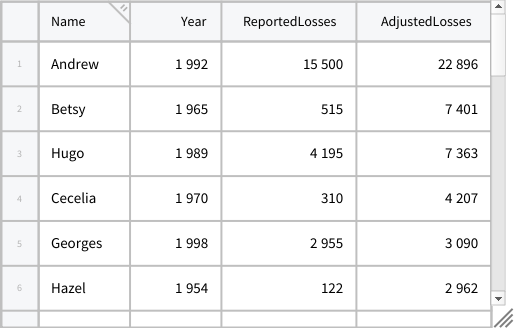 |
Create an association between two columns of the Tabular:
| In[2]:= | ![ResourceFunction[
"AssociateColumns", ResourceSystemBase -> "https://www.wolframcloud.com/obj/resourcesystem/api/1.0"][tabHurricanes, {"Name", "Year"}]](https://www.wolframcloud.com/obj/resourcesystem/images/44f/44f10a20-dcdd-4430-92d8-6daec9da5f77/65ea243cefffd7a1.png) |
| Out[2]= |  |
Create a nested association with three columns:
| In[3]:= | ![ResourceFunction[
"AssociateColumns", ResourceSystemBase -> "https://www.wolframcloud.com/obj/resourcesystem/api/1.0"][
tabHurricanes, {"Year", "Name", "ReportedLosses"}] // KeySort](https://www.wolframcloud.com/obj/resourcesystem/images/44f/44f10a20-dcdd-4430-92d8-6daec9da5f77/72f95429e8a44253.png) |
| Out[3]= |  |
If the first column contains duplicate keys, you can choose to merge them through a function specified as third argument:
| In[4]:= | ![ResourceFunction[
"AssociateColumns", ResourceSystemBase -> "https://www.wolframcloud.com/obj/resourcesystem/api/1.0"][tabHurricanes, {"Year", "Name"}, Sort] // KeySort](https://www.wolframcloud.com/obj/resourcesystem/images/44f/44f10a20-dcdd-4430-92d8-6daec9da5f77/14911b4f24cdb6cc.png) |
| Out[4]= |  |
Use an alternative syntax with a Rule for each level of nesting:
| In[5]:= | ![tabSpeed = Tabular[ResourceFunction["ExampleDataset"][{"Statistics", "SpeedOfLight"}]]](https://www.wolframcloud.com/obj/resourcesystem/images/44f/44f10a20-dcdd-4430-92d8-6daec9da5f77/1b699a740a645b77.png) |
| Out[5]= | 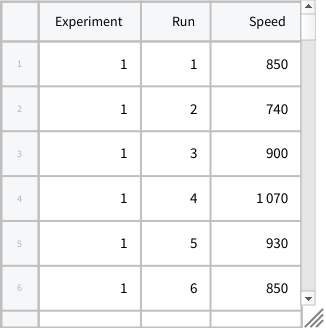 |
| In[6]:= | ![ResourceFunction[
"AssociateColumns", ResourceSystemBase -> "https://www.wolframcloud.com/obj/resourcesystem/api/1.0"][tabSpeed, "Experiment" -> "Run" -> "Speed"]](https://www.wolframcloud.com/obj/resourcesystem/images/44f/44f10a20-dcdd-4430-92d8-6daec9da5f77/3c96fa90a6ff9790.png) |
| Out[6]= |  |
Create an association with multiple columns as Values:
| In[7]:= | ![tabHurricanes = Tabular[ResourceFunction["ExampleDataset"][{"Statistics", "USHurricaneLoss"}]]](https://www.wolframcloud.com/obj/resourcesystem/images/44f/44f10a20-dcdd-4430-92d8-6daec9da5f77/70488fb2e68babeb.png) |
| Out[7]= | 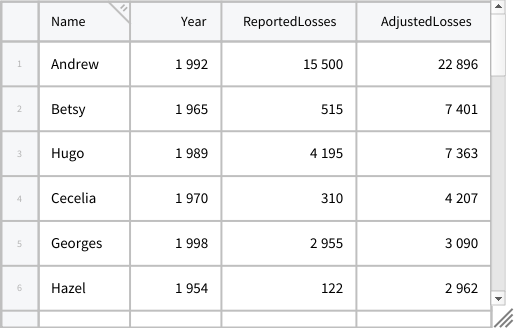 |
| In[8]:= | ![ResourceFunction[
"AssociateColumns", ResourceSystemBase -> "https://www.wolframcloud.com/obj/resourcesystem/api/1.0"][tabHurricanes, "Name" -> {"ReportedLosses", "AdjustedLosses"}]](https://www.wolframcloud.com/obj/resourcesystem/images/44f/44f10a20-dcdd-4430-92d8-6daec9da5f77/3841b5f92e5ef0fa.png) |
| Out[8]= |  |
Use multiple columns as Keys:
| In[9]:= | ![tabEarthquakes = Tabular[ResourceFunction["ExampleDataset"][{"Statistics", "USEarthquakes"}]]](https://www.wolframcloud.com/obj/resourcesystem/images/44f/44f10a20-dcdd-4430-92d8-6daec9da5f77/378c31b2882fdc52.png) |
| Out[9]= | 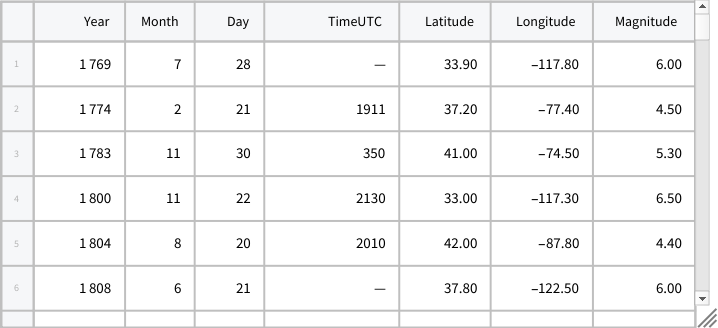 |
| In[10]:= | ![ResourceFunction[
"AssociateColumns", ResourceSystemBase -> "https://www.wolframcloud.com/obj/resourcesystem/api/1.0"][
tabEarthquakes, {"Latitude", "Longitude"} -> "Magnitude", Median] // Shallow](https://www.wolframcloud.com/obj/resourcesystem/images/44f/44f10a20-dcdd-4430-92d8-6daec9da5f77/7245ce4cc34d05d7.png) |
| Out[10]= |  |
| In[11]:= | ![ResourceFunction[
"AssociateColumns", ResourceSystemBase -> "https://www.wolframcloud.com/obj/resourcesystem/api/1.0"][
tabEarthquakes, {"Year", "Month", "Day"} -> {"Latitude", "Longitude"},
MapApply[GeoPosition, #] &] // Shallow](https://www.wolframcloud.com/obj/resourcesystem/images/44f/44f10a20-dcdd-4430-92d8-6daec9da5f77/065ddd9f74a3d365.png) |
| Out[11]= |  |
Create an arbitrarily nested association and visualize it as a Dataset:
| In[12]:= | ![tabOrders =
Tabular[<|"RawSchema" -> <|"ColumnProperties" -> <|"id" -> <|"ElementType" -> "Integer64"|>, "order_id" -> <|"ElementType" -> "Integer64"|>,
"activity_id" -> <|"ElementType" -> "Integer64"|>, "entity_name" -> <|"ElementType" -> "String"|>, "entity_code" -> <|"ElementType" -> "String"|>, "periodicity" -> <|"ElementType" -> "Integer64"|>, "year" -> <|"ElementType" -> "Integer64"|>|>, "KeyColumns" -> None, "Backend" -> "WolframKernel"|>, "Options" -> {},
"BackendData" -> <|"ColumnData" -> DataStructure["ColumnTable", {{
TabularColumn[<|"Data" -> {{1, 2, 3, 4, 5, 6, 7, 8, 9, 10, 11, 12, 13,
14, 15, 16, 17, 18, 19, 20, 21, 22, 23, 24, 25, 26}, {},
None}, "ElementType" -> "Integer64"|>],
TabularColumn[<|"Data" -> {{237, 242, 264, 270, 276, 320, 350, 353, 357, 359, 368, 383, 383, 385, 385, 400, 433, 439, 439, 446, 447, 451, 451, 451, 451, 455}, {}, None}, "ElementType" -> "Integer64"|>],
TabularColumn[<|"Data" -> {{9, 28, 9, 28, 28, 28, 9, 29, 28, 10, 17, 29, 29, 10, 10, 17, 10, 36, 36, 28, 10, 28, 28, 28, 28, 17}, {}, None}, "ElementType" -> "Integer64"|>],
TabularColumn[<|"Data" -> {{3, {0, 12, 26, 39, 56, 81, 99, 111, 124, 131, 136, 153, 166, 179, 183, 187, 201, 208, 215, 222, 236, 243, 250, 264, 271, 285, 299}, "Valle SabbiaIsola DovareseVallecamonicaPessina CremoneseTerre di Pievi e CastelliTorre de PicenardiValle SabbiaCosta VolpinoDossenaCainoBorgo San GiacomoCosta VolpinoCosta VolpinoIseoIseoCastelviscontiBarbataDossenaDossenaCastelviscontiBarbataDossenaCastelviscontiDossenaCastelviscontiCastelvisconti"}, {}, None},
"ElementType" -> "String"|>],
TabularColumn[<|"Data" -> {{3, {0, 6, 15, 25, 34, 44, 53, 59, 68, 77, 86, 95, 104, 113, 122, 131, 140, 149, 158, 167, 176, 185, 194, 203, 212, 221, 230}, "90302110301905310301561101030190701030266100103019107903021103016086103016092103017031103017020103016086103016086103017085103017085103019027103016019103016092103016092103019027103016019103016092103019027103016092103019027103019027"}, {}, None}, "ElementType" -> "String"|>],
TabularColumn[<|"Data" -> {{3, 1, 3, 1, 1, 1, 3, 1, 1, 1, 3, 1, 1, 1, 1, 3, 1, 1, 1, 1, 1, 1, 1, 1, 1, 3}, {}, None}, "ElementType" -> "Integer64"|>],
TabularColumn[<|"Data" -> {{2024, 2024, 2024, 2024, 2024, 2024, 2025, 2025, 2025, 2025, 2025, 2024, 2025, 2024, 2025, 2025, 2025, 2024, 2025, 2025, 2025, 2024, 2024, 2025, 2025, 2025}, {}, None}, "ElementType" -> "Integer64"|>]}}]|>|>]
;](https://www.wolframcloud.com/obj/resourcesystem/images/44f/44f10a20-dcdd-4430-92d8-6daec9da5f77/32f6b92a4b371a43.png) |
| In[13]:= | ![ResourceFunction[
"AssociateColumns", ResourceSystemBase -> "https://www.wolframcloud.com/obj/resourcesystem/api/1.0"][
tabOrders, {"year", "periodicity"} -> "activity_id" -> "order_id" -> {"entity_code", "entity_name"}, Sort] // KeySort](https://www.wolframcloud.com/obj/resourcesystem/images/44f/44f10a20-dcdd-4430-92d8-6daec9da5f77/084fe50e6a7acb96.png) |
| Out[13]= |  |
| In[14]:= | ![Dataset[%]](https://www.wolframcloud.com/obj/resourcesystem/images/44f/44f10a20-dcdd-4430-92d8-6daec9da5f77/744abe0eb5f6ece9.png) |
| Out[14]= | 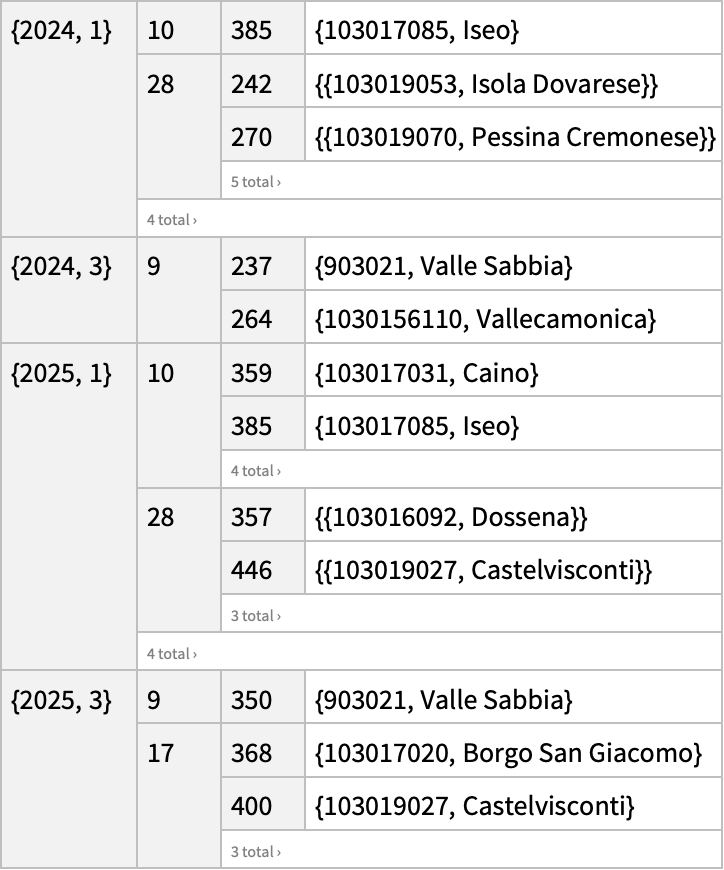 |
Specify a different merging function for each level of nesting:
| In[15]:= | ![ResourceFunction[
"AssociateColumns", ResourceSystemBase -> "https://www.wolframcloud.com/obj/resourcesystem/api/1.0"][tabOrders, {"year", "periodicity"} -> "activity_id" -> "order_id" -> {"entity_code", "entity_name"}, {First, Identity, First}]](https://www.wolframcloud.com/obj/resourcesystem/images/44f/44f10a20-dcdd-4430-92d8-6daec9da5f77/7071c8c057bb78d1.png) |
| Out[15]= |  |
Return a warning message when the column of the Keys contains duplicates and no merging function is specified:
| In[16]:= | ![tabHurricanes = Tabular[ResourceFunction["ExampleDataset"][{"Statistics", "USHurricaneLoss"}]]](https://www.wolframcloud.com/obj/resourcesystem/images/44f/44f10a20-dcdd-4430-92d8-6daec9da5f77/53b50b9359d8ad4b.png) |
| Out[16]= | 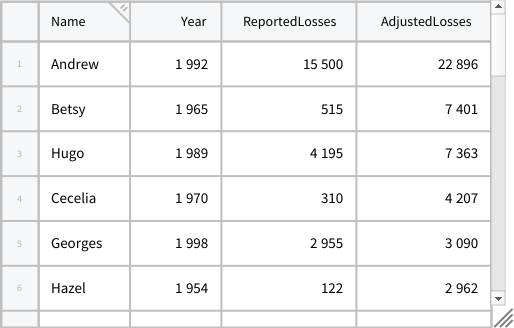 |
| In[17]:= | ![ResourceFunction[
"AssociateColumns", ResourceSystemBase -> "https://www.wolframcloud.com/obj/resourcesystem/api/1.0"][tabHurricanes, {"Year", "Name"}] // KeySort](https://www.wolframcloud.com/obj/resourcesystem/images/44f/44f10a20-dcdd-4430-92d8-6daec9da5f77/49fee22ba4f32339.png) |
| Out[17]= |  |
To avoid this message, you can just specify a merging function as the third argument, or set the option "DuplicatesWarning" to False, to obtain the automatic merging through Identity without error messages:
| In[18]:= | ![ResourceFunction[
"AssociateColumns", ResourceSystemBase -> "https://www.wolframcloud.com/obj/resourcesystem/api/1.0"][tabHurricanes, {"Year", "Name"}, Identity] // KeySort](https://www.wolframcloud.com/obj/resourcesystem/images/44f/44f10a20-dcdd-4430-92d8-6daec9da5f77/3f144a68e3293b27.png) |
| Out[18]= |  |
| In[19]:= | ![ResourceFunction[
"AssociateColumns", ResourceSystemBase -> "https://www.wolframcloud.com/obj/resourcesystem/api/1.0"][tabHurricanes, {"Year", "Name"}, "DuplicatesWarning" -> False] // KeySort](https://www.wolframcloud.com/obj/resourcesystem/images/44f/44f10a20-dcdd-4430-92d8-6daec9da5f77/5d0e049f36a7052a.png) |
| Out[19]= |  |
| In[20]:= | 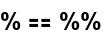 |
| Out[20]= |  |
Create an association between the coordinates and magnitudes of earthquakes:
| In[21]:= | ![tabEarthquakes = Tabular[ResourceFunction["ExampleDataset"][{"Statistics", "USEarthquakes"}]]](https://www.wolframcloud.com/obj/resourcesystem/images/44f/44f10a20-dcdd-4430-92d8-6daec9da5f77/63f46eb734408c4b.png) |
| Out[21]= | 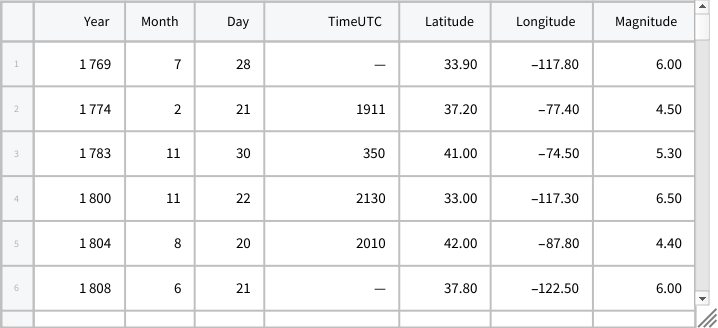 |
| In[22]:= | ![(assocGeoMagn = ResourceFunction[
"AssociateColumns", ResourceSystemBase -> "https://www.wolframcloud.com/obj/resourcesystem/api/1.0"][
tabEarthquakes, {"Latitude", "Longitude"} -> "Magnitude", Total]) // Shallow](https://www.wolframcloud.com/obj/resourcesystem/images/44f/44f10a20-dcdd-4430-92d8-6daec9da5f77/3e75cdb10304c15d.png) |
| Out[22]= |  |
Use it to create a GeoHistogram of US seismicity:
| In[23]:= | ![GeoHistogram[KeyMap[GeoPosition, assocGeoMagn], GeoRange -> Entity["Country", "UnitedStates"]]](https://www.wolframcloud.com/obj/resourcesystem/images/44f/44f10a20-dcdd-4430-92d8-6daec9da5f77/1b697178ad18903d.png) |
| Out[23]= | 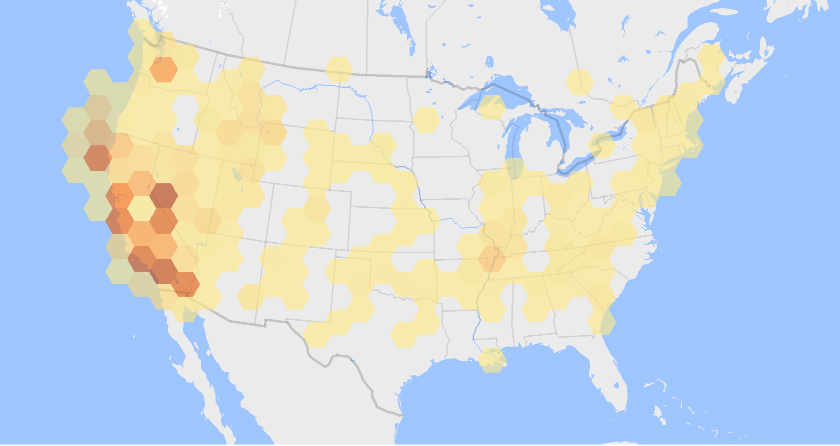 |
In the simplest case with only 2 columns, if there are no duplicates in the column of the keys, AssociateColumn[tab,{col1,col2}] is equivalent to Association[Rule@@@Values@Normal@tab[[All,{col1,col2}]]]:
| In[24]:= | ![tabHurricanes = Tabular[ResourceFunction["ExampleDataset"][{"Statistics", "USHurricaneLoss"}]]](https://www.wolframcloud.com/obj/resourcesystem/images/44f/44f10a20-dcdd-4430-92d8-6daec9da5f77/621775a143c4ee29.png) |
| Out[24]= | 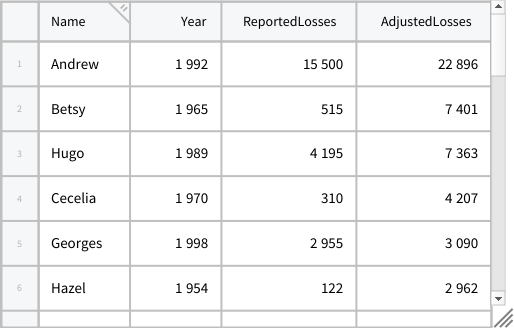 |
| In[25]:= | ![ResourceFunction[
"AssociateColumns", ResourceSystemBase -> "https://www.wolframcloud.com/obj/resourcesystem/api/1.0"][tabHurricanes, {"Name", "Year"}]](https://www.wolframcloud.com/obj/resourcesystem/images/44f/44f10a20-dcdd-4430-92d8-6daec9da5f77/7b7f2efb10fefdbb.png) |
| Out[25]= |  |
| In[26]:= | ![Association[Rule @@@ Values@Normal@tabHurricanes[[All, {"Name", "Year"}]]]](https://www.wolframcloud.com/obj/resourcesystem/images/44f/44f10a20-dcdd-4430-92d8-6daec9da5f77/33c49a0d043c0500.png) |
| Out[26]= |  |
| In[27]:= | 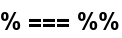 |
| Out[27]= |  |
If there are duplicates in the column of the keys, AssociateColumns[tab, {col1,col2},f] is equivalent to Map[f,GroupBy[Values@Normal@tab[[All,{col1,col2}]],First→Last]]:
| In[28]:= | ![ResourceFunction[
"AssociateColumns", ResourceSystemBase -> "https://www.wolframcloud.com/obj/resourcesystem/api/1.0"][tabHurricanes, {"Year", "Name"}, Sort]](https://www.wolframcloud.com/obj/resourcesystem/images/44f/44f10a20-dcdd-4430-92d8-6daec9da5f77/354c14b4f92e3973.png) |
| Out[28]= |  |
| In[29]:= | ![Map[Sort, GroupBy[Values@Normal@tabHurricanes[[All, {"Year", "Name"}]], First -> Last]]](https://www.wolframcloud.com/obj/resourcesystem/images/44f/44f10a20-dcdd-4430-92d8-6daec9da5f77/7a55faaefa87760f.png) |
| Out[29]= |  |
| In[30]:= | 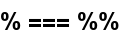 |
| Out[30]= |  |
The merging functions should be actually allowed by the structure of the data:
| In[31]:= | ![tabOrders =
Tabular[<|"RawSchema" -> <|"ColumnProperties" -> <|"id" -> <|"ElementType" -> "Integer64"|>, "order_id" -> <|"ElementType" -> "Integer64"|>,
"activity_id" -> <|"ElementType" -> "Integer64"|>, "entity_name" -> <|"ElementType" -> "String"|>, "entity_code" -> <|"ElementType" -> "String"|>, "periodicity" -> <|"ElementType" -> "Integer64"|>, "year" -> <|"ElementType" -> "Integer64"|>|>, "KeyColumns" -> None, "Backend" -> "WolframKernel"|>, "Options" -> {},
"BackendData" -> <|"ColumnData" -> DataStructure["ColumnTable", {{
TabularColumn[<|"Data" -> {{1, 2, 3, 4, 5, 6, 7, 8, 9, 10, 11, 12, 13,
14, 15, 16, 17, 18, 19, 20, 21, 22, 23, 24, 25, 26}, {},
None}, "ElementType" -> "Integer64"|>],
TabularColumn[<|"Data" -> {{237, 242, 264, 270, 276, 320, 350, 353, 357, 359, 368, 383, 383, 385, 385, 400, 433, 439, 439, 446, 447, 451, 451, 451, 451, 455}, {}, None}, "ElementType" -> "Integer64"|>],
TabularColumn[<|"Data" -> {{9, 28, 9, 28, 28, 28, 9, 29, 28, 10, 17, 29, 29, 10, 10, 17, 10, 36, 36, 28, 10, 28, 28, 28, 28, 17}, {}, None}, "ElementType" -> "Integer64"|>],
TabularColumn[<|"Data" -> {{3, {0, 12, 26, 39, 56, 81, 99, 111, 124, 131, 136, 153, 166, 179, 183, 187, 201, 208, 215, 222, 236, 243, 250, 264, 271, 285, 299}, "Valle SabbiaIsola DovareseVallecamonicaPessina CremoneseTerre di Pievi e CastelliTorre de PicenardiValle SabbiaCosta VolpinoDossenaCainoBorgo San GiacomoCosta VolpinoCosta VolpinoIseoIseoCastelviscontiBarbataDossenaDossenaCastelviscontiBarbataDossenaCastelviscontiDossenaCastelviscontiCastelvisconti"}, {}, None},
"ElementType" -> "String"|>],
TabularColumn[<|"Data" -> {{3, {0, 6, 15, 25, 34, 44, 53, 59, 68, 77, 86, 95, 104, 113, 122, 131, 140, 149, 158, 167, 176, 185, 194, 203, 212, 221, 230}, "90302110301905310301561101030190701030266100103019107903021103016086103016092103017031103017020103016086103016086103017085103017085103019027103016019103016092103016092103019027103016019103016092103019027103016092103019027103019027"}, {}, None}, "ElementType" -> "String"|>],
TabularColumn[<|"Data" -> {{3, 1, 3, 1, 1, 1, 3, 1, 1, 1, 3, 1, 1, 1, 1, 3, 1, 1, 1, 1, 1, 1, 1, 1, 1, 3}, {}, None}, "ElementType" -> "Integer64"|>],
TabularColumn[<|"Data" -> {{2024, 2024, 2024, 2024, 2024, 2024, 2025, 2025, 2025, 2025, 2025, 2024, 2025, 2024, 2025, 2025, 2025, 2024, 2025, 2025, 2025, 2024, 2024, 2025, 2025, 2025}, {}, None}, "ElementType" -> "Integer64"|>]}}]|>|>]
;](https://www.wolframcloud.com/obj/resourcesystem/images/44f/44f10a20-dcdd-4430-92d8-6daec9da5f77/6c0dbfd28711f906.png) |
| In[32]:= | ![ResourceFunction[
"AssociateColumns", ResourceSystemBase -> "https://www.wolframcloud.com/obj/resourcesystem/api/1.0"][tabOrders, {"year", "periodicity"} -> "activity_id" -> "order_id" -> {"entity_code", "entity_name"}, First]](https://www.wolframcloud.com/obj/resourcesystem/images/44f/44f10a20-dcdd-4430-92d8-6daec9da5f77/460a5ae1487580f4.png) |
| Out[32]= |  |
| In[33]:= | ![ResourceFunction[
"AssociateColumns", ResourceSystemBase -> "https://www.wolframcloud.com/obj/resourcesystem/api/1.0"][tabOrders, {"year", "periodicity"} -> "activity_id" -> "order_id" -> {"entity_code", "entity_name"}, {First, Identity, First}]](https://www.wolframcloud.com/obj/resourcesystem/images/44f/44f10a20-dcdd-4430-92d8-6daec9da5f77/1bf83d8b6aac7ad2.png) |
| Out[33]= |  |
| In[34]:= | ![ResourceFunction[
"AssociateColumns", ResourceSystemBase -> "https://www.wolframcloud.com/obj/resourcesystem/api/1.0"][tabOrders, {"year", "periodicity"} -> "activity_id" -> "order_id" -> {"entity_code", "entity_name"}, {Identity, First, First}]](https://www.wolframcloud.com/obj/resourcesystem/images/44f/44f10a20-dcdd-4430-92d8-6daec9da5f77/4568068463b408bc.png) |
| Out[34]= |  |
Sometimes the error messages suggest what to change:
| In[35]:= | ![tabHurricanes = Tabular[ResourceFunction["ExampleDataset"][{"Statistics", "USHurricaneLoss"}]]](https://www.wolframcloud.com/obj/resourcesystem/images/44f/44f10a20-dcdd-4430-92d8-6daec9da5f77/30f13e3f382e379b.png) |
| Out[35]= | 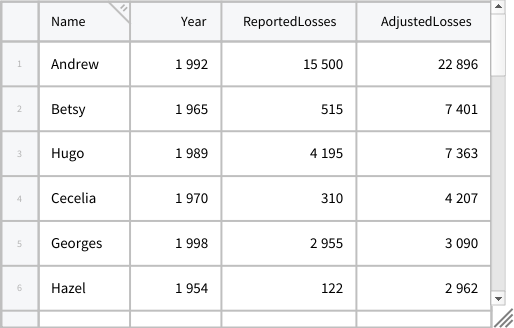 |
| In[36]:= | ![ResourceFunction[
"AssociateColumns", ResourceSystemBase -> "https://www.wolframcloud.com/obj/resourcesystem/api/1.0"][tabHurricanes, "Year" -> "Name" -> "ReportedLosses", Sort] // KeySort](https://www.wolframcloud.com/obj/resourcesystem/images/44f/44f10a20-dcdd-4430-92d8-6daec9da5f77/74ad7736e3862d9f.png) |
| Out[36]= |  |
| In[37]:= | ![ResourceFunction[
"AssociateColumns", ResourceSystemBase -> "https://www.wolframcloud.com/obj/resourcesystem/api/1.0"][tabHurricanes, "Year" -> "Name" -> "ReportedLosses", {Sort, Identity}] // KeySort](https://www.wolframcloud.com/obj/resourcesystem/images/44f/44f10a20-dcdd-4430-92d8-6daec9da5f77/54568ea7907a4ae3.png) |
| Out[37]= |  |
This work is licensed under a Creative Commons Attribution 4.0 International License




