Details and Options
AlgebraicRange creates ranges made of
algebraic numbers. This extends the basic concept of
Range to include, besides
Rational numbers, also roots, always restricted to the
Reals domain.
The first two arguments represent the bounds of the range (minimum and maximum values), while the optional third and fourth arguments (by default equal to 1 and 0) regulate the upper and lower bounds of the steps (differences between successive elements).
If no step parameter is specified, the elementary algebraic range
ResourceFunction["AlgebraicRange"][x,y] is determined by the square root range
Sqrt[Range[x^2,y^2]], for
x,y>0. The extension to negative bounds
x <0 or
y<0 is performed simply by reflection, since general real roots are mathematically defined only for positive arguments.
The step between successive algebraics is not straightforward to define univocally, as there exists no constant difference among the irrational numbers generated even with the elementary algebraic range. However, it turns out that an intuitively simple class of algebraic ranges, with non-unit step parameter
s, is obtained by taking the Outer product of
ResourceFunction["AlgebraicRange"][Min[x,x/s],y] with
Join[Range[0,Max[1, s], s], Range[Max[1, s], y, s]], for
0<s<=y-x and
0<=x<=y. Then the parameter
s also becomes the upper bound for all the steps. For example,

This definition of algebraic step is more easily conveyed in terms of
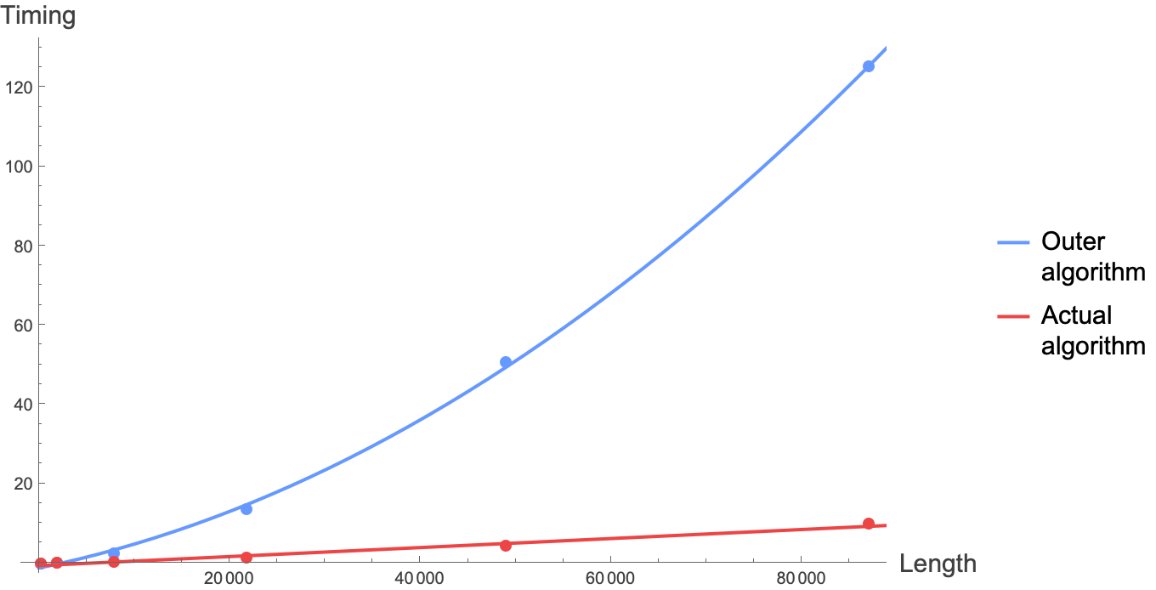
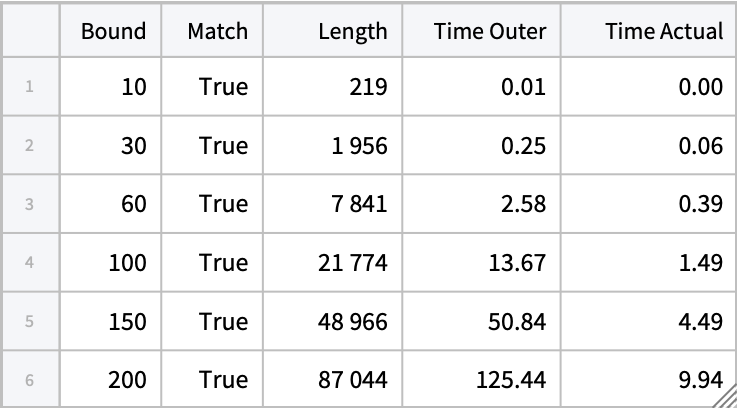
Outer, but if implemented literally it would lead to an intrinsically inefficient algorithm, for which
Timing would scale quadratically with respect to the size of the input arguments. Thus, the actual algorithm implemented by
ResourceFunction["AlgebraicRange"] generates output equivalent to
Outer but is internally more refined - crucially leveraging the function
Nearest inside
For loops - and effectively scales with linear time complexity.
The algebraic numbers thus generated can often be in a great number, with a tendency to accumulate towards certain points. To avoid these features, a further fourth argument d can be optionally provided to require a minimum (absolute value) difference between successive algebraics, that is a lower bound for all the steps. This truncation process typically leads to a nearly uniform distribution of numeric values.
Extended functionality and syntax, especially for creating algebraic numbers of a more general form, are provided in the homonymous function of the paclet
DanieleGregori/GeneralizedRange.
A natural application of AlgebraicRange is in the search for closed forms for floating point numbers, possibly in terms of arbitrary combinations of mathematical functions with algebraic arguments, through ResourceFunction["
FindClosedForm"].
ResourceFunction["AlgebraicRange"] accepts the following options:
| "RootOrder" | 2 | the root orders to be included |
| "StepMethod" | "Outer" | change the method to define the step |
| "FareyRange" | False | generate algebraic numbers with steps given by the Farey sequence |
| "FormulaComplexity" | Infinity | set a complexity threshold over which the algebraics are discarded |
| "AlgebraicsOnly" | True | accept only algebraic arguments and output |
| WorkingPrecision | MachinePrecision | set the precision for all internal numerical evaluations |
The option "RootOrder" can take the following values:
| r | include roots up to r order |
| {r} | include only roots of order r |
| {r1,r2,…} | include roots of all specified orders rk |
The option "StepMethod" can be used to define the step in ResourceFunction["AlgebraicRange"][x,y,s] and can take the following values, for 0<=x<=y, 0<s<=y-x:
| "Outer" | take the Outer product of ResourceFunction["AlgebraicRange"][Min[x,x/s],y] with Join[Range[0,Max[1, s], s]],Range[Max[1, s], y, s]] |
| "Root" | use Sqrt[Range[x^2,y^2,s^2]] |
A more detailed explanation of the step definition, also for negative arguments, can be found in the Properties and Relations examples.
Besides using the fourth argument to impose a lower bound on the steps, another way to restrict the output of
ResourceFunction["AlgebraicRange"] is by setting a threshold for the complexity of the numeric expressions involved through the option "FormulaComplexity". The corresponding numerical values are not meaningful in practice and should be determined through a heuristic approach. A user interested in precise computations of the underlying
homonymous function may use the paclet "
DanieleGregori/GeneralizedRange".
![range = ResourceFunction["AlgebraicRange"][3]](https://www.wolframcloud.com/obj/resourcesystem/images/f28/f2845916-4390-430d-b931-a23f7effc07c/2116c78c718f229b.png)

![NumberLinePlot[range]](https://www.wolframcloud.com/obj/resourcesystem/images/f28/f2845916-4390-430d-b931-a23f7effc07c/20d960fad275c905.png)

![range = ResourceFunction["AlgebraicRange"][0, 3, 1/2]](https://www.wolframcloud.com/obj/resourcesystem/images/f28/f2845916-4390-430d-b931-a23f7effc07c/3b89a1a3c8f845fe.png)

![NumberLinePlot[range]](https://www.wolframcloud.com/obj/resourcesystem/images/f28/f2845916-4390-430d-b931-a23f7effc07c/767eae114ec63738.png)

![range = ResourceFunction["AlgebraicRange"][-3, -1]](https://www.wolframcloud.com/obj/resourcesystem/images/f28/f2845916-4390-430d-b931-a23f7effc07c/296e02448bdd1e5a.png)

![NumberLinePlot[range]](https://www.wolframcloud.com/obj/resourcesystem/images/f28/f2845916-4390-430d-b931-a23f7effc07c/731fd0bb33149f0f.png)

![range = ResourceFunction["AlgebraicRange"][2, -2, -1/2]](https://www.wolframcloud.com/obj/resourcesystem/images/f28/f2845916-4390-430d-b931-a23f7effc07c/757b31f1147c066b.png)

![NumberLinePlot[range]](https://www.wolframcloud.com/obj/resourcesystem/images/f28/f2845916-4390-430d-b931-a23f7effc07c/6ae42c15c57460e5.png)

![range = ResourceFunction["AlgebraicRange"][2, 7, 1/3, 1/4]](https://www.wolframcloud.com/obj/resourcesystem/images/f28/f2845916-4390-430d-b931-a23f7effc07c/437bb0bae4d13bc8.png)

![NumberLinePlot[range]](https://www.wolframcloud.com/obj/resourcesystem/images/f28/f2845916-4390-430d-b931-a23f7effc07c/6d00a9e04f6f2d89.png)

![N@MinMax@Differences[range]](https://www.wolframcloud.com/obj/resourcesystem/images/f28/f2845916-4390-430d-b931-a23f7effc07c/2aa94ce645f05b5d.png)

![ResourceFunction["AlgebraicRange"][Sqrt[1 + Sqrt[2]], 7/2, 1/Sqrt[2]]](https://www.wolframcloud.com/obj/resourcesystem/images/f28/f2845916-4390-430d-b931-a23f7effc07c/1c2903875e360ab9.png)

![ResourceFunction["AlgebraicRange"][2, "RootOrder" -> 3]](https://www.wolframcloud.com/obj/resourcesystem/images/f28/f2845916-4390-430d-b931-a23f7effc07c/7142eec6e14297ed.png)

![ResourceFunction["AlgebraicRange"][0, 4, 2, "RootOrder" -> {4}]](https://www.wolframcloud.com/obj/resourcesystem/images/f28/f2845916-4390-430d-b931-a23f7effc07c/16bd6a7951cda607.png)

![ResourceFunction["AlgebraicRange"][1, 3/2, "RootOrder" -> {3, 5}]](https://www.wolframcloud.com/obj/resourcesystem/images/f28/f2845916-4390-430d-b931-a23f7effc07c/49d2b398d2865ab0.png)

![ResourceFunction["AlgebraicRange"][0, 4, 2, 1/4, "RootOrder" -> 4]](https://www.wolframcloud.com/obj/resourcesystem/images/f28/f2845916-4390-430d-b931-a23f7effc07c/1299aa6737145907.png)

![rootRg = ResourceFunction["AlgebraicRange"][0, 3, 1/3, "StepMethod" -> "Root"]](https://www.wolframcloud.com/obj/resourcesystem/images/f28/f2845916-4390-430d-b931-a23f7effc07c/620bf6d0caab4ffd.png)

![outerRg = ResourceFunction["AlgebraicRange"][0, 3, 1/3]](https://www.wolframcloud.com/obj/resourcesystem/images/f28/f2845916-4390-430d-b931-a23f7effc07c/6ab5199601068f8c.png)

![NumberLinePlot[{rootRg, outerRg}, PlotLegends -> {"Root", "Outer"}]](https://www.wolframcloud.com/obj/resourcesystem/images/f28/f2845916-4390-430d-b931-a23f7effc07c/7a9a191bdc02759c.png)

![algFareyRg = ResourceFunction["AlgebraicRange"][0, 3, 1/3, "FareyRange" -> True]](https://www.wolframcloud.com/obj/resourcesystem/images/f28/f2845916-4390-430d-b931-a23f7effc07c/343ebe76937f974c.png)

![fareyRg = ResourceFunction["FareyRange"][0, 3, 3]](https://www.wolframcloud.com/obj/resourcesystem/images/f28/f2845916-4390-430d-b931-a23f7effc07c/15f87aedb519b363.png)

![SubsetQ[algFareyRg, fareyRg]](https://www.wolframcloud.com/obj/resourcesystem/images/f28/f2845916-4390-430d-b931-a23f7effc07c/7c9717631944f3da.png)

![fareySq = FareySequence[3]~DeleteCases~0](https://www.wolframcloud.com/obj/resourcesystem/images/f28/f2845916-4390-430d-b931-a23f7effc07c/3f05756a0548fbd5.png)

![SortBy[Union@
Flatten@Map[ResourceFunction["AlgebraicRange"][0, 3, #] &, fareySq], N] == ResourceFunction["AlgebraicRange"][0, 3, 3, "FareyRange" -> True]](https://www.wolframcloud.com/obj/resourcesystem/images/f28/f2845916-4390-430d-b931-a23f7effc07c/4655b363bd088d41.png)

![ResourceFunction["AlgebraicRange"][1, 4, 1, "RootOrder" -> 4] // Short](https://www.wolframcloud.com/obj/resourcesystem/images/f28/f2845916-4390-430d-b931-a23f7effc07c/0ded0c2807e0e9cb.png)

![NumberLinePlot[%]](https://www.wolframcloud.com/obj/resourcesystem/images/f28/f2845916-4390-430d-b931-a23f7effc07c/140870934518c176.png)

![ResourceFunction["AlgebraicRange"][1, 4, 1, 1/10, "RootOrder" -> 4]](https://www.wolframcloud.com/obj/resourcesystem/images/f28/f2845916-4390-430d-b931-a23f7effc07c/32274b84765bdd36.png)

![NumberLinePlot[%]](https://www.wolframcloud.com/obj/resourcesystem/images/f28/f2845916-4390-430d-b931-a23f7effc07c/0bee51bfac49cd1a.png)

![ResourceFunction["AlgebraicRange"][4, "RootOrder" -> 4, "FormulaComplexity" -> 8]](https://www.wolframcloud.com/obj/resourcesystem/images/f28/f2845916-4390-430d-b931-a23f7effc07c/1a3ea683a83d3094.png)

![NumberLinePlot[%]](https://www.wolframcloud.com/obj/resourcesystem/images/f28/f2845916-4390-430d-b931-a23f7effc07c/045410da0709a7de.png)

![machPrecRg = With[{s = 10^(-17)},
ResourceFunction["AlgebraicRange"][Sqrt[1 - 25 s], Sqrt[1 + 25 s], s]]](https://www.wolframcloud.com/obj/resourcesystem/images/f28/f2845916-4390-430d-b931-a23f7effc07c/7bf2573c43837731.png)

![Min@Differences@N[machPrecRg, 20]](https://www.wolframcloud.com/obj/resourcesystem/images/f28/f2845916-4390-430d-b931-a23f7effc07c/258ebe97c9e5a0b3.png)

![highPrecRg = With[{s = 10^(-17)},
ResourceFunction["AlgebraicRange"][Sqrt[1 - 25 s], Sqrt[1 + 25 s], s, WorkingPrecision -> 20]];](https://www.wolframcloud.com/obj/resourcesystem/images/f28/f2845916-4390-430d-b931-a23f7effc07c/107b5fe5a122127b.png)
![Short[highPrecRg, 10]](https://www.wolframcloud.com/obj/resourcesystem/images/f28/f2845916-4390-430d-b931-a23f7effc07c/394f18d38ed50316.png)

![Min@Differences@N[highPrecRg, 20]](https://www.wolframcloud.com/obj/resourcesystem/images/f28/f2845916-4390-430d-b931-a23f7effc07c/589ee0e775cf3c7e.png)

![highPrecRg2 = Block[{s = 10^(-50), $MaxExtraPrecision = 100},
ResourceFunction["AlgebraicRange"][Sqrt[1 - 2 s], Sqrt[1 + 2 s], s, WorkingPrecision -> 60]]](https://www.wolframcloud.com/obj/resourcesystem/images/f28/f2845916-4390-430d-b931-a23f7effc07c/6908160ee2c5e54a.png)

![N[highPrecRg2, 60] // Column](https://www.wolframcloud.com/obj/resourcesystem/images/f28/f2845916-4390-430d-b931-a23f7effc07c/52dde9accfb81bd6.png)

![ResourceFunction["AlgebraicRange"][0, 5, Sqrt[E]]](https://www.wolframcloud.com/obj/resourcesystem/images/f28/f2845916-4390-430d-b931-a23f7effc07c/0faa1b7439b8be9e.png)

![ResourceFunction["AlgebraicRange"][0, 5, Sqrt[E], "AlgebraicsOnly" -> False]](https://www.wolframcloud.com/obj/resourcesystem/images/f28/f2845916-4390-430d-b931-a23f7effc07c/743a379549b77589.png)

![Element[%, Algebraics]](https://www.wolframcloud.com/obj/resourcesystem/images/f28/f2845916-4390-430d-b931-a23f7effc07c/25866c227d307e92.png)

![ResourceFunction["FindClosedForm"][1.05592, BarnesG, "SearchRange" -> Function[ResourceFunction["AlgebraicRange"][-#, #, "RootOrder" -> 4]]]](https://www.wolframcloud.com/obj/resourcesystem/images/f28/f2845916-4390-430d-b931-a23f7effc07c/22a4984919700329.png)

![N[%]](https://www.wolframcloud.com/obj/resourcesystem/images/f28/f2845916-4390-430d-b931-a23f7effc07c/3563f4153141bf1b.png)

![ResourceFunction["FindClosedForm"][1.05592, BarnesG, "SearchRange" -> "Plain"]](https://www.wolframcloud.com/obj/resourcesystem/images/f28/f2845916-4390-430d-b931-a23f7effc07c/38b86de25ff9a977.png)

![N[%]](https://www.wolframcloud.com/obj/resourcesystem/images/f28/f2845916-4390-430d-b931-a23f7effc07c/59b0388b125ad0b8.png)

![ResourceFunction["AlgebraicRange"][-3, 3, 1/3, "RootOrder" -> 4] // Short](https://www.wolframcloud.com/obj/resourcesystem/images/f28/f2845916-4390-430d-b931-a23f7effc07c/30994fa132665de9.png)

![MemberQ[%, 4/3]](https://www.wolframcloud.com/obj/resourcesystem/images/f28/f2845916-4390-430d-b931-a23f7effc07c/393857d15d198a7c.png)

![N[4 Sqrt[5 + Sqrt[2]], 10]](https://www.wolframcloud.com/obj/resourcesystem/images/f28/f2845916-4390-430d-b931-a23f7effc07c/5282526243fb6de7.png)

![RootApproximant[%] // ToRadicals](https://www.wolframcloud.com/obj/resourcesystem/images/f28/f2845916-4390-430d-b931-a23f7effc07c/0e15d3b31334094f.png)

![ResourceFunction["FindClosedForm"][10.13051909, Identity, "SearchRange" -> Function[
Join[ResourceFunction["AlgebraicRange"][1, #, 1/2], ResourceFunction["AlgebraicRange"][Sqrt[1 + Sqrt[2]], #, 1/Sqrt[2]]]]]](https://www.wolframcloud.com/obj/resourcesystem/images/f28/f2845916-4390-430d-b931-a23f7effc07c/56f53a387a8c6a4b.png)

![algrange = ResourceFunction["AlgebraicRange"][2, 5]](https://www.wolframcloud.com/obj/resourcesystem/images/f28/f2845916-4390-430d-b931-a23f7effc07c/500395e03de8eb31.png)

![range = Range[2, 5]](https://www.wolframcloud.com/obj/resourcesystem/images/f28/f2845916-4390-430d-b931-a23f7effc07c/3f1f1f6cb81e5e5f.png)

![SubsetQ[algrange, range]](https://www.wolframcloud.com/obj/resourcesystem/images/f28/f2845916-4390-430d-b931-a23f7effc07c/3f85984ca740cfc9.png)

![algrange = ResourceFunction["AlgebraicRange"][3/Sqrt@2, 4]](https://www.wolframcloud.com/obj/resourcesystem/images/f28/f2845916-4390-430d-b931-a23f7effc07c/00e1987cba3970a8.png)

![range = Range[3/Sqrt@2, 4]](https://www.wolframcloud.com/obj/resourcesystem/images/f28/f2845916-4390-430d-b931-a23f7effc07c/1a474ee56d70b5f8.png)

![Complement[range, algrange]](https://www.wolframcloud.com/obj/resourcesystem/images/f28/f2845916-4390-430d-b931-a23f7effc07c/51a206f8d8605018.png)

![ResourceFunction["AlgebraicRange"][-3, -1]](https://www.wolframcloud.com/obj/resourcesystem/images/f28/f2845916-4390-430d-b931-a23f7effc07c/117a476e0365d51a.png)

![Reverse[-ResourceFunction["AlgebraicRange"][1, 3]]](https://www.wolframcloud.com/obj/resourcesystem/images/f28/f2845916-4390-430d-b931-a23f7effc07c/72c656b1a42c3fa3.png)

![ResourceFunction["AlgebraicRange"][1, 3, 1/2]](https://www.wolframcloud.com/obj/resourcesystem/images/f28/f2845916-4390-430d-b931-a23f7effc07c/35357c1a1b54d416.png)

![Select[SortBy[
Outer[Times, Range[0, 3, 1/2], ResourceFunction["AlgebraicRange"][1, 3]] // Flatten // DeleteDuplicates, N], 1 <= # <= 3 &]](https://www.wolframcloud.com/obj/resourcesystem/images/f28/f2845916-4390-430d-b931-a23f7effc07c/52c110c3eab08d15.png)

![ResourceFunction["AlgebraicRange"][3, 3/2, -1/Sqrt[3]]](https://www.wolframcloud.com/obj/resourcesystem/images/f28/f2845916-4390-430d-b931-a23f7effc07c/3eb4e3bd2bedf06e.png)

![Select[ReverseSortBy[
Outer[Times, Join[Range[0, 1, 1/Sqrt[3]], Range[1, 3, 1/Sqrt[3]]], Range[3^2, (3/2)^2, -1]^(1/2)] // Flatten // DeleteDuplicates, N],
3/2 <= # <= 3 &]](https://www.wolframcloud.com/obj/resourcesystem/images/f28/f2845916-4390-430d-b931-a23f7effc07c/66dd520734064065.png)

![ResourceFunction["AlgebraicRange"][-3/2, 3/2, 1/3]](https://www.wolframcloud.com/obj/resourcesystem/images/f28/f2845916-4390-430d-b931-a23f7effc07c/1e719e796f617385.png)

![ResourceFunction["AlgebraicRange"][-Sqrt[2], 3/2, 1/3]](https://www.wolframcloud.com/obj/resourcesystem/images/f28/f2845916-4390-430d-b931-a23f7effc07c/2beb5b5ebf4410c7.png)

![ResourceFunction["AlgebraicRange"][Sqrt[10], -Sqrt[10], -2]](https://www.wolframcloud.com/obj/resourcesystem/images/f28/f2845916-4390-430d-b931-a23f7effc07c/7952d957241745d6.png)

![ResourceFunction["AlgebraicRange"][
2 Sqrt[2 + Sqrt[3]], -2 Sqrt[2 + Sqrt[3]], -Sqrt[5]] // Simplify](https://www.wolframcloud.com/obj/resourcesystem/images/f28/f2845916-4390-430d-b931-a23f7effc07c/49942d685686a03a.png)

![algrange = Block[{$MaxExtraPrecision = 200000}, ResourceFunction["AlgebraicRange"][
2 Sqrt[1 + Sqrt@RandomInteger[{2, 5}]], -2 Sqrt[
1 + Sqrt@RandomInteger[{2, 5}]], -Sqrt[2]/RandomInteger[{2, 5}], 1/4, "RootOrder" -> RandomInteger[{2, 5}, 2]]]](https://www.wolframcloud.com/obj/resourcesystem/images/f28/f2845916-4390-430d-b931-a23f7effc07c/5f228d22a0022646.png)

![Element[algrange, Algebraics]](https://www.wolframcloud.com/obj/resourcesystem/images/f28/f2845916-4390-430d-b931-a23f7effc07c/5b1aaf577b295d9b.png)

![Element[algrange, Reals]](https://www.wolframcloud.com/obj/resourcesystem/images/f28/f2845916-4390-430d-b931-a23f7effc07c/02ad23f17a605da5.png)

![ResourceFunction["AlgebraicRange"][Sqrt[1 - Sqrt[2]], 4, 1/Sqrt[2]]](https://www.wolframcloud.com/obj/resourcesystem/images/f28/f2845916-4390-430d-b931-a23f7effc07c/46d001c8fc6a4e5a.png)

![range = ResourceFunction["AlgebraicRange"][0.1, 3.1]](https://www.wolframcloud.com/obj/resourcesystem/images/f28/f2845916-4390-430d-b931-a23f7effc07c/0f326290ce9cce23.png)

![N[range]](https://www.wolframcloud.com/obj/resourcesystem/images/f28/f2845916-4390-430d-b931-a23f7effc07c/3ccd52edb8c25281.png)

![approxrange = ResourceFunction["AlgebraicRange"][1.266314886, 3]](https://www.wolframcloud.com/obj/resourcesystem/images/f28/f2845916-4390-430d-b931-a23f7effc07c/169c2c612c4c1c90.png)

![N[approxrange]](https://www.wolframcloud.com/obj/resourcesystem/images/f28/f2845916-4390-430d-b931-a23f7effc07c/32cdbb1f4b9d4160.png)

![range = ResourceFunction["AlgebraicRange"][1/2 Sqrt[5 + Sqrt[2]], 3]](https://www.wolframcloud.com/obj/resourcesystem/images/f28/f2845916-4390-430d-b931-a23f7effc07c/754ede1e55faf534.png)

![N[range - approxrange]](https://www.wolframcloud.com/obj/resourcesystem/images/f28/f2845916-4390-430d-b931-a23f7effc07c/584c669e02d62a69.png)

![NumberLinePlot[{approxrange, range}]](https://www.wolframcloud.com/obj/resourcesystem/images/f28/f2845916-4390-430d-b931-a23f7effc07c/45991af40db7480e.png)

![ResourceFunction["AlgebraicRange"][-3, -1, 1/3, 1/4]](https://www.wolframcloud.com/obj/resourcesystem/images/f28/f2845916-4390-430d-b931-a23f7effc07c/1b5c4f98bf2c96fe.png)

![Max@Differences@N[%]](https://www.wolframcloud.com/obj/resourcesystem/images/f28/f2845916-4390-430d-b931-a23f7effc07c/254f8dae54981238.png)

![outerAlgebraicRange[x_, y_, s_] /; x <= y && 0 < s <= y - x :=
Select[
SortBy[
Outer[
Times,
Join[
Range[0, Max[1, s], s],
Range[Max[1, s], Max[Abs[x], Abs[y]], s]],
ResourceFunction["AlgebraicRange"][
If[x > 0, Min[x, x/s], Max[x, x/s]],
y]]
// Flatten,
N],
x <= # <= y &] //
DeleteDuplicatesBy[N]](https://www.wolframcloud.com/obj/resourcesystem/images/f28/f2845916-4390-430d-b931-a23f7effc07c/6f911f54b39227ed.png)
![outerRg = outerAlgebraicRange[0, 2, 2/3]](https://www.wolframcloud.com/obj/resourcesystem/images/f28/f2845916-4390-430d-b931-a23f7effc07c/2d649d0c440abd11.png)

![ResourceFunction["AlgebraicRange"][0, 2, 2/3] == outerRg](https://www.wolframcloud.com/obj/resourcesystem/images/f28/f2845916-4390-430d-b931-a23f7effc07c/3f777ba643fa1c10.png)

![LeafCount[outerRg]](https://www.wolframcloud.com/obj/resourcesystem/images/f28/f2845916-4390-430d-b931-a23f7effc07c/2908877dc5ae8540.png)

![rootAlgebraicRange[x_, y_, s_] /; 0 <= x <= y && s > 0 :=
Sqrt[Range[x^2, y^2, s^2]]](https://www.wolframcloud.com/obj/resourcesystem/images/f28/f2845916-4390-430d-b931-a23f7effc07c/1857428965015550.png)
![rootRg = rootAlgebraicRange[0, 2, 2/3]](https://www.wolframcloud.com/obj/resourcesystem/images/f28/f2845916-4390-430d-b931-a23f7effc07c/293fe9a73d195438.png)

![ResourceFunction["AlgebraicRange"][0, 2, 2/3, "StepMethod" -> "Root"] == rootRg](https://www.wolframcloud.com/obj/resourcesystem/images/f28/f2845916-4390-430d-b931-a23f7effc07c/0674d7d056118acd.png)

![LeafCount[rootRg]](https://www.wolframcloud.com/obj/resourcesystem/images/f28/f2845916-4390-430d-b931-a23f7effc07c/09971d5303b4ea7f.png)


![job = RemoteBatchSubmit[ CompoundExpression[ timesO = {}; timesA = {}; lens = {}; checks = {};, Table[ Block[{resO, resA, timeO, timeA, check, len}, {timeO, resO} = outerAlgebraicRange[0, r, 1/2] // RepeatedTiming;
AppendTo[timesO, timeO]; {timeA, resA} = ResourceFunction["AlgebraicRange"][0, r, 1/2] // RepeatedTiming;
AppendTo[timesA, timeA]; check = resO == resA;
AppendTo[checks, check]; len = Length[resA];
AppendTo[lens, len];], {r, maxs}], <|"Bound" -> maxs, "Match" -> checks, "Length" -> lens, "Time Outer" -> timesO, "Time Actual" -> timesA|>], RemoteMachineClass -> "Basic4x16"]](https://www.wolframcloud.com/obj/resourcesystem/images/f28/f2845916-4390-430d-b931-a23f7effc07c/47511df3dcac7de7.png)

![job["JobStatus"]](https://www.wolframcloud.com/obj/resourcesystem/images/f28/f2845916-4390-430d-b931-a23f7effc07c/637f783bb80790b9.png)

![job["EvaluationTiming"]](https://www.wolframcloud.com/obj/resourcesystem/images/f28/f2845916-4390-430d-b931-a23f7effc07c/0724b9a8d9198966.png)

![job["CreditsSpent"]](https://www.wolframcloud.com/obj/resourcesystem/images/f28/f2845916-4390-430d-b931-a23f7effc07c/6cda76cab8111a3c.png)

![results = job["EvaluationResult"]](https://www.wolframcloud.com/obj/resourcesystem/images/f28/f2845916-4390-430d-b931-a23f7effc07c/5ae97c66f9387d0a.png)

![tabResults = Tabular[Transpose@Values[results], Keys[results]]](https://www.wolframcloud.com/obj/resourcesystem/images/f28/f2845916-4390-430d-b931-a23f7effc07c/65ff6fabca75f4c8.png)
![With[ {AC = ResourceFunction["AssociateColumns"]}, {lsLenTO = List @@@ Normal@AC[tabResults, "Length" -> "Time Outer"],
lsLenTA = List @@@ Normal@AC[tabResults, "Length" -> "Time Actual"]}, {quadfit = NonlinearModelFit[lsLenTO, a x^2 + b x + c, {a, b, c}, x] // Normal,
linfit = LinearModelFit[lsLenTA, x, x] // Normal, colors = {StandardBlue, StandardRed}, pt = 15, lsMax = Max[tabResults[All, "Length"] // Normal]}, Show[ ListPlot[
{lsLenTO, lsLenTA},
PlotStyle -> Evaluate[Directive[#, PointSize[Large]] & /@ colors], PlotRange -> All], Plot[{quadfit, linfit}, {x, 0, 10^Ceiling[Log10[lsMax]]}, PlotLegends -> {Style["Outer\nalgorithm", pt], Style["Actual\nalgorithm", pt]}, PlotStyle -> colors], AxesLabel -> {Style["Length", pt], Style["Timing", pt]}, ImageSize -> Large]]](https://www.wolframcloud.com/obj/resourcesystem/images/f28/f2845916-4390-430d-b931-a23f7effc07c/3f8284f2c7d3e72e.png)