Wolfram Function Repository
Instant-use add-on functions for the Wolfram Language
Function Repository Resource:
Run an adaptive evolution of a Turing machine
ResourceFunction["AdaptiveTuringMachine"][<|"AdaptiveIterations"→10|>] returns ten steps in an adaptive search, starting from the "always halt" 2-state, 2-color Turing machine and searching for machines that take longer to halt but still halt in finite time. | |
ResourceFunction["AdaptiveTuringMachine"][<|"AdaptiveIterations"→10,"InitialRule"→{rules,{s,k,r}}|>] returns ten steps in an adaptive evolution, starting from the s-state, k-color, r-radius Turing machine specified by rules and searching for machines that take longer to halt but still halt in finite time. | |
ResourceFunction["AdaptiveTuringMachine"][evospec,"FinalState"] returns only the final iteration in the adaptive evolution. | |
ResourceFunction["AdaptiveTuringMachine"][evospec,"BreakthroughStates"] returns only the breakthrough iterations in the adaptive evolution. | |
ResourceFunction["AdaptiveTuringMachine"][evospec,sequencespec,"RulePlot"] returns the plotted Turing machine tape for each step specified by the sequence specification (either "FinalState" or "BreakthroughStates") as a RulePlot. | |
ResourceFunction["AdaptiveTuringMachine"][evospec,sequencespec,"ArrayPlot"] returns the plotted Turing machine tape for each step specified by the sequence specification (either "FinalState" or "BreakthroughStates") as an ArrayPlot. | |
ResourceFunction["AdaptiveTuringMachine"][evospec, sequencespec,"Fitness"] returns only the fitness values. | |
ResourceFunction["AdaptiveTuringMachine"][evospec, sequencespec,propertyspec] returns all the information specified by the property specification. |
| All | (default) returns all the iterations in the evolution |
| "FinalState" | returns the final iteration in the evolution |
| "BreakthroughStates" | returns the breakthrough iterations in the evolution |
| All | returns an association with all the properties listed below |
| "BestRule" | returns the highest fitness rule found so far |
| "BestInitialCondition" | returns the highest fitness initial condition found so far |
| "BestFitness" | returns the highest fitness value found so far |
| "Rule" | returns the rule from that step |
| "InitialCondition" | returns the initial condition from that step |
| "Fitness" | returns the fitness from that step |
| "Lifetime" | the number of steps before the Turing machine halts |
| "Width" | the maximum length non-zero range in the pattern |
| "AspectRatio" | the "Lifetime" metric divided by the "Width" |
| "Index" | the iteration index |
| {"BestRule", "BestFitness"} | (default) returns an association with best rule and fitness found so far |
| {propertyspec1,…,propertyspecn} | returns an association with the specified properties |
| "InitialRule" | {7183,{2,2,1}} | the initial rule, and the state-space, color-space, and radius to use |
| "InitialCondition" | {1,{{1},0}} | the initial condition |
| "MaxSteps" | 100 | the number of steps to search to determine if the Turing machine halts |
| "AdaptiveIterations" | 1000 | the number of iterations to do in the adaptive evolution |
| "MutationFunction" | 1 | the type and number of mutations to do |
| "FitnessFunction" | "Lifetime" | the fitness function to use |
| "SelectionFunction" | #1>=#2& | the selection function to use |
| "Lifetime" | evolve to a longer finite lifetime |
| "Width" | evolve to a wider pattern that still halts |
| "AspectRatio" | evolve to a larger aspect ratio defined as the lifetime over the width |
| type→target | evolve to a target value for the given fitness type |
| func | a function taking the rule and initial condition and returning the fitness to assign |
| n | randomly mutate a single case in the rule n times |
| "Rule" -> n | randomly mutate a single case in the rule n times |
| "InitialCondition" -> n | randomly mutate n bits of the initial tape |
| "InitialCondition" -> {False,n} | randomly mutate n bits of the initial tape |
| "InitialCondition" -> {True,n} | randomly mutate n bits of the initial tape and randomly mutate the initial state of the Turing machine head |
| fun | a function taking the rule and returning the mutated version |
| <|"Rule"→funrule, "InitialCondition"→funic|> | mutates the rule and initial condition using the specified functions |
| "PlottingRegion" | "Lifetime" | accepts any time and offset specification for the TuringMachine function |
| "PlotSizingFunction" | ({Automatic,30Sqrt[#Height]}&) | takes arguments "Height" and "Width" and returns an ImageSize specification |
| "PlottingFunction" | Automatic | takes arguments from the state and returns a plot |
| "PlotLabels" | None | takes "Lifetime", "Width", "AspectRatio" or a function that is applied to the state |
| "LabelSize" | 11 | size of the labels given to the Style function |
Run a search for 10 steps starting from the "always halt" s=2, k=2, r=1 Turing machine and return every step in the search:
| In[1]:= | ![ResourceFunction[
"AdaptiveTuringMachine"][<|"AdaptiveIterations" -> 10|>, RandomSeeding -> 1004]](https://www.wolframcloud.com/obj/resourcesystem/images/46d/46da1c4a-a062-4245-81e8-45adac78b2a8/05729b9a8688a160.png) |
| Out[1]= |  |
Evolve for 1000 steps and plot the breakthrough mutation steps (i.e., those steps that achieve a new highest fitness) each as a RulePlot:
| In[2]:= | ![ResourceFunction[
"AdaptiveTuringMachine"][<|"AdaptiveIterations" -> 1000, "InitialRule" -> {2442211145482, {3, 3, 1}}|>, "BreakthroughStates", "RulePlot", RandomSeeding -> 1110]](https://www.wolframcloud.com/obj/resourcesystem/images/46d/46da1c4a-a062-4245-81e8-45adac78b2a8/6630164a4b99fbba.png) |
| Out[2]= | 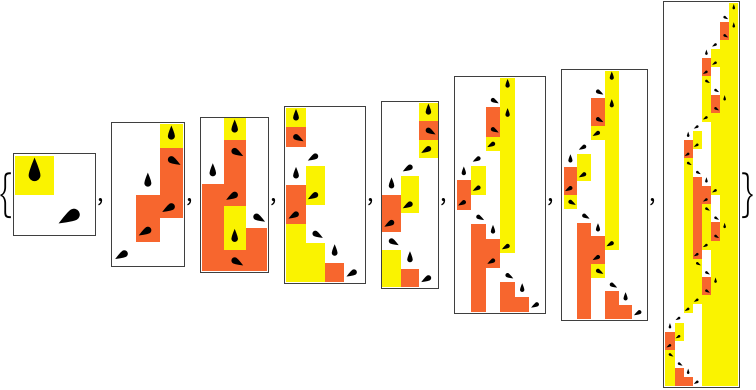 |
Plot the progressive fitness values showing the mutations that weren't selected:
| In[3]:= | ![Show[ListStepPlot[#BestFitness & /@ #], ListPlot[#Fitness & /@ #, PlotStyle -> Red]] &[
ResourceFunction[
"AdaptiveTuringMachine"][<|"AdaptiveIterations" -> 1000, "InitialRule" -> {2442211145482, {3, 3, 1}}|>, All, {"Fitness", "BestFitness"}, RandomSeeding -> 1110]]](https://www.wolframcloud.com/obj/resourcesystem/images/46d/46da1c4a-a062-4245-81e8-45adac78b2a8/0eee36a18c9e9e4c.png) |
| Out[3]= | 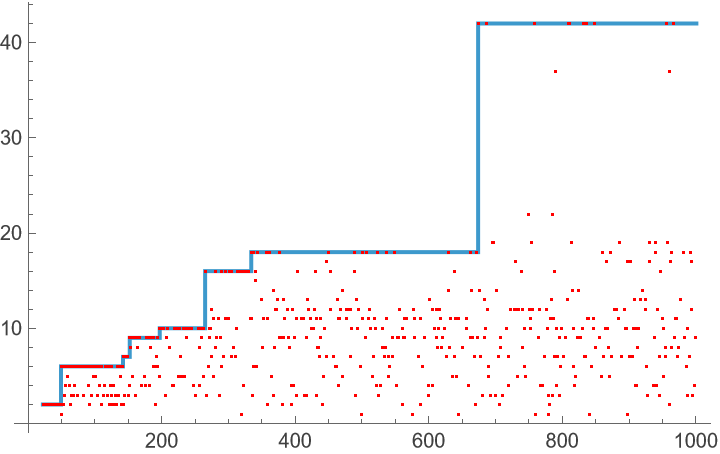 |
Plot the progressive best fitness values for 10 evolutions:
| In[4]:= | ![ListStepPlot[
Table[ResourceFunction[
"AdaptiveTuringMachine"][<|"AdaptiveIterations" -> 1000, "InitialRule" -> {2442211145482, {3, 3, 1}}|>, All, "BestFitness",
RandomSeeding -> 1100 + i], {i, 10}], PlotRange -> All]](https://www.wolframcloud.com/obj/resourcesystem/images/46d/46da1c4a-a062-4245-81e8-45adac78b2a8/3508b58743a9663d.png) |
| Out[4]= | 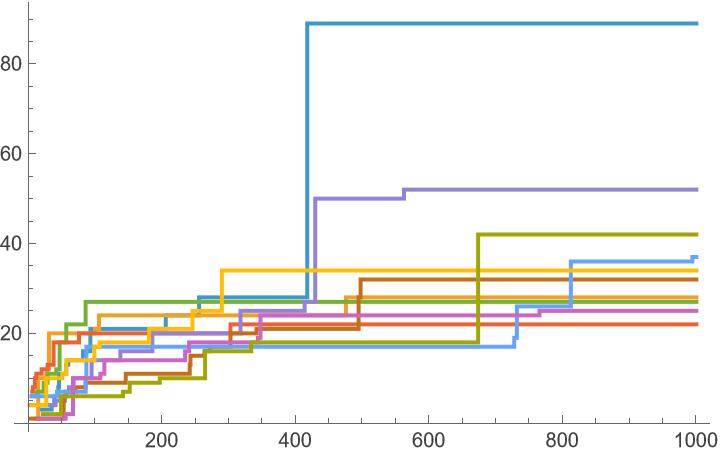 |
Plot the final states of 8 different evolutions:
| In[5]:= | ![Table[ResourceFunction[
"AdaptiveTuringMachine"][<|"AdaptiveIterations" -> 1000, "InitialRule" -> {2442211145482, {3, 3, 1}}|>, "FinalState", "RulePlot", RandomSeeding -> 1111 + i], {i, 8}]](https://www.wolframcloud.com/obj/resourcesystem/images/46d/46da1c4a-a062-4245-81e8-45adac78b2a8/763e23f90dfaa7b7.png) |
| Out[5]= | 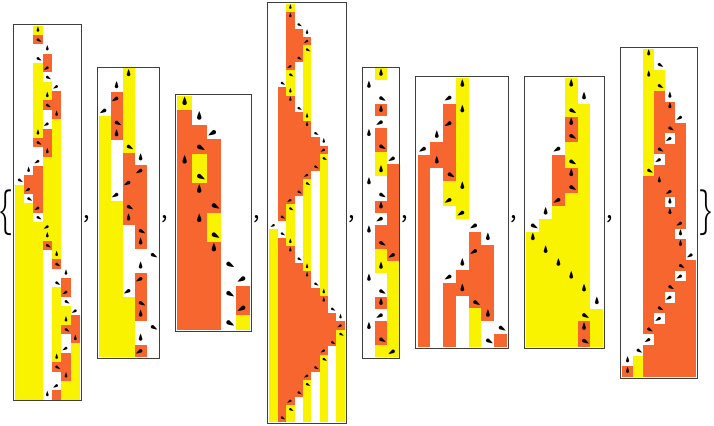 |
Evolve an s = 3, k = 5 Turing machine:
| In[6]:= | ![ResourceFunction[
"AdaptiveTuringMachine"][<|"InitialRule" -> {0, {3, 5, 1}}, "AdaptiveIterations" -> 1500|>, "BreakthroughStates", "RulePlot", RandomSeeding -> 111]](https://www.wolframcloud.com/obj/resourcesystem/images/46d/46da1c4a-a062-4245-81e8-45adac78b2a8/1a778f3cb0fbf832.png) |
| Out[6]= | 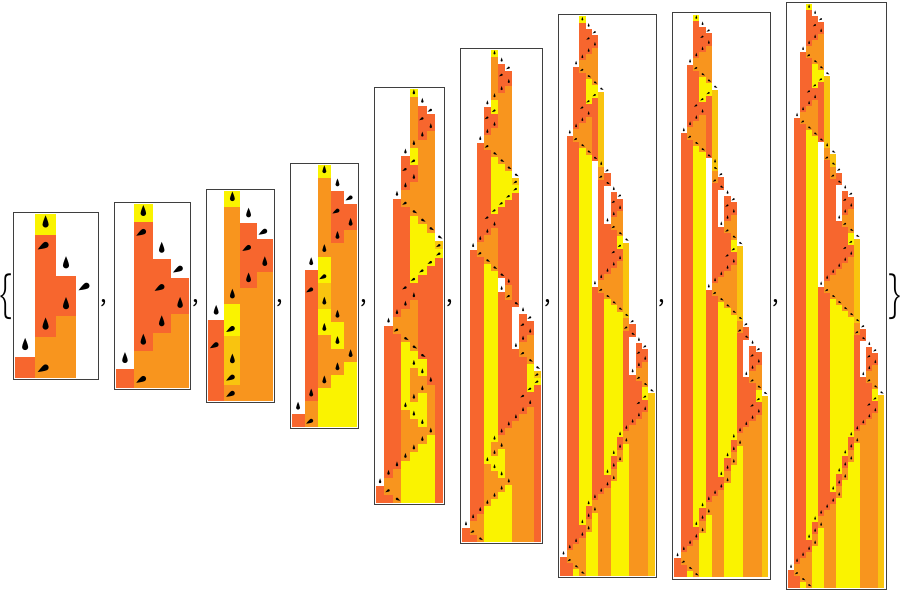 |
Evolve for longer automata using "MaxSteps":
| In[7]:= | ![ResourceFunction[
"AdaptiveTuringMachine"][<|"InitialRule" -> {0, {3, 5, 1}}, "AdaptiveIterations" -> 1500, "MaxSteps" -> 250|>, "BreakthroughStates", "RulePlot", RandomSeeding -> 111]](https://www.wolframcloud.com/obj/resourcesystem/images/46d/46da1c4a-a062-4245-81e8-45adac78b2a8/02094cf49a37ec9f.png) |
| Out[7]= | 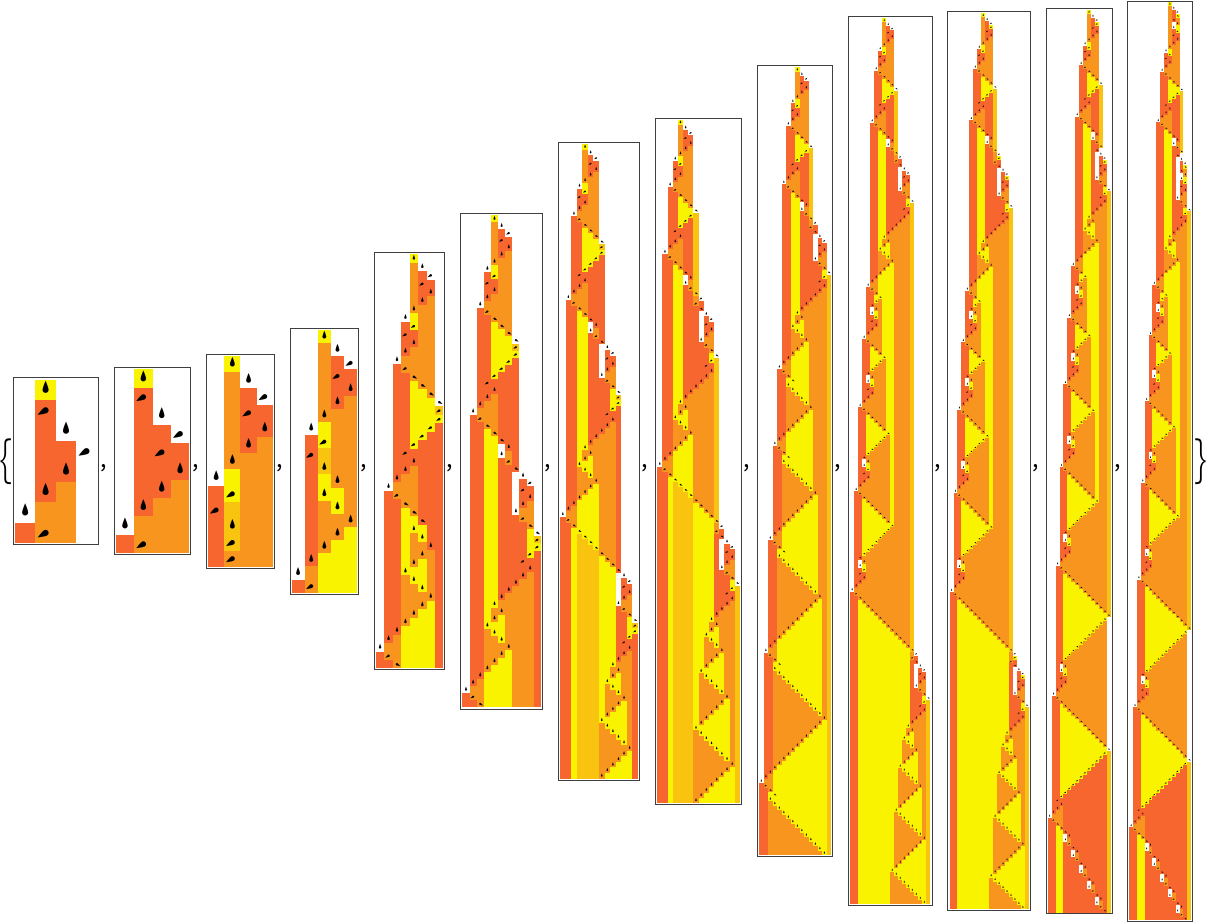 |
Evolve to a specific target lifetime:
| In[8]:= | ![ResourceFunction[
"AdaptiveTuringMachine"][<|"InitialRule" -> {0, {2, 5, 1}}, "AdaptiveIterations" -> 1500, "FitnessFunction" -> "Lifetime" -> 45,
"MaxSteps" -> 250|>, "BreakthroughStates", "RulePlot", "PlotLabels" -> "Lifetime", RandomSeeding -> 1000]](https://www.wolframcloud.com/obj/resourcesystem/images/46d/46da1c4a-a062-4245-81e8-45adac78b2a8/7dd1a47b6385c044.png) |
| Out[8]= | 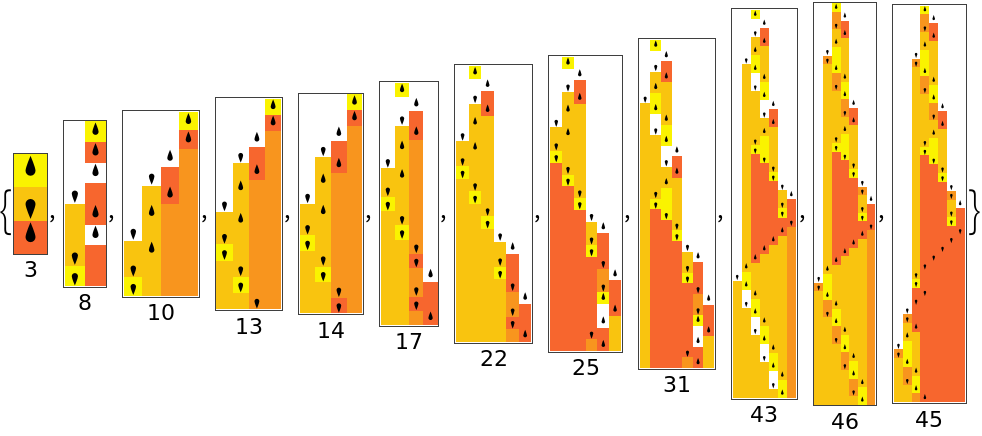 |
8 separate evolutions to a target lifetime of 50:
| In[9]:= | ![ParallelTable[
ResourceFunction[
"AdaptiveTuringMachine"][<|"InitialRule" -> {0, {2, 5, 1}}, "AdaptiveIterations" -> 2500, "FitnessFunction" -> "Lifetime" -> 50, "MaxSteps" -> 250|>, "FinalState", "RulePlot", "PlotLabels" -> "Lifetime", RandomSeeding -> 1000 + i],
{i, 8}
]](https://www.wolframcloud.com/obj/resourcesystem/images/46d/46da1c4a-a062-4245-81e8-45adac78b2a8/36c7292e31a4f4ab.png) |
| Out[9]= | 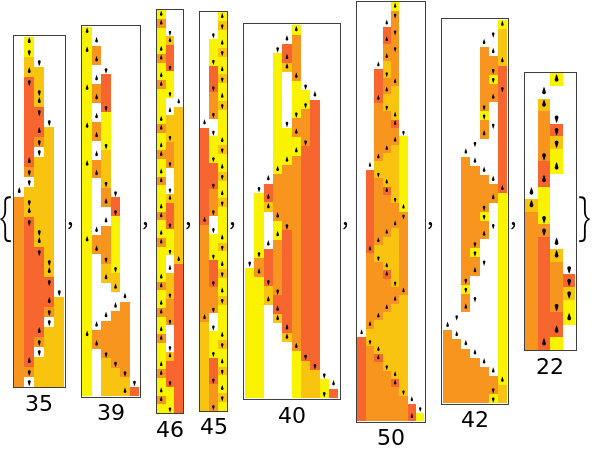 |
See the best fitness progressions:
| In[10]:= | ![ListStepPlot[
ParallelTable[
ResourceFunction[
"AdaptiveTuringMachine"][<|"InitialRule" -> {0, {2, 5, 1}}, "AdaptiveIterations" -> 2500, "FitnessFunction" -> "Lifetime" -> 50, "MaxSteps" -> 250|>, All, "BestFitness", RandomSeeding -> 1000 + i],
{i, 10}
]
]](https://www.wolframcloud.com/obj/resourcesystem/images/46d/46da1c4a-a062-4245-81e8-45adac78b2a8/48be5d74e195e42d.png) |
| Out[10]= | 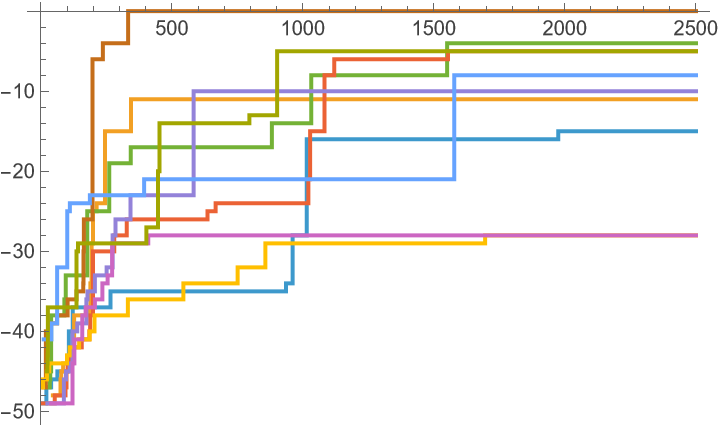 |
Evolve the initial condition of the tape of a Turing machine:
| In[11]:= | ![ResourceFunction[
"AdaptiveTuringMachine"][ <|
"InitialRule" -> {3259223296489, {3, 3, 1}}, "InitialCondition" -> {1, {{0, 0, 0, 0, 0, 0, 0}, 0}}, "MutationFunction" -> ("InitialCondition" -> {False, 1}), "AdaptiveIterations" -> 500|>, "BreakthroughStates", "RulePlot", "PlotLabels" -> "Lifetime", RandomSeeding -> 1002]](https://www.wolframcloud.com/obj/resourcesystem/images/46d/46da1c4a-a062-4245-81e8-45adac78b2a8/6a1dd2835435698b.png) |
| Out[11]= | 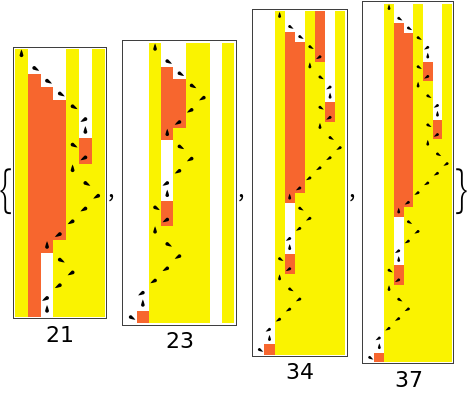 |
Evolve the initial condition of the tape of a Turing machine and the initial state of the machine head:
| In[12]:= | ![ResourceFunction[
"AdaptiveTuringMachine"][ <|
"InitialRule" -> {3259223296489, {3, 3, 1}}, "InitialCondition" -> {1, {{0, 0, 0, 0, 0, 0, 0}, 0}}, "MutationFunction" -> ("InitialCondition" -> {True, 1}), "AdaptiveIterations" -> 500|>, "BreakthroughStates", "RulePlot", "PlotLabels" -> "Lifetime", RandomSeeding -> 1002]](https://www.wolframcloud.com/obj/resourcesystem/images/46d/46da1c4a-a062-4245-81e8-45adac78b2a8/10619d3b76e5caea.png) |
| Out[12]= | 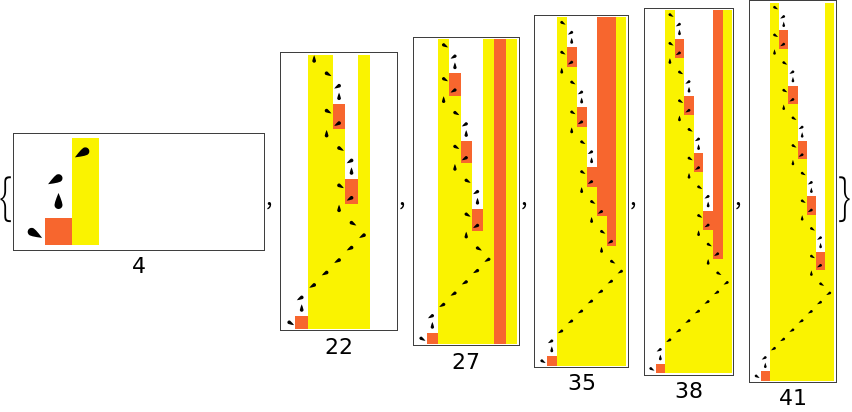 |
The default selection function accepts neutral mutations by default, make it so that it accepts mutations that decrease fitness by 1:
| In[13]:= | ![ResourceFunction[
"AdaptiveTuringMachine"][ <|"InitialRule" -> {101010101, {3, 3, 1}}, "SelectionFunction" -> (#1 >= #2 - 1 &), "AdaptiveIterations" -> 200|>, "BreakthroughStates", "RulePlot", "PlottingRegion" -> 30, "PlotLabels" -> "Lifetime", RandomSeeding -> 1002]](https://www.wolframcloud.com/obj/resourcesystem/images/46d/46da1c4a-a062-4245-81e8-45adac78b2a8/04e926d9d06fc63e.png) |
| Out[13]= | 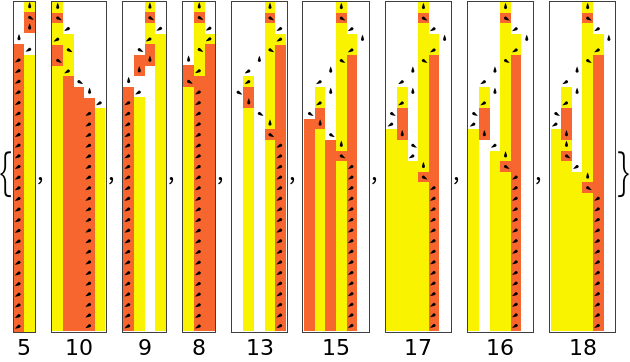 |
Use a custom plot sizing function:
| In[14]:= | ![ResourceFunction[
"AdaptiveTuringMachine"][<|"InitialRule" -> {101010101, {3, 3, 1}}, "AdaptiveIterations" -> 500|>, "BreakthroughStates", "RulePlot", "PlotSizingFunction" -> (3 #Height &), RandomSeeding -> 1002]](https://www.wolframcloud.com/obj/resourcesystem/images/46d/46da1c4a-a062-4245-81e8-45adac78b2a8/03f431080b29a25c.png) |
| Out[14]= | 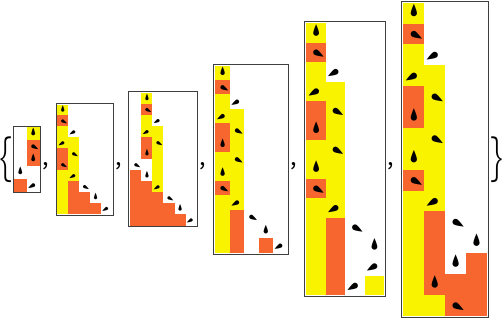 |
Plot using ArrayPlot instead of RulePlot:
| In[15]:= | ![ResourceFunction[
"AdaptiveTuringMachine"][<|"InitialRule" -> {101010101, {3, 3, 1}}, "AdaptiveIterations" -> 500|>, "BreakthroughStates", "ArrayPlot", RandomSeeding -> 1002]](https://www.wolframcloud.com/obj/resourcesystem/images/46d/46da1c4a-a062-4245-81e8-45adac78b2a8/35f67494f2668527.png) |
| Out[15]= | 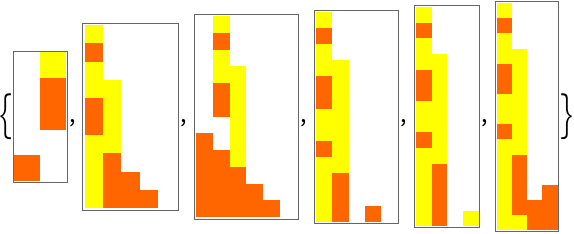 |
When plotting with "RulePlot" or "ArrayPlot", AdaptiveTuringMachine will use any of the options for those functions given:
| In[16]:= | ![ResourceFunction[
"AdaptiveTuringMachine"][<|"InitialRule" -> {101010101, {3, 3, 1}}, "AdaptiveIterations" -> 500|>, "BreakthroughStates", "RulePlot", ColorRules -> {0 -> Blue, 1 -> Pink, 2 -> Green}, RandomSeeding -> 1002]](https://www.wolframcloud.com/obj/resourcesystem/images/46d/46da1c4a-a062-4245-81e8-45adac78b2a8/26d02c7064974b7d.png) |
| Out[16]= | 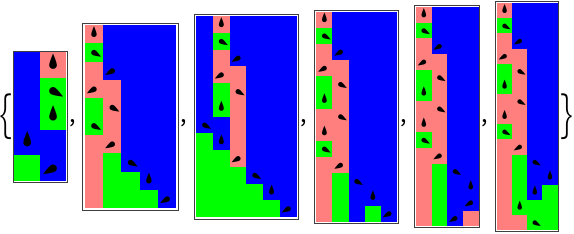 |
| In[17]:= | ![ResourceFunction[
"AdaptiveTuringMachine"][<|"InitialRule" -> {101010101, {3, 3, 1}}, "AdaptiveIterations" -> 500|>, "BreakthroughStates", "ArrayPlot", Mesh -> True, RandomSeeding -> 1002]](https://www.wolframcloud.com/obj/resourcesystem/images/46d/46da1c4a-a062-4245-81e8-45adac78b2a8/69ce7a387e01bfa3.png) |
| Out[17]= | 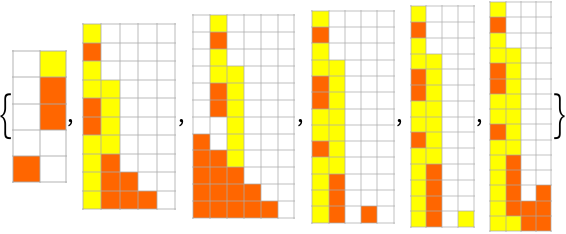 |
Plot with a specified region:
| In[18]:= | ![ResourceFunction[
"AdaptiveTuringMachine"][ <|"InitialRule" -> {101010101, {3, 3, 1}}, "AdaptiveIterations" -> 1000|>, "BreakthroughStates", "RulePlot", "PlottingRegion" -> 30, "PlotLabels" -> "Lifetime", RandomSeeding -> 1002]](https://www.wolframcloud.com/obj/resourcesystem/images/46d/46da1c4a-a062-4245-81e8-45adac78b2a8/267cf34cc28d9c3b.png) |
| Out[18]= | 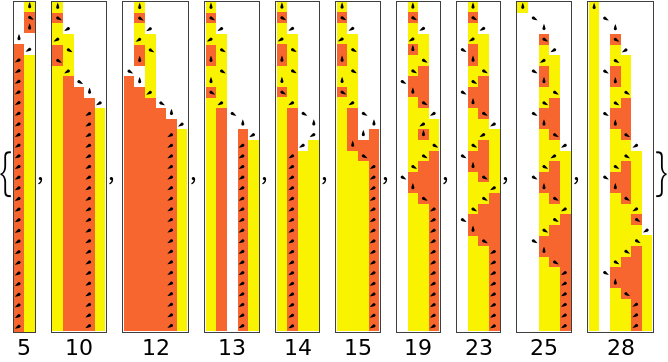 |
The "RulePlot" option does not work if the Turing machine rules specify offsets other than -1, 0, 1 because RulePlot itself does not support such offsets. Here is an example output for AdaptiveTuringMachine when a larger offset and the "RulePlot" option are used:
| In[19]:= | ![ResourceFunction[
"AdaptiveTuringMachine"][<|"AdaptiveIterations" -> 1000, "InitialRule" -> {2442211145482, {3, 3, 2}}|>, "FinalState", "RulePlot", RandomSeeding -> 1110]](https://www.wolframcloud.com/obj/resourcesystem/images/46d/46da1c4a-a062-4245-81e8-45adac78b2a8/5669a27fc35ca394.png) |
| Out[19]= |  |
The following shows a typical RulePlot[TuringMachine[…]] output and an example of it not working for a larger offset:
| In[20]:= | ![RulePlot[TuringMachine[{100, 2, 2, 1}]]](https://www.wolframcloud.com/obj/resourcesystem/images/46d/46da1c4a-a062-4245-81e8-45adac78b2a8/523283f384ee87e9.png) |
| Out[20]= |  |
| In[21]:= | ![RulePlot[TuringMachine[{100, 2, 2, 2}]]](https://www.wolframcloud.com/obj/resourcesystem/images/46d/46da1c4a-a062-4245-81e8-45adac78b2a8/35b12f3b7e5382fd.png) |
| Out[21]= |  |
Wolfram Language 13.0 (December 2021) or above
This work is licensed under a Creative Commons Attribution 4.0 International License