Wolfram Function Repository
Instant-use add-on functions for the Wolfram Language
Function Repository Resource:
Run an adaptive search for cellular automata
ResourceFunction["AdaptiveCellularAutomaton"][<|"AdaptiveIterations"→n|>] returns n steps in an adaptive search, starting from the 3-color null rule and searching for rules that give longer finite length patterns. | |
ResourceFunction["AdaptiveCellularAutomaton"][<|"AdaptiveIterations"→n, "InitialRule"→{0,k,r}|>] returns n steps in an adaptive evolution, starting from the k-color null rule and searching for rules that give longer finite length patterns. | |
ResourceFunction["AdaptiveCellularAutomaton"][evospec,"FinalState"] returns only the final iteration in the adaptive evolution. | |
ResourceFunction["AdaptiveCellularAutomaton"][evospec,"BreakthroughStates"] returns only the breakthrough iterations in the adaptive evolution. | |
ResourceFunction["AdaptiveCellularAutomaton"][evospec,sequencespec,"Plot"] returns the plotted cellular automata for each step specified by the sequence specification. | |
ResourceFunction["AdaptiveCellularAutomaton"][evospec,sequencespec,"Fitness"] returns only the fitness values. | |
ResourceFunction["AdaptiveCellularAutomaton"][evospec,sequencespec,propertyspec] returns all the information specified by the property specification. |
| All | (default) returns all the iterations in the evolution |
| "FinalState" | returns the final iteration in the evolution |
| "BreakthroughStates" | returns the breakthrough iterations in the evolution |
| "RuleChanges" | returns the iterations where the rule was changed in the evolution |
| t | returns iteration t in the evolution |
| {t1…} | returns the iterations specified in the list |
| t1;;t2;;td | returns the iterations t1 through t2 with step size d |
| All | Association with all the properties listed below |
| "BestRule" | most fit rule found so far |
| "BestInitialCondition" | most fit initial condition found so far |
| "BestFitness" | highest fitness value found so far |
| "Rule" | rule that was tried at each step |
| "InitialCondition" | initial condition that was tried at each step |
| "Fitness" | fitness at each step |
| "Lifetime" | number of steps before the automaton reaches the all-white state |
| "Width" | maximum length non-zero range in the pattern |
| "AspectRatio" | "Width" metric divided by the "Lifetime" |
| "Index" | iteration index |
| "MutationDistance" | the edit distance from the initial rule to the current best rule |
| {"BestRule", "BestFitness"} | (default) returns an Association with best rule and fitness found so far |
| {propertyspec1, propertyspec2 , propertyspecn } | Association with the specified properties |
| "InitialRule" | {0, 3, 1} | the initial rule, and the color-space and radius to use |
| "InitialCondition" | {{1}, 0} | the initial condition |
| "MaxSteps" | 100 | the number of steps to search to determine if the rule halts |
| "AdaptiveIterations" | 1000 | the number of iterations to do in the search |
| "MutationFunction" | 1 | the type and number of mutations to do |
| "FitnessFunction" | "Lifetime" | the fitness function to use |
| "SelectionFunction" | #1>=#2& | the selection function to use |
| "Lifetime" | evolve to a longer finite lifetime |
| "Width" | evolve to a wider pattern that still halts |
| "AspectRatio" | evolve to a larger aspect ratio defined as the width over the lifetime |
| type→target | evolve to a target value for the given fitness type |
| fun | function that takes as input the properties association |
| n | randomly mutate n cases in the rule |
| {n, "Symmetric"-> True} | only allow rule mutations that maintain symmetry |
| "Rule" -> n | randomly mutate n cases in the rule |
| "InitialCondition" -> n | randomly mutate a single bit in the initial condition |
| fun | a function taking the rule and returning the mutated version |
| <|"Rule"→funrule, "InitialCondition"→funic|> | mutates the rule and initial condition using the specified functions |
| "InitialRule" | {0, 3, 1} | the initial rule, and the color-space and radius to use |
| "InitialCondition" | {{1}, 0} | the initial condition |
| "MaxSteps" | 100 | the number of steps to search to determine if the rule halts |
| "AdaptiveIterations" | 1000 | the number of iterations to do in the search |
| "MutationFunction" | 1 | the type and number of mutations to do |
| "FitnessFunction" | "Lifetime" | the fitness function to use |
| "SelectionFunction" | #1>=#2& | the selection function to use |
| "PlottingRegion" | "Lifetime" | accepts any time and offset specification for the CellularAutomaton function |
| "PlotSizingFunction" | ({Automatic,30Sqrt[#Height]}&) | takes arguments "Height" and "Width" and returns an ImageSize specification |
| "PlottingFunction" | Automatic | takes arguments from the state and returns a plot |
| "HorizontalPadding" | 1 | the number of white cells to add on either side of the pattern |
| "PlotLabels" | None | takes "Lifetime", "Width", "AspectRatio" or a function that is applied to the state |
| "VerticalPadding" | 1 | the number of blank rows to add to the bottom of the pattern |
| "LabelSize" | 11 | size of the labels given to the Style function |
| "WhileCondition" | None | condition to continue the search |
Run an evolution for 3 steps starting from the null k=3, r=1 rule and return every step in the search:
| In[1]:= | ![ResourceFunction["AdaptiveCellularAutomaton", ResourceVersion->"3.0.0", ResourceSystemBase -> "https://www.wolframcloud.com/obj/resourcesystem/api/1.0"][<|"AdaptiveIterations" -> 3|>]](https://www.wolframcloud.com/obj/resourcesystem/images/a99/a99e4cdc-acd4-4f36-ae6a-b3bf57ff0406/3-0-0/55729a79918bdf82.png) |
| Out[1]= |  |
Return only the final state of the evolution:
| In[2]:= | ![ResourceFunction["AdaptiveCellularAutomaton", ResourceVersion->"3.0.0", ResourceSystemBase -> "https://www.wolframcloud.com/obj/resourcesystem/api/1.0"][<|"AdaptiveIterations" -> 3|>, "FinalState"]](https://www.wolframcloud.com/obj/resourcesystem/images/a99/a99e4cdc-acd4-4f36-ae6a-b3bf57ff0406/3-0-0/278338f45a668a6d.png) |
| Out[2]= |  |
Return the final best rule of the evolution:
| In[3]:= | ![ResourceFunction["AdaptiveCellularAutomaton", ResourceVersion->"3.0.0", ResourceSystemBase -> "https://www.wolframcloud.com/obj/resourcesystem/api/1.0"][<|
"AdaptiveIterations" -> 3|>, "FinalState", "BestRule"]](https://www.wolframcloud.com/obj/resourcesystem/images/a99/a99e4cdc-acd4-4f36-ae6a-b3bf57ff0406/3-0-0/6e95f9bed1f38308.png) |
| Out[3]= |  |
Evolve for 500 steps and plot the breakthrough mutation steps:
| In[4]:= | ![ResourceFunction["AdaptiveCellularAutomaton", ResourceVersion->"3.0.0", ResourceSystemBase -> "https://www.wolframcloud.com/obj/resourcesystem/api/1.0"][<|
"AdaptiveIterations" -> 500|>, "BreakthroughStates", "Plot", RandomSeeding -> 1110]](https://www.wolframcloud.com/obj/resourcesystem/images/a99/a99e4cdc-acd4-4f36-ae6a-b3bf57ff0406/3-0-0/2b0b991bfa7ade68.png) |
| Out[4]= | 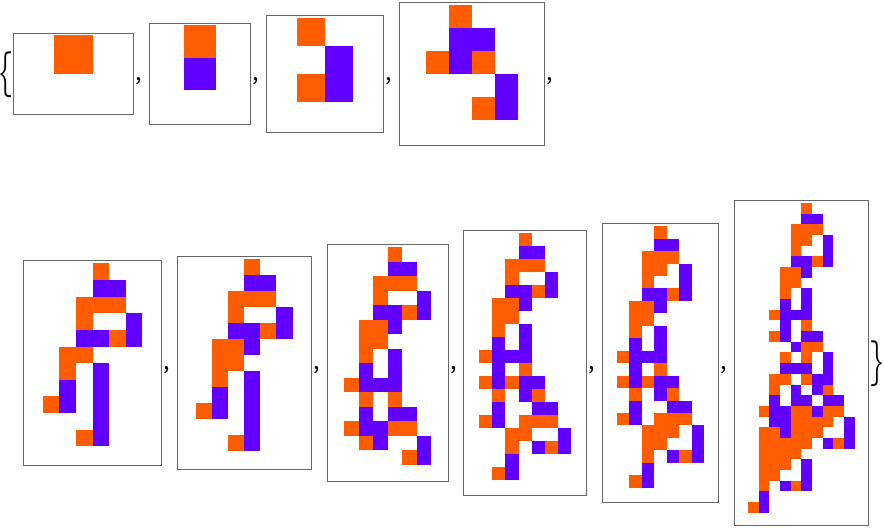 |
Plot the progressive fitness values showing the mutations that weren't selected:
| In[5]:= | ![Show[ListStepPlot[#BestFitness & /@ #], ListPlot[#Fitness & /@ #, PlotStyle -> Red]] &[
ResourceFunction["AdaptiveCellularAutomaton", ResourceVersion->"3.0.0", ResourceSystemBase -> "https://www.wolframcloud.com/obj/resourcesystem/api/1.0"][<|"AdaptiveIterations" -> 500|>, All, {"Fitness", "BestFitness"}, RandomSeeding -> 1110]]](https://www.wolframcloud.com/obj/resourcesystem/images/a99/a99e4cdc-acd4-4f36-ae6a-b3bf57ff0406/3-0-0/1476022165bea4ab.png) |
| Out[5]= | 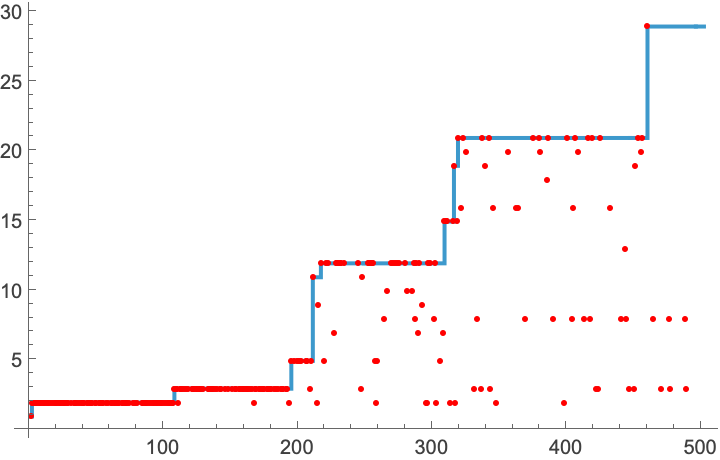 |
Plot the progressive fitness values for 10 evolutions:
| In[6]:= | ![ListStepPlot[
Table[ResourceFunction["AdaptiveCellularAutomaton", ResourceVersion->"3.0.0", ResourceSystemBase -> "https://www.wolframcloud.com/obj/resourcesystem/api/1.0"][<|"AdaptiveIterations" -> 500|>, All, "BestFitness"], 10], PlotRange -> All]](https://www.wolframcloud.com/obj/resourcesystem/images/a99/a99e4cdc-acd4-4f36-ae6a-b3bf57ff0406/3-0-0/4d3f9054d723f908.png) |
| Out[6]= | 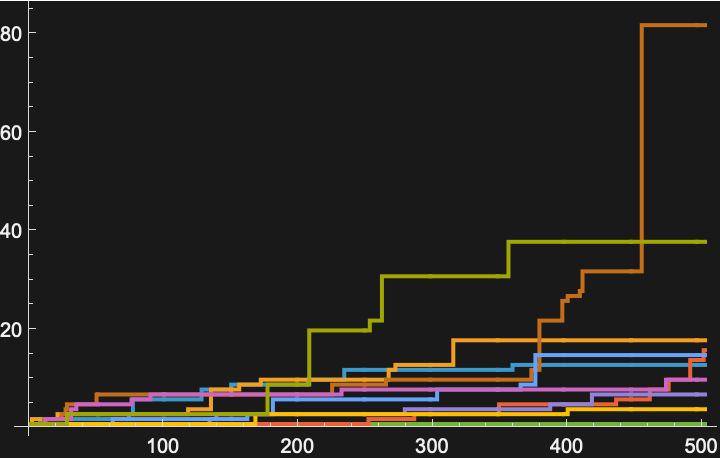 |
Plot the final states of 10 different evolutions:
| In[7]:= | ![Table[ResourceFunction["AdaptiveCellularAutomaton", ResourceVersion->"3.0.0", ResourceSystemBase -> "https://www.wolframcloud.com/obj/resourcesystem/api/1.0"][<|"AdaptiveIterations" -> 500|>, "FinalState", "Plot", RandomSeeding -> 1110 + i], {i, 10}]](https://www.wolframcloud.com/obj/resourcesystem/images/a99/a99e4cdc-acd4-4f36-ae6a-b3bf57ff0406/3-0-0/2530ea5ddbcb0c15.png) |
| Out[7]= | 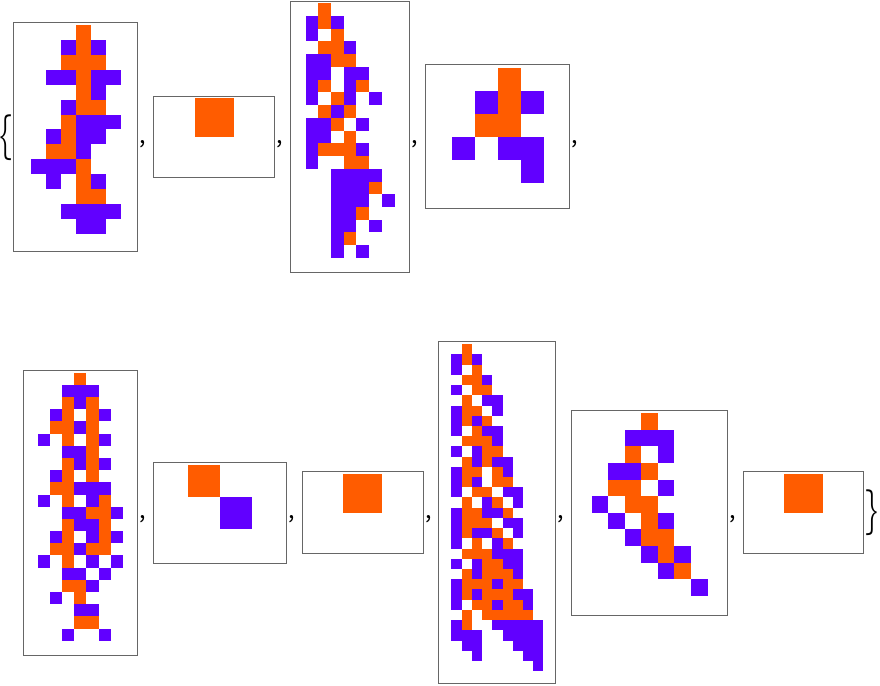 |
Evolve a k = 4 cellular automata:
| In[8]:= | ![ResourceFunction["AdaptiveCellularAutomaton", ResourceVersion->"3.0.0", ResourceSystemBase -> "https://www.wolframcloud.com/obj/resourcesystem/api/1.0"][<|"InitialRule" -> {0, 4, 1}, "AdaptiveIterations" -> 500|>, "BreakthroughStates", "Plot", RandomSeeding -> 1112]](https://www.wolframcloud.com/obj/resourcesystem/images/a99/a99e4cdc-acd4-4f36-ae6a-b3bf57ff0406/3-0-0/7fb0fdbdc4ad607e.png) |
| Out[8]= | 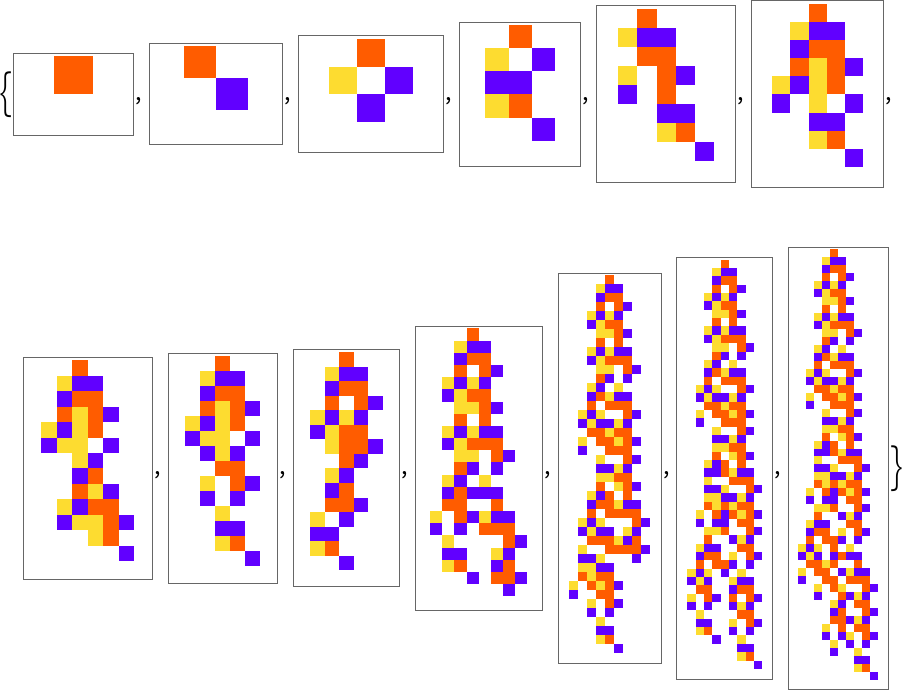 |
Evolve for longer automata using "MaxSteps":
| In[9]:= | ![SeedRandom[1118]; ResourceFunction["AdaptiveCellularAutomaton", ResourceVersion->"3.0.0", ResourceSystemBase -> "https://www.wolframcloud.com/obj/resourcesystem/api/1.0"][<|"InitialRule" -> {0, 4, 1}, "AdaptiveIterations" -> 500, "MaxSteps" -> 200|>, "BreakthroughStates", "Plot", "PlotSizingFunction" -> (30 #Height^.1 &)]](https://www.wolframcloud.com/obj/resourcesystem/images/a99/a99e4cdc-acd4-4f36-ae6a-b3bf57ff0406/3-0-0/1ef9347df0a47e22.png) |
| Out[9]= | 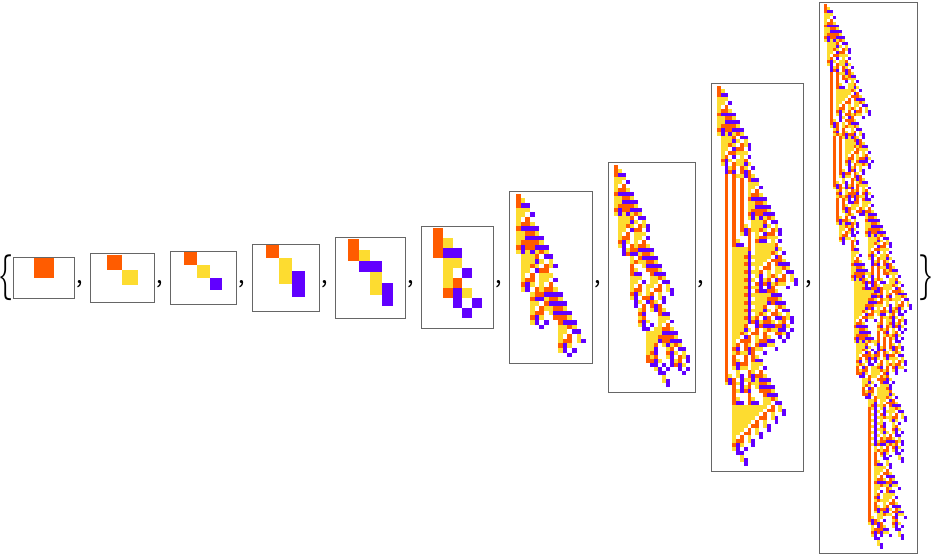 |
Evolve to a specific target lifetime:
| In[10]:= | ![ResourceFunction["AdaptiveCellularAutomaton", ResourceVersion->"3.0.0", ResourceSystemBase -> "https://www.wolframcloud.com/obj/resourcesystem/api/1.0"][<|"InitialRule" -> {0, 4, 1}, "AdaptiveIterations" -> 2000, "FitnessFunction" -> "Lifetime" -> 50, "MaxSteps" -> 200|>, "BreakthroughStates", "Plot", "PlotLabels" -> "Lifetime", RandomSeeding -> 1121]](https://www.wolframcloud.com/obj/resourcesystem/images/a99/a99e4cdc-acd4-4f36-ae6a-b3bf57ff0406/3-0-0/5c35053579f249e6.png) |
| Out[10]= | 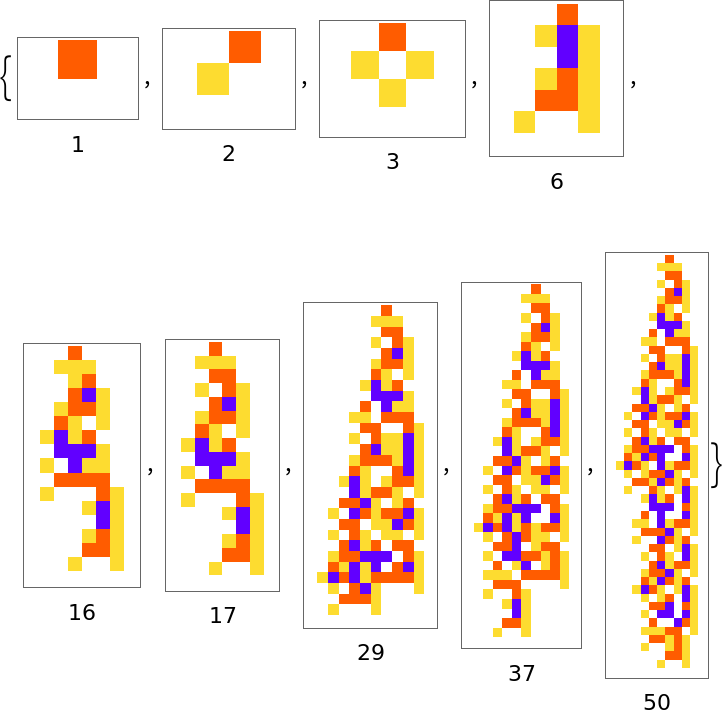 |
10 separate evolutions to a target lifetime of 50:
| In[11]:= | ![ParallelTable[
ResourceFunction["AdaptiveCellularAutomaton", ResourceVersion->"3.0.0", ResourceSystemBase -> "https://www.wolframcloud.com/obj/resourcesystem/api/1.0"][<|"InitialRule" -> {0, 4, 1}, "AdaptiveIterations" -> 2000, "FitnessFunction" -> "Lifetime" -> 50, "MaxSteps" -> 200|>, "FinalState", "Plot", "PlotLabels" -> "Lifetime", "PlotSizingFunction" -> ({Automatic, 20 #Height^.5} &), RandomSeeding -> 1118 + i], {i, 10}]](https://www.wolframcloud.com/obj/resourcesystem/images/a99/a99e4cdc-acd4-4f36-ae6a-b3bf57ff0406/3-0-0/65aeb2c4155e540d.png) |
| Out[11]= | 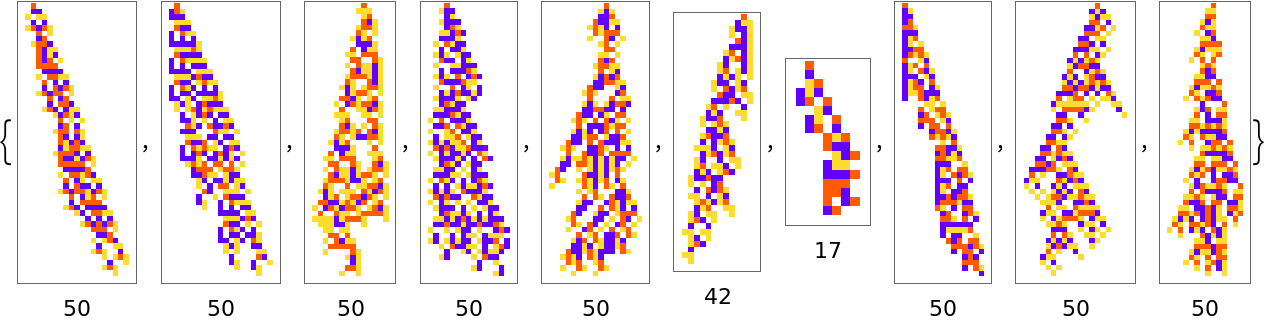 |
See the fitness progressions:
| In[12]:= | ![ListStepPlot[
ParallelTable[
ResourceFunction["AdaptiveCellularAutomaton", ResourceVersion->"3.0.0", ResourceSystemBase -> "https://www.wolframcloud.com/obj/resourcesystem/api/1.0"][<|"InitialRule" -> {0, 4, 1}, "AdaptiveIterations" -> 2000, "FitnessFunction" -> "Lifetime" -> 50, "MaxSteps" -> 200|>, All, "BestFitness", RandomSeeding -> 1118 + i], {i, 10}]]](https://www.wolframcloud.com/obj/resourcesystem/images/a99/a99e4cdc-acd4-4f36-ae6a-b3bf57ff0406/3-0-0/710b01a18f547cd2.png) |
| Out[12]= | 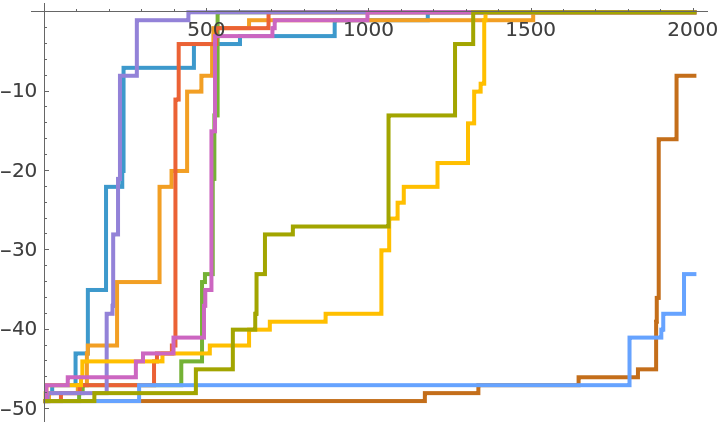 |
Evolve the initial conditions of a cellular automata:
| In[13]:= | ![SeedRandom[444330]; ResourceFunction["AdaptiveCellularAutomaton", ResourceVersion->"3.0.0", ResourceSystemBase -> "https://www.wolframcloud.com/obj/resourcesystem/api/1.0"][<|"InitialRule" -> {1246491453600, 3, 1}, "InitialCondition" -> {CenterArray[1, 20], 0}, "MutationFunction" -> ("InitialCondition" -> 1), "AdaptiveIterations" -> 2000|>, "BreakthroughStates", "Plot"]](https://www.wolframcloud.com/obj/resourcesystem/images/a99/a99e4cdc-acd4-4f36-ae6a-b3bf57ff0406/3-0-0/2b00236a0e9e9ca5.png) |
| Out[13]= | 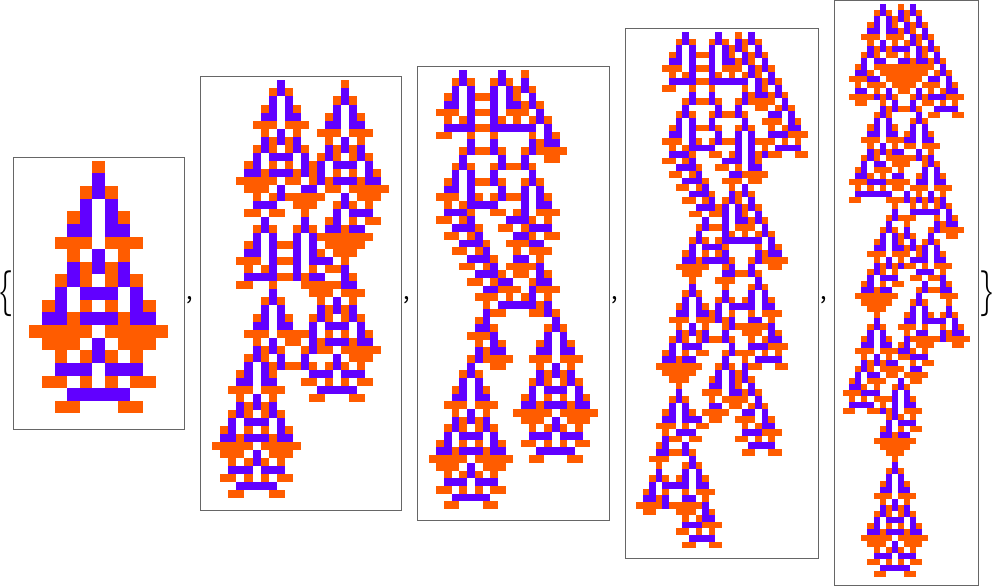 |
The default selection function accepts neutral mutations by default, make it so that it accepts mutations that decrease fitness by 1:
| In[14]:= | ![ResourceFunction["AdaptiveCellularAutomaton", ResourceVersion->"3.0.0", ResourceSystemBase -> "https://www.wolframcloud.com/obj/resourcesystem/api/1.0"][<| "Depth" -> 1000, "SelectionFunction" -> (#2 - #1 <= 1 &)|>, "BreakthroughStates", "Plot", "PlottingRegion" -> 50, RandomSeeding -> 445550]](https://www.wolframcloud.com/obj/resourcesystem/images/a99/a99e4cdc-acd4-4f36-ae6a-b3bf57ff0406/3-0-0/55e0d7aa10c3b7b2.png) |
| Out[14]= | 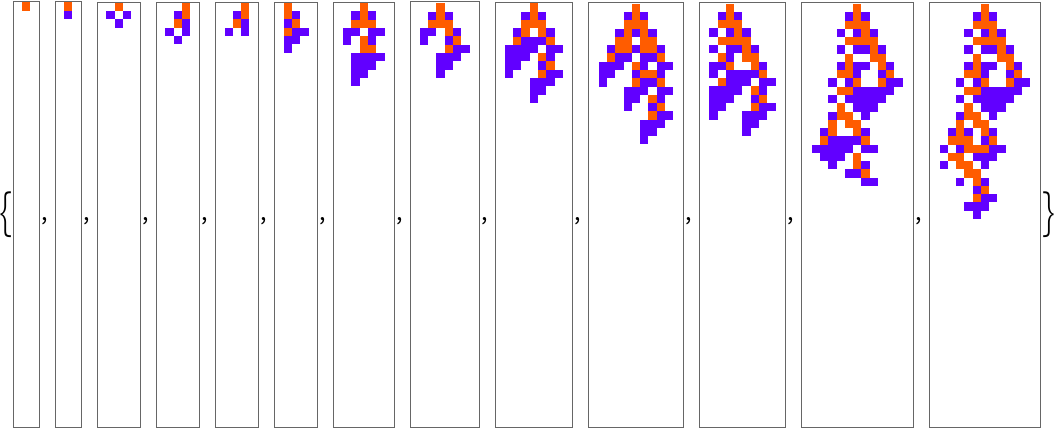 |
Use a fitness function that looks for repeating automata rather than terminating ones:
| In[15]:= | ![ResourceFunction["AdaptiveCellularAutomaton", ResourceVersion->"3.0.0", ResourceSystemBase -> "https://www.wolframcloud.com/obj/resourcesystem/api/1.0"][<|"InitialRule" -> {256, 4, 1}, "AdaptiveIterations" -> 4000,
"MutationFunction" -> {1, "Symmetric" -> True}, "FitnessFunction" -> (If[# === 201, -Infinity, #] &[
Length[Last[
FindTransientRepeat[CellularAutomaton[#Rule, {{1}, 0}, 200], 1]]]] &)|>, "BreakthroughStates", "Plot", "PlottingRegion" -> (2 #Fitness &), RandomSeeding -> 100035]](https://www.wolframcloud.com/obj/resourcesystem/images/a99/a99e4cdc-acd4-4f36-ae6a-b3bf57ff0406/3-0-0/3012a1979b5ac5de.png) |
| Out[15]= | 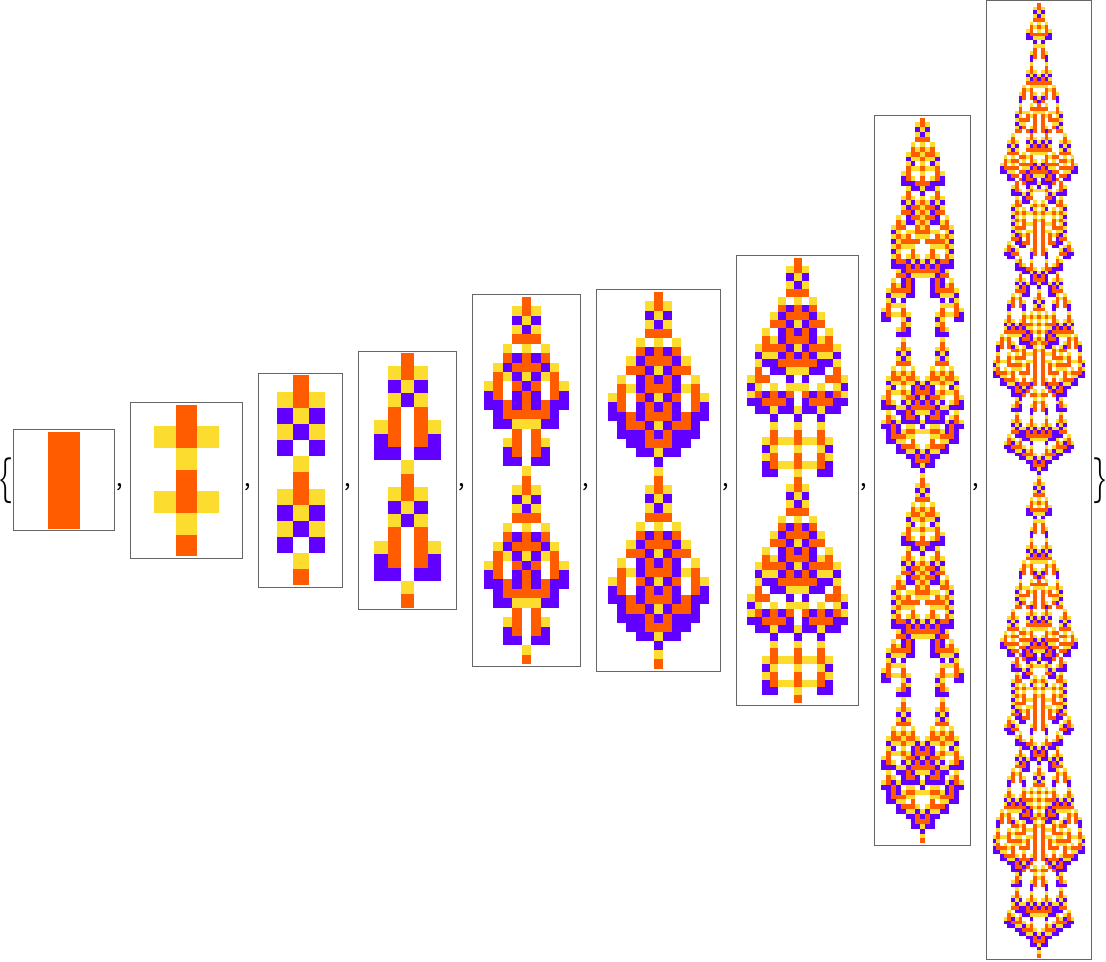 |
Use a fitness function that selects automata with more and more colored cells:
| In[16]:= | ![ResourceFunction["AdaptiveCellularAutomaton", ResourceVersion->"3.0.0", ResourceSystemBase -> "https://www.wolframcloud.com/obj/resourcesystem/api/1.0"][<|"InitialRule" -> {0, 4, 1}, "MutationFunction" -> {3, "Symmetric" -> True}, "FitnessFunction" -> (With[{ca = CellularAutomaton[#Rule, {{1}, 0}, {100, {-100, 100}}]}, If[# == 0, -Infinity, Count[ca, x_ /; x != 0, {2}]] &[
LengthWhile[Reverse[ca], Total[#] == 0 &]]] &)|>, "BreakthroughStates", "Plot", RandomSeeding -> 1334402, "PlotSizingFunction" -> ({Automatic, 20 Sqrt[#Height]} &)]](https://www.wolframcloud.com/obj/resourcesystem/images/a99/a99e4cdc-acd4-4f36-ae6a-b3bf57ff0406/3-0-0/05852dba64d8fef3.png) |
| Out[16]= | 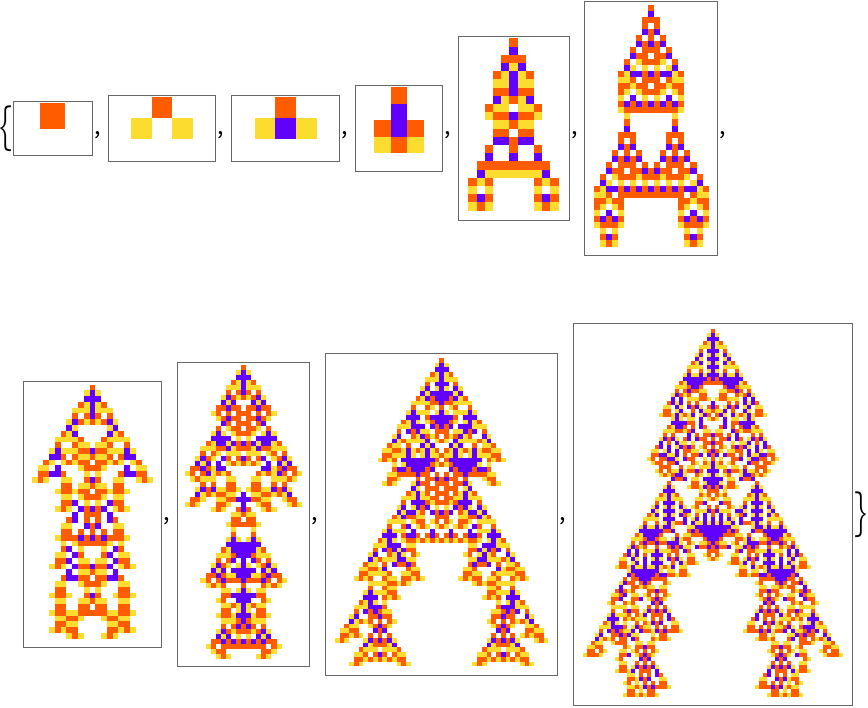 |
Write a mutation function that has a higher probability flipping a rule to white or blue:
| In[17]:= | ![ResourceFunction["AdaptiveCellularAutomaton", ResourceVersion->"3.0.0", ResourceSystemBase -> "https://www.wolframcloud.com/obj/resourcesystem/api/1.0"][<|"InitialRule" -> {0, 3, 1}, "AdaptiveIterations" -> 500,
"MutationFunction" -> ({FromDigits[
MapAt[RandomChoice[{0.75, 0.25} -> DeleteCases[Range[0, 2], #]] &, IntegerDigits[First[#BestRule], 3, 27], RandomInteger[{1, Length[IntegerDigits[First[#BestRule], 3, 27]] - 1}]], 3], 3, 1} &)|>, "BreakthroughStates", "Plot", RandomSeeding -> 100035]](https://www.wolframcloud.com/obj/resourcesystem/images/a99/a99e4cdc-acd4-4f36-ae6a-b3bf57ff0406/3-0-0/554d5b6759be379b.png) |
| Out[17]= | 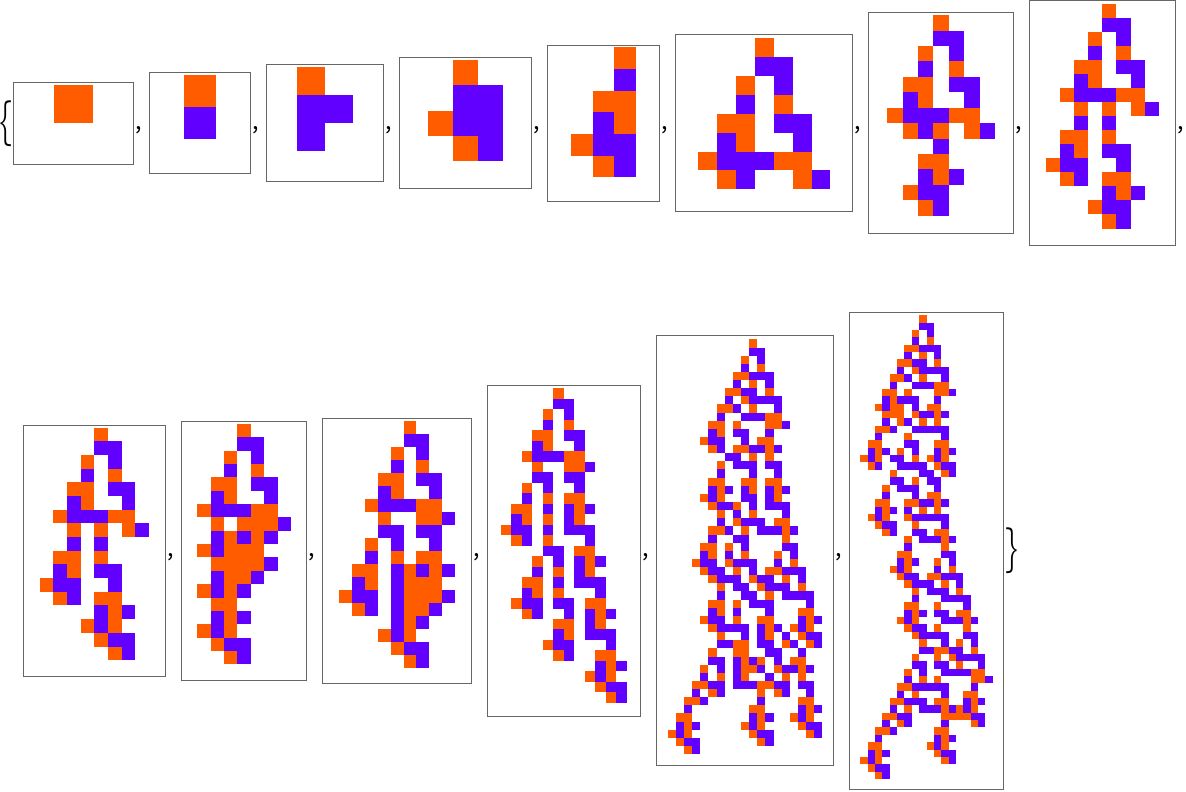 |
You can also use index values for the sequence specification:
| In[18]:= | ![ResourceFunction["AdaptiveCellularAutomaton", ResourceVersion->"3.0.0", ResourceSystemBase -> "https://www.wolframcloud.com/obj/resourcesystem/api/1.0"][<|"AdaptiveIterations" -> 500|>, -1, "Plot", RandomSeeding -> 1110]](https://www.wolframcloud.com/obj/resourcesystem/images/a99/a99e4cdc-acd4-4f36-ae6a-b3bf57ff0406/3-0-0/4140333fcac270b0.png) |
| Out[18]= | 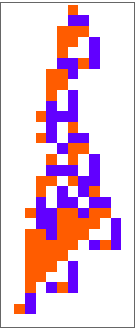 |
A list of indices will return a list with the result at each respective state:
| In[19]:= | ![ResourceFunction["AdaptiveCellularAutomaton", ResourceVersion->"3.0.0", ResourceSystemBase -> "https://www.wolframcloud.com/obj/resourcesystem/api/1.0"][<|"AdaptiveIterations" -> 500|>, {1, 250, -1}, "Plot", RandomSeeding -> 1110]](https://www.wolframcloud.com/obj/resourcesystem/images/a99/a99e4cdc-acd4-4f36-ae6a-b3bf57ff0406/3-0-0/4f559a4c5e33b4f9.png) |
| Out[19]= | 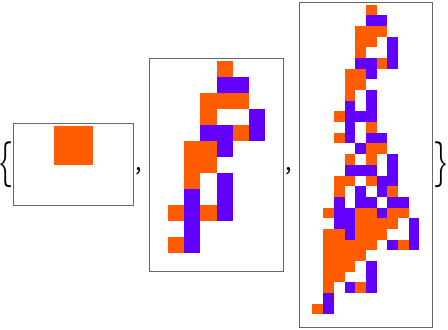 |
You can also use a span specification, here is the result every 100 steps:
| In[20]:= | ![ResourceFunction["AdaptiveCellularAutomaton", ResourceVersion->"3.0.0", ResourceSystemBase -> "https://www.wolframcloud.com/obj/resourcesystem/api/1.0"][<|"AdaptiveIterations" -> 500|>, 1 ;; -1 ;; 100, "Plot", RandomSeeding -> 1110]](https://www.wolframcloud.com/obj/resourcesystem/images/a99/a99e4cdc-acd4-4f36-ae6a-b3bf57ff0406/3-0-0/55063f205ecc4702.png) |
| Out[20]= | 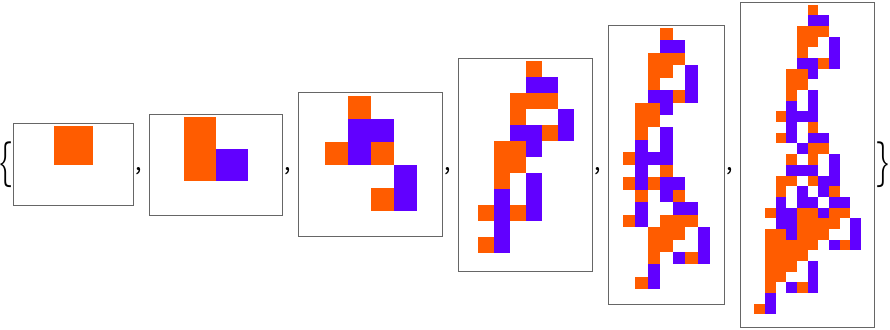 |
Combining this with a list of property specifications will return a list of associations with keys and values for the given specifications:
| In[21]:= | ![ResourceFunction["AdaptiveCellularAutomaton", ResourceVersion->"3.0.0", ResourceSystemBase -> "https://www.wolframcloud.com/obj/resourcesystem/api/1.0"][<|"AdaptiveIterations" -> 500|>, 1 ;; -1 ;; 100, {"BestRule", "Plot"}, RandomSeeding -> 1110, "PlotSizingFunction" -> ({Automatic, 15 Sqrt[#Height]} &)]](https://www.wolframcloud.com/obj/resourcesystem/images/a99/a99e4cdc-acd4-4f36-ae6a-b3bf57ff0406/3-0-0/19dba9d967ca4021.png) |
| Out[21]= | 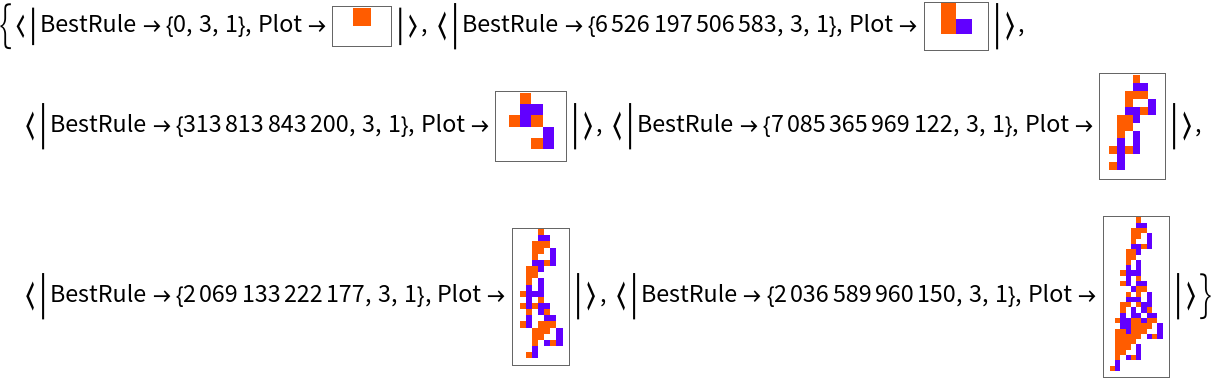 |
You can generate fitness progressions in a memory-efficient way using "Index":
| In[22]:= | ![ListStepPlot[
Callout[{#Index, #BestFitness}, #Plot] & /@ ResourceFunction["AdaptiveCellularAutomaton", ResourceVersion->"3.0.0", ResourceSystemBase -> "https://www.wolframcloud.com/obj/resourcesystem/api/1.0"][<|"AdaptiveIterations" -> 5000|>, "BreakthroughStates", {"Index", "BestFitness", "Plot"}, RandomSeeding -> 1110], Filling -> Bottom]](https://www.wolframcloud.com/obj/resourcesystem/images/a99/a99e4cdc-acd4-4f36-ae6a-b3bf57ff0406/3-0-0/0a389a29a0db3120.png) |
| Out[22]= | 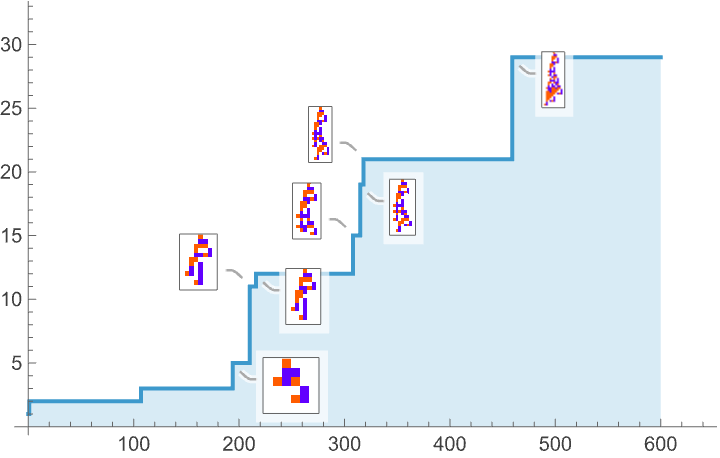 |
You can also track the mutation distance of the current rule from the initial rule over time:
| In[23]:= | ![ListLinePlot[
ResourceFunction["AdaptiveCellularAutomaton", ResourceVersion->"3.0.0", ResourceSystemBase -> "https://www.wolframcloud.com/obj/resourcesystem/api/1.0"][<|"AdaptiveIterations" -> 10|>, All, "MutationDistance", RandomSeeding -> 1110], Mesh -> All]](https://www.wolframcloud.com/obj/resourcesystem/images/a99/a99e4cdc-acd4-4f36-ae6a-b3bf57ff0406/3-0-0/08669335a70df64f.png) |
| Out[23]= | 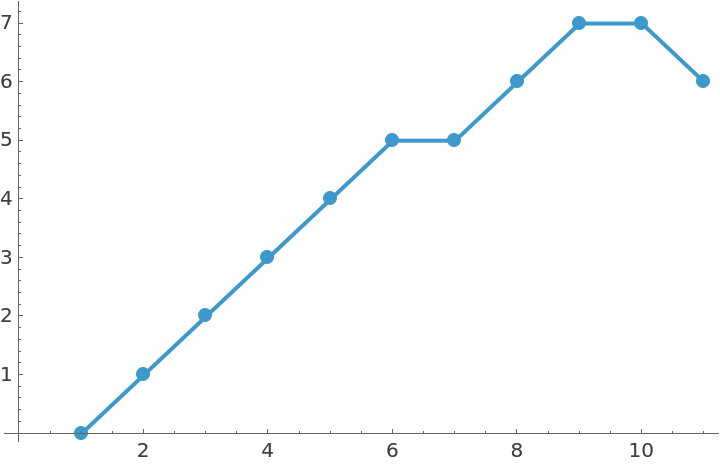 |
The evolution specification "RuleChanges" will return only the iterations in the evolution where the rule changed:
| In[24]:= | ![ArrayPlot[
IntegerDigits[#[[1]], 3, 27] & /@ ResourceFunction["AdaptiveCellularAutomaton", ResourceVersion->"3.0.0", ResourceSystemBase -> "https://www.wolframcloud.com/obj/resourcesystem/api/1.0"][<|"AdaptiveIterations" -> 20|>, "RuleChanges",
"BestRule", RandomSeeding -> 1110], ColorRules -> {0 -> GrayLevel[1], 1 -> Hue[0.06, 1, 1], 2 -> Hue[0.73, 1, 1], 3 -> Hue[0.14, 0.81, 0.99], 4 -> RGBColor[0, 0.56, 0], 5 -> RGBColor[0, 0.56, 1]}, Mesh -> True]](https://www.wolframcloud.com/obj/resourcesystem/images/a99/a99e4cdc-acd4-4f36-ae6a-b3bf57ff0406/3-0-0/13746a902a40cebf.png) |
| Out[24]= | 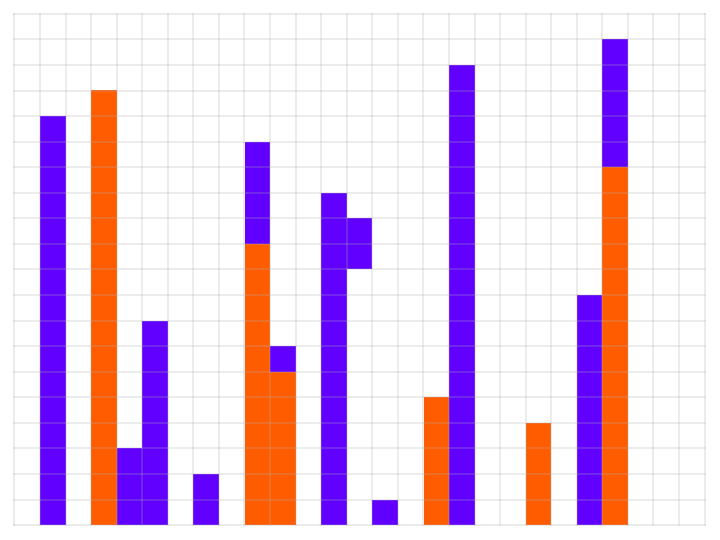 |
Use a custom plot sizing function:
| In[25]:= | ![SeedRandom[1110]; ResourceFunction["AdaptiveCellularAutomaton", ResourceVersion->"3.0.0", ResourceSystemBase -> "https://www.wolframcloud.com/obj/resourcesystem/api/1.0"][<|
"AdaptiveIterations" -> 500|>, "BreakthroughStates", "Plot", "PlotSizingFunction" -> (3 #Height &)]](https://www.wolframcloud.com/obj/resourcesystem/images/a99/a99e4cdc-acd4-4f36-ae6a-b3bf57ff0406/3-0-0/0b536149f4e74671.png) |
| Out[25]= | 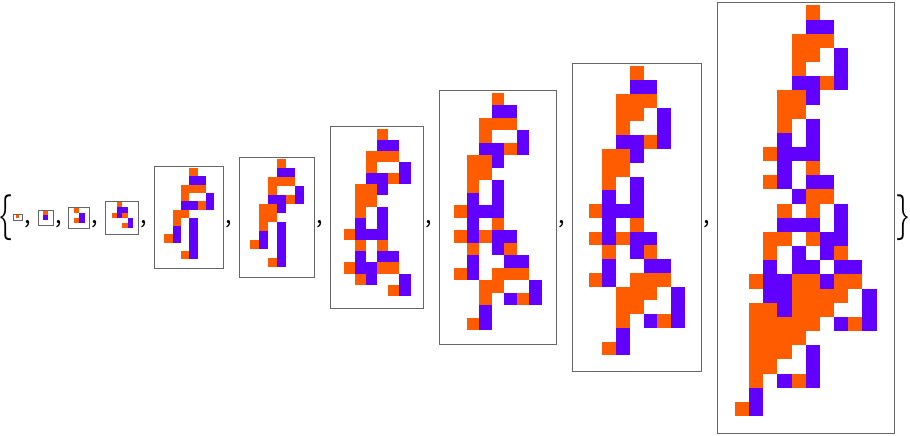 |
When "Plot" is specified AdaptiveCellularAutomaton will use any ArrayPlot options given:
| In[26]:= | ![SeedRandom[1110]; ResourceFunction["AdaptiveCellularAutomaton", ResourceVersion->"3.0.0", ResourceSystemBase -> "https://www.wolframcloud.com/obj/resourcesystem/api/1.0"][<|
"AdaptiveIterations" -> 500|>, "BreakthroughStates", "Plot", Mesh -> True]](https://www.wolframcloud.com/obj/resourcesystem/images/a99/a99e4cdc-acd4-4f36-ae6a-b3bf57ff0406/3-0-0/17a6976093f915da.png) |
| Out[26]= | 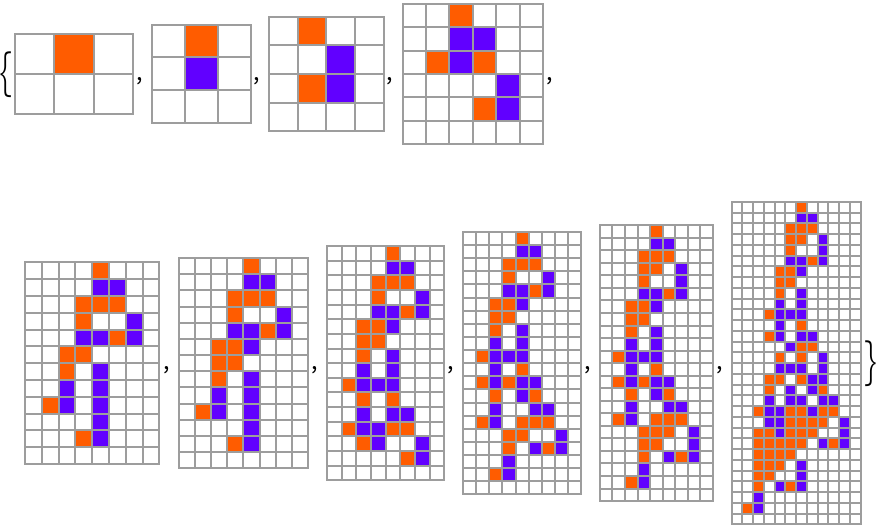 |
Plot with a specified region:
| In[27]:= | ![SeedRandom[1110]; ResourceFunction["AdaptiveCellularAutomaton", ResourceVersion->"3.0.0", ResourceSystemBase -> "https://www.wolframcloud.com/obj/resourcesystem/api/1.0"][<|
"AdaptiveIterations" -> 500|>, "BreakthroughStates", "Plot", "PlottingRegion" -> 30]](https://www.wolframcloud.com/obj/resourcesystem/images/a99/a99e4cdc-acd4-4f36-ae6a-b3bf57ff0406/3-0-0/65479b063b35c8f4.png) |
| Out[27]= | 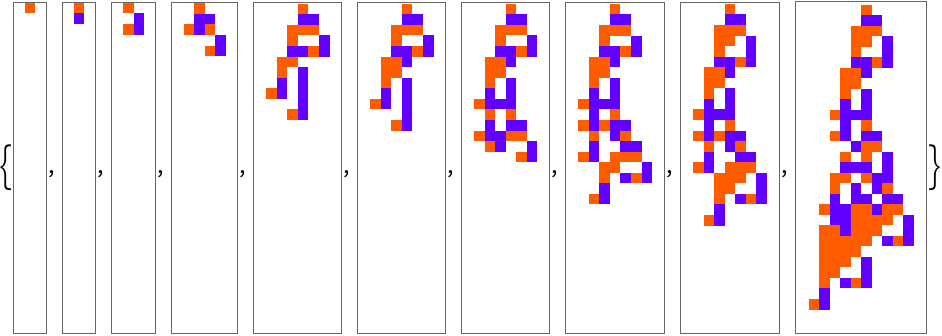 |
Specify the width and height of the region:
| In[28]:= | ![SeedRandom[1110]; ResourceFunction["AdaptiveCellularAutomaton", ResourceVersion->"3.0.0", ResourceSystemBase -> "https://www.wolframcloud.com/obj/resourcesystem/api/1.0"][<|
"AdaptiveIterations" -> 500|>, "BreakthroughStates", "Plot", "PlottingRegion" -> {30, {-5, 5}}]](https://www.wolframcloud.com/obj/resourcesystem/images/a99/a99e4cdc-acd4-4f36-ae6a-b3bf57ff0406/3-0-0/14d60d670ed86b3a.png) |
| Out[28]= | 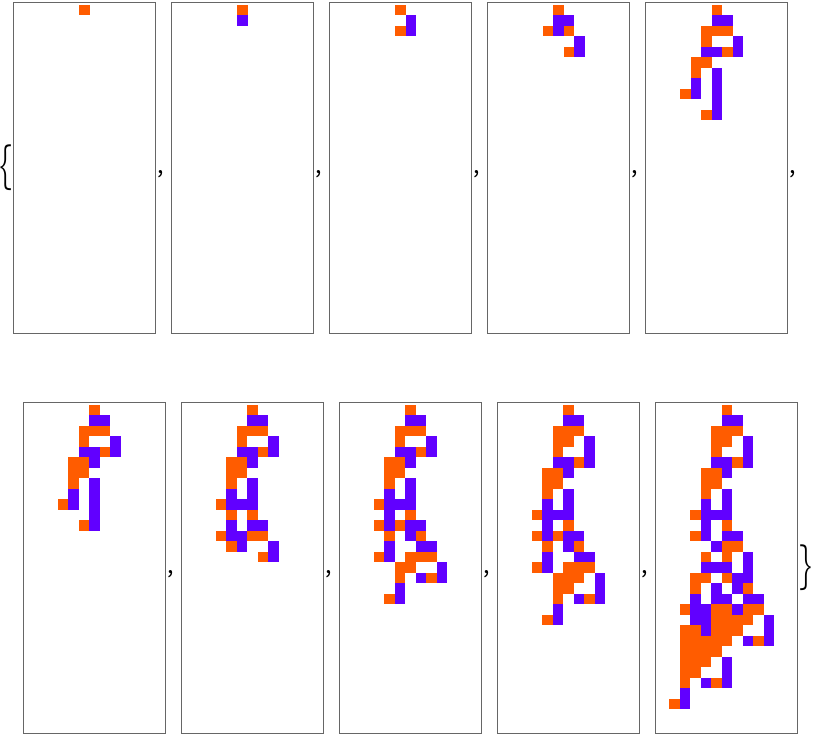 |
The adaptive search will terminate when the criterion for "WhileCondition" is no longer true:
| In[29]:= | ![ResourceFunction["AdaptiveCellularAutomaton", ResourceVersion->"3.0.0", ResourceSystemBase -> "https://www.wolframcloud.com/obj/resourcesystem/api/1.0"][<|
"AdaptiveIterations" -> Infinity|>, "BreakthroughStates", "Plot", "PlotLabels" -> "Lifetime", "WhileCondition" -> (#BestFitness < 10 &), RandomSeeding -> 1110]](https://www.wolframcloud.com/obj/resourcesystem/images/a99/a99e4cdc-acd4-4f36-ae6a-b3bf57ff0406/3-0-0/257787e4be86e3e7.png) |
| Out[29]= | 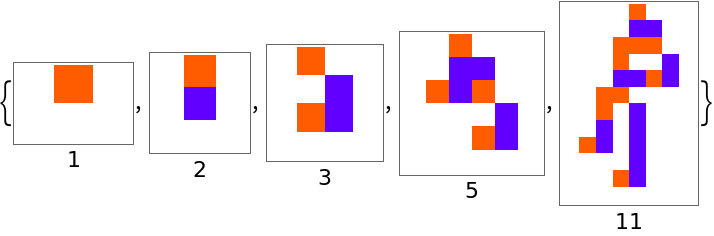 |
This enables more efficient parallel searches:
| In[30]:= | ![ListStepPlot[
ParallelTable[
Values /@ ResourceFunction["AdaptiveCellularAutomaton", ResourceVersion->"3.0.0", ResourceSystemBase -> "https://www.wolframcloud.com/obj/resourcesystem/api/1.0"][<|"AdaptiveIterations" -> 5000|>, "BreakthroughStates", {"Index", "BestFitness"}, RandomSeeding -> 1110 + i, "WhileCondition" -> (#BestFitness < 20 &)], {i, 10}], PlotRange -> All, Filling -> Bottom]](https://www.wolframcloud.com/obj/resourcesystem/images/a99/a99e4cdc-acd4-4f36-ae6a-b3bf57ff0406/3-0-0/31f976516463d5b3.png) |
| Out[30]= | 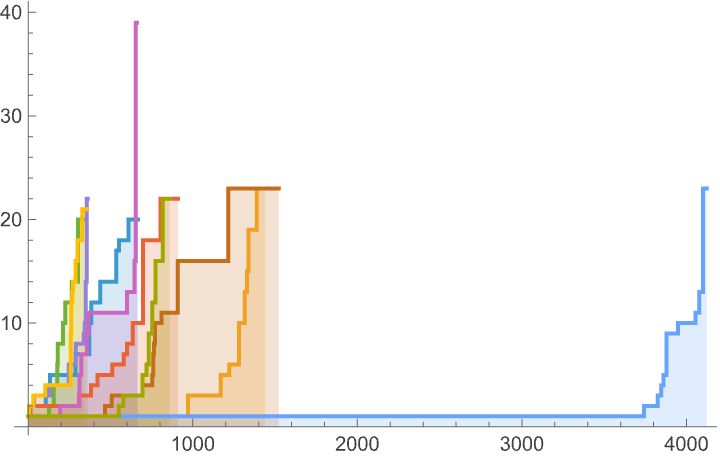 |
Argument specifications for evolving 2D totalistic cellular automata:
| In[31]:= | ![ResourceFunction["AdaptiveCellularAutomaton", ResourceVersion->"3.0.0", ResourceSystemBase -> "https://www.wolframcloud.com/obj/resourcesystem/api/1.0"][<|"AdaptiveIterations" -> 2000, "InitialRule" -> 0, "InitialCondition" -> {{{1}}, 0}, "MutationFunction" -> (FromDigits[
MapAt[RandomChoice[DeleteCases[Range[0, 2], #]] &, IntegerDigits[#BestRule, 3, 51], RandomInteger[{1, 50}]], 3] &) ,
"FitnessFunction" -> (With[{ca = CellularAutomaton[<|"OuterTotalisticCode" -> #Rule, "Dimension" -> 2, "Neighborhood" -> 9, "Colors" -> 3|>, #InitialCondition, 100]}, If[# == 0, -Infinity, Length[ca] - #] &[
LengthWhile[Reverse[ca], Total[#, 2] == 0 &]]] &)|>, "BreakthroughStates", "Plot",
"PlottingFunction" -> (Labeled[
ArrayPlot3D[
CellularAutomaton[<|"OuterTotalisticCode" -> #BestRule, "Dimension" -> 2, "Neighborhood" -> 9, "Colors" -> 3|>, {{{1}}, 0}, #BestFitness], ColorRules -> colorrules, ImageSize -> 10 Sqrt[#BestFitness]], Text[#BestFitness]] &),
RandomSeeding -> 667788]](https://www.wolframcloud.com/obj/resourcesystem/images/a99/a99e4cdc-acd4-4f36-ae6a-b3bf57ff0406/3-0-0/5fefd3afc026329c.png) |
| Out[31]= | 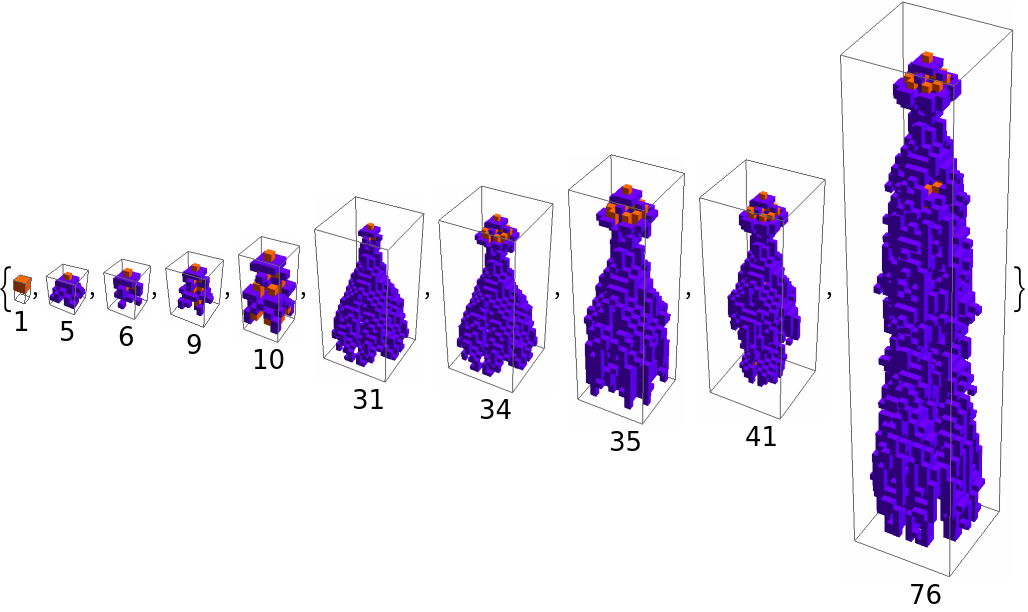 |
Wolfram Language 13.0 (December 2021) or above
This work is licensed under a Creative Commons Attribution 4.0 International License