Wolfram Function Repository
Instant-use add-on functions for the Wolfram Language
Function Repository Resource:
Return two polylines a fixed distance from a polyline
ResourceFunction["PolygonOffsets"][polyline,distance] creates two polylines at distance from polyline. |
Create offsets to a triangle:
| In[1]:= | ![pol = {{0, 0}, {8, 0}, {0, 6}};
off = ResourceFunction["PolygonOffsets"][pol, 1]](https://www.wolframcloud.com/obj/resourcesystem/images/9dc/9dc13e88-6f34-43e4-9db4-92f51a986f19/0fb97aff58877c99.png) |
| Out[2]= |  |
The "closed polyline" version has an identical result:
| In[3]:= | ![pol = {{0, 0}, {8, 0}, {0, 6}, {0, 0}};
off = ResourceFunction["PolygonOffsets"][pol, 1]](https://www.wolframcloud.com/obj/resourcesystem/images/9dc/9dc13e88-6f34-43e4-9db4-92f51a986f19/181cd74923e9f987.png) |
| Out[4]= |  |
Show the original polyline and the generated polylines:
| In[5]:= | ![Graphics[{Thick,
Green, Line[pol],
Red, Line[First[off]],
Blue, Line[Last[off]]}]](https://www.wolframcloud.com/obj/resourcesystem/images/9dc/9dc13e88-6f34-43e4-9db4-92f51a986f19/5ce5da04b9a75d90.png) |
| Out[5]= | 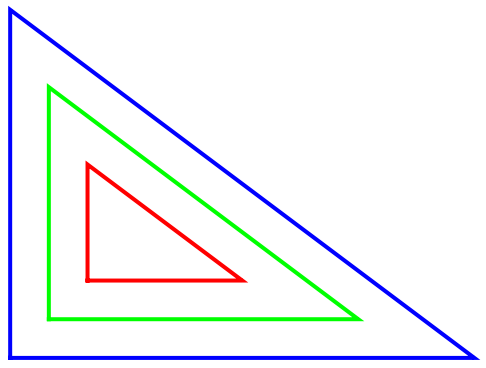 |
Show a more complicated offset:
| In[6]:= | ![pol = {{0, 2}, {0, 8}, {2, 8}, {7, 6}, {8, 8}, {8, 9}, {0, 2}};
off = ResourceFunction["PolygonOffsets"][pol, 1/3];
Graphics[{Thick, Green, Line[pol], Blue, Line[Last[off]], Red, Line[First[off]]}]](https://www.wolframcloud.com/obj/resourcesystem/images/9dc/9dc13e88-6f34-43e4-9db4-92f51a986f19/3e941d270d11be5a.png) |
| Out[8]= | 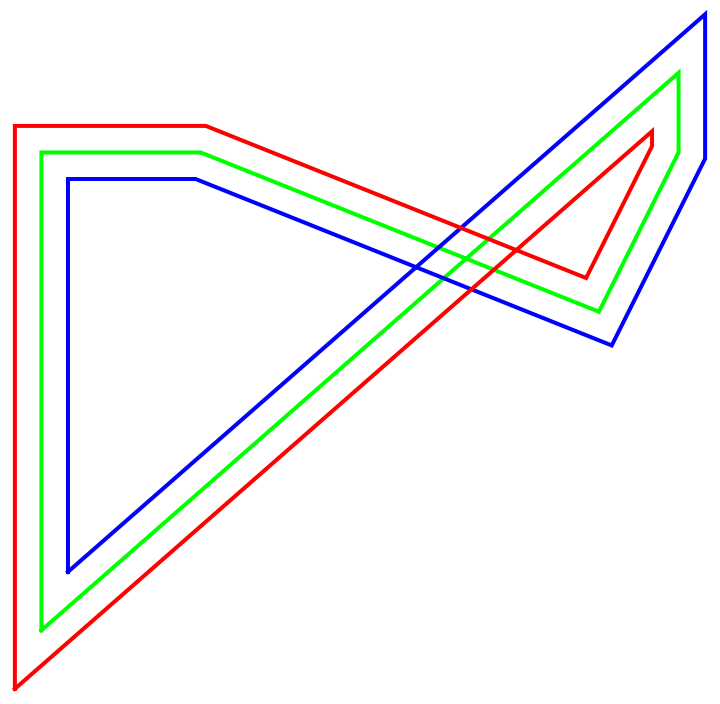 |
Use a Polygon:
| In[9]:= | ![poly = Polygon[{{-2, 0}, {-1, 3/2}, {1, 3/2}, {2, 0}, {1, -3/2}, {-1, -3/2}}];
offsets = ResourceFunction["PolygonOffsets"][poly, .5]](https://www.wolframcloud.com/obj/resourcesystem/images/9dc/9dc13e88-6f34-43e4-9db4-92f51a986f19/449c3a231531dad2.png) |
| Out[10]= |  |
See the offset polygons:
| In[11]:= | ![Graphics[{Opacity[.2], Polygon /@ offsets, poly}]](https://www.wolframcloud.com/obj/resourcesystem/images/9dc/9dc13e88-6f34-43e4-9db4-92f51a986f19/1dfbb884193ba541.png) |
| Out[11]= |  |
Create an op-art effect:
| In[12]:= | ![pol = {{0, 0}, {8, 1}, {1, 4}, {7, 3}};
Graphics[
Line /@ Table[
ResourceFunction["PolygonOffsets"][pol, k], {k, .1, .5, .05}]]](https://www.wolframcloud.com/obj/resourcesystem/images/9dc/9dc13e88-6f34-43e4-9db4-92f51a986f19/7c77bf764e2a1269.png) |
| Out[13]= |  |
If the offset is large, the results can become meaningless:
| In[14]:= | ![pol = {{0, 2}, {0, 8}, {2, 8}, {7, 6}, {8, 8}, {8, 9}, {0, 2}};
off = ResourceFunction["PolygonOffsets"][pol, 2];
Graphics[{Thick, Green, Line[pol], Blue, Line[Last[off]], Red, Line[First[off]]}]](https://www.wolframcloud.com/obj/resourcesystem/images/9dc/9dc13e88-6f34-43e4-9db4-92f51a986f19/3a688c9177bf0882.png) |
| Out[16]= | 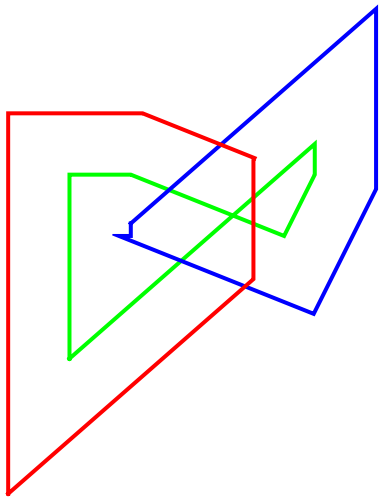 |
Round the corners using the resource function RoundedLine. Note that the beginning point on the bottom left is not rounded:
| In[17]:= | ![pol = {{0, 1}, {2, 0}, {1, 1}, {3, 2}, {2, 3}, {1, 2}, {3, 1}, {1, 0}, {2, 1}, {0, 2}, {1, 3}, {2, 2}, {0, 1}};
off = ResourceFunction["PolygonOffsets"][pol, .04];
Graphics[{Thick, {Hue[Random[]], ResourceFunction["RoundedLine"][#, .07]} & /@ Append[off, pol]}]](https://www.wolframcloud.com/obj/resourcesystem/images/9dc/9dc13e88-6f34-43e4-9db4-92f51a986f19/7021b4bb9fec61cf.png) |
| Out[19]= |  |
This work is licensed under a Creative Commons Attribution 4.0 International License