Wolfram Function Repository
Instant-use add-on functions for the Wolfram Language
Function Repository Resource:
Apply functions to elements of specific columns in rectangular data
ResourceFunction["MapAtColumns"][f,tab] applies function f to the elements all column in Tabular data tab. | |
ResourceFunction["MapAtColumns"][{col1→f1,…}, tab] applies different functions to different columns. | |
ResourceFunction["MapAtColumns"][rules] represents an operator form that can be applied to Tabular data. |
Round up the values in all columns:
| In[1]:= | ![tab = Tabular[{{2., 2.78}, {1., 3.14}, {3.5, 1.68}}, {"a", "b"}]](https://www.wolframcloud.com/obj/resourcesystem/images/818/8186c6f2-05b9-4a0a-94b9-de77461630c5/702c653864c39d48.png) |
| Out[1]= | 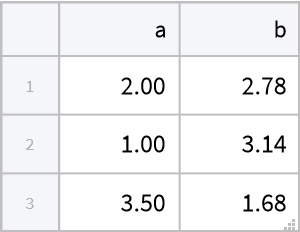 |
| In[2]:= | ![ResourceFunction["MapAtColumns"][Ceiling, tab]](https://www.wolframcloud.com/obj/resourcesystem/images/818/8186c6f2-05b9-4a0a-94b9-de77461630c5/6f633e8d75226519.png) |
| Out[2]= | 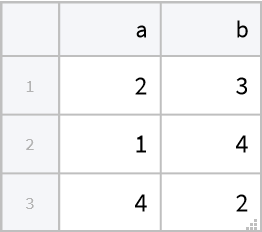 |
Round up only a specific column:
| In[3]:= | ![ResourceFunction["MapAtColumns"]["b" -> Ceiling, tab]](https://www.wolframcloud.com/obj/resourcesystem/images/818/8186c6f2-05b9-4a0a-94b9-de77461630c5/21817effa583aa5c.png) |
| Out[3]= | 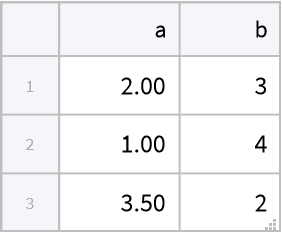 |
Apply different functions to different columns:
| In[4]:= | ![ResourceFunction["MapAtColumns"][{"a" -> Sqrt, "b" -> Ceiling}, tab]](https://www.wolframcloud.com/obj/resourcesystem/images/818/8186c6f2-05b9-4a0a-94b9-de77461630c5/6d04f1eafd230d19.png) |
| Out[4]= | 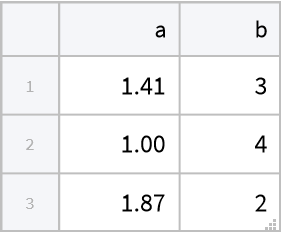 |
Use MapAtColumns as an operator:
| In[5]:= | ![tab =
Tabular[<|"RawSchema" -> <|"ColumnProperties" -> <|"a" -> <|"ElementType" -> "Real64"|>, "b" -> <|"ElementType" -> "Real64"|>|>, "KeyColumns" -> None, "Backend" -> "WolframKernel"|>, "BackendData" -> <|"ColumnData" -> DataStructure["ColumnTable", {{
TabularColumn[<|"Data" -> {{2., 1., 3.5}, {}, None}, "ElementType" -> "Real64"|>],
TabularColumn[<|"Data" -> {{2.78, 3.14, 1.68}, {}, None}, "ElementType" -> "Real64"|>]}}]|>|>];
tab // ResourceFunction["MapAtColumns"][ "b" -> Floor]](https://www.wolframcloud.com/obj/resourcesystem/images/818/8186c6f2-05b9-4a0a-94b9-de77461630c5/12cdc6d28f9dad41.png) |
| Out[6]= | 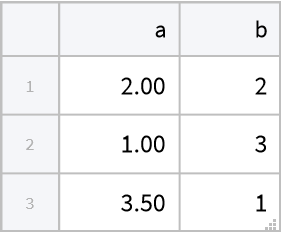 |
Use ColumnwiseValue to subtract the Mean from a columns:
| In[7]:= | ![tab =
Tabular[<|"RawSchema" -> <|"ColumnProperties" -> <|"a" -> <|"ElementType" -> "Real64"|>, "b" -> <|"ElementType" -> "Real64"|>|>, "KeyColumns" -> None, "Backend" -> "WolframKernel"|>, "BackendData" -> <|"ColumnData" -> DataStructure["ColumnTable", {{
TabularColumn[<|"Data" -> {{2., 1., 3.5}, {}, None}, "ElementType" -> "Real64"|>],
TabularColumn[<|"Data" -> {{2.78, 3.14, 1.68}, {}, None}, "ElementType" -> "Real64"|>]}}]|>|>];
ResourceFunction["MapAtColumns"][
Function[# - ColumnwiseValue[Mean[#]]], tab]](https://www.wolframcloud.com/obj/resourcesystem/images/818/8186c6f2-05b9-4a0a-94b9-de77461630c5/72b4d611c9e31934.png) |
| Out[8]= | 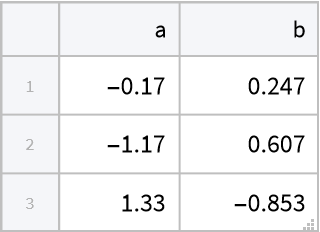 |
| In[9]:= | ![ResourceFunction["MapAtColumns"][
"b" -> Function[# - ColumnwiseValue[Mean[#]]], tab]](https://www.wolframcloud.com/obj/resourcesystem/images/818/8186c6f2-05b9-4a0a-94b9-de77461630c5/7f87c182e5b61df7.png) |
| Out[9]= | 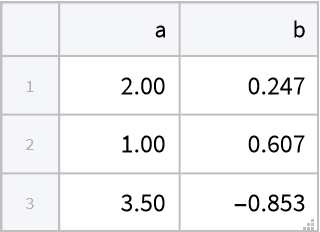 |
Accumulate a column:
| In[10]:= | ![tab =
Tabular[<|"RawSchema" -> <|"ColumnProperties" -> <|"a" -> <|"ElementType" -> "Real64"|>, "b" -> <|"ElementType" -> "Real64"|>|>, "KeyColumns" -> None, "Backend" -> "WolframKernel"|>, "BackendData" -> <|"ColumnData" -> DataStructure["ColumnTable", {{
TabularColumn[<|"Data" -> {{2., 1., 3.5}, {}, None}, "ElementType" -> "Real64"|>],
TabularColumn[<|"Data" -> {{2.78, 3.14, 1.68}, {}, None}, "ElementType" -> "Real64"|>]}}]|>|>];
ResourceFunction["MapAtColumns"][
"b" -> Function[ColumnwiseThread[Accumulate[#]]], tab]](https://www.wolframcloud.com/obj/resourcesystem/images/818/8186c6f2-05b9-4a0a-94b9-de77461630c5/2c3769ac6d079c0a.png) |
| Out[11]= | 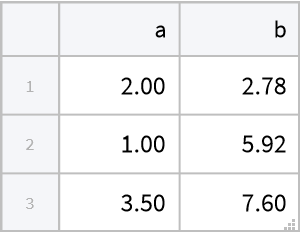 |
Accumulate multiple columns:
| In[12]:= | ![ResourceFunction["MapAtColumns"][
Function[ColumnwiseThread[Accumulate[#]]], tab]](https://www.wolframcloud.com/obj/resourcesystem/images/818/8186c6f2-05b9-4a0a-94b9-de77461630c5/66b7e07499aab961.png) |
| Out[12]= | 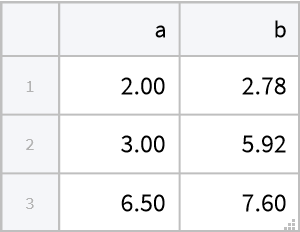 |
Start with a tabular object:
| In[13]:= | ![tab =
Tabular[<|"RawSchema" -> <|"ColumnProperties" -> <|"a" -> <|"ElementType" -> "Real64"|>, "b" -> <|"ElementType" -> "Real64"|>|>, "KeyColumns" -> None, "Backend" -> "WolframKernel"|>, "BackendData" -> <|"ColumnData" -> DataStructure["ColumnTable", {{
TabularColumn[<|"Data" -> {{2., 1., 3.5}, {}, None}, "ElementType" -> "Real64"|>],
TabularColumn[<|"Data" -> {{2.78, 3.14, 1.68}, {}, None}, "ElementType" -> "Real64"|>]}}]|>|>];](https://www.wolframcloud.com/obj/resourcesystem/images/818/8186c6f2-05b9-4a0a-94b9-de77461630c5/14cf6a438b95b405.png) |
MapAtColumns works with other column-based data as well:
| In[14]:= | ![ResourceFunction["MapAtColumns"][{"a" -> Sqrt/*N, "b" -> Ceiling}, Normal@tab]](https://www.wolframcloud.com/obj/resourcesystem/images/818/8186c6f2-05b9-4a0a-94b9-de77461630c5/43585799f06cebc0.png) |
| Out[14]= |  |
| In[15]:= | ![ResourceFunction["MapAtColumns"][{"a" -> Sqrt/*N, "b" -> Ceiling}, Dataset@tab]](https://www.wolframcloud.com/obj/resourcesystem/images/818/8186c6f2-05b9-4a0a-94b9-de77461630c5/7480b1a82323e9ea.png) |
| Out[15]= | 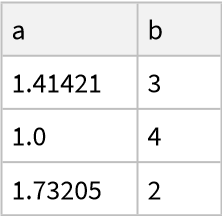 |
MapAtColumns takes functions that do not refer to column names:
| In[16]:= | ![tab =
Tabular[<|"RawSchema" -> <|"ColumnProperties" -> <|"a" -> <|"ElementType" -> "Real64"|>, "b" -> <|"ElementType" -> "Real64"|>|>, "KeyColumns" -> None, "Backend" -> "WolframKernel"|>, "BackendData" -> <|"ColumnData" -> DataStructure["ColumnTable", {{
TabularColumn[<|"Data" -> {{2., 1., 3.5}, {}, None}, "ElementType" -> "Real64"|>],
TabularColumn[<|"Data" -> {{2.78, 3.14, 1.68}, {}, None}, "ElementType" -> "Real64"|>]}}]|>|>];
ResourceFunction["MapAtColumns"]["b" -> Ceiling, tab]](https://www.wolframcloud.com/obj/resourcesystem/images/818/8186c6f2-05b9-4a0a-94b9-de77461630c5/1ce3ad022ccc3ad1.png) |
| Out[17]= | 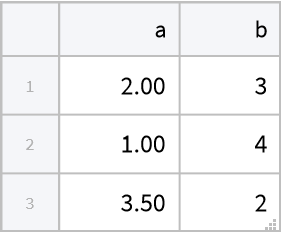 |
TransformColumns can do the same thing, but needs a function that explicitly refers to the source column of the data:
| In[18]:= | ![TransformColumns[tab, "b" -> (Ceiling[#b] &)]](https://www.wolframcloud.com/obj/resourcesystem/images/818/8186c6f2-05b9-4a0a-94b9-de77461630c5/79e04f0ebe4a9a2b.png) |
| Out[18]= | 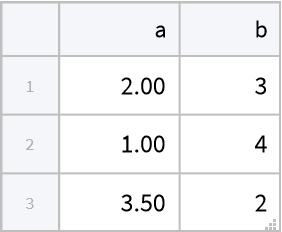 |
Wolfram Language 14.0 (January 2024) or above
This work is licensed under a Creative Commons Attribution 4.0 International License