Wolfram Function Repository
Instant-use add-on functions for the Wolfram Language
Function Repository Resource:
Compute a lattice sum
ResourceFunction["LatticeSum"][monomial,constraints] gives the sum of monomial over all integer lattice points satisfying the constraints. |
Sum xt for t from 0 to infinity:
| In[1]:= | ![ResourceFunction["LatticeSum"][\!\(TraditionalForm\`
\*SuperscriptBox[\(x\), \(t\)]\), t >= 0]](https://www.wolframcloud.com/obj/resourcesystem/images/389/3891c7f2-5e26-4f7f-9d45-4bfbbe142dc3/663203333f1f99c1.png) |
| Out[1]= |  |
Sum rxsy for all integer lattice points satisfying x ⩾ 0, y ⩾ 0 and x +y ⩽ 5:
| In[2]:= | ![sum = ResourceFunction["LatticeSum"][r^x s^y , x + y <= 5 && x >= 0 && y >= 0]](https://www.wolframcloud.com/obj/resourcesystem/images/389/3891c7f2-5e26-4f7f-9d45-4bfbbe142dc3/35f53364d98b76f5.png) |
| Out[2]= |  |
Count the number of integer lattice points satisfying x ⩾ 0, y ⩾ 0 and x + y ⩽ 5:
| In[3]:= | ![Limit[sum, {r -> 1, s -> 1}]](https://www.wolframcloud.com/obj/resourcesystem/images/389/3891c7f2-5e26-4f7f-9d45-4bfbbe142dc3/0be98ebb3ba91249.png) |
| Out[3]= |  |
Compute the number directly:
| In[4]:= | ![ResourceFunction["LatticeSum"][1 , x + y <= 5 && x >= 0 && y >= 0]](https://www.wolframcloud.com/obj/resourcesystem/images/389/3891c7f2-5e26-4f7f-9d45-4bfbbe142dc3/4388f4c41016f1c2.png) |
| Out[4]= |  |
Compute the sum of xaybzc over non-negative integers satisfying x + y + z ⩽ 5:
| In[5]:= | ![ResourceFunction["LatticeSum"][\!\(TraditionalForm\`
\*SuperscriptBox[\(x\), \(a\)]
\*SuperscriptBox[\(y\), \(b\)]
\*SuperscriptBox[\(z\), \(c\)]\), a + b + c <= 5 && a >= 0 && b >= 0 && c >= 0]](https://www.wolframcloud.com/obj/resourcesystem/images/389/3891c7f2-5e26-4f7f-9d45-4bfbbe142dc3/5ddf06454ef75cf3.png) |
| Out[5]= |  |
Count the total number of non-negative lattice points satisfying x + y + z ⩽ 5:
| In[6]:= | ![ResourceFunction["LatticeSum"][\!\(TraditionalForm\`1\), a + b + c <= 5 && a >= 0 && b >= 0 && c >= 0]](https://www.wolframcloud.com/obj/resourcesystem/images/389/3891c7f2-5e26-4f7f-9d45-4bfbbe142dc3/7b0d4609897edc9d.png) |
| Out[6]= |  |
Visualize these lattice points. Here, we use FindInstance to obtain all the points:
| In[7]:= | ![ListPointPlot3D[
Table[{x, y, z} /. u, {u, FindInstance[
x + y + z <= 5 && x >= 0 && y >= 0 && z >= 0, {x, y, z}, Integers,
10000]}], AxesLabel -> {"x", "y", "z"}, PlotStyle -> {Blue, PointSize[0.03]}, Boxed -> True, BoxRatios -> {1, 1, 1}]](https://www.wolframcloud.com/obj/resourcesystem/images/389/3891c7f2-5e26-4f7f-9d45-4bfbbe142dc3/08c495416183652d.png) |
| Out[7]= | 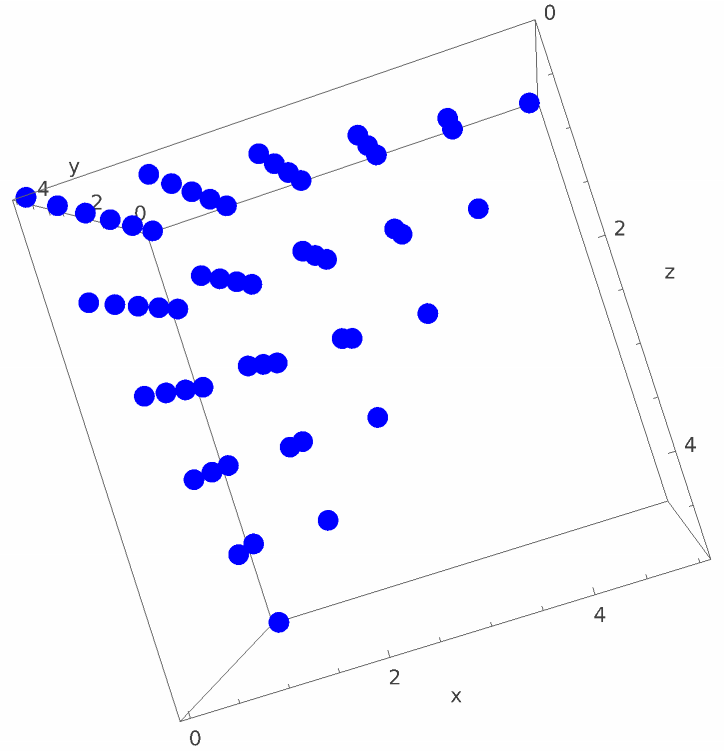 |
A complicated example, the algorithm gets the result instantly:
| In[8]:= | ![ResourceFunction["LatticeSum"][
x0^h x1^(1 + 2 f + k) x2^(5 + e + f + h + 3 j) x3^(
2 + e + 2 f + k + n - t) x4^(5 + e + f + h + 3 j + t) x5^e x6^(
4 + 2 f + h + 2 j + k), t >= 1 && t <= 2 + 2 f + k + n && n >= 4 + e + 3 f + j + k && h >= 0 && e >= 0 && f >= 0 && j >= 0 && k >= 0]](https://www.wolframcloud.com/obj/resourcesystem/images/389/3891c7f2-5e26-4f7f-9d45-4bfbbe142dc3/5f1533aac7706bca.png) |
| Out[8]= |  |
LatticeSum[monomial, constraints] returns Indeterminate if the constraints are not bounded:
| In[9]:= | ![ResourceFunction["LatticeSum"][1, r > 10]](https://www.wolframcloud.com/obj/resourcesystem/images/389/3891c7f2-5e26-4f7f-9d45-4bfbbe142dc3/3279a7811b264171.png) |
| Out[9]= |  |
Here z+w is treated as a base of the monomial:
| In[10]:= | ![ResourceFunction["LatticeSum"][x^r y^s (z + w)^t, t > 2]](https://www.wolframcloud.com/obj/resourcesystem/images/389/3891c7f2-5e26-4f7f-9d45-4bfbbe142dc3/1305e80c4595556e.png) |
| Out[10]= |  |
The first input should be a monomial:
| In[11]:= | ![ResourceFunction["LatticeSum"][x^r y^s z^t + 2, r > 10]](https://www.wolframcloud.com/obj/resourcesystem/images/389/3891c7f2-5e26-4f7f-9d45-4bfbbe142dc3/4b9cdc573e899048.png) |
| Out[11]= |  |
Constraint variables cannot be the same as the base variables of the monomial:
| In[12]:= | ![ResourceFunction["LatticeSum"][x^r y^s z^t, z > 10]](https://www.wolframcloud.com/obj/resourcesystem/images/389/3891c7f2-5e26-4f7f-9d45-4bfbbe142dc3/0aa1e5038af06aac.png) |
| Out[12]= |  |
All constraints should be linear and have integer or rational coefficients:
| In[13]:= | ![ResourceFunction["LatticeSum"][x^r y^s z^t, t > Sqrt[2]]](https://www.wolframcloud.com/obj/resourcesystem/images/389/3891c7f2-5e26-4f7f-9d45-4bfbbe142dc3/3e6599f7aa33f67c.png) |
| Out[13]= |  |
Wolfram Language 13.0 (December 2021) or above
This work is licensed under a Creative Commons Attribution 4.0 International License


