Wolfram Function Repository
Instant-use add-on functions for the Wolfram Language
Function Repository Resource:
Divide an audio signal into musical sources (such as vocals, drums and bass) using a neural network model
ResourceFunction["AudioSeparate"][input] separates the input audio into all available sources. | |
ResourceFunction["AudioSeparate"][input,source] separates the input audio and returns only the specified source. |
| "Overlap" | 0.25 | fraction of overlap between consecutive chunks. Must be between 0 and 0.5. |
| BatchSize | 1 | number of chunks processed in a single batch. Can be a positive integer or Infinity. |
| TargetDevice | "CPU" | device on which the neural network is evaluated. Possible values include "CPU" and "GPU". |
Separate instruments in an audio recording:
| In[1]:= | ![ResourceFunction["AudioSeparate"][
ReleaseHold[
Replace[
HoldComplete[
Audio[
CloudObject[
"https://www.wolframcloud.com/obj/documentation/Audio/Audio-2026-02-10T08-11-26-103.wav"], "Real32", Appearance -> Automatic, AudioOutputDevice -> Automatic, SampleRate -> 44100, SoundVolume -> 1]], (Appearance -> Blank[]) -> (
Appearance -> "Basic"), {2}]]]](https://www.wolframcloud.com/obj/resourcesystem/images/2e8/2e853113-4ed1-46d8-984b-30c27887ded4/6a320c1af76ab6ee.png) |
| Out[1]= |  |
| In[2]:= | ![ResourceFunction["AudioSeparate"][
ReleaseHold[
Replace[
HoldComplete[
Audio[
CloudObject[
"https://www.wolframcloud.com/obj/documentation/Audio/Audio-2026-02-12T09-52-08-472.wav"], "Real32", Appearance -> Automatic, AudioOutputDevice -> Automatic, SampleRate -> 44100, SoundVolume -> 1]], (Appearance -> Blank[]) -> (
Appearance -> "Basic"), {2}]]]](https://www.wolframcloud.com/obj/resourcesystem/images/2e8/2e853113-4ed1-46d8-984b-30c27887ded4/40cad9e4287c0a7a.png) |
| Out[2]= |  |
Use "Overlap" to control the fraction of overlap between consecutive chunks:
| In[6]:= | ![EchoTiming [ ResourceFunction["AudioSeparate"][ReleaseHold[
Replace[
HoldComplete[
Audio[
CloudObject[
"https://www.wolframcloud.com/obj/documentation/Audio/Audio-2026-02-10T08-11-26-103.wav"], "Real32", Appearance -> Automatic, AudioOutputDevice -> Automatic, SampleRate -> 44100, SoundVolume -> 1]], (Appearance -> Blank[]) -> (
Appearance -> "Basic"), {2}]], "drums", "Overlap" -> 0.5 ] ]](https://www.wolframcloud.com/obj/resourcesystem/images/2e8/2e853113-4ed1-46d8-984b-30c27887ded4/347ea6dd68bc3993.png) |
| Out[6]= |  |
| In[7]:= | ![EchoTiming [ ResourceFunction["AudioSeparate"][ReleaseHold[
Replace[
HoldComplete[
Audio[
CloudObject[
"https://www.wolframcloud.com/obj/documentation/Audio/Audio-2026-02-10T08-11-26-103.wav"], "Real32", Appearance -> Automatic, AudioOutputDevice -> Automatic, SampleRate -> 44100, SoundVolume -> 1]], (Appearance -> Blank[]) -> (
Appearance -> "Basic"), {2}]], "drums", "Overlap" -> 0.1] ]](https://www.wolframcloud.com/obj/resourcesystem/images/2e8/2e853113-4ed1-46d8-984b-30c27887ded4/74b5b1b3bb806242.png) |
| Out[7]= |  |
Use BatchSize to specify the number of chunks processed in a single batch:
| In[8]:= | ![EchoTiming[ResourceFunction["AudioSeparate"][ReleaseHold[
Replace[
HoldComplete[
Audio[
CloudObject[
"https://www.wolframcloud.com/obj/documentation/Audio/Audio-2026-02-12T09-52-08-472.wav"], "Real32", Appearance -> Automatic, AudioOutputDevice -> Automatic, SampleRate -> 44100, SoundVolume -> 1]], (Appearance -> Blank[]) -> (
Appearance -> "Basic"), {2}]], "drums", BatchSize -> 1]]](https://www.wolframcloud.com/obj/resourcesystem/images/2e8/2e853113-4ed1-46d8-984b-30c27887ded4/62f31b7dc10e5056.png) |
| Out[8]= |  |
| In[9]:= | ![EchoTiming[ResourceFunction["AudioSeparate"][ReleaseHold[
Replace[
HoldComplete[
Audio[
CloudObject[
"https://www.wolframcloud.com/obj/documentation/Audio/Audio-2026-02-12T09-52-08-472.wav"], "Real32", Appearance -> Automatic, AudioOutputDevice -> Automatic, SampleRate -> 44100, SoundVolume -> 1]], (Appearance -> Blank[]) -> (
Appearance -> "Basic"), {2}]], "drums", BatchSize -> 4]]](https://www.wolframcloud.com/obj/resourcesystem/images/2e8/2e853113-4ed1-46d8-984b-30c27887ded4/4e5ba3de1b5f180c.png) |
| Out[9]= |  |
Use TargetDevice to set the device on which the neural network is evaluated:
| In[10]:= | ![AudioPlot /@ ResourceFunction["AudioSeparate"][ReleaseHold[
Replace[
HoldComplete[
Audio[
CloudObject[
"https://www.wolframcloud.com/obj/documentation/Audio/Audio-2026-02-10T08-11-26-103.wav"], "Real32", Appearance -> Automatic, AudioOutputDevice -> Automatic, SampleRate -> 44100, SoundVolume -> 1]], (Appearance -> Blank[]) -> (
Appearance -> "Basic"), {2}]], TargetDevice -> "GPU"]](https://www.wolframcloud.com/obj/resourcesystem/images/2e8/2e853113-4ed1-46d8-984b-30c27887ded4/455b4da3939ba7b5.png) |
| Out[10]= | 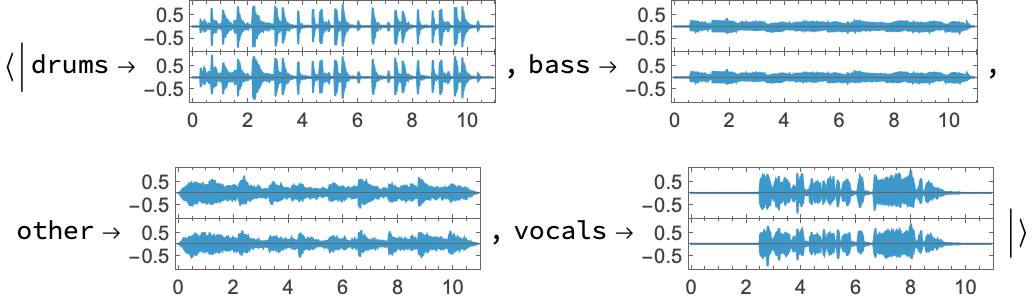 |
This work is licensed under a Creative Commons Attribution 4.0 International License
![(* Evaluate this cell to get the example input *) CloudGet["https://www.wolframcloud.com/obj/704f6cb2-efda-47c1-a587-16858ea8f0ca"]](https://www.wolframcloud.com/obj/resourcesystem/images/2e8/2e853113-4ed1-46d8-984b-30c27887ded4/61d6daf14b176b3f.png)
![stems = ResourceFunction["AudioSeparate"][
Audio@snd, {"drums", "bass", "other"}];
AudioPlot /@ stems](https://www.wolframcloud.com/obj/resourcesystem/images/2e8/2e853113-4ed1-46d8-984b-30c27887ded4/3efa31bb2aabe16a.png)
