Basic Examples (5)
Define a geometric Brownian motion stochastic process:
Get the arithmetic Brownian motion via a logarithmic transformation:
Mean and variance of the transformed process:
Start with a Wiener process:
In a square transformation of this process, a particular branch is picked in the inverse mapping:
Define a 2D process with the noise as a matrix:
Two variable linear transformation of the process:
Start with a Wiener process:
Perform an exponential transformation:
Create a geometric Brownian motion process:
Reciprocal transformation of the process:
Scope (4)
Create a particular Ito process:
Explicit time-dependent transformation:
Start with a driftless process:
Calculate the drift of the transformation under the variable change z = tanh(x):
Start with a 2D Wiener process:
Transform the process to polar coordinates such that the initial zero drift becomes non zero and radial dependent in polar coordinates:
Start with a 3D Wiener process:
Transform the process from Cartesian to ParabolicCylindrical coordinates using a long name convention:
Options (4)
Define a 1D Wiener process:
Perform a trigonometric change of variables, because of the periodic nature of the transformation is not possible to get a unique solution:
Using the assumption 0<x<π, we select one branch:
Using the assumption -π<x<0, we get a different branch that has a sign flip in the diffusion:
Applications (17)
Mean shifting Ornstein-Uhlenbeck (4)
Define the OrnsteinUhlenbeck process:
Compute mean and variance of the process:
Perform the variable change y=x-μ:
Check the mean and variance, the mean got shifted but the process remains OrnsteinUhlenbeck:
Risk-neutral measure (GBM model) (3)
Define a geometric Brownian motion process modeling a stock price:
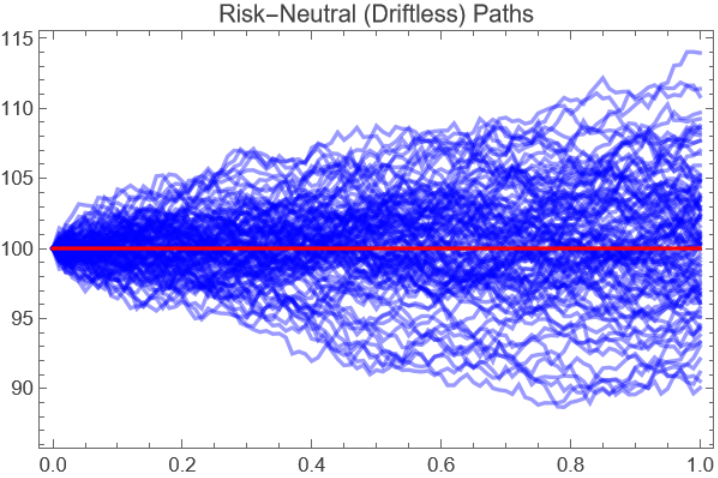
Find the discounted stock price via the transformation S = ⅇ-r tx, S is a martingale:
Show a path simulation, setting σ = 0.05 and x0 = 100:
Noisy oscillator (4)
Define a process representing a noisy oscillator, with drift in velocity related to position (as in Hooke's law), with added diffusion only in velocity:
Transforming to E and ϕ variables (energy and phase):
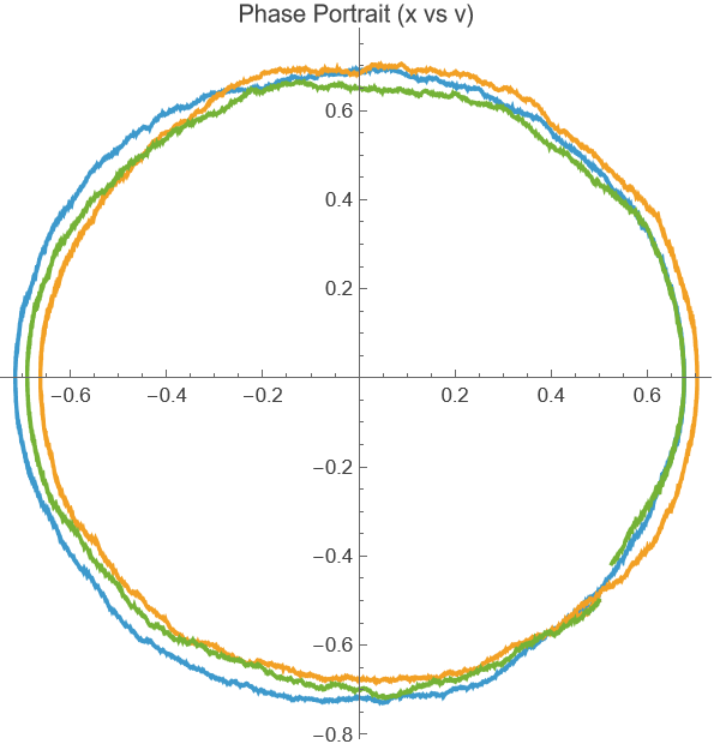
Show a path simulation with σ=0.03,x0=0.5,v0=-0.5. Plotting the phase portrait we get deformed circular paths:
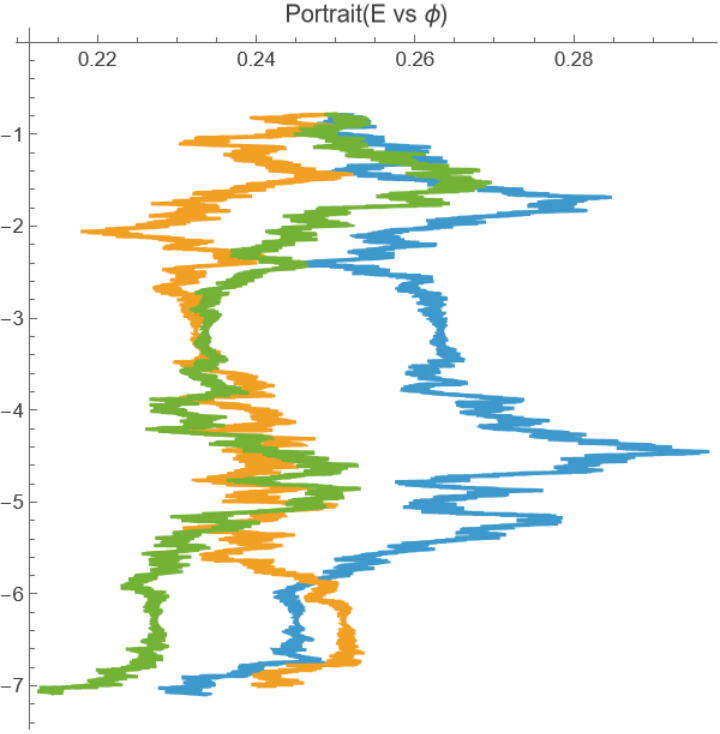
In energy-phase space the same parameters create noisy paths:
Quantum State Diffusion (6)
Define a stochastic differential equation in Cartesian coordinates, this process was obtained from Quantum State Diffusion for some density matrix ρ and Lindblad jump operator L=σz:
Perform change of variables to spherical coordinates which are more appropriate to the geometry of the state space:
Assign parameters. The initial state is on the surface of the Bloch sphere (r =1, θ=π/3, ϕ = π/3):
Generate 100 realizations of the transformed process using simulation time γ/ωx:
Calculate Bloch vector trajectories:
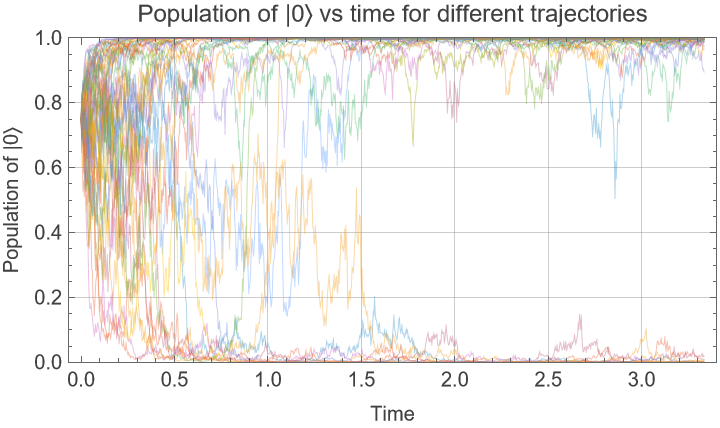
Population of |0〉 can be calculated as 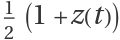 , show some trajectories and how they converge towards the poles:
Possible Issues (2)
If no initial state is supplied when creating a process the default is 0 for each state variable:
Some initial conditions may be undefined under the variable transformation, in this case the origin:

![gbm = ItoProcess@GeometricBrownianMotionProcess[\[Mu], \[Sigma], x0]](https://www.wolframcloud.com/obj/resourcesystem/images/2c7/2c7d8c8d-85ab-437d-a1e0-417e2c898ac2/2459c3aaca70fde5.png)

![logGBM = ResourceFunction["ItoProcessChangeVariables"][
gbm, {y}, {y == Log[\[FormalX]]}]](https://www.wolframcloud.com/obj/resourcesystem/images/2c7/2c7d8c8d-85ab-437d-a1e0-417e2c898ac2/44c87897935ddf11.png)

![Comap[{Mean, Variance}, logGBM[t]]](https://www.wolframcloud.com/obj/resourcesystem/images/2c7/2c7d8c8d-85ab-437d-a1e0-417e2c898ac2/52e847a5bf424f0a.png)

![wiener = ItoProcess[WienerProcess[]]](https://www.wolframcloud.com/obj/resourcesystem/images/2c7/2c7d8c8d-85ab-437d-a1e0-417e2c898ac2/2914421e636b8184.png)

![ResourceFunction[
"ItoProcessChangeVariables"][wiener, {y}, {y == \[FormalX]^2}]](https://www.wolframcloud.com/obj/resourcesystem/images/2c7/2c7d8c8d-85ab-437d-a1e0-417e2c898ac2/12d6b8447d76d2ca.png)

![proc = ItoProcess[{{0, 0}, PauliMatrix[1]}, {{x, y}, {x0, y0}}, t]](https://www.wolframcloud.com/obj/resourcesystem/images/2c7/2c7d8c8d-85ab-437d-a1e0-417e2c898ac2/1043518a3adb49a5.png)

![transProc = ResourceFunction["ItoProcessChangeVariables"][
proc, {u, v}, {u == x + y, v == x - y}]](https://www.wolframcloud.com/obj/resourcesystem/images/2c7/2c7d8c8d-85ab-437d-a1e0-417e2c898ac2/5c4ed548469ec785.png)

![wiener = ItoProcess[{0, 1}, {x, x0}, t]](https://www.wolframcloud.com/obj/resourcesystem/images/2c7/2c7d8c8d-85ab-437d-a1e0-417e2c898ac2/744dd2b1b1f12268.png)

![expProc = ResourceFunction["ItoProcessChangeVariables"][
wiener, {y}, {y == Exp[x]}]](https://www.wolframcloud.com/obj/resourcesystem/images/2c7/2c7d8c8d-85ab-437d-a1e0-417e2c898ac2/31e9b39cfc30fdef.png)

![gbm = ItoProcess[{\[Mu] x[t], \[Sigma] x[t]}, {x, x0}, t]](https://www.wolframcloud.com/obj/resourcesystem/images/2c7/2c7d8c8d-85ab-437d-a1e0-417e2c898ac2/5cc2e67ef08f4171.png)

![reciprocal = ResourceFunction["ItoProcessChangeVariables"][gbm, {y}, {y == 1/x}]](https://www.wolframcloud.com/obj/resourcesystem/images/2c7/2c7d8c8d-85ab-437d-a1e0-417e2c898ac2/2230f9374d9ea876.png)

![proc = ItoProcess[{\[Alpha] x, \[Beta]}, {x, x0}, {t, 0}]](https://www.wolframcloud.com/obj/resourcesystem/images/2c7/2c7d8c8d-85ab-437d-a1e0-417e2c898ac2/50f4b0217e1f7638.png)

![ResourceFunction[
"ItoProcessChangeVariables"][proc, {y}, {y == x Exp[-t]}]](https://www.wolframcloud.com/obj/resourcesystem/images/2c7/2c7d8c8d-85ab-437d-a1e0-417e2c898ac2/012a9febde23f3b4.png)

![proc = ItoProcess[{0, \[Beta] E^-x}, {x, x0}, {t, 0}]](https://www.wolframcloud.com/obj/resourcesystem/images/2c7/2c7d8c8d-85ab-437d-a1e0-417e2c898ac2/007f7e01284f2a30.png)

![ResourceFunction["ItoProcessChangeVariables"][proc, {z}, {z == Tanh[x]}][
"Drift"] // FullSimplify](https://www.wolframcloud.com/obj/resourcesystem/images/2c7/2c7d8c8d-85ab-437d-a1e0-417e2c898ac2/3b505b3008120e51.png)

![wiener2D = ItoProcess[{{0, 0}, IdentityMatrix[2]}, {{x, y}, {x0, y0}}, t]](https://www.wolframcloud.com/obj/resourcesystem/images/2c7/2c7d8c8d-85ab-437d-a1e0-417e2c898ac2/4c81714e2a3e55d2.png)

![ResourceFunction["ItoProcessChangeVariables"][wiener2D, {r, \[Theta]},
"Cartesian" -> "Polar"]](https://www.wolframcloud.com/obj/resourcesystem/images/2c7/2c7d8c8d-85ab-437d-a1e0-417e2c898ac2/18c12adbbf852dd2.png)

![wiener3D = ItoProcess[{{0, 0, 0}, IdentityMatrix[3]}, {{x, y, z}, {x0, y0, z0}},
t]](https://www.wolframcloud.com/obj/resourcesystem/images/2c7/2c7d8c8d-85ab-437d-a1e0-417e2c898ac2/5d836fc41dee3338.png)

![ResourceFunction[
"ItoProcessChangeVariables"][wiener3D, {\[Sigma], \[Tau], \[FormalZ]}, {"Cartesian", "Euclidean", 3} -> {"ParabolicCylindrical",
"Euclidean", 3}]](https://www.wolframcloud.com/obj/resourcesystem/images/2c7/2c7d8c8d-85ab-437d-a1e0-417e2c898ac2/2e86606b89057da0.png)

![wiener = ItoProcess[{0, {1}}, {x, x0}, t]](https://www.wolframcloud.com/obj/resourcesystem/images/2c7/2c7d8c8d-85ab-437d-a1e0-417e2c898ac2/69c4474aec5381a5.png)

![ResourceFunction[
"ItoProcessChangeVariables"][wiener, {y}, {y == Cos[x]}]](https://www.wolframcloud.com/obj/resourcesystem/images/2c7/2c7d8c8d-85ab-437d-a1e0-417e2c898ac2/5ca0e82390380381.png)

![ResourceFunction[
"ItoProcessChangeVariables"][wiener, {y}, {y == Cos[x]}, Assumptions -> {0 < x < \[Pi]}]](https://www.wolframcloud.com/obj/resourcesystem/images/2c7/2c7d8c8d-85ab-437d-a1e0-417e2c898ac2/07b4e249f90bafe2.png)

![ResourceFunction[
"ItoProcessChangeVariables"][wiener, {y}, {y == Cos[x]}, Assumptions -> {-\[Pi] < x < 0}]](https://www.wolframcloud.com/obj/resourcesystem/images/2c7/2c7d8c8d-85ab-437d-a1e0-417e2c898ac2/76972413e95b0123.png)

![proc = OrnsteinUhlenbeckProcess[\[Mu], \[Sigma], \[Theta], x0];](https://www.wolframcloud.com/obj/resourcesystem/images/2c7/2c7d8c8d-85ab-437d-a1e0-417e2c898ac2/3e2cae2455a1bf3e.png)
![Comap[{Mean, Variance}, proc[t]] // Simplify](https://www.wolframcloud.com/obj/resourcesystem/images/2c7/2c7d8c8d-85ab-437d-a1e0-417e2c898ac2/2191e02ec4ab9f81.png)

![transformed = ResourceFunction["ItoProcessChangeVariables"][ ItoProcess@proc, {y}, {y == \[FormalX] - \[Mu]}]](https://www.wolframcloud.com/obj/resourcesystem/images/2c7/2c7d8c8d-85ab-437d-a1e0-417e2c898ac2/2759aae8d205f1f7.png)

![Comap[{Mean, Variance}, transformed[t]] // FullSimplify](https://www.wolframcloud.com/obj/resourcesystem/images/2c7/2c7d8c8d-85ab-437d-a1e0-417e2c898ac2/41d77930bc165a5d.png)

![proc = ItoProcess[{r x, \[Sigma] x}, {x, x0}, {t, 0}]](https://www.wolframcloud.com/obj/resourcesystem/images/2c7/2c7d8c8d-85ab-437d-a1e0-417e2c898ac2/4eddd4b200abada5.png)

![transformedProc = ResourceFunction["ItoProcessChangeVariables"][
proc, {S}, {S == x Exp[-r t]}]](https://www.wolframcloud.com/obj/resourcesystem/images/2c7/2c7d8c8d-85ab-437d-a1e0-417e2c898ac2/0dc18b6a12e94e6b.png)

![paths = RandomFunction[
transformedProc /. {\[Sigma] -> 0.05, x0 -> 100}, {0, 1, 0.01}, 100];
cleanedPaths = paths["Paths"] /. {t_, {v_}} :> {t, v};
ListLinePlot[cleanedPaths, PlotStyle -> Directive[Opacity[0.4`], Blue],
PlotLabel -> "Risk-Neutral (Driftless) Paths", AxesLabel -> {"Time (T)", "Value (Y)"}, Frame -> True, Epilog -> {Red, Thick, Line[{{0, 100}, {1, 100}}]} ]](https://www.wolframcloud.com/obj/resourcesystem/images/2c7/2c7d8c8d-85ab-437d-a1e0-417e2c898ac2/28a3c9d19731b760.png)
![oscillator = ItoProcess[{{v, -x}, {{0}, {\[Sigma]}}, {x[t], v[t]}}, {{x, v}, {x0, v0}}, {t, 0}]](https://www.wolframcloud.com/obj/resourcesystem/images/2c7/2c7d8c8d-85ab-437d-a1e0-417e2c898ac2/0b9a143dbccda0a0.png)

![transformed = ResourceFunction["ItoProcessChangeVariables"][
oscillator, {\[FormalCapitalE], \[Phi]}, {\[FormalCapitalE] == 1/2 (x^2 + v^2), \[Phi] == ArcTan[x, v]}] // Quiet](https://www.wolframcloud.com/obj/resourcesystem/images/2c7/2c7d8c8d-85ab-437d-a1e0-417e2c898ac2/2c28dc287e0ab297.png)

![paths = RandomFunction[(oscillator /. {\[Sigma] -> 0.03, x0 -> 0.5, v0 -> -0.5}), {0, 2 \[Pi], 0.001}, 3];
data = paths["Paths"][[All, All, 2]];
ListLinePlot[data, AspectRatio -> 1, PlotRange -> All, PlotLabel -> "Phase Portrait (x vs v)"]](https://www.wolframcloud.com/obj/resourcesystem/images/2c7/2c7d8c8d-85ab-437d-a1e0-417e2c898ac2/7fc004150c3fd4c2.png)
![paths = RandomFunction[(transformed /. {\[Sigma] -> 0.03, x0 -> 0.5, v0 -> -0.5}), {0, 2 \[Pi], 0.001}, 3];
data = paths["Paths"][[All, All, 2]];
ListLinePlot[data, AspectRatio -> 1, PlotRange -> All, PlotLabel -> "Portrait(E vs \[Phi])"]](https://www.wolframcloud.com/obj/resourcesystem/images/2c7/2c7d8c8d-85ab-437d-a1e0-417e2c898ac2/6d73e2c626cf3aca.png)
![procCartesian = ItoProcess[{{-2 x \[Gamma], -2 y \[Gamma] - z \[Omega]x, y \[Omega]x}, {-2 x z Sqrt[\[Gamma]], -2 y z Sqrt[\[Gamma]], 2 (1 - z^2) Sqrt[\[Gamma]]}}, {{x, y, z}, {x0, y0, z0}}, t];](https://www.wolframcloud.com/obj/resourcesystem/images/2c7/2c7d8c8d-85ab-437d-a1e0-417e2c898ac2/0ea47c983f11afee.png)
![procSpherical = ResourceFunction["ItoProcessChangeVariables"][
procCartesian, {r, \[Theta], \[Phi]}, "Cartesian" -> "Spherical"]](https://www.wolframcloud.com/obj/resourcesystem/images/2c7/2c7d8c8d-85ab-437d-a1e0-417e2c898ac2/25c813ca2fc55326.png)

![procSpherical = procSpherical /. Join[Thread[{x0, y0, z0} -> FromSphericalCoordinates[{1, \[Pi]/3, \[Pi]/3}]], {\[Gamma] -> 1, \[Omega]x -> 0.3}];](https://www.wolframcloud.com/obj/resourcesystem/images/2c7/2c7d8c8d-85ab-437d-a1e0-417e2c898ac2/09d699b14d934a6d.png)
![trajectoriesSpherical = RandomFunction[procSpherical, {0, 10/3, 1/300}, 100];](https://www.wolframcloud.com/obj/resourcesystem/images/2c7/2c7d8c8d-85ab-437d-a1e0-417e2c898ac2/538a18dfd22bc0c2.png)
![blochVectorTrajectoriesCollapse = MapAt[Apply[#1 {Cos[#3] Sin[#2], Sin[#3] Sin[#2], Cos[#2]} &], trajectoriesSpherical["ValueList"], {All, All}];](https://www.wolframcloud.com/obj/resourcesystem/images/2c7/2c7d8c8d-85ab-437d-a1e0-417e2c898ac2/6a8b5951e61ed086.png)
![ListLinePlot[(
1 + blochVectorTrajectoriesCollapse[[;; 50, All, 3]])/2, Sequence[
PlotRange -> {0, 1}, AspectRatio -> 1/2, Frame -> True, GridLines -> Automatic, PlotStyle -> Thin, DataRange -> {0, 10/3}, FrameLabel -> {"Time", "Population of |0\[RightAngleBracket]"}, PlotLabel -> "Population of |0\[RightAngleBracket] vs time for different trajectories"]]](https://www.wolframcloud.com/obj/resourcesystem/images/2c7/2c7d8c8d-85ab-437d-a1e0-417e2c898ac2/4afff2a3b62f5cb7.png)
![wiener2D = ItoProcess[{{0, 0}, IdentityMatrix[2]}, {x, y}, t]](https://www.wolframcloud.com/obj/resourcesystem/images/2c7/2c7d8c8d-85ab-437d-a1e0-417e2c898ac2/7cc1c7f0155ff797.png)

![ResourceFunction["ItoProcessChangeVariables"][wiener2D, {r, \[Theta]},
"Cartesian" -> "Polar"]](https://www.wolframcloud.com/obj/resourcesystem/images/2c7/2c7d8c8d-85ab-437d-a1e0-417e2c898ac2/02323b01781e45d0.png)

