Basic Examples (4)
Load the bundled example environment:
How many constants, and of what kinds:
A single constant is a LeanTerm summary box:
Its type, pretty-printed as Lean source - the proposition it proves:
And the proof term:
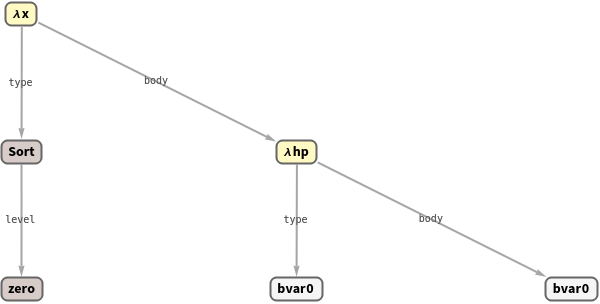
Every expression is a tree; "ExprGraph" draws it:
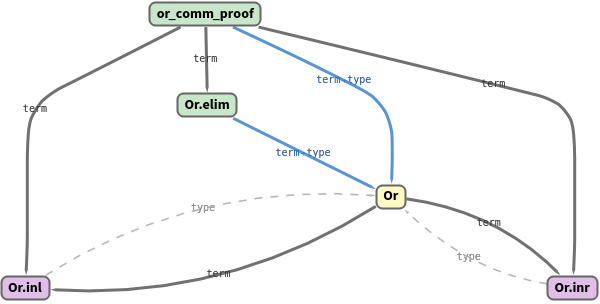
"CallGraph" shows which constants a proof depends on:
Scope (2)
Import from Mathlib by pointing "ProjectDir" at a built mathlib4 checkout (gated so the page still builds without one):
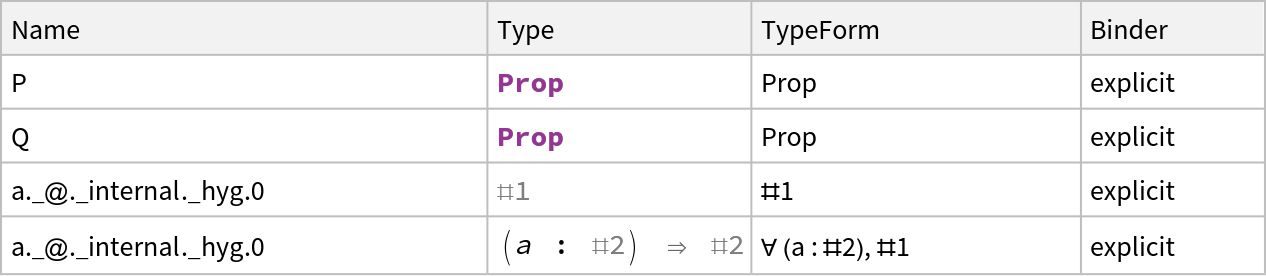
The "Parameters" property unfolds a theorem's binder chain - explicit, implicit, and instance arguments - as a Dataset:
Applications (3)
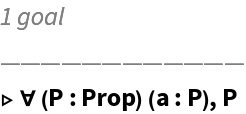
Open any theorem as a proof goal and step through it with tactics:
Transpile a Wolfram ProofObject into a checkable Lean environment:
Lower a (non-dependent) Lean definition to native code via FunctionCompile:
Properties and Relations (1)
LeanImportString round-trips with LeanExportString: import a source string, query it, and export an environment back to Lean source:
ProofToLean complements MetamathImport - both bring an external formal-proof corpus into the Wolfram Language; LeanLink targets Lean 4 / Mathlib and additionally drives the prover interactively.
Possible Issues
The native bridge needs the platform dylib under
LeanLink/LibraryResources/. Mathlib import and the out-of-process graph functions (
LeanExprGraph,
LeanCallGraph) additionally need
elan /
lake on
PATH and a
built project -
LeanImport of an unbuilt module returns an empty environment.
LeanCompile's
dependent-type path (Vector-sized signatures via
TypePi) requires a forked Wolfram compiler; the non-dependent path works against the stock compiler.
A type shown in isolation can print an unresolved bound variable as #0 / #1; the full-theorem "TypeForm" resolves binder names.
Neat Examples (1)
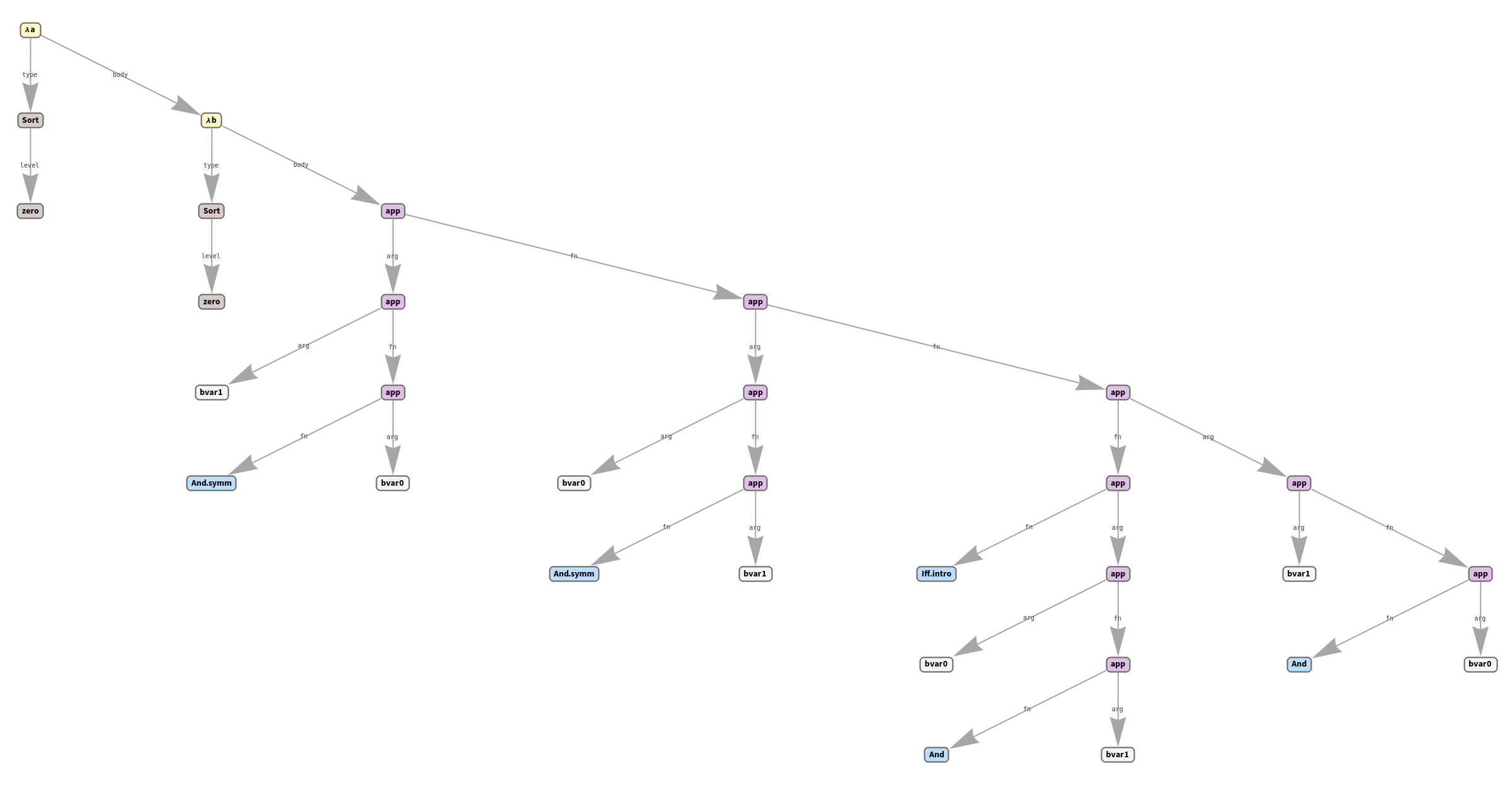
The type of a Mathlib theorem, drawn as its expression tree (gated on a built checkout):

![env = LeanImport[
PacletObject["Wolfram/LeanLink"]["AssetLocation", "Examples"]]](https://www.wolframcloud.com/obj/resourcesystem/images/af9/af9b7856-a677-4630-8cf4-aaabe0d398bf/1-0-3/32bd1fc8d6e1b3dc.png)

![Length[env]](https://www.wolframcloud.com/obj/resourcesystem/images/af9/af9b7856-a677-4630-8cf4-aaabe0d398bf/1-0-3/13e4d728335c8d2a.png)

![Information[env, "Kinds"]](https://www.wolframcloud.com/obj/resourcesystem/images/af9/af9b7856-a677-4630-8cf4-aaabe0d398bf/1-0-3/6096ab95de1acfef.png)

![env["id_proof"]](https://www.wolframcloud.com/obj/resourcesystem/images/af9/af9b7856-a677-4630-8cf4-aaabe0d398bf/1-0-3/034e514727bc7268.png)

![env["id_proof"]["TypeForm"]](https://www.wolframcloud.com/obj/resourcesystem/images/af9/af9b7856-a677-4630-8cf4-aaabe0d398bf/1-0-3/69e2a09c5135f366.png)

![env["id_proof"]["TermForm"]](https://www.wolframcloud.com/obj/resourcesystem/images/af9/af9b7856-a677-4630-8cf4-aaabe0d398bf/1-0-3/2409d95050869582.png)

![env["id_proof"]["ExprGraph"]](https://www.wolframcloud.com/obj/resourcesystem/images/af9/af9b7856-a677-4630-8cf4-aaabe0d398bf/1-0-3/4a2b6c220fa434d9.png)
![env["or_comm_proof"]["CallGraph"]](https://www.wolframcloud.com/obj/resourcesystem/images/af9/af9b7856-a677-4630-8cf4-aaabe0d398bf/1-0-3/6dafd25a7ad40d92.png)
![mathlibDir = FileNameJoin[{$HomeDirectory, "src", "mathlib4"}];
If[ DirectoryQ[FileNameJoin[{mathlibDir, ".lake", "build"}]],
mulComm = LeanImport["Mathlib.Algebra.Group.Basic",
"ProjectDir" -> mathlibDir, "Filter" -> "mul_comm"];
mulComm["mul_comm"]["TypeForm"],
"Mathlib not built - run: lake exe cache get && lake build Mathlib.Algebra.Group.Basic"
]](https://www.wolframcloud.com/obj/resourcesystem/images/af9/af9b7856-a677-4630-8cf4-aaabe0d398bf/1-0-3/1cb0610fe223d976.png)

![env["modus_ponens"]["Parameters"] // Dataset](https://www.wolframcloud.com/obj/resourcesystem/images/af9/af9b7856-a677-4630-8cf4-aaabe0d398bf/1-0-3/0b3672a4abdd371f.png)
![s0 = LeanState[env["id_proof"]]](https://www.wolframcloud.com/obj/resourcesystem/images/af9/af9b7856-a677-4630-8cf4-aaabe0d398bf/1-0-3/227de115d0fadf90.png)
![s1 = LeanTactic[{"intro P", "intro h", "exact h"}][s0];
s1["Complete"]](https://www.wolframcloud.com/obj/resourcesystem/images/af9/af9b7856-a677-4630-8cf4-aaabe0d398bf/1-0-3/704ffc283aece363.png)

![leanEnv = ProofToLean[FindEquationalProof[a == c, {a == b, b == c}]];
Keys[leanEnv]](https://www.wolframcloud.com/obj/resourcesystem/images/af9/af9b7856-a677-4630-8cf4-aaabe0d398bf/1-0-3/6410ef9d587014ea.png)

![LeanState[leanEnv["FinalGoal"]]["Complete"]](https://www.wolframcloud.com/obj/resourcesystem/images/af9/af9b7856-a677-4630-8cf4-aaabe0d398bf/1-0-3/576409f15665271b.png)

![addEnv = LeanImportString["def myAdd (x y : Nat) : Nat := x + y"];
cf = LeanCompile[addEnv["myAdd"]];
cf[3, 4]](https://www.wolframcloud.com/obj/resourcesystem/images/af9/af9b7856-a677-4630-8cf4-aaabe0d398bf/1-0-3/358af88c313709fe.png)

![imported = LeanImportString["theorem myT : Nat.succ 0 = 1 := rfl"];
imported["myT"]["TypeForm"]](https://www.wolframcloud.com/obj/resourcesystem/images/af9/af9b7856-a677-4630-8cf4-aaabe0d398bf/1-0-3/51483286cf189cdd.png)

![If[ DirectoryQ[
FileNameJoin[{$HomeDirectory, "src", "mathlib4", ".lake", "build"}]],
LeanImport["Mathlib.Logic.Basic", "ProjectDir" -> FileNameJoin[{$HomeDirectory, "src", "mathlib4"}],
"Filter" -> "And.comm"]["And.comm"]["ExprGraph"],
"Mathlib not built"
]](https://www.wolframcloud.com/obj/resourcesystem/images/af9/af9b7856-a677-4630-8cf4-aaabe0d398bf/1-0-3/31e8026f13375625.png)