Wolfram Language
Paclet Repository
Community-contributed installable additions to the Wolfram Language
Primary Navigation
Categories
Cloud & Deployment
Core Language & Structure
Data Manipulation & Analysis
Engineering Data & Computation
External Interfaces & Connections
Financial Data & Computation
Geographic Data & Computation
Geometry
Graphs & Networks
Higher Mathematical Computation
Images
Knowledge Representation & Natural Language
Machine Learning
Notebook Documents & Presentation
Scientific and Medical Data & Computation
Social, Cultural & Linguistic Data
Strings & Text
Symbolic & Numeric Computation
System Operation & Setup
Time-Related Computation
User Interface Construction
Visualization & Graphics
Random Paclet
Alphabetical List
Using Paclets
Create a Paclet
Get Started
Download Definition Notebook
Learn More about
Wolfram Language
TensorTrainTools
Guides
TensorTrainTools Overview
Symbols
RandomTensorTrain
TensorTrainCompress
TensorTrainContract
TensorTrainDecomposition
TensorTrainHadamard
TensorTrainInnerProduct
TensorTrain
TensorTrainNorm
TensorTrainOrthogonalize
TensorTrainPlus
TensorTrainScale
RubenRanval`TensorTrainTools`
T
e
n
s
o
r
T
r
a
i
n
T
e
n
s
o
r
T
r
a
i
n
[
{
A
1
,
A
2
,
…
,
A
n
}
]
r
e
p
r
e
s
e
n
t
s
a
t
e
n
s
o
r
i
n
t
e
n
s
o
r
t
r
a
i
n
f
o
r
m
a
t
w
i
t
h
r
a
n
k
-
3
c
o
r
e
s
A
i
D
e
t
a
i
l
s
a
n
d
O
p
t
i
o
n
s
▪
A tensor train (also called a matrix product state, MPS) expresses a tensor of rank
n
as a chain of
n
rank-3 cores, typically storing far fewer elements than the dense tensor.
▪
Each core
A
i
must be a rank-3 array with dimensions
{
χ
i
-
1
,
n
i
,
χ
i
}
, where
n
i
is the
t
h
i
dimension of the represented tensor and
χ
i
are the bond dimensions.
▪
The boundary bond dimensions
χ
0
and
χ
n
must both equal 1, and the last dimension of each core must equal the first dimension of the following core.
▪
T
e
n
s
o
r
T
r
a
i
n
validates its cores, issuing a message and returning
$
F
a
i
l
e
d
if they do not form a valid tensor train.
▪
T
e
n
s
o
r
T
r
a
i
n
[
…
]
[
"
P
r
o
p
e
r
t
i
e
s
"
]
gives a list of all available properties.
"
C
o
r
e
s
"
t
h
e
l
i
s
t
o
f
r
a
n
k
-
3
c
o
r
e
s
"
C
o
r
e
C
o
u
n
t
"
t
h
e
n
u
m
b
e
r
o
f
c
o
r
e
s
"
T
e
n
s
o
r
D
i
m
e
n
s
i
o
n
s
"
t
h
e
d
i
m
e
n
s
i
o
n
s
o
f
t
h
e
o
r
i
g
i
n
a
l
t
e
n
s
o
r
"
B
o
n
d
D
i
m
e
n
s
i
o
n
s
"
t
h
e
i
n
t
e
r
n
a
l
b
o
n
d
d
i
m
e
n
s
i
o
n
s
o
f
t
h
e
t
e
n
s
o
r
t
r
a
i
n
"
P
a
r
a
m
e
t
e
r
C
o
u
n
t
"
t
h
e
t
o
t
a
l
n
u
m
b
e
r
o
f
s
t
o
r
e
d
c
o
r
e
e
l
e
m
e
n
t
s
"
F
u
l
l
E
l
e
m
e
n
t
C
o
u
n
t
"
t
h
e
n
u
m
b
e
r
o
f
e
l
e
m
e
n
t
s
o
f
t
h
e
r
e
p
r
e
s
e
n
t
e
d
d
e
n
s
e
t
e
n
s
o
r
"
C
o
m
p
r
e
s
s
i
o
n
R
a
t
i
o
"
r
a
t
i
o
o
f
d
e
n
s
e
e
l
e
m
e
n
t
c
o
u
n
t
t
o
s
t
o
r
e
d
p
a
r
a
m
a
t
e
r
c
o
u
n
t
"
T
e
n
s
o
r
"
t
h
e
o
r
i
g
i
n
a
l
i
n
p
u
t
t
e
n
s
o
r
"
D
i
a
g
r
a
m
"
a
t
e
n
s
o
r
n
e
t
w
o
r
k
d
i
a
g
r
a
m
o
f
t
h
e
t
r
a
i
n
▪
N
o
r
m
a
l
[
T
e
n
s
o
r
T
r
a
i
n
[
…
]
]
gives the represented tensor as a dense array, contracting all bond indices. It is equivalent to
T
e
n
s
o
r
T
r
a
i
n
C
o
n
t
r
a
c
t
[
T
e
n
s
o
r
T
r
a
i
n
[
…
]
]
.
▪
L
e
n
g
t
h
[
T
e
n
s
o
r
T
r
a
i
n
[
…
]] gives the number of cores.
▪
Standard arithmetic operators are supported when, and only when, all operands are tensor trains:
t
1
+
t
2
+
…
T
e
n
s
o
r
T
r
a
i
n
P
l
u
s
[
t
1
,
t
2
,
…
]
c
t
(
n
u
m
e
r
i
c
c
)
T
e
n
s
o
r
T
r
a
i
n
S
c
a
l
e
[
c
,
t
]
-
t
T
e
n
s
o
r
T
r
a
i
n
S
c
a
l
e
[
-
1
,
t
]
t
1
⊙
t
2
⊙
…
T
e
n
s
o
r
T
r
a
i
n
H
a
d
a
m
a
r
d
[
t
1
,
t
2
,
…
]
▪
Expressions mixing tensor trains with other quantities return unevaluated.
Examples
(
2
)
Basic Examples
(
1
)
Construct a tensor train from two explicit cores:
I
n
[
1
]
:
=
c
o
r
e
s
=
{
R
a
n
d
o
m
R
e
a
l
[
{
-
1
,
1
}
,
{
1
,
2
,
3
}
]
,
R
a
n
d
o
m
R
e
a
l
[
{
-
1
,
1
}
,
{
3
,
2
,
1
}
]
}
;
t
t
=
T
e
n
s
o
r
T
r
a
i
n
[
c
o
r
e
s
]
O
u
t
[
1
]
=
T
e
n
s
o
r
T
r
a
i
n
C
o
r
e
s
:
2
M
a
x
χ
:
3
T
e
n
s
o
r
d
i
m
s
:
{
2
,
2
}
Extract properties from that tensor train:
I
n
[
2
]
:
=
tt["BondDimensions"]
tt["CompressionRatio"]
O
u
t
[
2
]
=
{
3
}
O
u
t
[
2
]
=
1
3
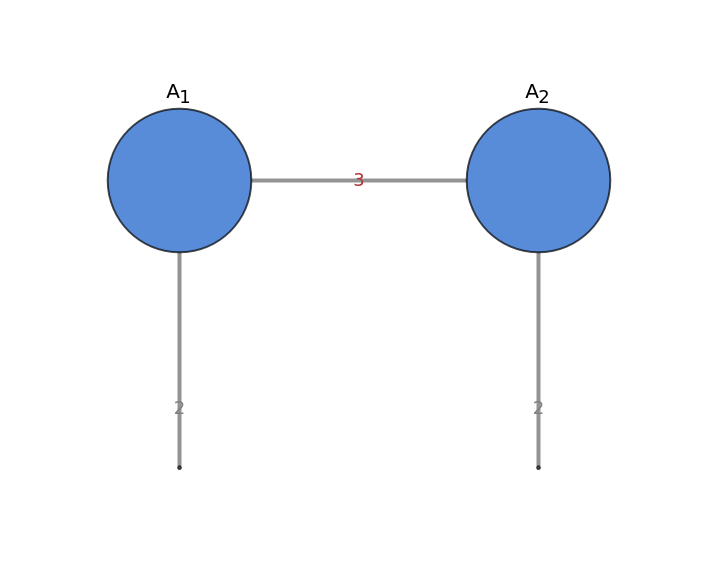
Or visualize the tensor train in a tensor network diagram:
I
n
[
3
]
:
=
t
t
[
"
D
i
a
g
r
a
m
"
]
O
u
t
[
3
]
=
N
o
r
m
a
l
gives back the original dense tensor:
I
n
[
4
]
:
=
N
o
r
m
a
l
[
t
t
]
O
u
t
[
4
]
=
{
{
-
0
.
3
3
8
2
7
6
,
0
.
1
4
8
7
0
7
}
,
{
-
0
.
6
6
4
1
1
7
,
0
.
3
5
4
5
4
2
}
}
P
o
s
s
i
b
l
e
I
s
s
u
e
s
(
1
)
R
e
l
a
t
e
d
G
u
i
d
e
s
▪
T
e
n
s
o
r
T
r
a
i
n
T
o
o
l
s
O
v
e
r
v
i
e
w
"
"