Wolfram Language Paclet Repository

Community-contributed installable additions to the Wolfram Language

Primary Navigation

    • Cloud & Deployment
    • Core Language & Structure
    • Data Manipulation & Analysis
    • Engineering Data & Computation
    • External Interfaces & Connections
    • Financial Data & Computation
    • Geographic Data & Computation
    • Geometry
    • Graphs & Networks
    • Higher Mathematical Computation
    • Images
    • Knowledge Representation & Natural Language
    • Machine Learning
    • Notebook Documents & Presentation
    • Scientific and Medical Data & Computation
    • Social, Cultural & Linguistic Data
    • Strings & Text
    • Symbolic & Numeric Computation
    • System Operation & Setup
    • Time-Related Computation
    • User Interface Construction
    • Visualization & Graphics
    • Random Paclet
    • Alphabetical List
  • Using Paclets
    • Get Started
    • Download Definition Notebook
  • Learn More about Wolfram Language

MCPClient

Guides

  • Thin MCP Client

Tech Notes

  • Client for a Python-made MCP server
  • Client for Docker MCP Toolkit

Symbols

  • MCPInitialize
  • MCPKill
  • MCPListTools
  • MCPStart
  • MCPToLLMTool
Client for a Python-made MCP server
Introduction
Tools discovery and creation
Setup and initialization
LLM invocations
Introduction
This notebook has a complete usage example of a thin Model Context Protocol (MCP) client of the Raku package "MCPClient".
The MCP server is created and run in Python -- see the file
simple_mcp_server.py
. That MCP server provides the methods add , random_words_list , random_pet_names_list , and random_pretentious_job_title_list . The corresponding Python packages have to be installed -- see the from ... import ... statements in that Python file.
"MCPClient" provides a set of functions for using MCP server's methods by converting them to
LLMTool
objects. Those objects can be used with Wolfram Language's Large Language Model (LLM) framework. (
LLMSynthesize
,
LLMFunction
,
LLMConfiguration
.)
Install the paclet and load it
In[76]:=
PacletInstall["AntonAntonov/MCPClient"];​​Needs["AntonAntonov`MCPClient`"]
Setup and initialization
Setup MCP server process creation command elements:
In[78]:=
cmd={​​FileNameJoin[{$HomeDirectory,"/miniforge3/bin/python"}],​​"-i",​​FileNameJoin[{PacletObject["AntonAntonov/MCPClient"]["Location"],"Resources","simple_mcp_server.py"}]​​};
Create the MCP client object:
In[79]:=
client=
MCPStart
[cmd];​​
Function[
][
]
Out[80]=
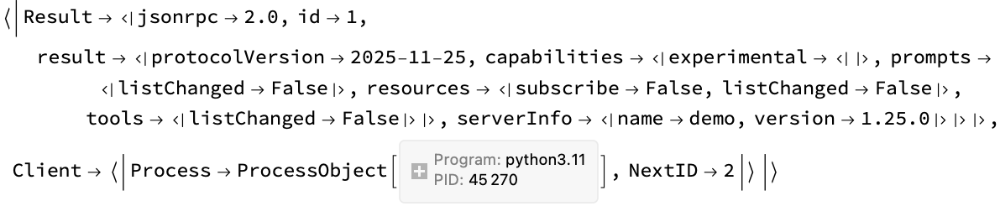
Initialize the client:
In[81]:=
r=
MCPInitialize
[client];​​
Function[
][
]
Out[82]=
Tools discovery and creation
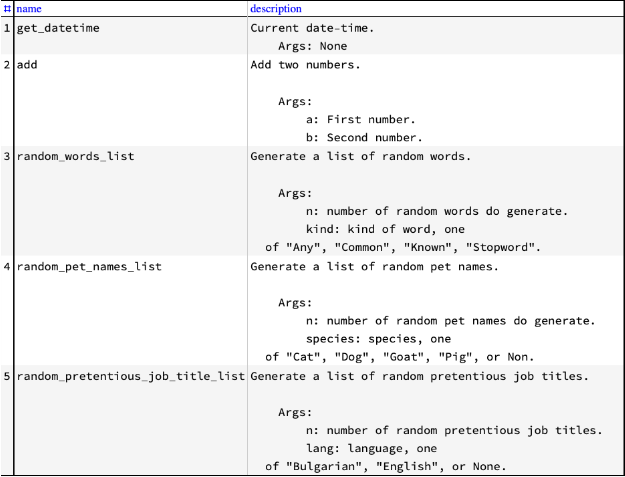
Get the MCP server tools list (and tabulate parts of it):
In[94]:=
mcpTools=
MCPListTools
[client];​​
Function[
][
]
Out[95]=
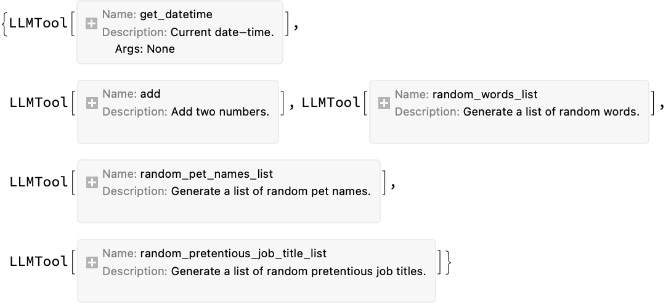
Make LLMTool objects:
In[85]:=
tools=
MCPToLLMTool
[client,mcpTools];​​
Function[
][
]
Out[86]=
Make a configuration with the tools:
In[87]:=
conf=LLMConfiguration["Model"{"OpenAI","gpt-5.3-chat-latest"},"MaxTokens"8192,"Tools"tools];
LLM invocations
Find the unaccepted GitHub Pull Requests (PRs):
In[88]:=
LLMSynthesize["Give the current time and generate a list of 12 random cat pet names.",LLMEvaluatorconf]
Out[88]=
Current time: 2026-05-18 12:01:40​Here are 12 random cat names:Tofu, Gracie, James, Olive, Katharine, Greyson, Elsa, Max, Creep, Clay, Korra, Winston
Generate a JSON object of random pretentious jobs, and deserialize and print it:
In[89]:=
fJobs=LLMFunction[{"Generate a list of `1` random pompous-sounding jobs, in English, and `2` in Bulgarian.",​​LLMPrompt["NothingElse"]["JSON"]​​},LLMEvaluatorconf];
In[90]:=
res=fJobs[6,3];​​res=ImportString[ToString[res,CharacterEncoding"UTF-8"],"JSON"]
Out[91]=
english{Future Applications Facilitator,District Interactions Facilitator,Global Web Engineer,Future Paradigm Coordinator,District Identity Assistant,Customer Response Strategist},bulgarianКорпоративен Плановик на Сигурност,Динамичен Оркестратор на Изследвания,Главен Продуцент по Интеграция
RelatedGuides
▪
Thin MCP Client
RelatedTechNotes
▪
Client for Docker MCP Toolkit
""

© 2026 Wolfram. All rights reserved.

  • Legal & Privacy Policy
  • Contact Us
  • WolframAlpha.com
  • WolframCloud.com