Wolfram Language Paclet Repository

Community-contributed installable additions to the Wolfram Language

Primary Navigation

    • Cloud & Deployment
    • Core Language & Structure
    • Data Manipulation & Analysis
    • Engineering Data & Computation
    • External Interfaces & Connections
    • Financial Data & Computation
    • Geographic Data & Computation
    • Geometry
    • Graphs & Networks
    • Higher Mathematical Computation
    • Images
    • Knowledge Representation & Natural Language
    • Machine Learning
    • Notebook Documents & Presentation
    • Scientific and Medical Data & Computation
    • Social, Cultural & Linguistic Data
    • Strings & Text
    • Symbolic & Numeric Computation
    • System Operation & Setup
    • Time-Related Computation
    • User Interface Construction
    • Visualization & Graphics
    • Random Paclet
    • Alphabetical List
  • Using Paclets
    • Get Started
    • Download Definition Notebook
  • Learn More about Wolfram Language

LeanLink

Guides

  • Lean 4 from the Wolfram Language

Tech Notes

  • Exploring Mathlib with LeanLink
  • An Import Graph for Mathlib
  • Getting Started with LeanLink

Symbols

  • ImportDOT
  • LeanApp
  • LeanBVar
  • LeanCallGraph
  • LeanCompile
  • LeanCompileTyped
  • LeanConstantInfo
  • LeanConstant
  • LeanConst
  • LeanEnvironment
  • LeanExport
  • LeanExportString
  • LeanExprGraph
  • LeanExpr
  • LeanExprToType
  • LeanForall
  • LeanFreeEnvironment
  • LeanFVar
  • LeanGoal
  • LeanImport
  • LeanImportString
  • LeanLam
  • LeanLet
  • LeanLevelIMax
  • LeanLevelMax
  • LeanLevelMVar
  • LeanLevelParam
  • LeanLevelSucc
  • LeanLevelZero
  • LeanListConstants
  • LeanListTheorems
  • LeanLitNat
  • LeanLitStr
  • LeanLoadEnvironment
  • LeanMVar
  • LeanNoValue
  • LeanProj
  • LeanSort
  • LeanState
  • LeanTactic
  • LeanTerm
  • LeanToFunction
  • LeanTruncated
  • LeanValue
  • ProofToLean
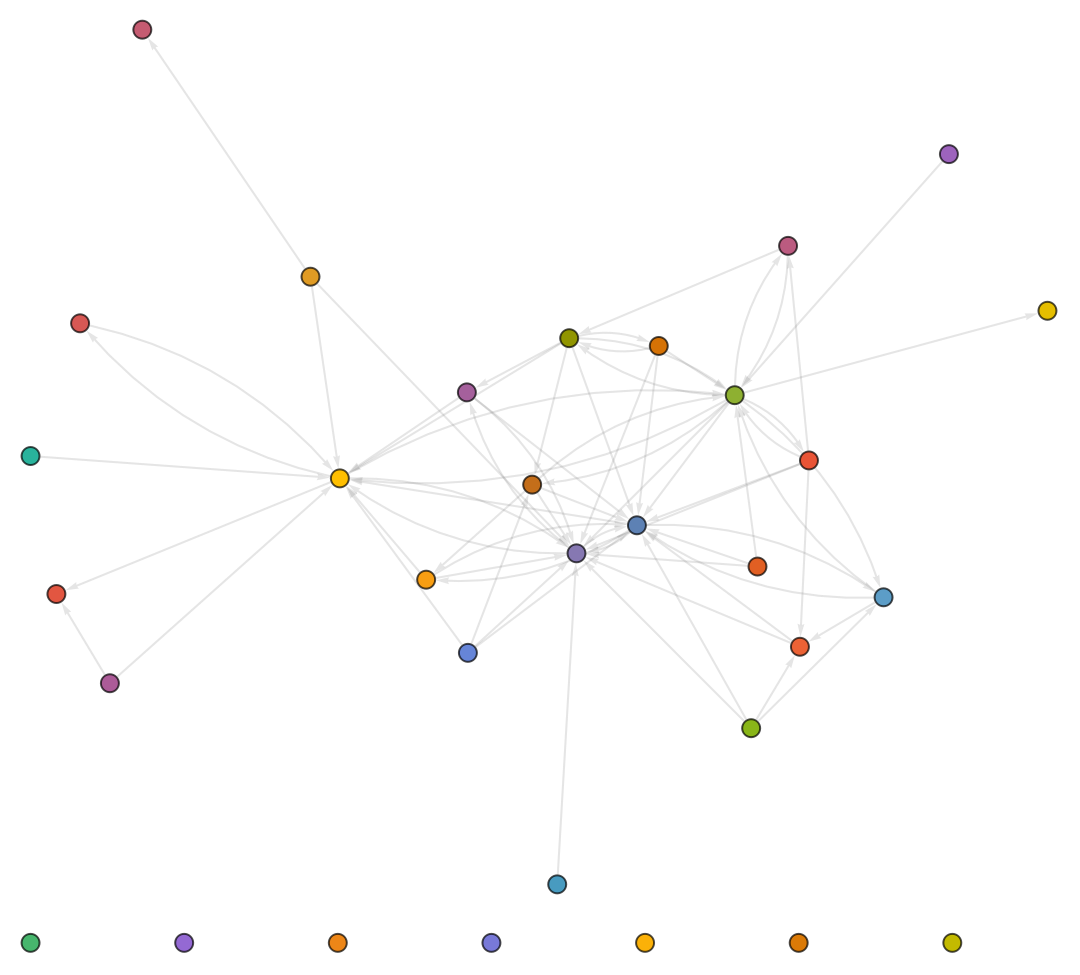
An Import Graph for Mathlib
Lean modules declare their dependencies with
import
lines at the top of each file. Scanning those across a whole project yields a dependency graph. This tutorial builds the import graph of
Mathlib
, aggregated by top-level namespace, straight from the source tree - no build required, since it only reads
.lean
headers. It complements LeanLink's declaration-level
LeanCallGraph
.
Prerequisites
You need a Mathlib source checkout (the
.lean
files; the project need not be compiled for import scanning):
(* Terminal:
git clone https://github.com/leanprover-community/mathlib4 ~/src/mathlib4
*)
In[1]:=
mathlibDir=FileNameJoin[{$HomeDirectory,"src","mathlib4"}];​​mathlibSrc=FileNameJoin[{mathlibDir,"Mathlib"}];​​mathlibReady=DirectoryQ[mathlibSrc]
Out[1]=
True
Scanning the Source Tree
Every
.lean
file under
Mathlib/
:
In[2]:=
leanFiles=If[mathlibReady,FileNames["*.lean",mathlibSrc,Infinity],{}];​​Length[leanFiles]
Out[2]=
7791
A module's top-level namespace is the component just after
Mathlib
(so
Mathlib.Algebra.Group.Basic
is in
Algebra
). These helpers map a module name, and a file path, to that namespace:
In[3]:=
namespaceOf[mod_String]:=With[{p=StringSplit[mod,"."]},​​If[Length[p]≥2&&p〚1〛"Mathlib",p〚2〛,Missing[]]];​​​​fileNamespace[file_String]:=namespaceOf@StringRiffle[​​FileNameSplit[StringReplace[FileNameDrop[file,FileNameDepth[mathlibDir]],".lean"""]],"."];
Imports live at the top of a file, so reading only the first 60 lines keeps the scan fast (a couple of seconds for all 7791 files). We keep just the
Mathlib.*
imports and map each to its namespace:
In[4]:=
readImportNamespaces[file_String]:=Module[{stream=OpenRead[file],lines},​​lines=ReadList[stream,"String",60];​​Close[stream];​​DeleteMissing[namespaceOf/@(​​StringTrim[StringReplace[#,"import """]]&/@​​Select[lines,StringStartsQ[#,"import "]&])]​​];
Building the Namespace Graph
Each file contributes edges from its own namespace to the namespaces it imports; we drop self-loops and duplicates:
In[5]:=
nsEdges=If[mathlibReady,​​DeleteDuplicates@DeleteCases[​​Flatten@Map[​​file(DirectedEdge[fileNamespace[file],#]&/@readImportNamespaces[file]),​​leanFiles],​​DirectedEdge[x_,x_]],​​{}];​​Length[nsEdges]
Out[5]=
72
Count the files in each namespace - this both sizes the nodes and orders the legend:
In[6]:=
nsCounts=If[mathlibReady,Reverse@Sort@Counts[fileNamespace/@leanFiles],];​​Take[Normal[nsCounts],UpTo[5]]
Out[6]=
{Algebra1284,CategoryTheory1031,Analysis779,RingTheory657,Data639}
Color each namespace from the standard scheme, size each node by its file count, and lay the graph out. No background is pinned, so it reads on both light and dark themes:
In[7]:=
importGraph=If[mathlibReady,​​Module[{namespaces=Keys[nsCounts],maxCount=Max[nsCounts],colorOf},​​colorOf=AssociationThread[namespaces(ColorData[97]/@Range[Length[namespaces]])];​​Graph[namespaces,nsEdges,​​VertexStyleNormal[colorOf],​​VertexSizeAssociationMap[0.3+0.7Sqrt[nsCounts[#]/maxCount]&,namespaces],​​VertexLabelsPlaced["Name",Tooltip],​​EdgeStyleDirective[Opacity[0.2],GrayLevel[0.5],Arrowheads[0.012]],​​GraphLayout"SpringElectricalEmbedding",​​ImageSize540]​​],​​"Mathlib source not found"]
Out[7]=
Statistics
The full ranking of namespaces by file count:
In[8]:=
If[mathlibReady,​​Dataset@KeyValueMap["Namespace"#1,"Files"#2&,nsCounts],​​"Mathlib source not found"]
Out[8]=
Namespace
Files
Algebra
1284
CategoryTheory
1031
Analysis
779
RingTheory
657
Data
639
Topology
625
LinearAlgebra
349
Tactic
331
Order
302
MeasureTheory
301
NumberTheory
224
Combinatorics
168
GroupTheory
157
Geometry
126
AlgebraicGeometry
125
Probability
122
AlgebraicTopology
119
FieldTheory
78
Logic
57
SetTheory
45
rows 1–20 of 32
Declaration-Level Dependencies
This graph is file-level: which modules import which. For a finer view - which declarations a single constant depends on - LeanLink offers
LeanCallGraph
and the
"CallGraph"
property of a
LeanTerm
, which trace the proof-term dependencies of one theorem rather than the import structure of whole files.
RelatedGuides
▪
LeanLink
RelatedTechNotes
▪
LeanLinkIntro
▪
ExploringMathlib

© 2026 Wolfram. All rights reserved.

  • Legal & Privacy Policy
  • Contact Us
  • WolframAlpha.com
  • WolframCloud.com