Wolfram Language Paclet Repository

Community-contributed installable additions to the Wolfram Language

Primary Navigation

    • Cloud & Deployment
    • Core Language & Structure
    • Data Manipulation & Analysis
    • Engineering Data & Computation
    • External Interfaces & Connections
    • Financial Data & Computation
    • Geographic Data & Computation
    • Geometry
    • Graphs & Networks
    • Higher Mathematical Computation
    • Images
    • Knowledge Representation & Natural Language
    • Machine Learning
    • Notebook Documents & Presentation
    • Scientific and Medical Data & Computation
    • Social, Cultural & Linguistic Data
    • Strings & Text
    • Symbolic & Numeric Computation
    • System Operation & Setup
    • Time-Related Computation
    • User Interface Construction
    • Visualization & Graphics
    • Random Paclet
    • Alphabetical List
  • Using Paclets
    • Get Started
    • Download Definition Notebook
  • Learn More about Wolfram Language

LeanLink

Guides

  • LeanLink

Tech Notes

  • Exploring Mathlib with LeanLink
  • An Import Graph for Mathlib
  • Getting Started with LeanLink

Symbols

  • ImportDOT
  • LeanApp
  • LeanBVar
  • LeanCallGraph
  • LeanCompile
  • LeanCompileTyped
  • LeanConstantInfo
  • LeanConstant
  • LeanConst
  • LeanEnvironment
  • LeanExport
  • LeanExportString
  • LeanExprGraph
  • LeanExpr
  • LeanExprToType
  • LeanForall
  • LeanFreeEnvironment
  • LeanFVar
  • LeanGoal
  • LeanImport
  • LeanImportString
  • LeanLam
  • LeanLet
  • LeanLevelIMax
  • LeanLevelMax
  • LeanLevelMVar
  • LeanLevelParam
  • LeanLevelSucc
  • LeanLevelZero
  • LeanListConstants
  • LeanListTheorems
  • LeanLitNat
  • LeanLitStr
  • LeanLoadEnvironment
  • LeanMVar
  • LeanNoValue
  • LeanProj
  • LeanSort
  • LeanState
  • LeanTactic
  • LeanTerm
  • LeanToFunction
  • LeanTruncated
  • LeanValue
  • ProofToLean
Exploring Mathlib with LeanLink
Mathlib
is Lean's community mathematics library. LeanLink imports any built Mathlib module and lets you read theorem statements, dissect their binder structure, and inspect the typeclass machinery behind them - all from the Wolfram Language. Every example below is guarded so the page still builds where Mathlib is absent.
Prerequisites: Building Mathlib
Install
elan
(the Lean version manager), then create a project with Mathlib as a dependency and build the modules used here:
(* Terminal:
curl https://elan.lean-lang.org/install.sh | sh
mkdir -p ~/src/mathlib4 && cd ~/src/mathlib4
lake init MathlibTest math
lake exe cache get
lake build Mathlib.Algebra.Group.Basic
lake build Mathlib.Logic.Basic
*)
Point a variable at the checkout and record whether it is built:
In[1]:=
mathlibDir=FileNameJoin[{$HomeDirectory,"src","mathlib4"}];​​mathlibReady=DirectoryQ[FileNameJoin[{mathlibDir,".lake","build"}]]
Out[1]=
True
Loading a Module
LeanImport
reads a module from the project. A
"Filter"
keeps the result small - here, the constants whose names contain
"mul"
:
In[2]:=
algEnv=IfmathlibReady,​​
LeanImport
["Mathlib.Algebra.Group.Basic","ProjectDir"mathlibDir,"Filter""mul"],​​;​​If[mathlibReady,Length[algEnv],"Mathlib not built"]
Out[2]=
2272
Reading a Theorem's Type
A theorem's
"TypeForm"
is the proposition it proves.
mul_comm
states commutativity of multiplication:
In[3]:=
If[mathlibReady,algEnv["mul_comm"]["TypeForm"],"Mathlib not built"]
Out[3]=
∀ {G : Type u_1} [inst : CommMagma G] (a : G) (b : G), a * b = b * a
And
one_mul
- one is a left identity:
In[4]:=
If[mathlibReady,algEnv["one_mul"]["TypeForm"],"Mathlib not built"]
Out[4]=
∀ {M : Type u} [inst : MulOneClass M] (a : M), 1 * a = a
Binder Annotations
Lean has three kinds of argument brackets:
◼
  • (x:T)
    - explicit: the caller supplies it
  • ◼
  • {x:T}
    - implicit: Lean infers it from context
  • ◼
  • [inst:T]
    - instance: Lean resolves it by typeclass search
  • The
    "Parameters"
    property unfolds the binder chain and tags each one. As a
    Dataset
    :
    In[5]:=
    If[mathlibReady,algEnv["mul_comm"]["Parameters"]//Dataset,"Mathlib not built"]
    Out[5]=
    Name
    Type
    TypeForm
    Binder
    G
    Sort
    u_1
    +1
    Type u_1
    implicit
    inst._@.Mathlib.Algebra.Group.Defs.544328808._hygCtx._hyg.3
    CommMagma
    #0
    CommMagma #0
    instance
    a
    #1
    #1
    explicit
    b
    #2
    #2
    explicit
    Reading it: to use
    mul_comm
    you supply two explicit values
    a
    and
    b
    ; Lean infers the type
    G
    and finds the
    CommMagma
    instance automatically.
    Typeclasses
    Typeclasses express algebraic structure. Selecting just the instance binders shows what
    mul_comm
    demands of its type:
    In[6]:=
    If[mathlibReady,​​Select[algEnv["mul_comm"]["Parameters"],#Binder"instance"&]//Dataset,​​"Mathlib not built"]
    Out[6]=
    Name
    Type
    TypeForm
    Binder
    inst._@.Mathlib.Algebra.Group.Defs.544328808._hygCtx._hyg.3
    CommMagma
    #0
    CommMagma #0
    instance
    Propositional Logic
    A different module, the same workflow. Load the logic basics, filtered to the commutativity lemmas:
    In[7]:=
    logicEnv=IfmathlibReady,​​
    LeanImport
    ["Mathlib.Logic.Basic","ProjectDir"mathlibDir,"Filter""comm"],​​;​​If[mathlibReady,logicEnv["And.comm"]["TypeForm"],"Mathlib not built"]
    Out[7]=
    ∀ {a : Prop} {b : Prop}, a ∧ b ⇔ b ∧ a
    In[8]:=
    If[mathlibReady,logicEnv["Or.comm"]["TypeForm"],"Mathlib not built"]
    Out[8]=
    ∀ {a : Prop} {b : Prop}, a ∨ b ⇔ b ∨ a
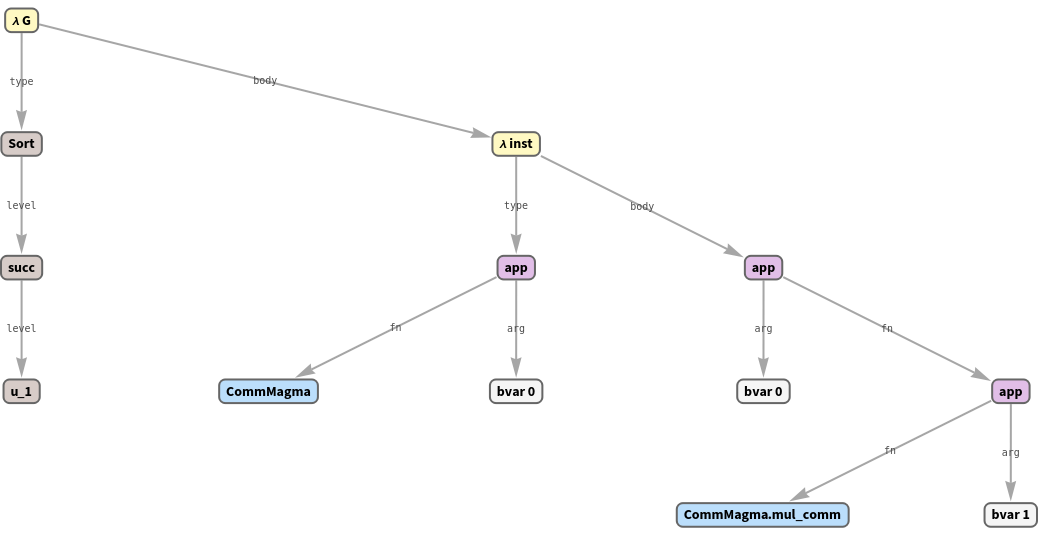
    Expression Graphs
    The full type of a theorem, drawn as its expression tree:
    In[9]:=
    If[mathlibReady,algEnv["mul_comm"]["ExprGraph"],"Mathlib not built"]
    Out[9]=
    Interactive Proofs
    Any imported theorem can be opened as a goal with
    LeanState
    and stepped with
    LeanTactic
    . Open
    one_mul
    and confirm it presents a single goal:
    In[10]:=
    IfmathlibReady,
    LeanState
    [algEnv,"one_mul"]["GoalCount"],"Mathlib not built"
    Out[10]=
    1
    The
    Getting Started
    tutorial walks a full tactic proof end to end.
    RelatedGuides
    ▪
    LeanLink
    RelatedTechNotes
    ▪
    LeanLinkIntro
    ▪
    ImportGraph
    ""

    © 2026 Wolfram. All rights reserved.

    • Legal & Privacy Policy
    • Contact Us
    • WolframAlpha.com
    • WolframCloud.com