Wolfram Language Paclet Repository

Community-contributed installable additions to the Wolfram Language

Primary Navigation

    • Cloud & Deployment
    • Core Language & Structure
    • Data Manipulation & Analysis
    • Engineering Data & Computation
    • External Interfaces & Connections
    • Financial Data & Computation
    • Geographic Data & Computation
    • Geometry
    • Graphs & Networks
    • Higher Mathematical Computation
    • Images
    • Knowledge Representation & Natural Language
    • Machine Learning
    • Notebook Documents & Presentation
    • Scientific and Medical Data & Computation
    • Social, Cultural & Linguistic Data
    • Strings & Text
    • Symbolic & Numeric Computation
    • System Operation & Setup
    • Time-Related Computation
    • User Interface Construction
    • Visualization & Graphics
    • Random Paclet
    • Alphabetical List
  • Using Paclets
    • Get Started
    • Download Definition Notebook
  • Learn More about Wolfram Language

QuantumBlockCellularAutomata

Guides

  • Quantum Block Cellular Automata

Tech Notes

  • Numeric Quantum Block Cellular Automata Examples

Symbols

  • PlotQuantumCA
  • QuantumCA
DenizYoldas`QuantumBlockCellularAutomata`
PlotQuantumCA
​
PlotQuantumCA
[evo]
creates an original-style combined visualization for a
QuantumCA
result.
​
Details and Options
▪
PlotQuantumCA
reads the
"BlochVectors"
and
"Unitary"
entries from a
QuantumCA
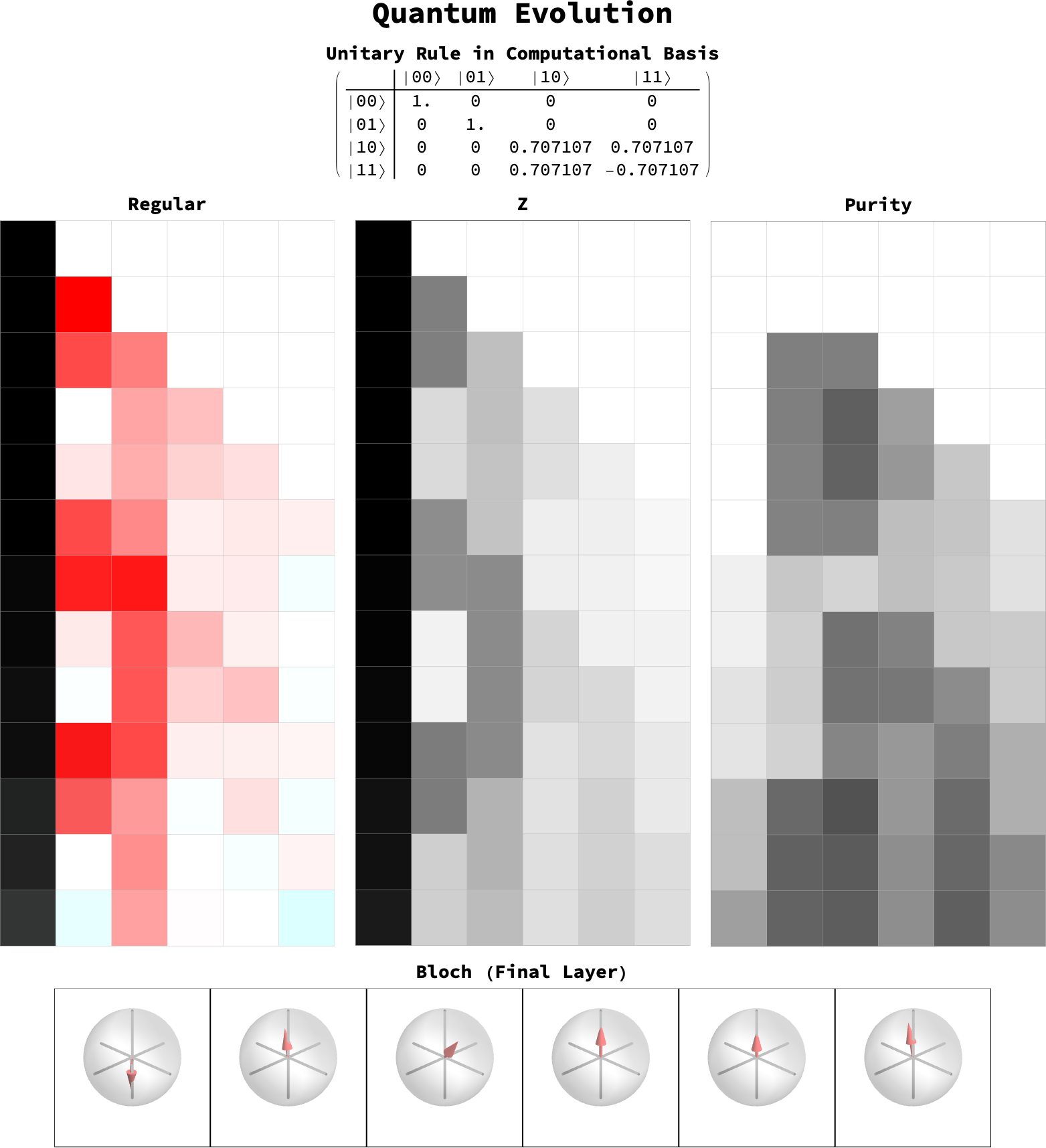
association. The default visualization combines Regular, Z and Purity panels with the local unitary matrix.
option
default
effect
"Views"
{"Regular","Z","Purity"}
views to show; use
"Bloch"
to append final-layer Bloch spheres
"ShowMatrix"
True
include the local 4 by 4 gate matrix
"ShowTimings"
False
include backend, qudit and substep metadata
"PlotImageSize"
Automatic
image size for each CA view
"Rasterize"
Automatic
rasterize the combined layout like the original notebook plots
"ImageResolution"
144
raster image resolution
▪
By default, the combined evolution view is rasterized to match the original
ultraPlot
output style.
▪
The CA views are built from
evo["BlochVectors"]
, matching the original local Bloch-vector plotting workflow.
▪
The
"Bloch"
view displays the reduced Bloch vector for every qubit under the heading "Bloch (Final Layer)".
▪
Classical rules naturally appear as binary patterns in the Regular and Z views without requiring a separate classical panel.
▪
ImageSize
controls the combined width, while
"PlotImageSize"
controls each evolution panel.
​
Examples  
(13)
Basic Examples  
(1)
Plot a controlled-Hadamard evolution from a six-qubit computational-basis state:
In[1]:=
evo=
QuantumCA
[{1,0,0,0,0,0},QuantumOperator["CH"],6];​​
PlotQuantumCA
[evo,"Views"{"Regular","Z","Purity","Bloch"},ImageSize700]
xs$::shdw:Symbolxs$appearsinmultiplecontexts{Wolfram`QuantumFramework`Labels`PackagePrivate`,Wolfram`QuantumFramework`Properties`PackagePrivate`};definitionsincontextWolfram`QuantumFramework`Labels`PackagePrivate`mayshadoworbeshadowedbyotherdefinitions.
Out[1]=
Scope  
(2)

Options  
(5)

Applications  
(1)

Properties & Relations  
(2)

Possible Issues  
(1)

Neat Examples  
(1)

SeeAlso
QuantumCA
RelatedGuides
▪
QuantumBlockCellularAutomata
""

© 2026 Wolfram. All rights reserved.

  • Legal & Privacy Policy
  • Contact Us
  • WolframAlpha.com
  • WolframCloud.com