Wolfram Language
Paclet Repository
Community-contributed installable additions to the Wolfram Language
Primary Navigation
Categories
Cloud & Deployment
Core Language & Structure
Data Manipulation & Analysis
Engineering Data & Computation
External Interfaces & Connections
Financial Data & Computation
Geographic Data & Computation
Geometry
Graphs & Networks
Higher Mathematical Computation
Images
Knowledge Representation & Natural Language
Machine Learning
Notebook Documents & Presentation
Scientific and Medical Data & Computation
Social, Cultural & Linguistic Data
Strings & Text
Symbolic & Numeric Computation
System Operation & Setup
Time-Related Computation
User Interface Construction
Visualization & Graphics
Random Paclet
Alphabetical List
Using Paclets
Create a Paclet
Get Started
Download Definition Notebook
Learn More about
Wolfram Language
PhysicsModelLink
Guides
PhysicsModelLink
Symbols
CreatePhysicsModel
DynamicBody
FixedBody
PhysicsModelAnimate
PhysicsModelEvolve
PhysicsModelIterate
PhysicsModelObject
PhysicsModelPlot
PhysicsModelVideo
ArnoudBuzing`PhysicsModelLink`
C
r
e
a
t
e
P
h
y
s
i
c
s
M
o
d
e
l
C
r
e
a
t
e
P
h
y
s
i
c
s
M
o
d
e
l
[
{
b
o
d
y
1
,
b
o
d
y
2
,
…
}
,
o
p
t
s
]
c
r
e
a
t
e
s
a
p
h
y
s
i
c
s
s
i
m
u
l
a
t
i
o
n
f
r
o
m
D
y
n
a
m
i
c
B
o
d
y
/
F
i
x
e
d
B
o
d
y
w
r
a
p
p
e
d
p
r
i
m
i
t
i
v
e
s
.
R
e
t
u
r
n
s
a
P
h
y
s
i
c
s
M
o
d
e
l
O
b
j
e
c
t
.
D
e
t
a
i
l
s
a
n
d
O
p
t
i
o
n
s
Examples
(
1
)
Basic Examples
(
1
)
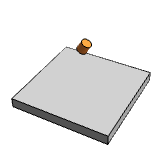
Create a new model with a fixed floor and a dynamic cylinder:
I
n
[
1
]
:
=
m
o
d
e
l
=
C
r
e
a
t
e
P
h
y
s
i
c
s
M
o
d
e
l
F
i
x
e
d
B
o
d
y
[
{
C
u
b
o
i
d
[
{
-
5
,
-
5
,
-
1
}
,
{
5
,
5
,
0
}
]
}
]
,
D
y
n
a
m
i
c
B
o
d
y
[
{
C
y
l
i
n
d
e
r
[
{
{
0
,
0
,
4
}
,
{
0
,
0
,
5
}
}
,
0
.
5
]
}
,
"
O
r
i
e
n
t
a
t
i
o
n
"
R
o
t
a
t
i
o
n
M
a
t
r
i
x
[
3
0
D
e
g
r
e
e
,
{
0
,
1
,
0
}
]
]
O
u
t
[
1
]
=
P
h
y
s
i
c
s
M
o
d
e
l
O
b
j
e
c
t
D
y
n
a
m
i
c
b
o
d
i
e
s
:
1
F
i
x
e
d
b
o
d
i
e
s
:
1
T
i
m
e
:
0
.
0
0
0
Compute 300 frames:
I
n
[
2
]
:
=
f
r
a
m
e
s
=
P
h
y
s
i
c
s
M
o
d
e
l
E
v
o
l
v
e
[
m
o
d
e
l
,
3
0
0
,
1
/
6
0
]
;
Create a video of the simulation:
I
n
[
3
]
:
=
P
h
y
s
i
c
s
M
o
d
e
l
V
i
d
e
o
[
f
r
a
m
e
s
,
P
l
o
t
R
a
n
g
e
1
.
0
1
*
{
{
-
5
,
5
}
,
{
-
5
,
5
}
,
{
-
1
,
5
}
}
]
O
u
t
[
3
]
=
S
e
e
A
l
s
o
P
h
y
s
i
c
s
M
o
d
e
l
O
b
j
e
c
t
R
e
l
a
t
e
d
G
u
i
d
e
s
▪
P
h
y
s
i
c
s
M
o
d
e
l
L
i
n
k
"
"