AntonAntonov/ RakuMode

Notebook style with cells for external execution of Raku commands

Contributed by: Anton Antonov

Notebook style with cells for external execution of Raku commands
Installation Instructions

To install this paclet in your Wolfram Language environment, evaluate this code:
PacletInstall["AntonAntonov/RakuMode"]


To load the code after installation, evaluate this code:
Needs["AntonAntonov`RakuMode`"]

Details

One type of cells is provided for external execution of Raku commands via ZeroMQ process connection.
Another type of cells is for external execuation of Raku commands via Rakupp.
For the first type of cells it is assumed that the user of this paclet has successfully installed Raku and the Raku module "Text::CodeProcessing".
For the second type of cells it is assumed that the user has installed the Rakupp library "librakupp".
The function RakuMode can be used to enable and disable the notebook style.
The shortcut "Shift-|" can be used to create an Raku input cell.
Using "Tab" the beginning of a Raku input cell will convert that cell into a Rakupp cell and vice versa.
If WL's version is 13.3 or higher then RakuMode notebook stylesheet inherits from the style "Chatbook.nb"; otherwise from "Default.nb".
This means that WL's chat-input cells can be used in RakuMode notebooks. (If WL's version is 13.3 or higher.)
Both light-mode and dark-mode notebook styles are supported.

Examples

Basic Examples (1) 

Enable the current notebook to have Raku external execution cells:

In[1]:=
RakuMode[]

Another RakuMode[] invocation converts the notebook into the default notebook style. More explicitly the styling can be specified with RakuMode[True] or RakuMode[False].

RakuMode can also take notebook objects as arguments.

Scope (2) 

Here we get the notebook style provided by this paclet:


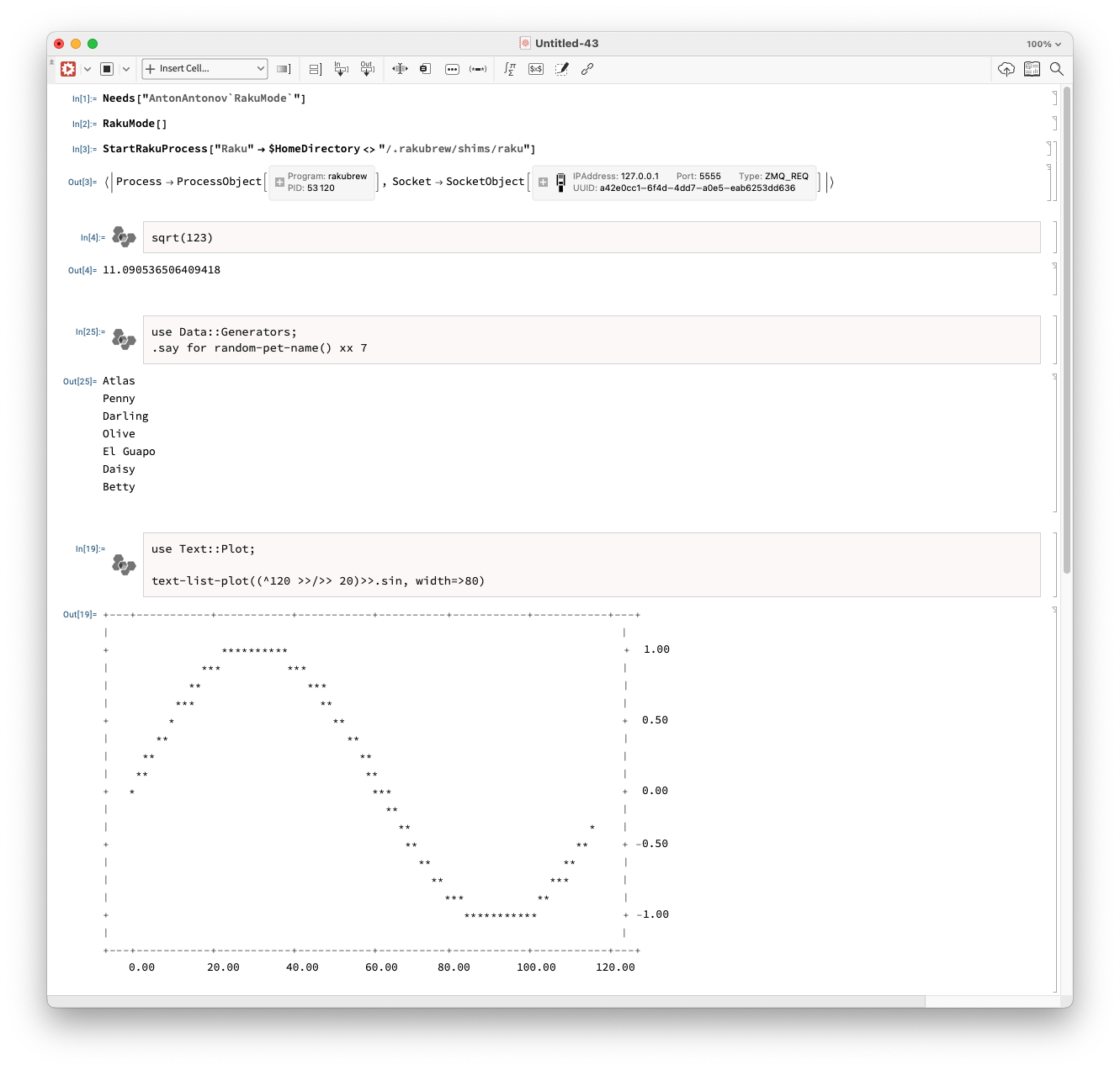
Here is a screenshot of a notebook with the notebook style RakuMode applied:

Publisher

Anton Antonov

Disclosures

Compatibility

Wolfram Language Version 13.2

Version History

  • 1.2.0 – 27 August 2026
  • 1.1.1 – 26 August 2026
  • 1.1.0 – 26 August 2026
  • 1.0.4 – 25 August 2026
  • 1.0.3 – 11 October 2023
  • 1.0.2 – 04 July 2023
  • 1.0.1 – 10 April 2023
  • 1.0.0 – 09 April 2023

License Information

MIT License

Paclet Source

Source Metadata

See Also